Franz: "Launch Franz on start" not working
Expected Behavior
"Launch Franz on start" disabled: Should not start at boot.
Current Behavior
"Launch Franz on start" disabled: Application starts at boot.
Screenshots (if appropriate):
Not necessary. Just disable "Launch Franz on start" in the settings.
Possible Solution
Looks like it does not remember the setting. Close and re-open -> "Launch Franz on start" is turn on (even if turned off before closing).
Steps to Reproduce (for bugs)
- Disable "Launch Franz on start"
- Restart (or just close and re-open application)
- Look into the settings: "Launch Franz on start" is enabled
Context
I just want to disable launching at startup.
Your Environment
- Franz Version used: 5.0.0-beta.10
- Operating System and version: macOS 10.13
 floqqi
All 16 comments
Seems like there is an issue with windows as well with Franz _not_ starting even though the option is et.
https://twitter.com/aaneric/status/921429385495941120
 adlk
on 21 Oct 2017
adlk
on 21 Oct 2017
@adlk can confirm the "start on windows" issue and disabling on MacOS
 rwkyyy
on 22 Oct 2017
rwkyyy
on 22 Oct 2017
Ok, I did my tests on 10.12 and it worked fine. I'm going to upgrade now to 10.13 and hope that I'm able to reproduce it.
I've been able to find the issue on Windows and will ship a fix with the next update.
adlk
on 22 Oct 2017
It seems like that there is an issue with Electron & High Sierra with disabling autostart.
I'll update Franz to not automatically start until this issue is resolved.
Here is the issue on electron for reference: https://github.com/electron/electron/issues/10880
If you need a solution to disable autostart
- Go to System Preferences -> User -> Login
- Select Franz
- Remove it with the minus button
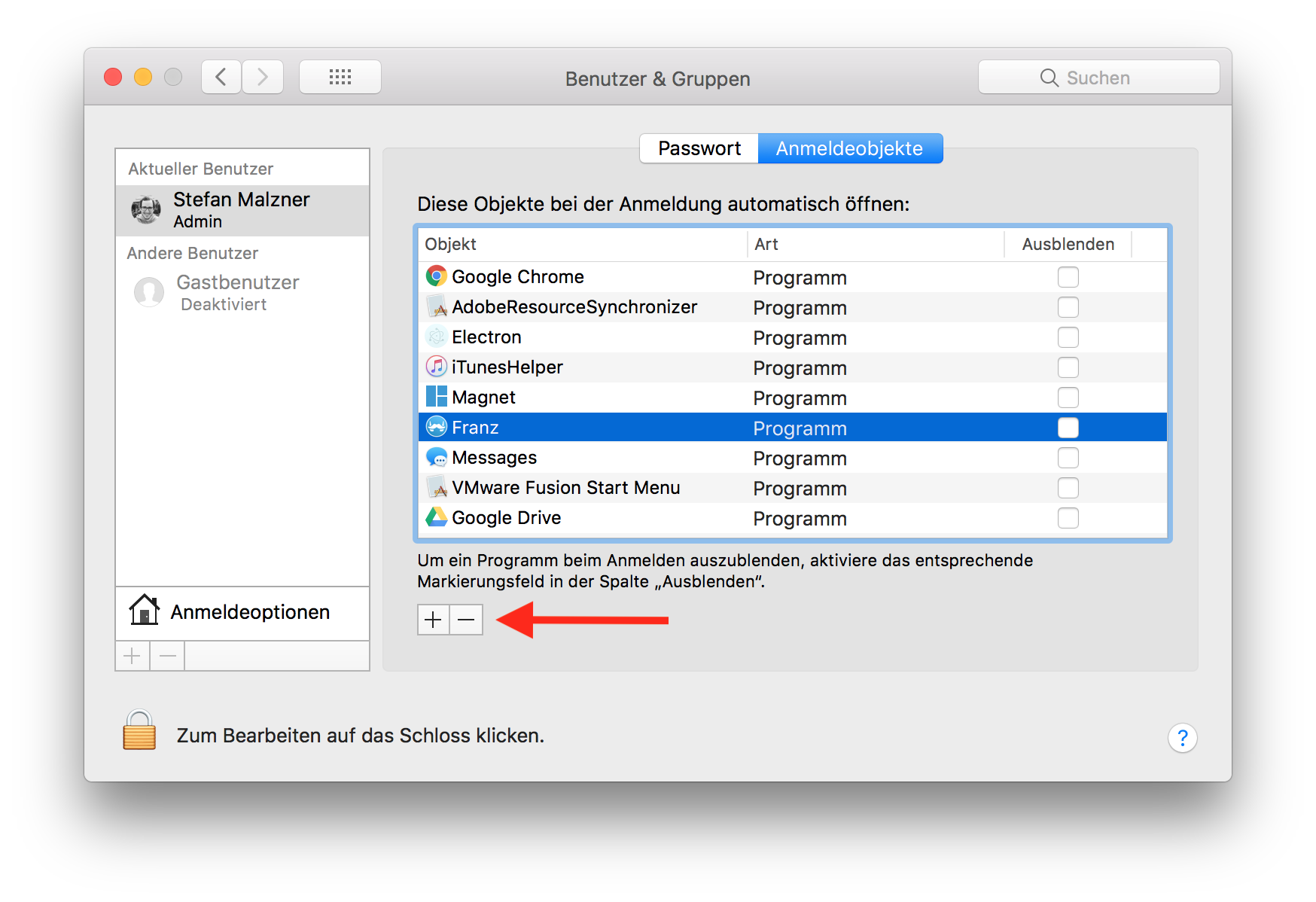
Sorry for the german screenshot but I assume you'll get it anyway :)
adlk
on 23 Oct 2017
It continue failing on High Sierra
 SergioSuarezDev
on 25 Oct 2017
SergioSuarezDev
on 25 Oct 2017
I'm currently using the built in electron autostart option but I'm not really satisfied how it works.
Might use node-auto-launch again as it did a much better job with previous Franz versions.
https://github.com/Teamwork/node-auto-launch
adlk
on 26 Oct 2017
Would be better, on previous versions autostart on/off works very well
SergioSuarezDev
on 26 Oct 2017
This bug is still exist in linux.
- Franz Version: 5.0.0-beta.15
- OS: Debian 9.3
Issue: "Launch Franz at Start up" is toggled "on" everytime when Franz is launched.
 darekaze
on 29 Jan 2018
darekaze
on 29 Jan 2018
This bug also still exists for macOS High Sierra (10.13.3).
Please fix this!
 jakobsudau
on 3 Feb 2018
jakobsudau
on 3 Feb 2018
@jakobsudau remove and download the latest version. then from dock, right click and open at startup.
for me it works. also macOS High Sierra.
rwkyyy
on 3 Feb 2018
Same here. Re-Installed Franz - removed it from Login Objects… it still start on Launch. macOS 10.13.2
 maxxscho
on 7 Feb 2018
maxxscho
on 7 Feb 2018
Same problem for me. OSX v10.13.3 and Franz Version 5.0.0-beta.15
 chadhamre
on 11 Feb 2018
chadhamre
on 11 Feb 2018
Same problem for me as well: OSX v10.13.13, Franz: 5.0.0-beta.15. Come on guys ... I've been struggling with this for over a month now .. and it's really maddening. This can't be complicated .. I don't understand how this is still not fixed. Can you please provide something asap on this? PLEASE!!!
 LjAce
on 20 Feb 2018
LjAce
on 20 Feb 2018
Same problem here macOS 10.12.6.
 kecinzer
on 23 Feb 2018
kecinzer
on 23 Feb 2018
Same problem on POP!_OS (Ubuntu) 17.10
Current version: 5.0.0-beta.15
 leehblue
on 23 Feb 2018
leehblue
on 23 Feb 2018
Hey Guys ... FYI ... very happy to report .. the latest Beta Update which came out in the past few days (5.0.0-beta-16.762) fixes the problem on all 3 of my Macs (all running High Sierra 10.13.3, and one 10.13.4 beta). Note: after you first update and re-launch ... go into your Mac System Preferences to your user account "Login Items" settings, and check / remove all the Franz entries, as the initial update may have added an extra one in there upon update ... which makes sense if you think about it.
Thanks to all the Franz dev guys ... as I know this probably didn't seem like a big deal as most people probably have it set to auto-launch anyway, but for the few of us who don't want it to auto-launch ... this really was driving us (at least me) mad. 👍
LjAce
on 24 Feb 2018
Related issues
 hello-jason
·
4Comments
hello-jason
·
4Comments
 m2kk
·
4Comments
m2kk
·
4Comments
 wibimaster
·
3Comments
wibimaster
·
3Comments
 seanford
·
4Comments
seanford
·
4Comments
 agodlydeciple
·
4Comments
agodlydeciple
·
4Comments
Most helpful comment
This bug is still exist in linux.
Issue: "Launch Franz at Start up" is toggled "on" everytime when Franz is launched.