Foundation-sites: reveal background shifted incorrectly when having html { height:100%}
What should happen?
when reveal is open, the background stays
What happens instead?
when reveal is open, the background shifted incorrectly when html having height:100%;
Possible Solution
In the foundation.reveal.js
I have
_disableScroll(){
    if ($(document).height() > $(window).height()) {
      var scrollTop = $(window).scrollTop();
      var height = $(window).height();
      $("html")
        .css("top", -scrollTop);
      $("html").css("height", height+scrollTop);
    }
  }
 _enableScroll(){
    if ($(document).height() > $(window).height()) {
      var scrollTop = parseInt($("html").css("top"));
      $("html")
        .css("top", "");
       $("html").css("height", "");
      $(window).scrollTop(-scrollTop);
    }
  }
It seems get solved after I add those.
Test Case and/or Steps to Reproduce
Test Case:
How to reproduce:
- create a html page with style html { height:100%}
- create a modal in the bottom of the page.
- click the modal. you should see the background get shifted
Context
Your Environment
- Foundation version(s) used: 6.4.4rc1
- Browser(s) name and version(s): chrome
- Operating System and version (desktop or mobile): Mac OS desktop
Checklist (all required):
- [X] I have read and follow the CONTRIBUTING.md document.
- [X] There are no other issues similar to this one.
- [X] The issue title is descriptive.
- [X] The template is correctly filled.
 ash11tw
All 9 comments
Hi @ash11tw. Thank you for your issue.
We just released Foundation v6.5.0-rc.1. We fixed a lot of Reveal bugs in it. Could you test it and tell if you have the same error ?
 ncoden
on 29 Jun 2018
ncoden
on 29 Jun 2018
Hi, Sorry for late reply. I tried v6.5.0-rc.1. The problem existed. I think it is because _disableScroll and _enableScroll were added after v6.4.4-rc.1. I don't see those methods in v6.4.3. When set top for document, it get wrong top if you have height: 100%.
ash11tw
on 5 Jul 2018
@ash11tw I have some trouble to reproduce the issue. Could you provide a CodePen ?
ncoden
on 5 Jul 2018
Hi @ncoden I have made a quick sample from issue reported in this post
https://codepen.io/angie_rd/pen/yRMPLW
I have the same problem. I'm using version [email protected]
 AngieRd
on 10 Oct 2018
AngieRd
on 10 Oct 2018
another workaround:
Foundation.Reveal.prototype['_disableScroll'] = function() {}
 domschmidt
on 14 Nov 2018
domschmidt
on 14 Nov 2018
@AngieRd @domschmidt Thank you, I'll take a look at it.
ncoden
on 14 Nov 2018
Another workaround (hook into open event) @ash11tw @ncoden @domschmidt
$(document)
  .on("open.zf.reveal", function() {
                $("html").removeClass("is-reveal-open")
     });
 paxperscientiam
on 16 Nov 2018
paxperscientiam
on 16 Nov 2018
Hi. I investigated this issue.
It comes from the way we disable the scrollbar. It works by making the whole page fixed and applying an offset on it to reproduce the scroll shift. It's a bit tricky but it's the only way we found to make this working on all browsers.
When you use height: 100% on body, its height is now relative to the viewport, much smaller than the whole page height, so if you scrolled a bit, its content overflows and is not visible.
See for example with html in black, body in white and the content in grey.
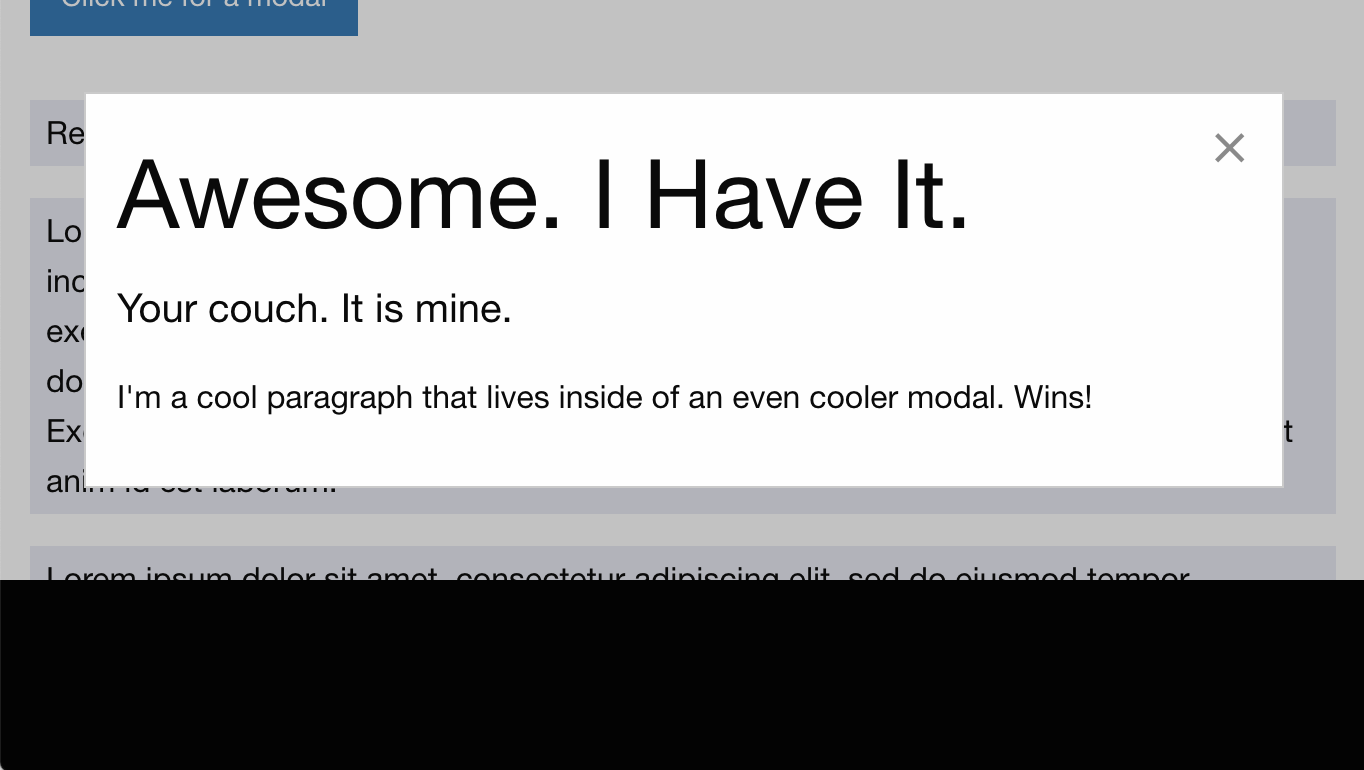
We could solve this (and others issues) by preventing the scroll on html/body without hiding their content (overflow: visible) and/or by forcing html to have the window height, like proposed in the description of this pull request.
At first I'll check if we still need this trick or if we could drop it for a more sustainable solution, according to a new browser support range.
ncoden
on 20 Nov 2018
The following should fix this:
html, body{
  min-height: 100%;
  max-height: 100%;
}
 DanielRuf
on 20 Oct 2019
DanielRuf
on 20 Oct 2019
Related issues
 barrywoolgar
·
3Comments
barrywoolgar
·
3Comments
 alexkuc
·
3Comments
alexkuc
·
3Comments
 Jared-Dev
·
3Comments
Jared-Dev
·
3Comments
 umphy
·
4Comments
umphy
·
4Comments
 chanwhab
·
3Comments
chanwhab
·
3Comments