Foundation-sites: Turn off awkward "feedback" when click
When I click on any link(button, tab...) on mobile, it shows some awkward blue feedback on a second, do you know how to turn that off?
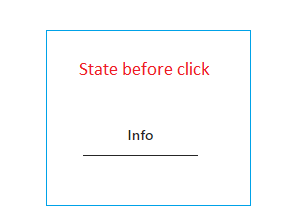
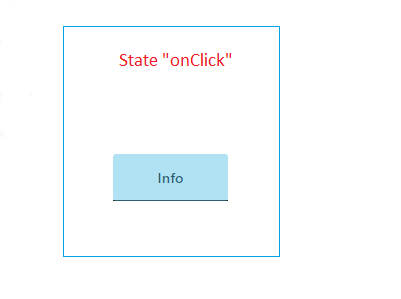
On this picture is screenshot how that looks in dev tools, but it's same thing on mobile
Thanks!
 johnylaravel
All 4 comments
Hello @johnylaravel. I do not see what link or button your are talking about. Could you provide a codepen with the link on it ?
See: https://codepen.io/IamManchanda/pen/EXbGKJ
 ncoden
on 29 Dec 2017
ncoden
on 29 Dec 2017
I know you're still waiting for a reply @ncoden, but in case this helps: @johnylaravel maybe you can directly manipulate the active state of your button with :active CSS selector? I would test that first, and if no dice, then I know Android and iOS both have their own element selection style that could be worth testing against (for webkit browsers): https://css-tricks.com/snippets/css/remove-gray-highlight-when-tapping-links-in-mobile-safari/
 geotrev
on 1 Jan 2018
geotrev
on 1 Jan 2018
@geotrev You are freaking awesome. That's it, problem was webkit selection. Thank you so much!
So for anyone, solution is to add this peace of code in your css:
// Remove tap highlight
input,
textarea,
button,
select,
a {
  -webkit-tap-highlight-color: rgba(0,0,0,0);
}
@ncoden Thanks for trying :D
johnylaravel
on 9 Jan 2018
Glad to help! Cheers.
geotrev
on 9 Jan 2018
Related issues
ncoden
·
3Comments
 BicanMarianValeriu
·
3Comments
BicanMarianValeriu
·
3Comments
 anware
·
3Comments
anware
·
3Comments
 coachie
·
4Comments
coachie
·
4Comments
 lspoor
·
3Comments
lspoor
·
3Comments
Most helpful comment
I know you're still waiting for a reply @ncoden, but in case this helps: @johnylaravel maybe you can directly manipulate the active state of your button with
:activeCSS selector? I would test that first, and if no dice, then I know Android and iOS both have their own element selection style that could be worth testing against (for webkit browsers): https://css-tricks.com/snippets/css/remove-gray-highlight-when-tapping-links-in-mobile-safari/