Fomantic-ui: [Form] Right Aligned Button
Feature Request
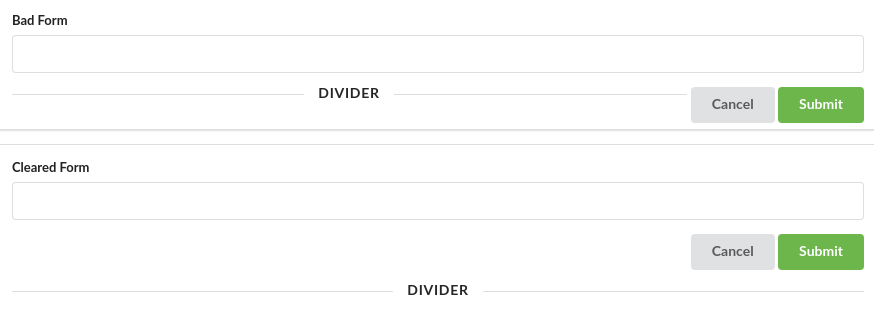
I regularly put action buttons on the right side of form. If I don't have any default (left aligned) buttons and only use right aligned buttons the content under the form is not cleared correctly. I normally fix it by adding the following css:
.ui.clearing.form:after {
    content: "";
    display: block;
    clear: both;
}
I think this would make sense to add to the framework, since it's such a common pattern. Modals even use this pattern!
Example
https://jsfiddle.net/uhtvoexc/1/
Screenshot
 GammaGames
All 4 comments
I've looked into this issue. But I see that its generic requirement depend on individual project and unnecessary to add into FUI.
The floated element can be found anywhere, not only in form. So, it should be used as helper class like clearfix that can be attached to any element which need to self-clear the floating element inside it. This should be implemented in project specific CSS file. I've done such generic CSS in my project files out of FUI for my projects.
Clearing floated element also depends on how the HTML is structured. It only works if there's no sibling element follows after the floated element inside the same parent.
Example if the form has validation errors, it doesn't work. See this fiddle. The buttons are covered by the message container. So, you would need to wrap your buttons inside another container and clear the float there (https://jsfiddle.net/qjyst851/3/).
So, if you're intending for the forms in your project, you should extend the form UI which fulfill your needs. You can extend like this in form.overrides in your theme:
.ui.form .actions {
   text-align: right;
}
And wrap your buttons inside the actions container in your form.
FUI modal doesn't use the floated buttons. It just uses text-align: right with actions container as above.
You can also wrap the buttons in ui right aligned fluid container without your own customizations. Here's fiddle.
 ko2in
on 8 Sep 2020
ko2in
on 8 Sep 2020
@lubber-de Should we close this?
ko2in
on 18 Sep 2020
@ko2in As you pointed out above, there does not seem to exist a proper solution which covers all usecases (clearing depends on html structure), so we might close this until we think about general helper classes (for example clearing in this case)
We could think about a unique logic to match modal, but i would postpone this for a v3
 lubber-de
on 18 Sep 2020
lubber-de
on 18 Sep 2020
I see. I'm closing this then.
ko2in
on 18 Sep 2020
Related issues
 ocharles
·
4Comments
ocharles
·
4Comments
 neokio
·
4Comments
neokio
·
4Comments
 PhilippGrashoff
·
3Comments
lubber-de
·
4Comments
PhilippGrashoff
·
3Comments
lubber-de
·
4Comments
 loweoj
·
3Comments
loweoj
·
3Comments
Most helpful comment
I've looked into this issue. But I see that its generic requirement depend on individual project and unnecessary to add into FUI.
The floated element can be found anywhere, not only in form. So, it should be used as helper class like
clearfixthat can be attached to any element which need to self-clear the floating element inside it. This should be implemented in project specific CSS file. I've done such generic CSS in my project files out of FUI for my projects.Clearing floated element also depends on how the HTML is structured. It only works if there's no sibling element follows after the floated element inside the same parent.
Example if the form has validation errors, it doesn't work. See this fiddle. The buttons are covered by the message container. So, you would need to wrap your buttons inside another container and clear the float there (https://jsfiddle.net/qjyst851/3/).
So, if you're intending for the forms in your project, you should extend the form UI which fulfill your needs. You can extend like this in
form.overridesin your theme:And wrap your buttons inside the
actionscontainer in your form.FUI modal doesn't use the floated buttons. It just uses
text-align: rightwithactionscontainer as above.You can also wrap the buttons in
ui right aligned fluid containerwithout your own customizations. Here's fiddle.