Flycast: Support for proper MAME rom sets for dc-based arcade systems
This would permit RA to read the ROM versions of dc-based arcade games (naomi/naomi2/atomiswave) in their proper MAME formats (as opposed to reading from .lst files as RA now does). Might be good timing now that CHDv5 support has been completed.
Many dc-based arcade games were commonly available in both ROM and GDROM formats. I assume that currently, RA only supports the MAME versions of GDROM-based arcade games, since those would be compressed to CHDv5 (though I haven't personally tested any of those). However, I understand that due to the current lack of libzip support in RA's reicast core, the ROM-based systems will currently not load.
It is important for preservation efforts that proper, best-known good dumps which are documented in MAME are supported here, as these will be in widespread use given RA's significant userbase. The faster the older, .lst-based roms are deprecated (and eventually eliminated), the better it will be for history's sake. For this reason hopefully a solution can be found relatively quickly.
@barbudreadmon A while ago you mentioned possibly being able to help with this. Is your kind offer still on the table?
Note: Current status as I understand it, will close when all are supported (please let me know of any inaccuracies):
- NAOMI M1 ROMs: Supported
- NAOMI M2 ROMs: Supported
- NAOMI M3 ROMs: Supported
- NAOMI M4 ROMs: Supported
- NAOMI GDROMs: Supported
- NAOMI2 ROMs: Not supported, no core emulation
- NAOMI2 GDROMs: Not supported, no core emulation
- AtomisWave ROMs: Supported
 Shoegzer
All 106 comments
I think kronos's code for reading st-v games might be of help here. We got some code to read zips, and we got some code to decrypt roms (st-v seems to use similar decrypting mecanism). Imho we should start by adding the "read from zip stuff", so we'll be able to read zipped stuff (like reference redump iso set), then move to the mame rom stuff.
 barbudreadmon
on 2 Nov 2018
barbudreadmon
on 2 Nov 2018
By the way, .lst files are no longer needed by this core as of about a week ago.
 zerojay
on 4 Nov 2018
zerojay
on 4 Nov 2018
Thanks @zerojay, I realize that, but unless I'm mistaken RA currently only loads sets that were originally .lst-based (i.e. .rom files that were originally loaded from an .lst file), rather than proper MAME dumps. The only difference now is that instead of requiring the .lst file, RA can now load the .rom files directly. However, RA still cannot load for example, MAME's pstone.zip (for Power Stone) which includes files such as epr-21597.ic22 in addition to loading the separate naomi bios as included in naomi.zip. This is the reason for this issue.
Shoegzer
on 4 Nov 2018
See #377. Still a work-in-progress but feedback is welcome
 flyinghead
on 4 Nov 2018
flyinghead
on 4 Nov 2018
@flyinghead happy to see the st-v code from kronos was of some help :).
barbudreadmon
on 4 Nov 2018
Happy to test, but could someone share a list/link of M2 titles?
 newoski
on 4 Nov 2018
flyinghead
on 4 Nov 2018
newoski
on 4 Nov 2018
flyinghead
on 4 Nov 2018
and https://github.com/mamedev/mame/blob/master/src/mame/drivers/naomi.cpp for more games
flyinghead
on 4 Nov 2018
Will report back, asap. Any reason Atomiswave aren't included in this?
newoski
on 4 Nov 2018
Any reason Atomiswave aren't included in this?
Because that's another machine, current reicast doesn't emulate atomiswave at all, it emulates naomiswave (= atomiswave games ported to naomi)
barbudreadmon
on 4 Nov 2018
Ah ok, thank you
newoski
on 4 Nov 2018
@flyinghead Thanks so much! However, it doesn't seem to work. Core information shows Naomi bios as "present" (as required); however loading "pstone.zip" just causes RA to list a bunch of cores that aren't reicast. Any ideas?
Shoegzer
on 4 Nov 2018
@Shoegzer most likely, update your info files
Edit : actually, the info file wasn't updated yet
barbudreadmon
on 4 Nov 2018
@Shoegzer now it should work if you update your info files
barbudreadmon
on 4 Nov 2018
Wrong place, I know, but what do info files do?
newoski
on 4 Nov 2018
they give informations like "this emulator is allowed to launch roms with the xxx extension", and a lot of other things
barbudreadmon
on 4 Nov 2018
Here's a pretty good list of Naomi variants
http://emulation.gametechwiki.com/index.php/Sega_NAOMI_and_variants
 blisstik
on 4 Nov 2018
blisstik
on 4 Nov 2018
@barbudreadmon Thanks, that did the trick. NAOMI Power Stone MAME roms do run now. What remains to close:
1) NAOMI GDROMs (loading these just starts dreamcast BIOS rather than naomi BIOS and game itself doesn't launch)
2) NAOMI2 GDROMS / ROMs (does reicast even support these?)
3) AtomisWave ROMs (from this thread it seems native AW sets aren't supported yet - how difficult would it be to add such support?)
Shoegzer
on 5 Nov 2018
NAOMI GDROMs (loading these just starts dreamcast BIOS rather than naomi BIOS and game itself doesn't launch)
I'm worried DC chd support will get in the way for those
NAOMI2 GDROMS / ROMs (does reicast even support these?)
No, and i don't think we are close
AtomisWave ROMs (from this thread it seems native AW sets aren't supported yet - how difficult would it be to add such support?)
No idea what will be needed.
Naomi M1 roms are also missing, we got some issues decrypting them.
barbudreadmon
on 5 Nov 2018
Removed (details moved to issue summary)
Shoegzer
on 5 Nov 2018
For ease of testing, I've put together a list of all games from those two links @flyinghead provided. I believe I boiled these down to just the games (not the bios files etc)
18wheelr
alienfnt
alpilota
aw1w
aw2c
crackndj
crakndj2
crzytaxi
csmash
cspike
deathcoxo
dybbnao
f355dlx
gundmct
gwing2
hotd2
jambo
marstv
monkeyba
mvsc2u
pstone
pstone2
puyoda
ringout
samba
samba2k
sgtetris
shaktamb
slasho
smarinef
sstrkfgt
suchie3
totd
toyfight
virnba
vonot
wrungp
zerogu2
zombrvn
zombrvno
newoski
on 6 Nov 2018
Latest blog post lists the follow as working??
NAOMI M1 cartridge support
NAOMI M2 cartridge support
NAOMI M4 cartridge support
newoski
on 6 Nov 2018
Ah got it - thanks @newoski. I had no idea M4 roms even existed (I guess that implies there are such things as M3 roms but I really don't know). Support details are now in the issue summary, someone please let me know of any inaccuracies there.
Shoegzer
on 6 Nov 2018
Hey guys - not all roms are supported but we have the framework. Please see the list here:
Naomi M1 - https://pastebin.com/raw/v6hV0wuu
Naomi M2 - https://pastebin.com/raw/u4kJShKv
Naomi M4 - https://pastebin.com/raw/BQxZu7FK
If anybody wants to help convert some code so it can be put into naomi_roms.h, it would speed up support for all other roms.
Here's what needs to be done.
From the page below:
https://raw.githubusercontent.com/mamedev/mame/master/src/mame/drivers/naomi.cpp
Find the rom name, for example: capsnk
// ver 000904
ROM_START( capsnk )
    NAOMI_BIOS
    NAOMI_DEFAULT_EEPROM

    ROM_REGION( 0x7800000, "rom_board", ROMREGION_ERASEFF)
    ROM_LOAD( "epr-23511c.ic22", 0x000000, 0x400000, CRC(3dbf8eb2) SHA1(1f7b89ba99e018cc85022fa852d56d4e345e1bd2) )
    ROM_LOAD( "mpr-23504.ic1", 0x0800000, 0x1000000, CRC(e01a31d2) SHA1(e00e138f6a20175c7aadb6500f6d7541b91def14) )
    ROM_LOAD( "mpr-23505.ic2", 0x1800000, 0x1000000, CRC(3a34d5fe) SHA1(f3c5f6fcbaa7004d371923eb412ea1fcf3fa461a) )
    ROM_LOAD( "mpr-23506.ic3", 0x2800000, 0x1000000, CRC(9cbab27d) SHA1(f166352355a03c9ccafbc15f926330b3622ec040) )
    ROM_LOAD( "mpr-23507.ic4", 0x3800000, 0x1000000, CRC(363c1734) SHA1(16b0485f1aacc8925b3c6d6152680139748e6df8) )
    ROM_LOAD( "mpr-23508.ic5", 0x4800000, 0x1000000, CRC(0a3590aa) SHA1(84c0e1853f069b003d09b268caee97e58c4dacb6) )
    ROM_LOAD( "mpr-23509.ic6", 0x5800000, 0x1000000, CRC(281d633d) SHA1(d773be8e95f7bf9212ee1061f3076220d4fce9e0) )
    ROM_LOAD( "mpr-23510.ic7", 0x6800000, 0x1000000, CRC(b856fef5) SHA1(0634f86740c438b40286256a0269570d24cb845a) )

    // 841-0011    2000     317-5059-COM   Naomi
    ROM_PARAMETER( ":rom_board:segam2crypt:key", "00000000" )
ROM_END
Then convert it in this format (remove the arrow notes):
// Capcom Vs. SNK Millennium Fight 2000 (Rev C)
    {
        "capsnk.zip",
        0x78000000,  <-- ROM_REGION
        0x00000000, <-- this is the crypt key
        NULL, <-- leave at NULL
        M2, <-- change as necessary
        {
            { "epr-23511c.ic22", 0x0000000, 0x4000000 },
            { "mpr-23504.ic1",   0x0800000, 0x1000000 },
            { "mpr-23505.ic2",   0x1800000, 0x1000000 },
            { "mpr-23506.ic3",   0x2800000, 0x1000000 },
            { "mpr-23507.ic4",   0x3800000, 0x1000000 },
            { "mpr-23508.ic5",   0x4800000, 0x1000000 },
            { "mpr-23509.ic6",   0x5800000, 0x1000000 },
            { "mpr-23510.ic7",   0x6800000, 0x1000000 },
            { NULL, 0, 0 },
        }
    }
If someone can get started on the //TODO M1 and M4 list from pastebin links above, that would be a good start. Paste them on pastebin when done and I can compile them for flyinghead.
I can get started on M2 list. This is a huge undertaking! Any volunteers?
EDIT - Use instructions I have below this thread!
blisstik
on 7 Nov 2018
I'm not a coder, so this sounds like something I could help with. I'll get started from the top of the list, if anyone else wants to work from the bottom...
newoski
on 7 Nov 2018
Use the above as a template. Basically the *.icX files are what we need to extract. Just look at the two blocks. If you want to chat, ping me on Discord with the same name here.
blisstik
on 7 Nov 2018
@6alileo could you replace your link to naomi.c with this link please: https://github.com/mamedev/mame/blob/master/src/mame/drivers/naomi.cpp
The one you provided above is almost certainly outdated and only a fork, not an official part of the project. Thanks.
Shoegzer
on 7 Nov 2018
@Shoegzer - done
blisstik
on 7 Nov 2018
All crypt keys get a preface of 0x?
newoski
on 7 Nov 2018
Can you ping me on discord? Same username. Just signed up
newoski
on 7 Nov 2018
The M1 and M2 pastebin links are identical. Deliberate?
newoski
on 7 Nov 2018
@newoski - fixed
Hold tight. I will have a scraped version. It's not perfect but will speed things up.
blisstik
on 7 Nov 2018
Holding. Ready to start tonight, once you update
newoski
on 7 Nov 2018
I basically did a ton of search and replace from a copy of naomi.cpp so nothing was manually edited but it still needs to be organized but should be a lot faster than starting from scratch.
So use the link below instead of naomi.cpp link above. Start with gram2000 in the M1 list then paste it here. It should look very similar to below. Note that there are 4 spaces for each indent.
https://pastebin.com/raw/EDz6XT25
// Capcom Vs. SNK Millennium Fight 2000 (Rev C)
    {
        "capsnk.zip",
        0x78000000,  <-- ROM_REGION
        0x00000000, <-- this is the crypt key
        NULL, <-- leave at NULL
        M2, <-- change as necessary
        {
            { "epr-23511c.ic22", 0x0000000, 0x4000000 },
            { "mpr-23504.ic1",   0x0800000, 0x1000000 },
            { "mpr-23505.ic2",   0x1800000, 0x1000000 },
            { "mpr-23506.ic3",   0x2800000, 0x1000000 },
            { "mpr-23507.ic4",   0x3800000, 0x1000000 },
            { "mpr-23508.ic5",   0x4800000, 0x1000000 },
            { "mpr-23509.ic6",   0x5800000, 0x1000000 },
            { "mpr-23510.ic7",   0x6800000, 0x1000000 },
            { NULL, 0, 0 },
        }
    }
@newoski - see this detailed example
{ "cspike.zip", <-- from the quote, move to next line with 4 spaces; remove extra space after {
        NULL, <-- adjust 4 spaces
        M2, <-- adjust 4 spaces
<-- remove extra space
        0x6800000,{ <-- this line should go on top of _crypt_key; move { to separate line after M2 with 4 spaces
        { "epr-23210.ic22", 0x0000000, 0x0400000 },
        { "mpr-23198.ic1",  0x0800000, 0x0800000 },
        { "mpr-23199.ic2",  0x1000000, 0x0800000 },
        { "mpr-23200.ic3",  0x1800000, 0x0800000 },
        { "mpr-23201.ic4",  0x2000000, 0x0800000 },
        { "mpr-23202.ic5",  0x2800000, 0x0800000 },
        { "mpr-23203.ic6",  0x3000000, 0x0800000 },
        { "mpr-23204.ic7",  0x3800000, 0x0800000 },
        { "mpr-23205.ic8",  0x4000000, 0x0800000 },
        { "mpr-23206.ic9",  0x4800000, 0x0800000 },
        { "mpr-23207.ic10", 0x5000000, 0x0800000 },
        { "mpr-23208.ic11", 0x5800000, 0x0800000 },
        { "mpr-23209.ic12s",0x6000000, 0x0800000 },
        { NULL, 0, 0 }, <-- add this new line after last IC line
<-- remove extra line
<-- remove extra line
        000e2010, _crypt_key <- this should go on top of NULL; add 0x in front; remove _crypt_key marker
    <-- one of the brackets go here, 4 spaces
}}
@6alileo how do I paste maintaining the formatting?
newoski
on 7 Nov 2018
@newoski - it's close - try practicing using the comment above
blisstik
on 7 Nov 2018
OK, here we go
// Capcom Vs. SNK Millennium Fight 2000 (Rev C)
    {
        "capsnk.zip",
    0x7800000,
    0x0000000,
        NULL,
        M2,
        {
           { "epr-23511c.ic22", 0x000000, 0x400000 },
           { "mpr-23504.ic1", 0x0800000, 0x1000000 },
           { "mpr-23505.ic2", 0x1800000, 0x1000000 },
           { "mpr-23506.ic3", 0x2800000, 0x1000000 },
           { "mpr-23507.ic4", 0x3800000, 0x1000000 },
           { "mpr-23508.ic5", 0x4800000, 0x1000000 },
           { "mpr-23509.ic6", 0x5800000, 0x1000000 },
           { "mpr-23510.ic7", 0x6800000, 0x1000000 },
           { NULL, 0, 0}
    }
}
Formatting is wrong, above, as I don't lknow how to maintain that formatting in GitHub... but otherwise I think I'm there, minus the last 3 lines which I need an explanation of
newoski
on 7 Nov 2018
Get on Discord please
blisstik
on 7 Nov 2018
OK, I've got it now I think:
// Capcom Vs. SNK Millennium Fight 2000 (Rev C)
    {
        "capsnk.zip",
        0x7800000,
        0x0000000,
        NULL,
        M2,
        {
           { "epr-23511c.ic22", 0x000000, 0x400000 },
           { "mpr-23504.ic1", 0x0800000, 0x1000000 },
           { "mpr-23505.ic2", 0x1800000, 0x1000000 },
           { "mpr-23506.ic3", 0x2800000, 0x1000000 },
           { "mpr-23507.ic4", 0x3800000, 0x1000000 },
           { "mpr-23508.ic5", 0x4800000, 0x1000000 },
           { "mpr-23509.ic6", 0x5800000, 0x1000000 },
           { "mpr-23510.ic7", 0x6800000, 0x1000000 },
           { NULL, 0, 0}
    }
}
newoski
on 7 Nov 2018
@Shoegzer I edited this issue to add support for Naomi M3 and AtomisWave ROMs.
M3 carts are a variation of M2 and are supported.
flyinghead
on 9 Nov 2018
Is there a list of M3 that needs to be prepped, like the other variants?
newoski
on 9 Nov 2018
No, they are identified as M2 in mame
flyinghead
on 9 Nov 2018
Hi,
Thank you all for all the work. I have a question for you. I was looking a the file /core/hw/naomi/naomi_roms.h to see which roms are already supported in the mame format, and saw that Dolphin Blue (atomiswave) has this comment:
"dolphin.zip", // FIXME freezes when in-game
Does it mean this game freezes when ingame? Or is it something that has been already fixed? I remember playing dolphin blue some weeks ago in the old naomiswave/.lst converted roms format, and it was working fine. Could the problem be specific to the mame-formatted rom?
Thanks!
 cubatilles
on 9 Nov 2018
cubatilles
on 9 Nov 2018
I remember playing dolphin blue some weeks ago in the old naomiswave/.lst converted roms format, and it was working fine.
You finished it ? iirc this game was freezing in lvl 5
barbudreadmon
on 9 Nov 2018
Ah, no, I didin't get that far in the game. Sorry, I assumed the freeze was going to happen early on the game. I successfully finished levels 1 and 2.
Greetings.
cubatilles
on 9 Nov 2018
Yes, there's a issue with the AtomisWave version of Dolphin Blue. The game freezes after a few seconds in-game.
This doesn't happen on the Naomi conversion of the same game although the freeze on level 5 could very well be the same problem.
flyinghead
on 9 Nov 2018
@flyinghead thanks once again. Unfortunately though, there's a similar problem as before; i.e. loading an atomiswave zip results in dropping back to the RA menu without actually running it. This was resolved before by ensuring that the latest info file existed, so that was done again, but to no effect. I noticed that the MAME "awbios.zip" (atomiswave bios) is not listed in the info file. Could this be a reason?
Shoegzer
on 9 Nov 2018
@Shoegzer I just testing ggisuka, after updating my core, info, and databases and adding awbios.zip to my /System/DC folder. Game launched without issue and 4 players worked. Not sure if this helps get you going
newoski
on 9 Nov 2018
@newoski Thanks, I suspected that might work but first I want to be sure the info file is updated with the correct awbios.zip hash as that's very important. I assume your info file looks like this one i.e. no reference to that file? If so, then after the info is updated I'll try again.
Shoegzer
on 9 Nov 2018
@Shoegzer Correct. I just added it on a hunch, based on previous feedback from @flyinghead
Worked like a charm!
newoski
on 9 Nov 2018
Yup, I imagine it would. Just needs to be documented to avoid corrupt bios files and false negatives in issue reports.
@flyinghead when you have a chance can you update reicast.info with the aw bios info/hashes? Edit: understanding you're likely busy in other areas, maybe someone else can do this.
I"m pretty sure the file that needs changing is here. Also in case it helps, information according to mame documentation:
#define AW_BIOS \
    ROM_REGION( 0x200000, "awflash", 0) \
    ROM_SYSTEM_BIOS( 0, "bios0", "Atomiswave BIOS" ) \
    ROM_LOAD16_WORD_SWAP_BIOS( 0, "bios0.ic23", 0x000000, 0x020000, CRC(719b2b0b) SHA1(b4c1a26bc8906d5275eb28c701dff2b9365bcdfa) ) \
    ROM_LOAD16_WORD_SWAP_BIOS( 0, "bios1.ic23", 0x000000, 0x020000, CRC(d3e80a9f) SHA1(33024f9d51c04884c2b44ce146f340e7a857b959) )
/* default EEPROM values, same works for all games */
I haven't had a chance to check that file in any detail but for now I'll assume it's correct otherwise.
Shoegzer
on 9 Nov 2018
I was going to open an issue after Dolphin Blue Freezing when I saw this thread. I confirm it is freezing after a few seconds:
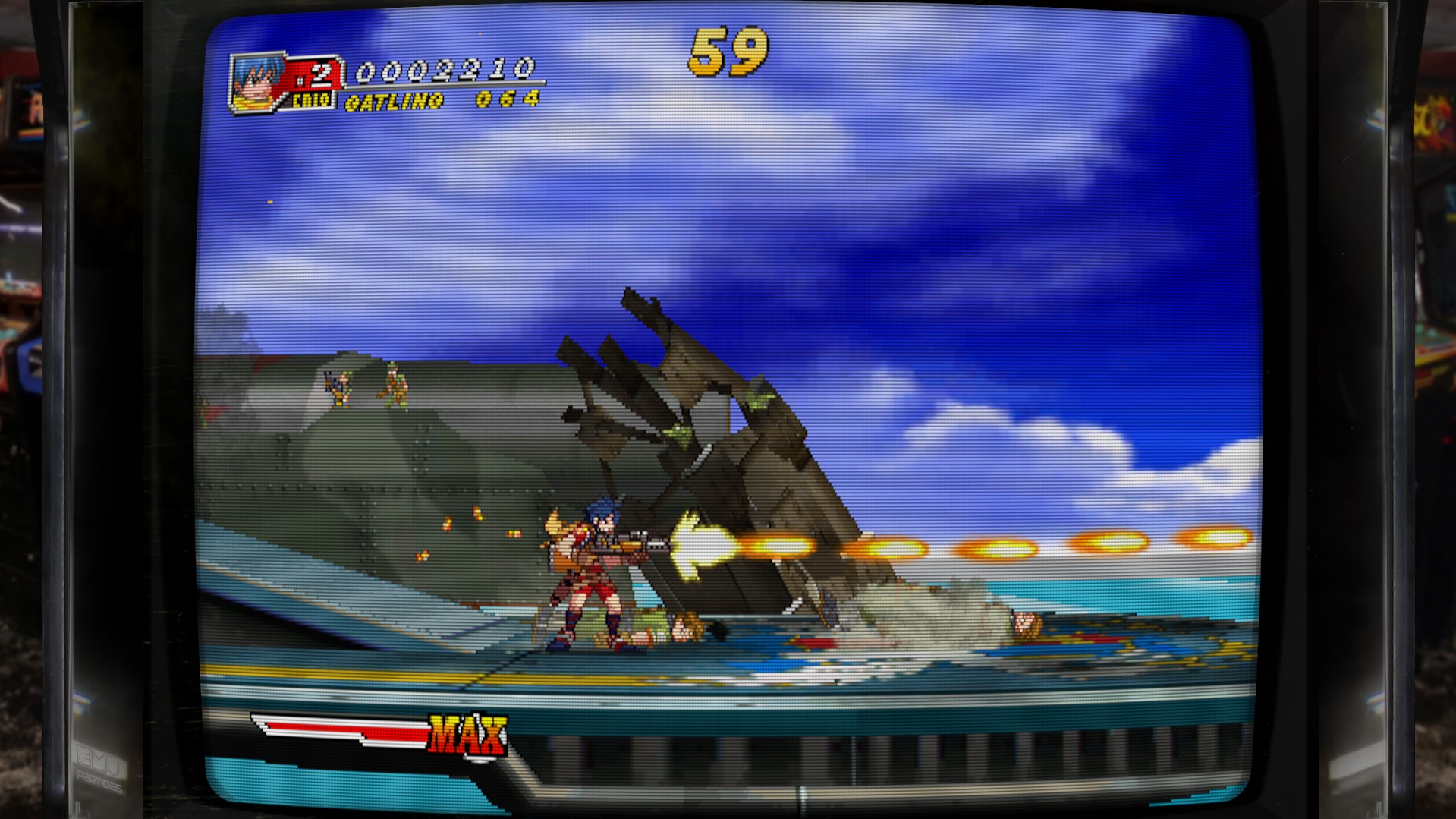
 furiadeoso
on 11 Nov 2018
furiadeoso
on 11 Nov 2018
is there any chance for 7z roms support?
 prettyfortune
on 11 Nov 2018
prettyfortune
on 11 Nov 2018
It's on my to-do list.
flyinghead
on 12 Nov 2018
@flyinghead Which is on your to-do - the 7z rom support or the reicast.info update?
Shoegzer
on 12 Nov 2018
Was talking about 7z support, sorry.
I don't think it makes sense to set the hash of a zip file. Does reicast.info support hash of files inside a zip?
flyinghead
on 12 Nov 2018
Just to update everything so far with the current commits today:
- Support for Naomi M1, M2/M3, M4 carts (most parent cart roms are supported; child roms in progress)
- Support for Atomiswave carts (all parent cart roms are supported; child roms in progress)
- Naomi GD-Roms (chd) are not yet supported
- Fix for Dolphin Blue freezes
- Selectable BIOS within RetroArch - must have
naomi.zipin the BIOS/dc folder
blisstik
on 12 Nov 2018
@flyinghead I think you're right - from the current info file it appears the hashes of individual files inside the zip are needed. So I believe the bios0.ic23 and bios1.ic23 files noted above would be individually listed there. Also, I imagine that one could simply drop the mame awbios.zip into the system/dc folder and the individual bios files would show up in the RA UI as "Present" as long as the hashes matched.
If you do find a few minutes to change the info file it would be much appreciated.
Shoegzer
on 12 Nov 2018
Dolphin Blue freezes randomly on the second stage for me. On the zone at the 6 minute mark on this video: https://www.youtube.com/watch?v=5EoVKjTA4VE
But it doesn't freeze like before, now it restarts the machine and goes to the title screen automatically.
Another problem is that the sound is too loud and it sounds horrible when there are a lot of samples at the same time. But I don't know if that problem is from the core or a RA config somewhere.
 aboutafter
on 12 Nov 2018
aboutafter
on 12 Nov 2018
Dolphin Blue still crashes randomly. Looking into it.
flyinghead
on 13 Nov 2018
@aboutafter - sound can be adjusted by going to the TEST/SERVICE menu, you have to enable it in the options for the button (L3) to work.
blisstik
on 13 Nov 2018
@aboutafter - sound can be adjusted by going to the TEST/SERVICE menu, you have to enable it in the options for the button (L3) to work.
Done! by default the sound level is at 15, which is the maximum and makes it sound bad (there is a name for this but I don't remember it). Lowering it to 10 fixes the issue completely.
Is this issue fixable core wise? because I don't think the majority of users know they can even access the service menu.
aboutafter
on 14 Nov 2018
@aboutafter @flyinghead as said on discord the other day, i think reicast needs a way to preset a few things in service on a per game basis without entering the service menu at runtime, things that come to mind :
- horizontal/vertical orientation
- number of player
- sound
barbudreadmon
on 14 Nov 2018
A couple FYIs for you guys that want this done as-is:
For Atomiswave roms, you can save your configuration in the TEST menu by the generated
nvmem2file. You go into TEST menu, make the changes, go back to the main menu and exit out of RetroArch. Do not use theExitin the TEST menu as a lot of Atomiswave roms will freeze RetroArch. If you invoke RGUI and close content or RetroArch via hotkey, it will generate thenvmemandnvmem2files. You only need to backup thenvmem2file for future use. You only need to do this once per rom but it does work.For Naomi roms, the same process can be done above but you simply backup the
eepromfiles instead. There is nonvmem2.
Just for fun - if you have Marvel vs Capcom 2 bin that has all the characters unlocked, you can grab the eeprom file from that bin and rename it mvsc2.zip.eeprom and it will load the mame rom version with all the characters unlocked :)
blisstik
on 14 Nov 2018
Or you can easily unlock all characters like this: http://wiki.shoryuken.com/Game_Codes_%28MvC2%29
Here is my proof :): 
EDIT: oh, and the Widescreen hack works perfectly! 
aboutafter
on 15 Nov 2018
EDIT: oh, and the Widescreen hack works perfectly!
How can that hack be done?
furiadeoso
on 15 Nov 2018
How can that hack be done?
@furiadeoso i think there is a core option for this
barbudreadmon
on 15 Nov 2018
I'm getting this error in ausfache.zip :
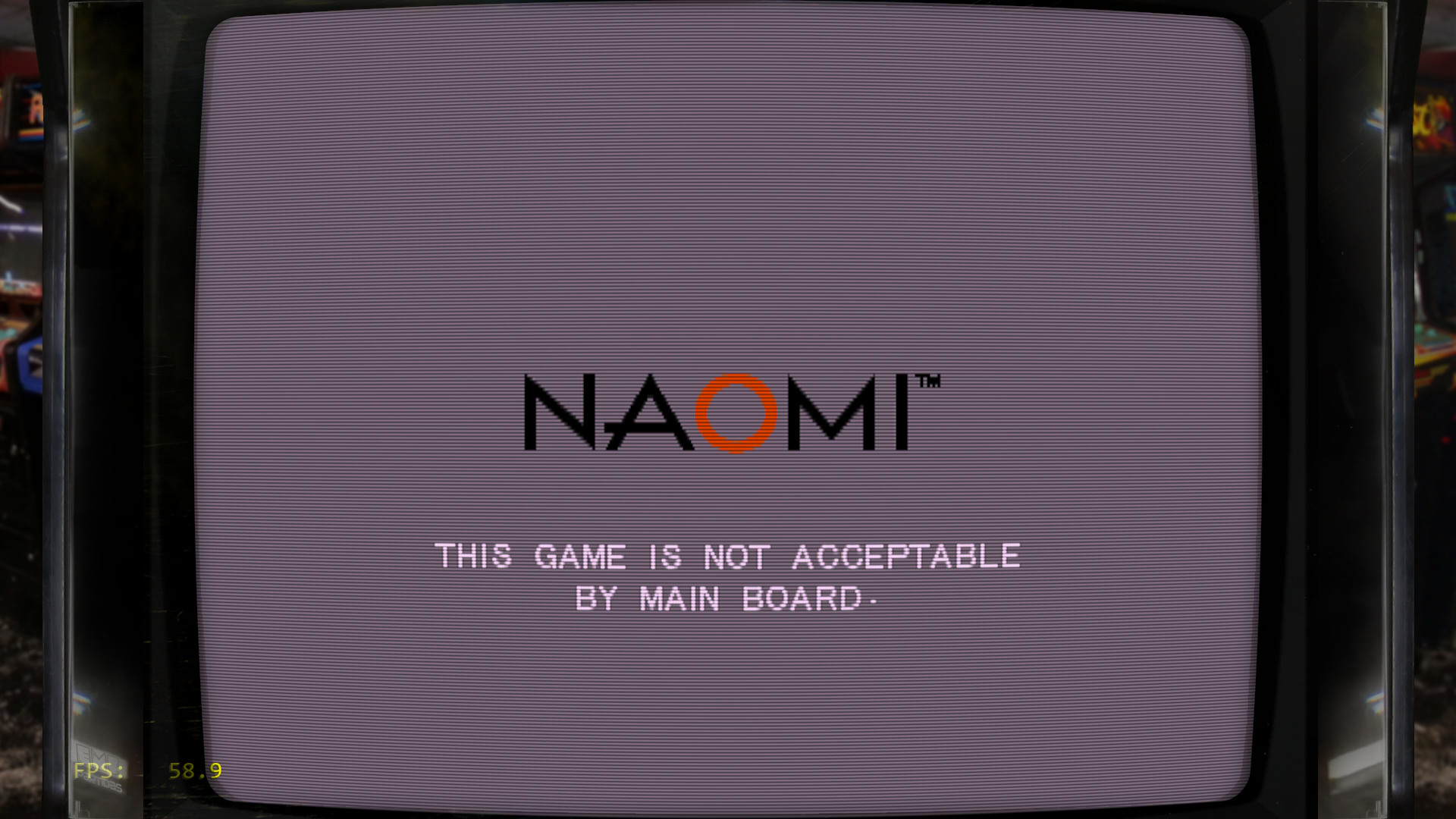
Do you get the same?
furiadeoso
on 17 Nov 2018
ausfache.zip works for me. You should check your rom.
flyinghead
on 17 Nov 2018
@furiadeoso this message appears when you are using a bios incompatible with the game, my guess is that you are using a usa bios with a game which only support japan bios. epr-21576g was the recommended bios for naomi with lst/bin for that very reason. reicast could use some improvements about this, by either forcing specific bios region with specific games, or implementing support for the epr-21576h-multi bios and forcing it on all games.
barbudreadmon
on 17 Nov 2018
ERROR 01 -> bad rom
ERROR 02 -> incompatible bios region
flyinghead
on 17 Nov 2018
Do you mean naomi_boot.bin? Yes I'm using epr-21576g.ic27 (renamed) in system/dc . And ausfache.zip / naomi.zip NON-MERGED (mame 0.203 zip) . Not working for me. Could I be missing something?
EDIT: Error 01 . But whaty I said. NON-MERGED mame 0.203 romset.
furiadeoso
on 17 Nov 2018
You also have naomi.zip in the system/dc folder ?
barbudreadmon
on 17 Nov 2018
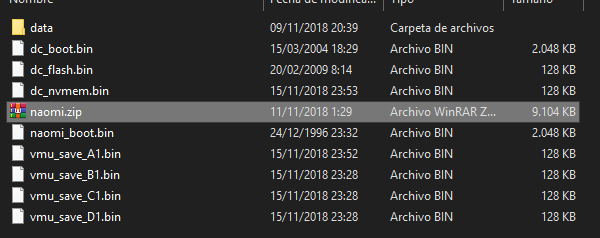
You also have naomi.zip in the system/dc folder ?
Yes I have: mame 0.203 non-mergeg naomi.zip :
furiadeoso
on 17 Nov 2018
Then naomi.zip is being used instead of naomi_boot.bin and the region set in the Core Options is used to select which BIOS to load.
Set the region to Japan in Core Options and see if it helps.
flyinghead
on 17 Nov 2018
Then naomi.zip is being used instead of naomi_boot.bin and the region set in the Core Options is used to select which BIOS to load.
Set the region to Japan in Core Options and see if it helps.
It works! Selecting Japan BIOS it is working.
BTW: deleting naomi_boot.bin is also working. only naomi.zip seems to be needed. At least in this game.
Thanks.
furiadeoso
on 17 Nov 2018
mamonoro.zip
I've tried to solve this myself entering in service mode but I don't know what I would must to change:
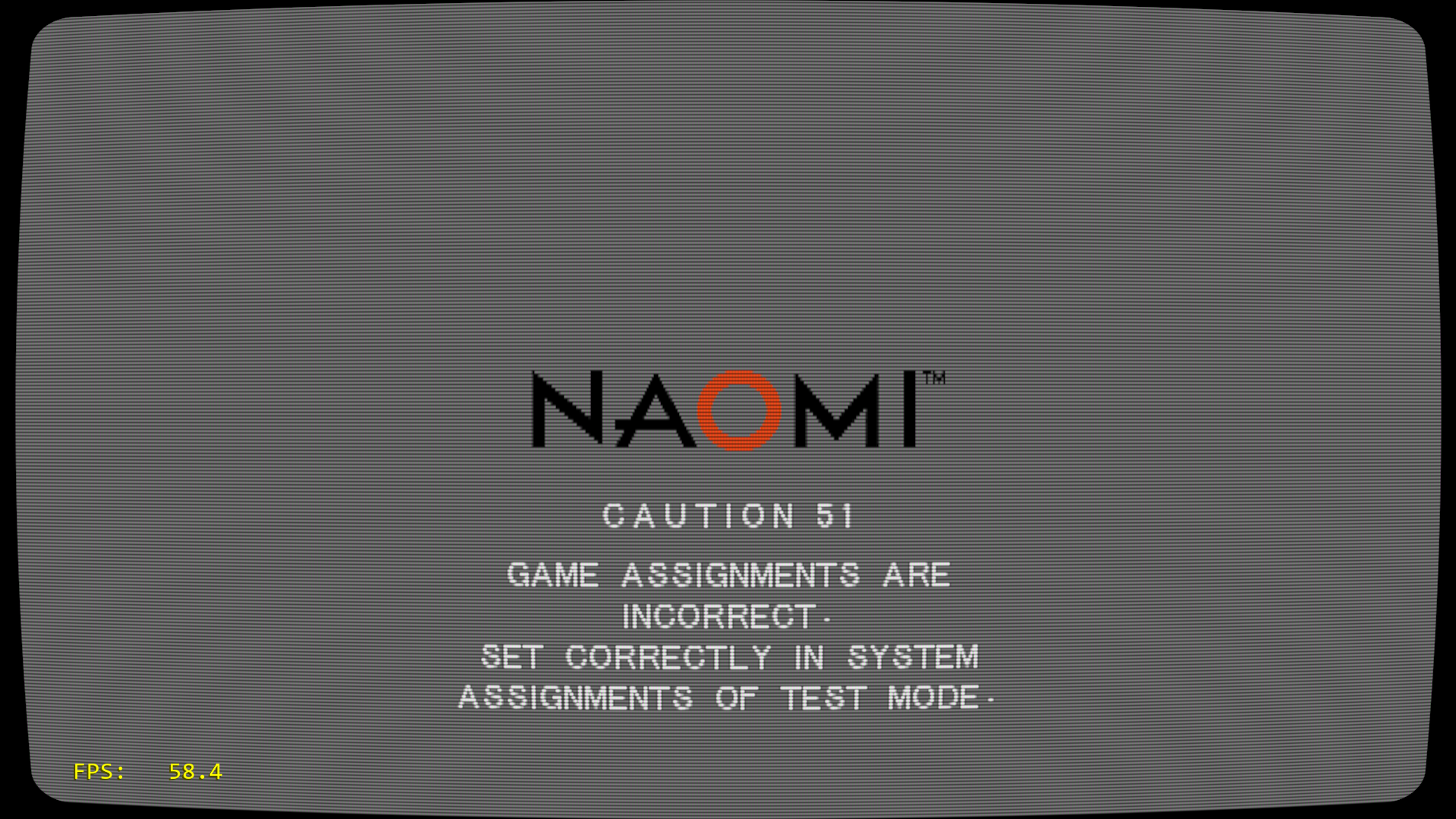
It is happening for me in .lst games also, like karous or psyvariar2
furiadeoso
on 17 Nov 2018
CAUTION 51
Display: GAME ASSIGNMENTS ARE INCORRECT. SET CORRECTLY IN SYSTEM ASSIGNMENTS OF TEST MODE.
Resolution: Enter TEST mode. Go to System Assignments -> Cabinet Type -> 1Player(s)
CAUTION 54
Display: GAME ASSIGNMENTS ARE INCORRECT. SET CORRECTLY IN SYSTEM ASSIGNMENTS OF TEST MODE.
Resolution: Enter TEST mode. Go to System Assignments -> Monitor Type -> Vertical
blisstik
on 17 Nov 2018
Naomi gdroms still don't work for me after the latest builds (testing with dd973fd6651f26e603b46f74c852825bbafae307). Attempting to launch games result in reicast dropping to the dreamcast bios. I'm not sure if this is based on any issues with the bios files themselves because the reicast info file has not been updated for a long time (and really needs it regardless). Any thoughts or suggestions are welcome.
Shoegzer
on 17 Nov 2018
ggxxac gives me "ERROR 02 - The game is not acceptable by the main board". The other gdroms I tried work correctly (Ikaruga, ggxx).
aboutafter
on 18 Nov 2018
@Shoegzer a mame rom is a zip file, sometimes accompanied by a chd in a subfolder by the name of the zip file, however you always have to load the zip file.
@aboutafter as explained above, ERROR 02 is wrong region, and a lot of games needs Japan region.
I don't think the purpose of this issue is to be a tutorial on how to use mame roms, with people asking again and again the same questions...
barbudreadmon
on 18 Nov 2018
@barbudreadmon I think the reason that there have been so many questions was the adding of roms and GDRoms as a separate add. To me, and I'm a pretty active user of MAME, I thought that they were maybe different versions of the same game, for Naomi.
Could you elaborate on the bios requirements? Is it as easy as having the naomi.zip and the awbios.zip files added? Or are there additional requirements? This is where things are starting to get murky
newoski
on 18 Nov 2018
In the Options, you can select Japan, USA or Export
On Sun, Nov 18, 2018 at 6:25 AM newoski notifications@github.com wrote:
@barbudreadmon https://github.com/barbudreadmon I think the reason that
there have been so many questions was the adding of roms and GDRoms as a
separate add. To me, and I'm a pretty active user of MAME, I thought that
they were maybe different versions of the same game, for Naomi.Could you elaborate on the bios requirements? Is it as easy as having the
naomi.zip and the awbios.zip files added? Or are there additional
requirements? This is where things are starting to get murky—
You are receiving this because you were mentioned.
Reply to this email directly, view it on GitHub
https://github.com/libretro/reicast-emulator/issues/371#issuecomment-439696845,
or mute the thread
https://github.com/notifications/unsubscribe-auth/AoSfFPxAD8P4qxlFQQZYwyKbYAUflH50ks5uwW3dgaJpZM4YK3JB
.
--
Galileo Morales
IT Business Solutions
PH/TXT: (916) 601-2400
blisstik
on 18 Nov 2018
@barbudreadmon You are correct, and loading the roms is of course the first thing I tried, but RA still crashes each time upon loading the archive with the reicast core. Tested against three different games (bdrdown, cvsgd, cvs2gd) and none of them worked.
I thought I had read somewhere though that RA works differently from stock mame in that it would permit loading of either the rom of gdrom, so I tried that too and that didn't work either, hence my previous post. Perhaps that was not right, but either way gdrom-based naomi games don't work here.
Again I'm thinking this has something to do with incorrect naomi bios files but without an updated info file it's hard to tell.
Shoegzer
on 18 Nov 2018
Do you have naomi.zip in system/dc folder? That's all it needs. In RA options, you can select the region which sets the bios for each rom.
From: Shoegzer notifications@github.com
Sent: Sunday, November 18, 2018 8:50 AM
To: libretro/reicast-emulator
Cc: 6alileo; Mention
Subject: Re: [libretro/reicast-emulator] Support for proper MAME rom sets for dc-based arcade systems (#371)
@barbudreadmonhttps://github.com/barbudreadmon You are correct, and loading the roms is of course the first thing I tried, but RA still crashes each time upon loading the archive with the reicast core. Tested against three different games (bdrdown, cvsgd, cvs2gd) and none of them worked.
I thought I had read somewhere though that RA works differently from stock mame in that it would permit loading of either the rom of gdrom, so I tried that too and that didn't work either, hence my previous post. Perhaps that was not right, but either way gdrom-based naomi games don't work here.
Again I'm thinking this has something to do with incorrect naomi bios files but without an updated info filehttps://github.com/libretro/libretro-super/blob/master/dist/info/reicast_libretro.info it's hard to tell.
—
You are receiving this because you were mentioned.
Reply to this email directly, view it on GitHubhttps://github.com/libretro/reicast-emulator/issues/371#issuecomment-439707271, or mute the threadhttps://github.com/notifications/unsubscribe-auth/AoSfFErNmQoIXuRA0R6zGI88ypFMM1L5ks5uwY_pgaJpZM4YK3JB.
blisstik
on 18 Nov 2018
Again I'm thinking this has something to do with incorrect naomi bios files but without an updated info file it's hard to tell.
You just need naomi.zip, the old naomi_boot.bin is now useless, and the fact the info file wasn't updated for bios has no impact on emulation (well, i guess it could be a good idea to update it though).
barbudreadmon
on 18 Nov 2018
@6alileo Yes I do, and verified per mame .203, but RA still crashes.
@barbudreadmon Yes I realize the info file has no impact on emulation - my only point was to eliminate ambiguity because the file would otherwise contain a discrete manifest of all necessary bios files along with their hashes to avoid the possibility of corruption etc. getting in the way. Also, MAME includes a "naomigd.zip" too, specifically for gdrom purposes, though right now a newcomer would not know if it's needed or not. Same with awbios.zip for Atomiswave - which files are needed?
It's seriously great that the naomi side of DC is getting so much attention lately, but that means lots of changes to bios files where having the proper info file is extremely helpful to testing and troubleshooting efforts especially right now. As it stands not much can be done.
Shoegzer
on 18 Nov 2018
@Shoegzer afaik, naomigd.zip isn't needed. Also, hash for zip files is pretty useless : except if they were zipped with torrentzip the hash will always be different from a zip to another.
Let's try reading bdrdown declaration in https://github.com/libretro/reicast-emulator/blob/dd973fd6651f26e603b46f74c852825bbafae307/core/hw/naomi/naomi_roms.h#L3724-L3735
First, you need a zip file named bdrdown.zip containing a file named 317-5097-jpn.pic which is a decrypt key iirc, might be a good idea to make sure you have the last version of this file from mame 0.203.
Second, you need naomi.zip file in system/dc folder, again, make sure you have the latest version from mame 0.203.
Third, inside the folder containing bdrdown.zip, you need a subfolder named bdrdown, containing a file named gdl-0023a.chd, again, make sure you have the latest version from mame 0.203.
Last but not least, always configure your reicast region to Japan, default currently link to Korea, which is an issue for many games.
barbudreadmon
on 18 Nov 2018
@barbudreadmon You are probably right, afaik too naomigd.zip is not needed, but see: we are both saying "afaik". Having the discrete list of files and hashes in the info would clear all that up for sure while again making it easier to troubleshoot and test, especially for newcomers who wouldn't necessarily know what to do otherwise. As a rule I always follow the info files to the letter before attempting any testing on any RA core. Also hashing for zip files IS of course useless, but take another look at the info file syntax - they don't list hashes for zips, only the individual bios files.
Regarding the issue: I appreciate your breaking things down, but I had all those files already from mame .203 as I had stated, and in the right places. As it turns out it was related to an entirely different issue which I fixed - RA was set for "boot to bios" from when I was testing some dc-specific issues for flyinghead, and that predictably causes problems for naomi systems. For the sake of "fault tolerance" it would be nice if that option could be inhibited upon launching non-dc software, or at least verbose/informative logging to reflect that it crashed for this reason. Thoughts here @flyinghead?
Shoegzer
on 18 Nov 2018
@barbudreadmon Thank you for updating the info file - this is a tremendous help.
One request - could the info list the files and hashes contained within the zips, rather than the zips themselves? For example with naomi.zip, MAME documentation (search on page for #define NAOMI_BIOS), lists each file and hash in naomi.zip. This would make the file more comparable in size to other libretro info files e.g. bsnes/higan, but would help e.g. to avoid issues in troubleshooting due to corrupt or missing files.
On a related note, a while ago I posted an issue about the the libretro-reicast flash rom being a known bad dump with an outdated hash. Without the corresponding hash listed in the info, that issue would not have been found.
Shoegzer
on 21 Nov 2018
This should be closed. Please open a new issue as a result of this implementation.
blisstik
on 21 Nov 2018
I opened a new issue capturing the above information, although I'll leave this issue open until support for loading naomi2 roms/gdroms is added as described above (which is of course dependent on naomi2 support in general).
Shoegzer
on 21 Nov 2018
Naomi2 is not supported by this emulator and its upstream forks. That's not
a feature request but more like a new emulator request, which warrants a
new issue.
On Wed, Nov 21, 2018 at 2:31 PM Shoegzer notifications@github.com wrote:
I opened a new issue capturing the above information, although I'll leave
this issue open until support for loading naomi2 roms is added as described
above (which is of course dependent on naomi2 support in general).—
You are receiving this because you were mentioned.
Reply to this email directly, view it on GitHub
https://github.com/libretro/reicast-emulator/issues/371#issuecomment-440831191,
or mute the thread
https://github.com/notifications/unsubscribe-auth/AoSfFJexFZcD0RGxOCdpRQzQbzVzY5olks5uxdRLgaJpZM4YK3JB
.
blisstik
on 21 Nov 2018
Well, I'll leave that up to @flyinghead as he once edited my support list above and left naomi2 alone. For all I know he or someone else could be working on such support right now. I don't doubt adding that platform is a heavier lift than most for the reicast core, although given that its architecture is quite similar to naomi (except for 2x the RAM etc.) I don't believe it's as involved as writing a new emulator or core from scratch. In the meantime, this is just a placeholder for rom loading.
Shoegzer
on 21 Nov 2018
One request - could the info list the files and hashes contained within the zips, rather than the zips themselves
That's not how info files work actually.
For all I know he or someone else could be working on such support right now
I discussed about this with @flyinghead, he lacks documentation on the ELAN custom chip included in naomi2, so it's currently impossible to make any progress on naomi2 support in lr-reicast. As far as we know, only the demul devs have some technical knowledge about this chip, we didn't find anything in MAME codebase, perhaps @p1pkin could break this stalemate by providing us some technical documentation he may have ?
barbudreadmon
on 22 Nov 2018
Not trying to be obtuse here but I don't know what you mean - the info files have always listed hashes for files within zips, not the zips. Take a look at info files for any core and you'll see what I mean. As even you've mentioned above, zip hashes will vary.
In any event, I'm not going to trivialize the task of naomi2 support - we all agree it's not going to be simple but I'm sure it can leverage at least some of the existing emulation work. At least from here it's primarily more memory (4x the RAM rather than double actually) for things like textures and audio streaming, though I didn't realize there was a custom chip involved. Hopefully p1pkin can kindly help with anything here since I suppose there isn't much in MAME''s documentation. I seem to recall dknute having at least _some_ information when he put Makaron together years ago, though I could be wrong.
Shoegzer
on 22 Nov 2018
@barbudreadmon I/we have no documentation for ELAN.
 p1pkin
on 23 Nov 2018
p1pkin
on 23 Nov 2018
@p1pkin Not even a quick list of register, interrupts, ... and what they do ? Last time we talked about this you recommended reverse engineering gpuDX11.dll from demul but well, it's closed source (it might be ok if we had autorization from the author of the file, is that actually you ?), and i guess it might only be the shader part ? Anyway, thanks for the answer.
barbudreadmon
on 23 Nov 2018
quick register list - https://github.com/mamedev/mame/blob/0ac5f76c95cfc36f8bcafcbf02b1327b864aa36d/src/mame/video/powervr2.cpp#L3896
I think I may say - you may look at vertex shader file in demul's DLL to get quick overview of ELAN features, as we think. in general, it is not good idea to RE someone's else implementation, because it might be wrong or/and full of hacks.
p1pkin
on 23 Nov 2018
One other item to mention here: support for mame "parent/clone" sets would be nice to see, as people tend to keep sets in this format primarily to save space. For example, looking here, anmlbskta loads vm2001f01.bin, where the same file is found in the parent anmlbskt. So, that file would not be needed inside anmlbskta.zip if reicast could find the file within anmlbstk.zip. Given that parent sets are already defined within the xml I'm hoping this wouldn't be too difficult a task.
Shoegzer
on 27 Nov 2018
@Shoegzer - parent/child/clone roms has been implemented a few days ago
blisstik
on 27 Nov 2018
NON-MERGED set is required as before or after child/clone support I can use SPLIT too?
Excuse me if the question has been answered yet, but I've done a repository search and find nothing about.
Thanks.
furiadeoso
on 27 Nov 2018
@furiadeoso - yes, merged, non-merged, and split should all work now. The clones now refer to the parent roms.
blisstik
on 27 Nov 2018
Ah, so it has and seems to be working well. Thank you, @6alileo. I saw the commit for 7zip support several days ago but missed the second part about split rom support.
At this point, since mame rom support seems to be working well now I'll go ahead and close this, though I'm happy to reopen if @flyinghead needs it.
NAOMI 2 information has been moved to https://github.com/libretro/reicast-emulator/issues/418 where it's more relevant at this point.
Shoegzer
on 27 Nov 2018
Related issues
blisstik
·
6Comments
 afjara
·
10Comments
afjara
·
10Comments
 Tatsuya79
·
5Comments
Tatsuya79
·
5Comments
 CouldBeWolf
·
10Comments
CouldBeWolf
·
10Comments
 twinaphex
·
6Comments
twinaphex
·
6Comments
Most helpful comment
@aboutafter @flyinghead as said on discord the other day, i think reicast needs a way to preset a few things in service on a per game basis without entering the service menu at runtime, things that come to mind :