Fluxion: Handshake Snooper don't work
Read the wiki?
Yes
Do you want to request a feature or report a bug?
Bug
What is the current behaviour?
It doesn't capture handshakes
If the current behaviour is a bug, please provide the steps to reproduce it.
When I use Handshake Snooper on my network (with connected devices) this appears to me:
CH 11][ Elapsed: 10 s ][ 2018-04-28 19:46 ][ fixed channel fluxwl0: 5
What do you think the expected behaviour should be?
If this is a feature request, what is the motivation or use case for the added feature?
Specs
fluxwl0
FLUXION Info
FLUXION V4.7
BASH Info
GNU bash, versione 4.4.19(1)-release (x86_64-pc-linux-gnu)
Copyright (C) 2016 Free Software Foundation, Inc.
Licenza GPLv3+: GNU GPL versione 3 o successiva http://gnu.org/licenses/gpl.html
This is free software; you are free to change and redistribute it.
There is NO WARRANTY, to the extent permitted by law.
Path: /bin/bash
Interface (fluxwl0) Info
Device: phy1
Driver: ath9k_htc
Chipset: Atheros Communications, Inc. AR9271 802.11n
Master Modes Yes
Injection Test: Injection is working!
XTerm Infos
Version: XTerm(331)
Path: /usr/bin/xterm
Test: XServer/XTerm success!
HostAPD Info
hostapd v2.6
User space daemon for IEEE 802.11 AP management,
IEEE 802.1X/WPA/WPA2/EAP/RADIUS Authenticator
Copyright (c) 2002-2016, Jouni Malinen j@w1.fi and contributors
Path: /usr/sbin/hostapd
Aircrack-ng Info
Aircrack-ng 1.2 rc4 - (C) 2006-2015 Thomas d'Otreppe
http://www.aircrack-ng.org
System Info
Chipset: Linux version 4.15.0-parrot17-amd64 ([email protected]) (gcc version 7.3.0 (Debian 7.3.0-11)) #1 SMP Debian 4.15.17-1parrot17 (2018-04-22)
wlan0
FLUXION Info
FLUXION V4.7
BASH Info
GNU bash, versione 4.4.19(1)-release (x86_64-pc-linux-gnu)
Copyright (C) 2016 Free Software Foundation, Inc.
Licenza GPLv3+: GNU GPL versione 3 o successiva http://gnu.org/licenses/gpl.html
This is free software; you are free to change and redistribute it.
There is NO WARRANTY, to the extent permitted by law.
Path: /bin/bash
Interface (wlan0) Info
Device: phy1
Driver: ath9k_htc
Chipset: Atheros Communications, Inc. AR9271 802.11n
Master Modes Yes
Injection Test: Injection is working!
XTerm Infos
Version: XTerm(331)
Path: /usr/bin/xterm
Test: XServer/XTerm success!
HostAPD Info
hostapd v2.6
User space daemon for IEEE 802.11 AP management,
IEEE 802.1X/WPA/WPA2/EAP/RADIUS Authenticator
Copyright (c) 2002-2016, Jouni Malinen j@w1.fi and contributors
Path: /usr/sbin/hostapd
Aircrack-ng Info
Aircrack-ng 1.2 rc4 - (C) 2006-2015 Thomas d'Otreppe
http://www.aircrack-ng.org
System Info
Chipset: Linux version 4.15.0-parrot17-amd64 ([email protected]) (gcc version 7.3.0 (Debian 7.3.0-11)) #1 SMP Debian 4.15.17-1parrot17 (2018-04-22)
 pwnedCtrl
All 77 comments
Something is locking your wireless adapter on channel 5, while your network appears to be on 11.
 strasharo
on 28 Apr 2018
strasharo
on 28 Apr 2018
My network is on channel 13. The number in "fixed channel" changes every second approximately.
I only have this problem with these versions of Fluxion (4.6 / 4.7) and not with 3.x
pwnedCtrl
on 28 Apr 2018
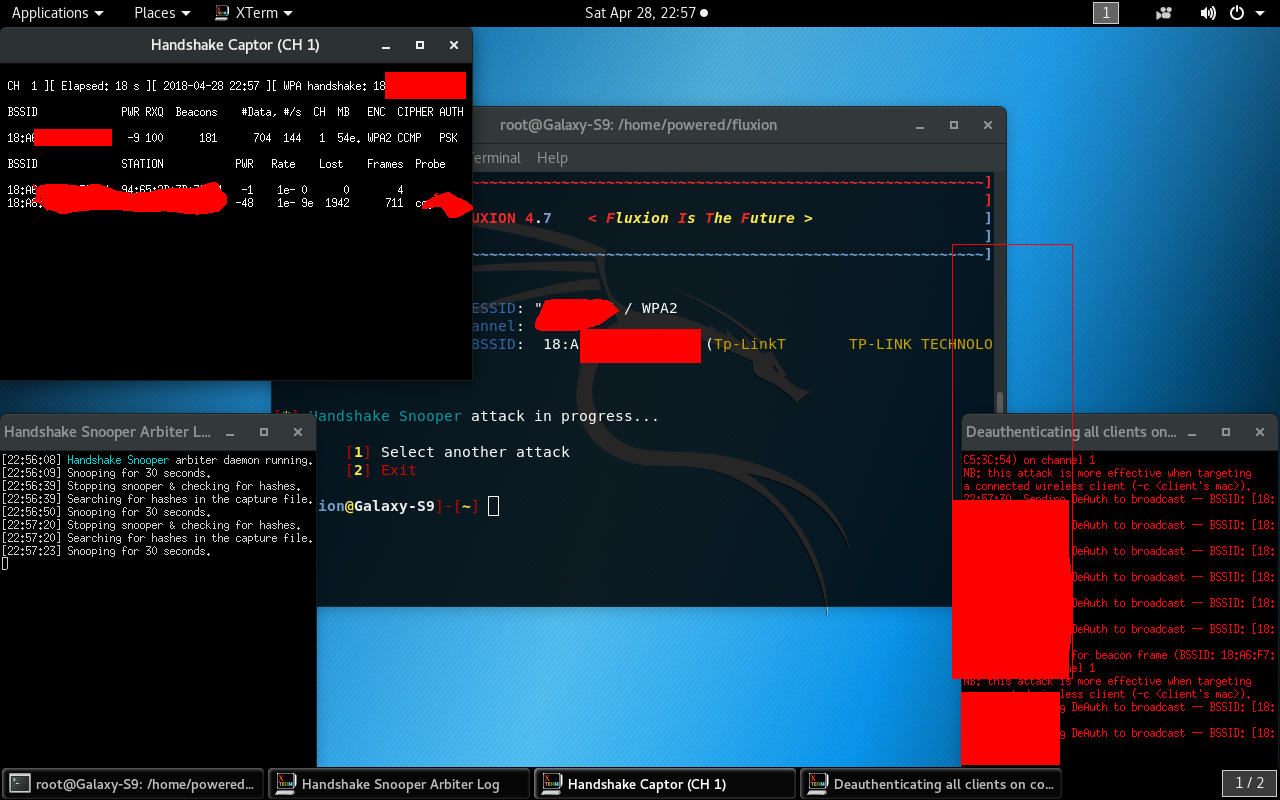
I think it's a problem with the Handshake snooper in the latest version... I can't capture handshakes either...
 djmeero
on 28 Apr 2018
djmeero
on 28 Apr 2018
The deauth is working...the handshake gets captured but the snooper doesn't recognize it...tried with both pyrit and aircrack check.... same result
djmeero
on 28 Apr 2018
@gigino96 Seems like something might be interfering with airodump-ng. Make sure nothing else is trying to control the wireless card while fluxion is working with it. It could also be an issue with your drivers, but it's very unlikely because I've successfully tested fluxion with that driver. Also, you should not have any fluxion interfaces visible. You should only see wlanX when you close fluxion, make sure no interfaces are being left after the script stops execution.
 MPX4132
on 28 Apr 2018
MPX4132
on 28 Apr 2018
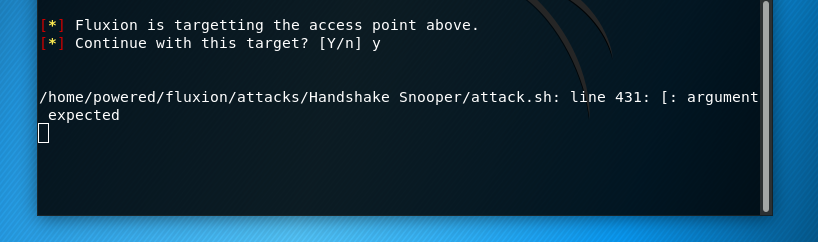
Weird...I just tried with version 4.5 still not working...besides after I choose the target I get an error for 1 sec between the menus but managed to screenshot it:
djmeero
on 28 Apr 2018
@MPX4132 I don't think that something interferes with airodump, because even if I try just turn on the vm I see that "fixed channel" (something that until 3.x did not happen). This only happens when the handshake is captured, not when I'm looking for networks or using the Captive Portal.
pwnedCtrl
on 28 Apr 2018
@djmeero Can you try the following to see if the handshake being caught is valid? This'll answer whether or not fluxion's responsible for your issue.
Open a file browser, typically nautilus on Kali, and go to /tmp/fluxspace. Open a terminal, start fluxion, and select the Handshake Captor attack. When you get to synchronicity, select "Synchronous." When you get to the interval time, select the highest time available (90 seconds, I think).
Launch the attack, and wait until you see the "WPA handshake: ..." message on airodump-ng (the "Handshake Captor" window). Be ready for when that window closes, and close the verifier window (bottom-left). As soon as you can, copy the handshake file on the nautilus window you opened earlier somewhere else. I can't remember if it's immediately in that directory, or in another within that directory.
Once you've got the handshake file, try to verify it manually with pyrit and check whether it's valid or not.
MPX4132
on 28 Apr 2018
@djmeero You're using an outdated version of fluxion, I can't help you if you don't update.
MPX4132
on 28 Apr 2018
@gigino96 Download version 3.x from the stable releases and check if it happens. You need to show me proof from both, 3.x and the current version.
MPX4132
on 28 Apr 2018
ok, I updated it and just tried...The dump cap contains a handshake...
[[ In the picture formerly linked here, you could see the user checking the handshake with aircrack-ng and also an exposed BSSID ]]
djmeero
on 28 Apr 2018
@djmeero Verify with pyrit now.
MPX4132
on 28 Apr 2018
So the problem is with pyrit?
djmeero
on 28 Apr 2018
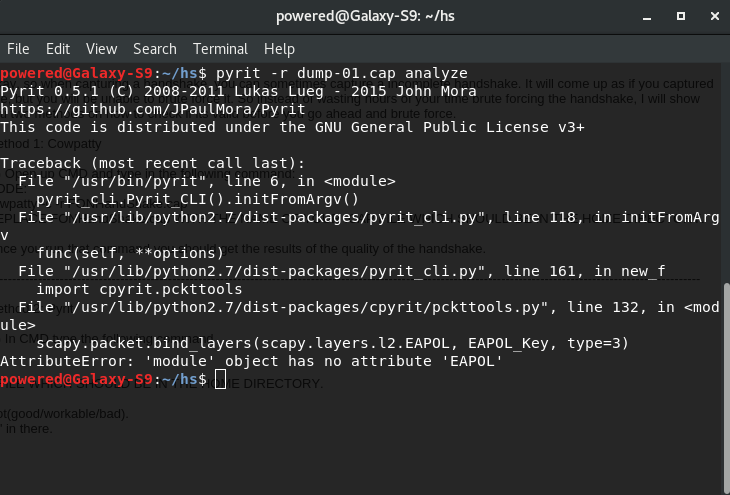
This is with pyrit.. I guess you didn't get to see the edit
djmeero
on 28 Apr 2018
@djmeero Yeah, it seems like the version of python you've got doesn't have a particular attribute or something along the lines. It's probably a python package that differs, and doesn't have everything. You could try to reinstall.
MPX4132
on 28 Apr 2018
This error seems to be caused by pyrit not working with the "new" version 2.4 (Released in March)
quick fix for me was to remove the python2 version of scapy 2.4
with
pip2 uninstall scapy
and install 2.3.3 forcefully
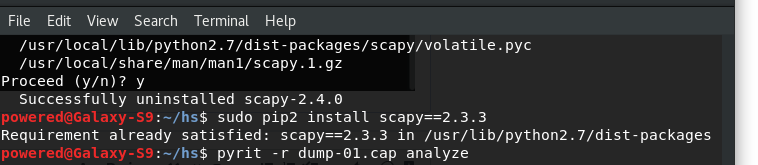
pip2 install scapy==2.3.3
 rad4day
on 28 Apr 2018
rad4day
on 28 Apr 2018
I tried @rad4day this is what I get....the result is the same...
djmeero
on 28 Apr 2018
This is very strange as I cant reproduce this on kali
rad4day
on 28 Apr 2018
Thanks @rad4day that did the trick..scapy 2.4 was installed on user env (.local/)..I uninstalled it without sudo ..now it's working. Thanks.
djmeero
on 28 Apr 2018
Yeah, I can't reproduce it either. Seems like an isolated incident/problem to me.
MPX4132
on 28 Apr 2018
That's a pyrit problem then. If this also fixed the fluxion problem for you that'd be great @djmeero
It also seems like pyrit isn't actively maintained anymore. So it's unlikely to be updated to work with scapy 2.4.0 or lock it's requirements to 2.3.3. Which is bad news for us.
rad4day
on 28 Apr 2018
Yes, the snooper is working too. Thanks
djmeero
on 28 Apr 2018
@djmeero Are you using "parrot"? Just asking to make sure I remember it seems to have an issue with pyrit.
edit: That might've been op, not you.
MPX4132
on 28 Apr 2018
I'm using Kali 2018.1
djmeero
on 28 Apr 2018
Weird, I wonder how you got that corrupted. I've updated all my bs and mine never corrupted.
MPX4132
on 28 Apr 2018
even my handshake file is also not capturing and after few seconds handshake captor window box as well as deauth windows automatically get closed and after 2/3 seconds again these handshake captor window box and deauth all window box appears and this loops continuely repeating and on handshake captor window box where handshake captured appears on top right it is showing fixed channel fluxw10: 12 and these 12 changes to 3 5 7 9 and randmoly i am using kali linux 2018.1 rolling and i used apt-get update also before installing fluxion4 4.7 and this problem appears even when i am running the latest fluxion version????plz tell how to resolve it???
 vishalsangwa
on 1 May 2018
vishalsangwa
on 1 May 2018
@vishasangwa That's the dynamic target tracking that was recently implemented by me. It's following the target when it changes channel.
MPX4132
on 1 May 2018
same as me have a problem with that @djmeero i have python 2.7 and i dont know how can uninstall it .now version i can use is 4.4 is work for me .. for 4.7 same to you the problem can you help me with that.. thanks
 makmak05
on 1 May 2018
makmak05
on 1 May 2018
What do you mean? You can't capture the handshake? Did u tried manually checking the capture file for a valid handshake with pyrit?
djmeero
on 1 May 2018
yes same to you.. how you uninstall the python 2.7 and install scapy?
makmak05
on 2 May 2018
@makmak05 If you read the thread from this comment onwards, it should explain everything you need to fix it.
rad4day
on 2 May 2018
same problem here. The issue is Pyrit. Unable to get the handshake.
Also, the victim can now input ANY password and it is accepted. The verification process is not working. :( Does anyone know where i can get version 4.4? I didn't have these issues with 4.4.
thanks
 medudder
on 2 May 2018
medudder
on 2 May 2018
I doubt that version 4.4 would help... because pyrit is already installed in your system..if that's the real problem
djmeero
on 2 May 2018
Ok maah dudes, I'm just grabbin something to eat and then I'm going to add a check for the pyrit problem to the diagnostics. I'll probably write a fool proof (temporary) solution in the wiki after that.
rad4day
on 2 May 2018
Thanks!!! Looking forward to it!
medudder
on 2 May 2018
Could Pyrit also be responsible for not verifying passwords in the captive portals?
medudder
on 2 May 2018
@medudder If pyrit fails, the handshake isn't properly verified. If the handshake isn't properly verified, the verifier handshake is invalid. If the verifier handshake is invalid, password verification is invalid. If password verification is invalid, password verification will not work, or will give wrong results, like you described.
MPX4132
on 2 May 2018
@MPX4132
Very Very well put! I guess we'll have to wait for an update.
Thanks!!!
medudder
on 2 May 2018
Hi mate, i have two question here.
first, i install kali linux on pc as my primary os. Not on vm or dual boot method, using fluxion, can i use my inbuilt wireless adapter (intel centrino wireless-N 1000), any idea if it work with fluxion or do i need to get external wireless adapter. My inbuilt wireless adapter is connecting to monitor mode.
second, i captured the handshake but cant create fake AP. Am always getting stuck at "starting captive portal AP service....a window quickly open then close..plus am usin fluxion 4.7 (rev 6).
 elliotanderson
on 2 May 2018
elliotanderson
on 2 May 2018
Without running the diagnostic script it is hard to tell but it looks like that your wireless card doesn't support ap mode. However, there detailed instructions in the wiki you could check
them out.
 deltaxflux
on 2 May 2018
deltaxflux
on 2 May 2018
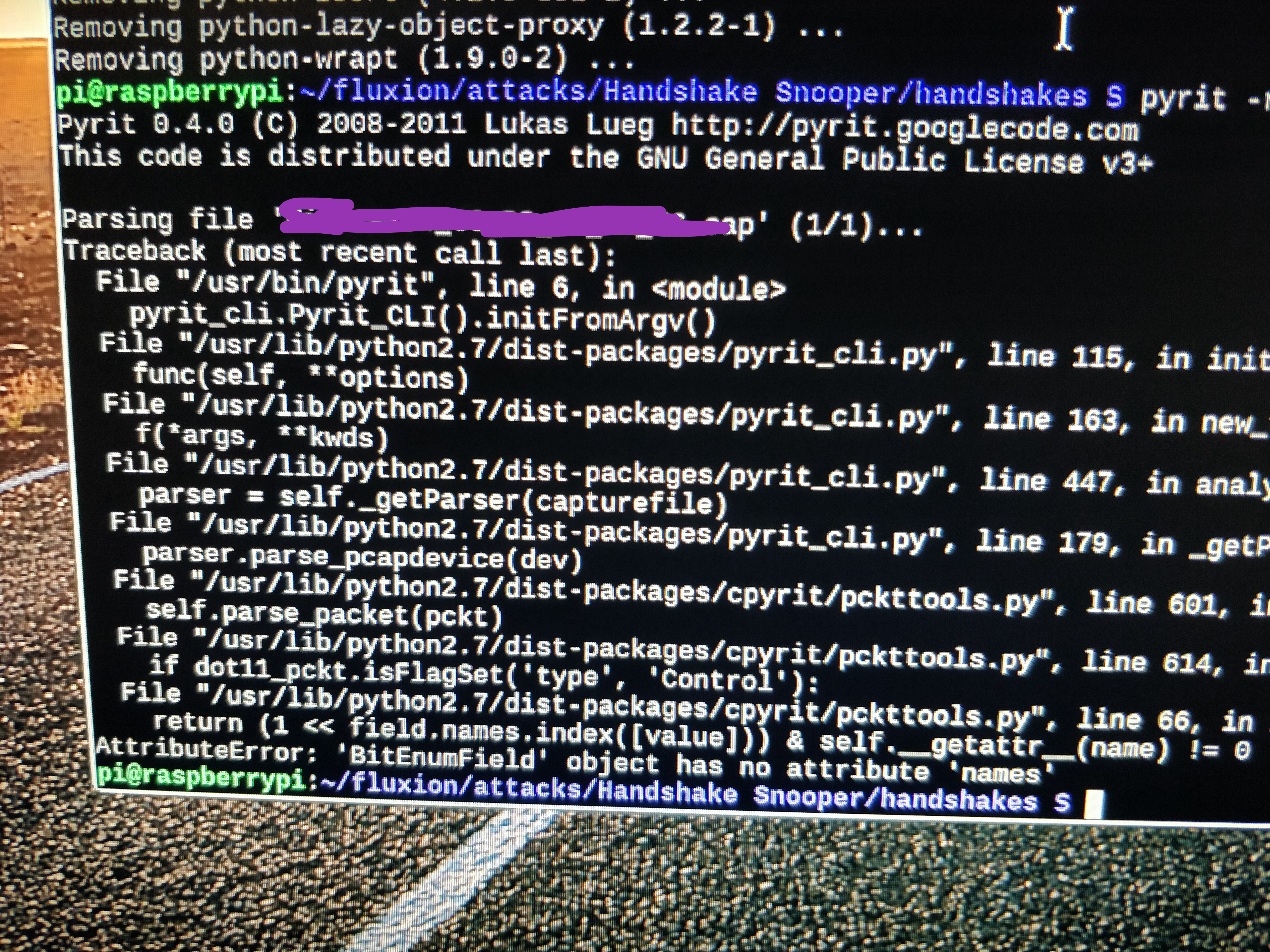
@rad4day now I get another pyrit error this time on a fresh install of Raspbian 9.. python 2.7 scapy 2.3.3 still i get this error:
djmeero
on 2 May 2018
I think I’ll add cowpatty to the verifiers. Pyrit isn’t doing too great at the moment.
MPX4132
on 3 May 2018
any idea on when we can expect an update?
Cheers
medudder
on 3 May 2018
I mean, I could do it right now. Just give me some time to implement it and test it.
MPX4132
on 3 May 2018
@MPX4132,
Wow, well don;t rush it. We here, really appreciate the work that you guys are putting into this.
I really wish my Wifi Pineapple could do the wonders of Fluxion.
Cheers & thanks Bro!
medudder
on 3 May 2018
@medudder Cowpatty was added as a verifier.
MPX4132
on 3 May 2018
@MPX4132
AMAZING! IT WORKED!!! and it's now verifying passwords.
I did get a small error right before the captive portal is selected:
"xterm: cannot load font '-misc-fixed-medium-r-semicondensed--13-120-75-75-c-60-iso10646-1'
"
does not seem to be a big deal though. All i can say is that Fluxion is now working. Thank you SO MUCH!!!!!!
medudder
on 3 May 2018
@medudder Yeah, I didn't mess with xterm, so that wasn't my fault lol.
MPX4132
on 3 May 2018
@MPX4132 ,
It stopped working.... really strange. it's no longer capturing the handshake. So i tried to delete the fluxion folder so as to reinstall it.... but now I'm getting a permission denied . I can't delete anything that is in the root directory..... Anyone else having any issues?
Thanks again.
medudder
on 3 May 2018
That's weird man. Make sure you're running the script as root. If you're on Kali, that's not the problem. That problem doesn't sound like it's related to fluxion, though, it's a permissions problem.
MPX4132
on 3 May 2018
I agree that the permission denied issue is screwing up my fluxion... So i downloaded the .zip version and placed it in my Desktop and fired it up from the Desktop instead it does not capture the handshake as well.
Again, I don't think it's a fluxion issue as well. If the problem continues, I'll reinstall Raspian on my RP3+
Thanks!1
medudder
on 3 May 2018
OHHH you're on a raspberry pi? There's instances where the power dips below a certain threshold and the file system goes into read-only mode man.
MPX4132
on 3 May 2018
R u serious?
It's plugged in right into a powerstrip ...... I never had this issue before.
Any suggestions??
medudder
on 3 May 2018
Rebooting should help.
MPX4132
on 3 May 2018
I've encountered that issue when the Pi uses too much power for the wireless hardware, and the system's amperage dips, leading to the read-only issue I mentioned.
MPX4132
on 3 May 2018
ok, well, It's getting late. I'll try it from another power source tomorrow and if it doesn't I'll reinstall the Raspian. I've rebooted a few times already... no luck. Keep you posted.
Thanks a bunch
medudder
on 3 May 2018
IT'S WORKING!!! (but not all the time)
I got it to work on my Desktop.
It take a bit longer to get the handshake but it really works now!!!
How long should we wait for a handshake? After 3 minutes, I imagine it''s not going to get he handshake.... (I'm using my own router for testing)
thanks!
medudder
on 3 May 2018
That's good to hear. Yeah, I always had issues with the Raspberry Pi every couple of weeks, especially after it would run the jammer, since it consumes a considerable amount power, and the power input to the Pi is exactly what 1 USB port can power (~5v with 200ma I think), and the Pi itself requires that. Then when the wifi hardware is used, it starts to require a lot more power and sometimes it just doesn't have enough.
MPX4132
on 3 May 2018
I have Kali.I dont understand why it doesnt normally.I have scapy 2.3.3.
(Image censored due to presence of personal information)
 snipertr
on 3 May 2018
snipertr
on 3 May 2018
Fixed channel always changed.When i update 4.8 .I seen just one time handshake but ıt couldnt finised and save file to
handshake.
snipertr
on 3 May 2018
@snipertr When that happens I suggest you use monitor mode only, no jammer. The problem is that it will take much longer to catch a handshake.
MPX4132
on 3 May 2018
wow! I tried monitor mode instead of jammer and got the handshake very quickly!
Thanks!
medudder
on 3 May 2018
@medudder that means the system was taking too long to start listening again after the jammer stopped. That can’t really be fixed because it’s the driver or your device that can’t keep up, but it’s not an issue if it’s working with just monitor mode.
MPX4132
on 3 May 2018
@MPX4132 , actually it's working with and without monitor mode.
The only difference is that monitor mode seems to pick up the handshake faster.
Do you suggest that I not use monitor mode?
Cheers
medudder
on 4 May 2018
@medudder No, in fact, you should use monitor mode when possible. The other two aggressive ones aren't a good idea, but they might be needed in cases where you need to force someone to reauthenticate quickly.
MPX4132
on 4 May 2018
I'm closing this issue since op hasn't replied in a while. Conversation can continue though.
MPX4132
on 4 May 2018
Great feedback. thanks a lot!!!
medudder
on 4 May 2018
I'm sorry to be late for not responding. I tried the monitor mode but the process is not complete.It only succeeded one time. It seems like the source of the problem is that it can not be channel fixed.
snipertr
on 4 May 2018
@snipertr are you selecting an interface for target tracking?
If you are selecting an interface for target tracking, answer the following questions:
- Which interface did you select for target tracking?
- Which interface did you select for monitoring?
MPX4132
on 4 May 2018
I can verify that the same happens to me, although it's very strange since it doesn't happen in older versions (version 2 for example). Both versions tested on the same computers. The older version works as expected, the current one doesn't.
 kkar
on 12 Jul 2018
kkar
on 12 Jul 2018
@kkar Did this start happening recently, as in, for a few days/weeks now? If you don't know that's fine.
MPX4132
on 13 Jul 2018
@MPX4132 it happens every time since I tried the most recent version of the script. Not happening with version 2.
kkar
on 17 Jul 2018
Sorry, I'm not familiar with version 2.
If you need airmon-ng support, use the airmon-ng flag:
./fluxion.sh --airmon-ng
hi all! im using fluxion 5.7 running on parrot os (using virtual box) .
Im getting a similar problem with fluxion.
After selecting language, It gives the options between 'captive portal - handshake snooper - back'
when I chose either 1 or 2 I always get the same message:
[*] select a wireless interface for target seraching.
[1] repeat
[2] back
tried reinstalling scapy succesfully but the problem still persists... any ideas on what shouldI try to fix it?
 johncodesit
on 5 Mar 2019
johncodesit
on 5 Mar 2019
Do you have wireless interfaces ?
deltaxflux
on 5 Mar 2019
Do you have wireless interfaces ?
I do have. Im using a kozumi k-1500udn wireless USB adapter.
I'm reading a bit about it, i believe the problem is i'm using virtualbox to run parrot os.
There might be an issue when virtualizing the hardware? (i'm just learning coding + pentesting, so don't be unnecessarily rude 😄 )
Any guide will be usefull... thanks in advance!
johncodesit
on 5 Mar 2019
Do you have wireless interfaces ?
problem solved. Created a filter for USB wireless adapter following the steps in the following URL:
https://forums.virtualbox.org/viewtopic.php?f=35&t=82639#p390401
check the post done by socratis » 11. Apr 2017, 16:14
johncodesit
on 5 Mar 2019
Related issues
 kandarpgautam
·
15Comments
kandarpgautam
·
15Comments
 Geczy
·
16Comments
Geczy
·
16Comments
 GNSMaverick
·
7Comments
GNSMaverick
·
7Comments
 S3cur3Th1sSh1t
·
5Comments
S3cur3Th1sSh1t
·
5Comments
 navyarm
·
8Comments
navyarm
·
8Comments
Most helpful comment
@MPX4132
Very Very well put! I guess we'll have to wait for an update.
Thanks!!!