Which version of fluxion are you using?
Latest branch as of https://github.com/FluxionNetwork/fluxion/commit/5522c85e7170cc2c373ff9bce5d897ad62ee53da
What distribution of Linux (including the version) are you running it on?
Kali 2017.1
What wireless adapter are you using?
- USB3: ALFA AWUS036ACH
- Chipset: RTL8812AU
Which is the driver for it?
realtek-rtl88xxau-dkms
Does it support injection ( output of aireplay-ng -9)
Tried wlan0 and wlan1, both support injection
x@ghost:~/fluxion$ sudo aireplay-ng -9 wlan0
19:12:11  Trying broadcast probe requests...
19:12:11  Injection is working!
19:12:13  Found 1 AP

19:12:13  Trying directed probe requests...
19:12:13  50:C7:BA:1C:01:5A - channel: 1 - 'TP-LINK_Smart Plug_015F'
19:12:13  Ping (min/avg/max): 2.403ms/7.006ms/33.810ms Power: -41.00
19:12:13  30/30: 100%
General description of your issue along with the steps to reproduce it

After selecting 2, then all channels, WIFI Monitor never shows any clients. But selecting the integrated wifi card wlan1, it will fill in the results no problem. But I need wlan0, my new USB card.
                        WIFI LIST

 ID      MAC                      CHAN    SECU     PWR   ESSID


 (*) Active clients

        Select target. For rescan type r
[deltaxflux@fluxion]-[~]
 Geczy
Geczy
All 16 comments
Here's running it in debug mode:
[~~~~~~~~~~~~~~~~~~~~~~~~~~~~~~~~~~~~~~~~~~~~~~~~~~~~~~]
[                                                      ]
[      FLUXION 2    < Fluxion Is The Future >          ]
[                                                      ]
[~~~~~~~~~~~~~~~~~~~~~~~~~~~~~~~~~~~~~~~~~~~~~~~~~~~~~~]


PHY Interface   Driver      Chipset


ethtool failed...
Only mac80211 devices on kernel 2.6.33 or higher are officially supported by airmon-ng.
mon0, Select an interface

      [1] wlan1     Intel 4965/5xxx/6xxx/1xxx   iwlwifi
      [2] wlan0     Unknown     8812au
      [3] mon0      Unknown
Have also tried to install 5.1.5 https://github.com/diederikdehaas/rtl8812AU/issues/63#issuecomment-302216460
Geczy
on 21 Jul 2017
Must be some bug/incompatiblity with the bundled airmon.
Can you, please, execute the file lib/airmon/airmon.sh bundled with airmon and post the results here.
Also execute airmon-ng that comes with aircrack from your distribution and post the output from there as well.
Thank you.
 strasharo
on 21 Jul 2017
strasharo
on 21 Jul 2017
@strasharo I will modify the interface function so it is comparible with the latest airmon version shipped with aircrack.
 deltaxflux
on 21 Jul 2017
deltaxflux
on 21 Jul 2017
@strasharo I am not the OP but using exactly the same Hard- & Software setup and ran into the same problem. I executed lib/airmon/airmon.sh and airmon-ng. Here is the output:

 NyiX-git
on 22 Jul 2017
NyiX-git
on 22 Jul 2017
Are you able to bring it up in monitor mode using airmon-ng? How do you flip it to monitor usually?
strasharo
on 22 Jul 2017
Sorry I don't have access to the laptop right now to test. I will have it tomorrow
Geczy
on 22 Jul 2017
I usually flip to monitor mode using "iwconfig wlan0 mode monitor":

the "airodump-ng wlan0" command is working fine after that and the second "iwconfig" command shows the card is in monitor mode
I can not start monitor mode via airmon-ng:

When I run "airmon-ng check kill" and "airmon-ng start wlan0" again I keep getting the same output
@Geczy do you use an other way to put the card into monitor mode?
NyiX-git
on 23 Jul 2017
I was getting the same issues as you in putting my card into monitor mode. For now I am using https://github.com/wifiphisher/wifiphisher which uses both of my wlan0 and wlan1, but I don't think it's the optimal solution...It's not utilizing the full potential of my new wifi card
Geczy
on 23 Jul 2017
I opened a new issue at aircrack-ng fin case that this problem is caused by airmon-ng:
https://github.com/aircrack-ng/aircrack-ng/issues/134
NyiX-git
on 23 Jul 2017
Here's what you requested @strasharo
Can you, please, execute the file lib/airmon/airmon.sh bundled with airmon and post the results here.
Also execute airmon-ng that comes with aircrack from your distribution and post the output from there as well.
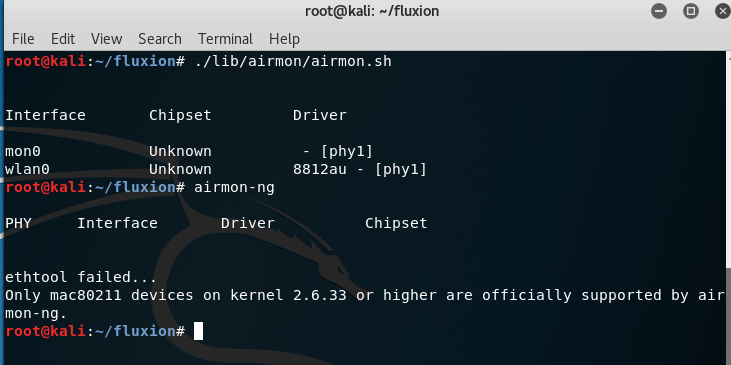
Geczy
on 24 Jul 2017
Install drivers probertly. This is not a fluxion issue
deltaxflux
on 29 Jul 2017
any update how fix this method ,i have same issue like this alfa awus036ACH not support for Airmon-ng
I'm doing this :
Ifconfig wlan1 down
Iwconfig wlan1 mode monitor
Ifconfig wlan1 up
Nothing happens n that's still doesnt work with that
 Dark-Project
on 21 Apr 2018
Dark-Project
on 21 Apr 2018
Well you don't have any basic understanding of wireless cards.
deltaxflux
on 21 Apr 2018
That wasn't very nice
Geczy
on 21 Apr 2018
I just turned off my wifi at top right corner in the drop down arrow..and it worked started showing me wifi networks on qifi monitor.
 Santosh-DJ
on 19 Jan 2020
Santosh-DJ
on 19 Jan 2020
Related issues
 SyntaxError843
·
9Comments
SyntaxError843
·
9Comments
 Gabo1203
·
14Comments
Gabo1203
·
14Comments
 christiantokevin
·
16Comments
christiantokevin
·
16Comments
 scratchmex
·
7Comments
scratchmex
·
7Comments
 EOS123
·
3Comments
EOS123
·
3Comments