Fluxion: Cannot connect any device to Fluxion Evil Twin Fake AP
Support Question
I have installed Fluxion v6 in Ubuntu 19.10 with Pyrit.
After capturing the Handshake from Fluxion 6 (rev 8), I start a Captive Portal Attack and a Fake AP with same name is created and is visible on all nearby devices. But upon trying to connecting to Fake AP, all devices get always stuck at "Obtaining IP Address". Please help...
 GNSMaverick
All 7 comments
Show screenshot of all xterm windows esp dhcp window. On ubuntu maybe you have permission issue with dhcp.
 xpz3
on 14 May 2020
xpz3
on 14 May 2020
here is the screenshot you needed...
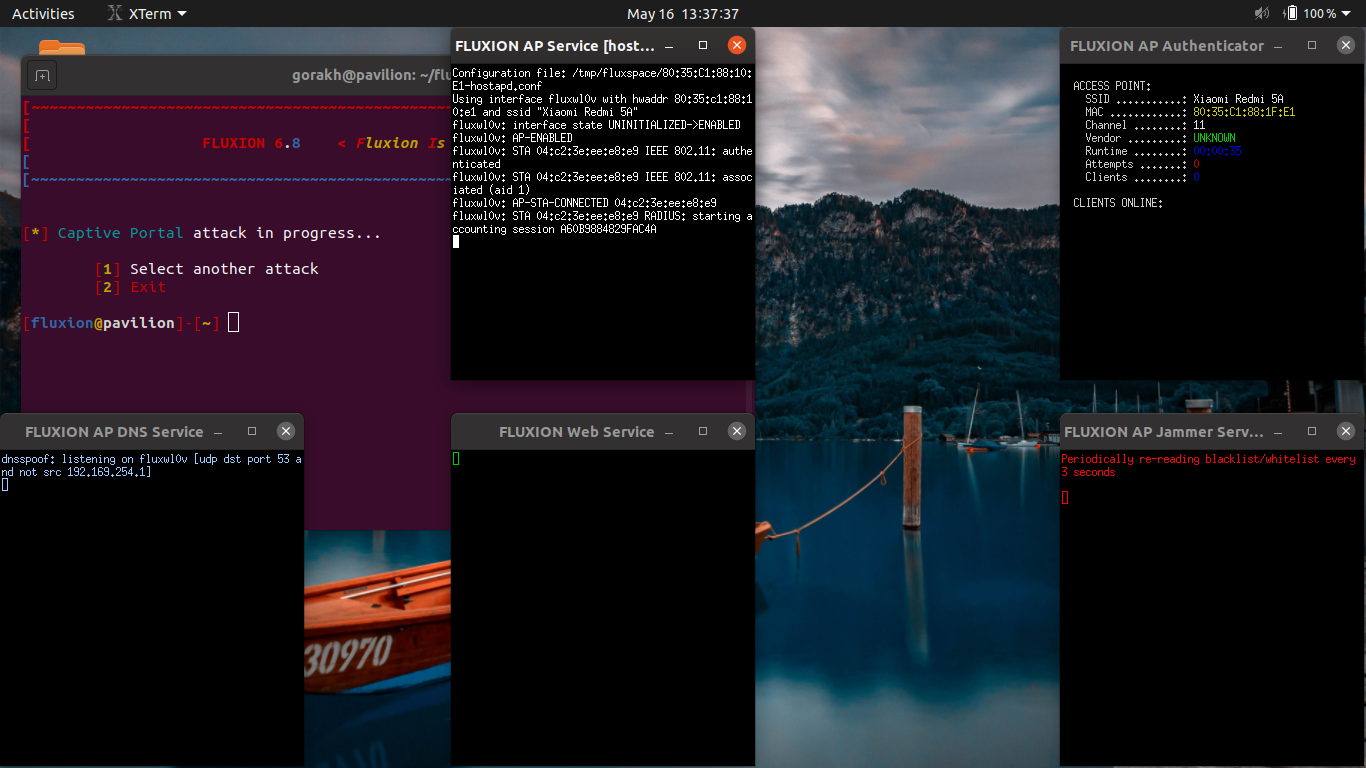
I have been facing another issue now. After Fluxion is closed, the network-manager start but wifi is connected with "No internet Access". Please help.
And why my issue has closed so quickly, without even solving it...
GNSMaverick
on 16 May 2020
Your first issue is as i told earlier is regarding dhcp. To resolve the issue see this thread https://github.com/FluxionNetwork/fluxion/issues/792
After doing as mentioned in the thread (only dhcp stuff) your captive portal will work.
Your issue was closed because
- You are using an unsupported OS
- You didn't search through the issues if such an issue already exists or not (it exists)
- You didn't fill up the issue template completely
What more to become a perfect candidate for immediate closure?
If network manager isn't working just restart the service.
xpz3
on 16 May 2020
Thank you so much, i finally got it working... I want to mark your reply as answer, but i can't
GNSMaverick
on 17 May 2020
Well lately, I have observed that the method listed in thread #792 is not running well in real life scenario. For example, I have tried hacking my neighbour's wifi which has around three users connected at a time(with his consent). The "evil twin" AP gets started normally, but none of his device gets automatically connected to "Evil Twin". All those devices keep connecting and disconnecting from original AP.
I faced same issue with Mobile Hotspots. The hotspots created by those device especially which support "dual band wifi" are the issues.
In short, none of the devices gets Autoconnected to Evil Twin AP. The devices only connect when I manually make them to.
Also, I connected a Android 9 Device to "Evil Twin" but it got Autoconnected to AP, without landing on Sign-In page.
GNSMaverick
on 18 May 2020
No devices by default will auto connect to fake AP unless you force them to by changing the default settings. Evil AP creates a clone of the real AP but without any encryption and at the same time deauths all clients from real AP. But that doesn't mean the client will auto connect. Users who have little knowledge about all these, may connect to the fake ap while desperately trying to get connected. That's how it works.. manual connection is needed..
xpz3
on 18 May 2020
Is there any other way to force the devices to connect to Fake AP. Like jamming or hiding the Real AP temporarily so that the device get tricked and get connected to Fake AP
GNSMaverick
on 19 May 2020
Related issues
 prabhavdaga
·
6Comments
prabhavdaga
·
6Comments
 Barty89
·
21Comments
Barty89
·
21Comments
 Eladtopaz
·
8Comments
Eladtopaz
·
8Comments
 Gabo1203
·
14Comments
Gabo1203
·
14Comments
 blueflame357
·
20Comments
blueflame357
·
20Comments