Fluxion: no wireless network found
----Hello, I am having some trouble with fluxion: When I give the command to scan all channels in order to find wireless networks, the list remains blank even after several minutes... and yet my wireless adapter works fine, when I try with airodump-ng I am able to see many networks. What can the problem be? how can I solve it?
is not seen for us so please remove the arrows.
-->
 tmsflc
All 31 comments
Try running fluxion with the airmon-ng flag and see if that resolves the issue for you:
export FLUXIONAirmonNG=1
./fluxion.sh
 MPX4132
on 6 Jan 2018
MPX4132
on 6 Jan 2018
Thank you for your answer. I tried but I get the same result. Any other ideas?
I attach a screenshot so that you can have a better idea of the problem

tmsflc
on 6 Jan 2018
Did you try "2GHz", "5GHz", or "2GHz & 5GHz"?
MPX4132
on 6 Jan 2018
I wouldn't know how to do that, which command should give? I am just getting started with penetration tests, so I don't have a great knowledge of all the functions
tmsflc
on 11 Jan 2018
What version of fluxion are you running?
MPX4132
on 11 Jan 2018
I have Fluxion 2 (rev. 9).
Can the problem be that I am using an alfa AWUS036ACH? I noticed tht others using this adapter seem to have similar problems and I read that Fluxion doesn't support the RTL8812AU chipset. Is it correct? if so, is there any way I can fix it?
tmsflc
on 11 Jan 2018
You can look for an alternative driver, but I can’t really help you with that. Other than that, you can also use two different wireless devices. I highly suggest you update to the latest version... we’re already at 3.11 or 3.12, I forget.
MPX4132
on 11 Jan 2018
I have the same problem. I use 3.11 and export FLUXIONAirmonNG=1.
But it seems wrong to start airmon-ng, because when scanning for wireless, the netcard still be wlan0.
There is no wifi found. I will try external netcard later.

 vanpersiexp
on 12 Jan 2018
vanpersiexp
on 12 Jan 2018
@vanpersiexp Make sure you've set the flag properly, like below:
export FLUXIONAirmonNG=1
./fluxion.sh
Is that how you've been launching it? If it is, we might have an issue.
MPX4132
on 12 Jan 2018
@MPX4132 I tried an external netcard. It worked well.
But I still can't scan using my built-in network card: Intel Corporation Wireless 7260 (rev 6b)
vanpersiexp
on 12 Jan 2018
@MPX4132 @vanpersiexp why should i use this command:
export FLUXIONAirmonNG=1
??
it does not make sense to me
 wahbi
on 2 Dec 2018
wahbi
on 2 Dec 2018
Thank you for your answer. I tried but I get the same result. Any other ideas?
I attach a screenshot so that you can have a better idea of the problem
100% PROBLEM SOLVED
Actually there is no probem, YOu just need to run " sudo airmon-ng check kill " before " sudo ./fluxion.sh "
!!!Enjoy guys!!!
 fir0j
on 8 Dec 2018
fir0j
on 8 Dec 2018
Thank you so much you saved my alfa card
 mikesalazar284
on 26 May 2019
mikesalazar284
on 26 May 2019
Still did'nt get
 evantitan
on 21 Nov 2019
evantitan
on 21 Nov 2019
Wtf!
You have to disable the network connection before using sudo./fluxion.sh
It worked for me
evantitan
on 21 Nov 2019
Thank you for your answer. I tried but I get the same result. Any other ideas?
I attach a screenshot so that you can have a better idea of the problem
100% PROBLEM SOLVED
Actually there is no probem, YOu just need to run " sudo airmon-ng check kill " before " sudo ./fluxion.sh "
!!!Enjoy guys!!!
It's not working for me. Any solution so far??
 Vardaan79
on 22 Mar 2020
Vardaan79
on 22 Mar 2020
It's not working. Why you guys closed this thread. Can I get a solution please?
Vardaan79
on 22 Mar 2020
This thread was open in 2018. Fluxion has been updated many times since then. If you are still having issues there could be many factors causing that it. It could be that the WiFi adapter you are using is not supported for WiFi hacking or if you are running from a virtual machine like virtual box or VMware those are known to be unreliable for WiFi hacking. You would probably be better off opening a new thread on the exact issue you are having to get better help.
 cjb900
on 22 Mar 2020
cjb900
on 22 Mar 2020
Are you running a VM (Virtual Machine)? Do you have an external WiFi Card?
-No, I do not have an external WiFi Card,
*If you are running on macOS, for security reasons it won't let you access it. You have to install it onn your system with DualBoot
-Yes it is a virtual Machine
*Same as above.
-Yes, I have an external wifi card.
*Make sure it is attached properly and you have installed all the required drivers
-No it isn't a VM
*Interesting anybody got ideas? Perhaps you don't have a VM. But it's rather a internal WiFi Card Issue. Your WiFi card has to be capable of making injections, if its weak it wont work
 Cereal-Boy
on 23 Mar 2020
Cereal-Boy
on 23 Mar 2020
This thread was open in 2018. Fluxion has been updated many times since then. If you are still having issues there could be many factors causing that it. It could be that the WiFi adapter you are using is not supported for WiFi hacking or if you are running from a virtual machine like virtual box or VMware those are known to be unreliable for WiFi hacking. You would probably be better off opening a new thread on the exact issue you are having to get better help.
Actually external wifi cards will work i did it perfectly on my mbp late 2018, running virtualbox and attached the wifi card and worked magically
Cereal-Boy
on 23 Mar 2020
If you actually read what i posted i never said it wouldn't work i said that its known to be unreliable. i've seem may try to use a VM for wifi hacking and have issues and not have issues when running on dedicated hardware. Not all wifi cards support packet injection, or AP mode either. So just because your wifi adapter works doesn't mean the one they have supports packet injection or AP mode
cjb900
on 23 Mar 2020
I'm having the same problems and you i use the exact same Alfa external network device so i think it has to do with the device itself and not the Fluxion script.
I will continue to test some stuff out and if it works i will let you know.
 rayabee
on 24 Mar 2020
rayabee
on 24 Mar 2020
Ok that was quick. I fixed the problem by disconnecting the Alfa on the (i guess) USB 3.0 port and connect it to the USB 2.0 and now it works like a charm!
rayabee
on 24 Mar 2020
I'm using kali, persistence usb mode. Using my internal wifi adaptor for
scanning. It's working fine till the monitor mode. Then after, it's not
detecting any nearby network. Tried duing this manually, but no luck. Any
serious help would be appreciated.
On Tue, 24 Mar, 2020, 8:38 PM rayabee, notifications@github.com wrote:
Ok that was quick. I fixed the problem by disconnecting the Alfa on the (i
guess) USB 3.0 port and connect it to the USB 2.0 and now it works like a
charm!—
You are receiving this because you commented.
Reply to this email directly, view it on GitHub
https://github.com/FluxionNetwork/fluxion/issues/340#issuecomment-603294319,
or unsubscribe
https://github.com/notifications/unsubscribe-auth/AB57MA4RMTTWC35XILVSJ63RJDEH3ANCNFSM4EKJB6EA
.
Vardaan79
on 24 Mar 2020
Internal wifi cards are notorious for not working properly for wifi hacking. they have low range for creating AP's and deauthing and don't always support all the modes needed for proper wifi hacking. You are going to be better off getting a USB wifi adapter for hacking.
cjb900
on 24 Mar 2020
Earlier, with old version of Kali it worked.
On Tue, Mar 24, 2020 at 11:39 PM cjb900 notifications@github.com wrote:
Internal wifi cards are notorious for not working properly for wifi
hacking. they have low range for creating AP's and deauthing and don't
always support all the modes needed for proper wifi hacking. You are going
to be better off getting a USB wifi adapter for hacking.—
You are receiving this because you commented.
Reply to this email directly, view it on GitHub
https://github.com/FluxionNetwork/fluxion/issues/340#issuecomment-603418014,
or unsubscribe
https://github.com/notifications/unsubscribe-auth/AB57MA5JCO26P6WEAIMADE3RJDZL5ANCNFSM4EKJB6EA
.
--
Thanks & Regards,
Anand Prakash
Vardaan79
on 24 Mar 2020
have you tried running "airmon-ng check kill" before running fluxion. It could also be a driver issue as well. but if its not working in fluxion or manually thats usually a sign that its an issue with the wifi adapter you are using.
cjb900
on 24 Mar 2020
I had the same issue and i found a fix that can help -
_sudo systemctl stop NetworkManager.service
sudo airmon-ng check kill_
then run
sudo ./fluxion.sh
 nadinCodeHat
on 30 Mar 2020
nadinCodeHat
on 30 Mar 2020
SUCCESS
_Start fluxion with the parameter -r to reload drivers._
After unsuccessfully attempts to resolve the issue according to advices in this topic till 12 hours I have found the decision. Thank's God
 wirstein
on 4 May 2020
wirstein
on 4 May 2020
Maybe you should run command sudo iwconfig to know interface name and run sudo airmon-ng to check name of interface's status, make sure the interface status is monitor

Then you can run the fluxion script by command sudo ./fluxion.sh to scan wifi
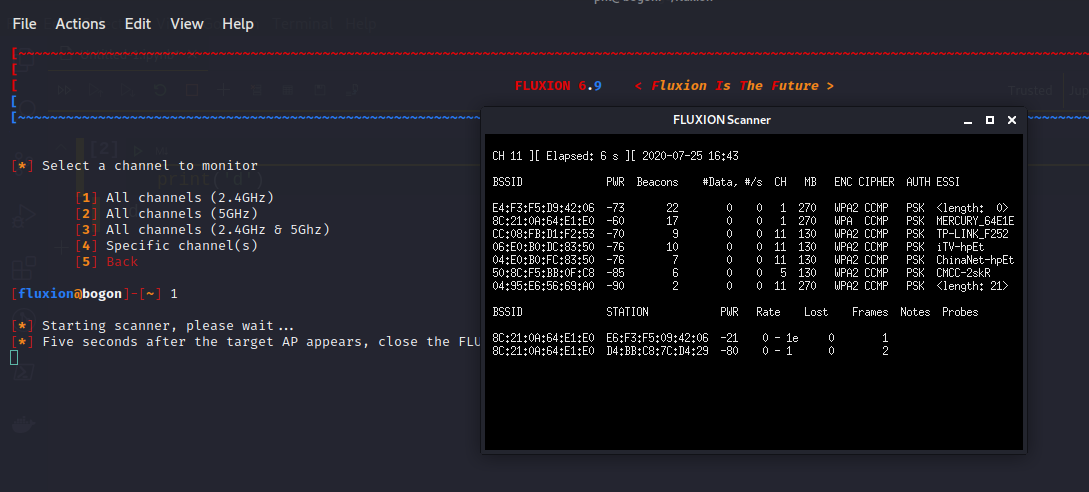
If no problem, i assume you get the wifi list on your near
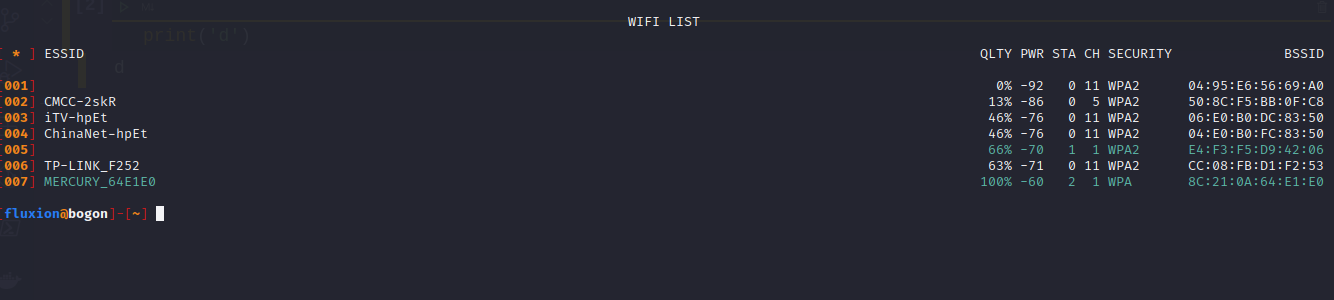
Hope can help you!
 notfound945
on 25 Jul 2020
notfound945
on 25 Jul 2020
Still not working on Kali 2020.4 but working on Kali 2018?
 mahadrasool
on 17 Feb 2021
mahadrasool
on 17 Feb 2021
Related issues
 Geczy
·
16Comments
Geczy
·
16Comments
 christiantokevin
·
16Comments
christiantokevin
·
16Comments
 brunoaduarte
·
7Comments
brunoaduarte
·
7Comments
 minanagehsalalma
·
17Comments
minanagehsalalma
·
17Comments
 GNSMaverick
·
7Comments
GNSMaverick
·
7Comments
Most helpful comment
100% PROBLEM SOLVED
Actually there is no probem, YOu just need to run " sudo airmon-ng check kill " before " sudo ./fluxion.sh "
!!!Enjoy guys!!!