Flutter-intellij: Unable to run flutter from Android Studio- Entry point isn't within current project
_From @Sahas on March 3, 2018 19:8_
I created a new project using flutter, added english_words package as mentioned in the quick app guide. As the package contents were not reflecting, I restarted the Android Studio. Before restarting, the flutter run was working properly. After restart, I'm facing the below issue.

_Copied from original issue: flutter/flutter#15111_
 devoncarew
All 39 comments
_From @Hixie on May 31, 2018 17:44_
cc @devoncarew IDE bug
devoncarew
on 1 Jun 2018
Thanks for the report - I'm not quite sure why this would be happening. Is there anything obvious different about the file paths for the project and the main.dart file?
You could try deleting that launch configuration and recreating one to see if the issue is with the specific launch config, and not w/ running that specific file.
devoncarew
on 1 Jun 2018
What version of Android Studio are you using? Please attach a flutter doctor -v report.
 stevemessick
on 4 Jun 2018
stevemessick
on 4 Jun 2018
Without additional information we're unfortunately not sure how to resolve this issue. We're going to close this bug for now, but please don't hesitate to comment on the bug if you have any more information for us; we're happy to reopen. Thanks for your contribution!
![no-response[bot] picture](https://avatars2.githubusercontent.com/u/26350515?v=4&s=40) no-response[bot]
on 21 Jun 2018
no-response[bot]
on 21 Jun 2018
I've the same issue. What additional information should I give in order to have a fix?
Edit: I am unsure wheter it makes sense but I'd like to notice that I use Android Studio 3.0.1 on Windows 10 Home.
Edit 2: My flutter doctor -v report
[√] Flutter (Channel beta, v0.9.4, on Microsoft Windows [Version 10.0.17134.345], locale tr-TR)
    • Flutter version 0.9.4 at D:\Android\flutter
    • Framework revision f37c235c32 (3 weeks ago), 2018-09-25 17:45:40 -0400
    • Engine revision 74625aed32
    • Dart version 2.1.0-dev.5.0.flutter-a2eb050044

[√] Android toolchain - develop for Android devices (Android SDK 28.0.2)
    • Android SDK at D:\Android\sdk
    • Android NDK location not configured (optional; useful for native profiling support)
    • Platform android-28, build-tools 28.0.2
    • ANDROID_HOME = D:\Android\sdk
    • Java binary at: C:\Program Files\Android\Android Studio\jre\bin\java
    • Java version OpenJDK Runtime Environment (build 1.8.0_152-release-915-b01)
    • All Android licenses accepted.

[√] Android Studio (version 3.0)
    • Android Studio at C:\Program Files\Android\Android Studio
    • Flutter plugin version 23.2.1
    • Dart plugin version 171.4424
    • Java version OpenJDK Runtime Environment (build 1.8.0_152-release-915-b01)

[!] Connected devices
    ! No devices available

! Doctor found issues in 1 category.
 berkantkz
on 19 Oct 2018
berkantkz
on 19 Oct 2018
Without additional information we're unfortunately not sure how to resolve this issue. We're going to close this bug for now, but please don't hesitate to comment on the bug if you have any more information for us; we're happy to reopen. Thanks for your contribution!
no-response[bot]
on 19 Oct 2018
Aside @devoncarew : it looks to me like our bot is too aggressive and auto-closed this one again.
 pq
on 19 Oct 2018
pq
on 19 Oct 2018
I had this problem!
The way I fixed it was clicking: File -> Project Structure -> Module
And then add the root folder of the project, then it will detect that its a flutter app again, and then build and work again.
 HPH92
on 21 Nov 2018
HPH92
on 21 Nov 2018
@HPH92 This solved the problem for me, Thanks.
 MohamedRoushdy
on 5 Dec 2018
MohamedRoushdy
on 5 Dec 2018
I had this problem!
The way I fixed it was clicking: File -> Project Structure -> Module
And then add the root folder of the project, then it will detect that its a flutter app again, and then build and work again.
Worked for me as well. Thanks
 Sakshi492
on 20 Feb 2019
Sakshi492
on 20 Feb 2019
I had this problem!
The way I fixed it was clicking: File -> Project Structure -> Module
And then add the root folder of the project, then it will detect that its a flutter app again, and then build and work again.
I have the same problem

I tryed to do this, but I can´t find the Project Structure in File.

my project is in D:\Desarrollo\Flutter\flutter_homework_01 but in android studio in project view is D:\Desarrollo\Flutter\flutter_homework_01\ android . before was OK (the first path) but now have ...\android.
I dont know what happen and how to fix it.
please help.


 darthzulder
on 14 Mar 2019
darthzulder
on 14 Mar 2019
Same problem as @darthzulder. If I create a new Flutter project, the File -> Project Structure option is visible. In the Flutter project with issue, File -> Project Structure is not a listed option. Also, in the Tools menu, the Flutter is no longer a menu option, and the Flutter toolbar options are missing.
 JaeW
on 20 Mar 2019
JaeW
on 20 Mar 2019
The followings steps helped me:
- In Android Studio click File > Sync Project With Gradle files.
- Open *.dart file and click "Enable Dart Support for this Project".
 w3ggy
on 27 Mar 2019
w3ggy
on 27 Mar 2019
The followings steps helped me:
- In Android Studio click File > Sync Project With Gradle files.
- Open *.dart file and click "Enable Dart Support for this Project".

there is no File > Sync Project With Gradle files.
darthzulder
on 5 Apr 2019
The followings steps helped me:
- In Android Studio click File > Sync Project With Gradle files.
- Open *.dart file and click "Enable Dart Support for this Project".
there is no File > Sync Project With Gradle files.
Try to import project via gradle again.
Latest releases of the Android Studio working bad with Flutter projects.
The debugger doesn't work, after re-opening project AS can't compile it.
w3ggy
on 5 Apr 2019
There is a simple way, just upload your code to git, then clone, reopen project with androidstuio, It will work fine. no thanks
 googleliyang
on 15 May 2019
googleliyang
on 15 May 2019
The followings steps helped me:
- In Android Studio click File > Sync Project With Gradle files.
- Open *.dart file and click "Enable Dart Support for this Project".
Works for me. Tks
 polenvinagre
on 21 May 2019
polenvinagre
on 21 May 2019
I had this problem!
The way I fixed it was clicking: File -> Project Structure -> Module
And then add the root folder of the project, then it will detect that its a flutter app again, and then build and work again.
Right click on Project -> Select Open Module Settings or F4 ->
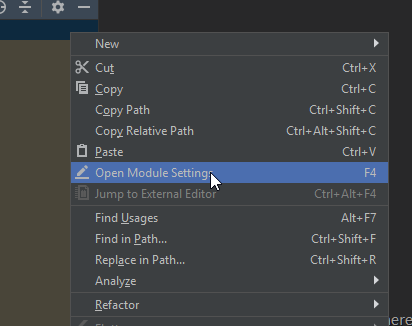
If any Exist there, delete and then add the root content folder -> Click Apply
then set Add/Edit App Configurations ->
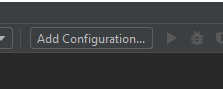
Select Flutter Template> Select main.dart ->

Then Enable And set Dart SDK path.
Solved the issue
Hope it helps.
 praveenb
on 28 Jun 2019
praveenb
on 28 Jun 2019
this works for me
 RodacK
on 1 Jul 2019
RodacK
on 1 Jul 2019
Thanks guys. All of you save my day
 htaryuswe
on 4 Jul 2019
htaryuswe
on 4 Jul 2019
Thanks...! works like charm...!!!!!!
 esanthosh28
on 25 Jul 2019
esanthosh28
on 25 Jul 2019
I am able to adjust the project based on the @HPH92 recommendation but every time I restart the app, it asks me to resolve the error. Finally, I reimported it with Gradle as @w3ggy recommends and it works!
 hailemix
on 29 Oct 2019
hailemix
on 29 Oct 2019
File -> Project Structure -> Module
I have no Module in Project Structure =(
 incker
on 4 Dec 2019
incker
on 4 Dec 2019
@praveenb Thanks!
 Entschuldigung
on 5 Dec 2019
Entschuldigung
on 5 Dec 2019
I have same error in mac but cann't solve.Please help me someone.
 heinzan
on 16 Jan 2020
heinzan
on 16 Jan 2020
I had this problem!
The way I fixed it was clicking: File -> Project Structure -> Module
And then add the root folder of the project, then it will detect that its a flutter app again, and then build and work again.
Where to find the root folder??
 harshitlakhani
on 17 Jan 2020
harshitlakhani
on 17 Jan 2020
For me the solution was to delete the folder .idea/ that is located in the root folder of the flutter project.
Then i restarted Android Studio and everything was fine !
Im using Android Studio 4.1 Canary 1
 ThePredators
on 13 May 2020
ThePredators
on 13 May 2020
was
This works fine
 Mtconcept
on 3 Jun 2020
Mtconcept
on 3 Jun 2020
It didn't work permanently, just temporary... And it doesn't work again thou all is set but still showing "entypoint isn't within the current project"
 Emred360
on 13 Jun 2020
Emred360
on 13 Jun 2020
In my case.
I just added the code after
import 'package:flutter/material.dart';
void main() {
  runApp(MyApp());
}
 BinTofajjal
on 15 Jun 2020
BinTofajjal
on 15 Jun 2020
For me the solution was to delete the folder .idea/ that is located in the root folder of the flutter project.
Then i restarted Android Studio and everything was fine !
Im using Android Studio 4.1 Canary 1
Thanks, man you saved my day
 AbdullahAli1993
on 26 Jun 2020
AbdullahAli1993
on 26 Jun 2020
Deleting .idea filder inside flutter project helped me.
 swaroopmaddu
on 2 Jul 2020
swaroopmaddu
on 2 Jul 2020
add
void main(){ runApp(MyApp());}
in your main.dart file // replace MyApp with your Class Name.
 ErrorFo7nd
on 10 Jul 2020
ErrorFo7nd
on 10 Jul 2020
Deleting .idea filder inside flutter project helped me.
This helped. Thanks for sharing.
 vishnu-r-nair
on 18 Aug 2020
vishnu-r-nair
on 18 Aug 2020
For me the solution was to delete the folder .idea/ that is located in the root folder of the flutter project.
Then i restarted Android Studio and everything was fine !
Im using Android Studio 4.1 Canary 1
This helped for me!
 charmingQin
on 24 Aug 2020
charmingQin
on 24 Aug 2020
After trying several hours quite some strange things I read something more from here, tried it, and now it works. Still: What exactly brought my project back to right state and why it suddenly wasn't dart/flutter project anymore is to me mystery.
 nikkijuk
on 9 Sep 2020
nikkijuk
on 9 Sep 2020
Re-selecting Dart entrypoint file (in the file selection dialog navigate again to main.dart) in the Run Configurations dialog solved the issue. Oddly enoug, old and new new paths were the same. Seems that somewhere some configuration got updated.
(Android Studio 4.0.2).
 pmartinsons
on 31 Oct 2020
pmartinsons
on 31 Oct 2020
What worked for me:
(1) Uninstall android studio COMPLETELY and redownload android studio Beta 4.2 or higher, preferably.
(2)Do a custom installation and set the path to your flutter file on your c drive (c:).
 Ethan-4u
on 26 Dec 2020
Ethan-4u
on 26 Dec 2020
Deleting .idea filder inside flutter project helped me.
This helped. Thank you!
 dungne
on 4 Jan 2021
dungne
on 4 Jan 2021
Related issues
 marcglasberg
·
25Comments
marcglasberg
·
25Comments
 pcdinh
·
54Comments
pcdinh
·
54Comments
 gazialankus
·
28Comments
marcglasberg
·
49Comments
pq
·
50Comments
gazialankus
·
28Comments
marcglasberg
·
49Comments
pq
·
50Comments
Most helpful comment
I had this problem!
The way I fixed it was clicking: File -> Project Structure -> Module
And then add the root folder of the project, then it will detect that its a flutter app again, and then build and work again.