Flutter-intellij: IntelliJ is becoming unusable, steadily becoming slower and slower as the project grows.
As my project grows, IntelliJ is becoming unusable. It's been steadily becoming slower and slower as the project grows. I've been watching this get worse and worse for months.
I'd say Flutter tooling is really bad in terms of performance for large projects. We have brand new, extremely fast computers, and yet, it halts all the time, all operations are slow. We're doing simple renames by hand, and stopped using autocomplete, because it just takes 5 seconds or so. Today I turned off inspections, to make it a bit faster. When I open small projects it's really fast. Yes, our project is big, but when I open much larger Java and Kotlin projects the IDE works just fine. Everything is slow: Code completion, refactoring, importing, renaming, searching usages. This is all not at the same level as Java or Kotlin.
For example, if I search for usages of some method, it shows me the usages of all classes with that method name. For example, if I'm in MyClass and search usages of its method map it will show me usages of all Iterable classes, since all of them have a map method. This makes the search very slow, and it's never what I want. I want usages of MyClass.map obviously. And it also shows me dynamic variables with that name. Which is also not what I want. I believe the analyzer is being overwhelmed with all this noise, and it gets slow.
In any case, it seems to me the analyzer is just bad. For example, if I try to rename a private variable it should be fast, right? Just a single file to look at. Yet it takes a lot of time, as if it was searching the whole codebase. This issue is similar to https://github.com/flutter/flutter-intellij/issues/4012 but that issue was closed, and the problem still persists. In special this is still true for large projects:
_"It's slow enough that as I edit code, I can watch the syntax highlighting update about once every two to 15 seconds, which is far to slow to be useful. The suggestions dialog takes 3-4 seconds to show up, and another second or two to populate, sometimes showing the little in-menu spinner for ten seconds before showing any information, and sometimes it just gives up after 20 seconds or so with "No Suggestions" when I know for sure that there are valid suggestions to make."_
Also, it may not be just the analyzer. There are also issues when renaming/moving folders with more than 10 files (the number 10 is arbitrary, just a “larger” number of files) either not all references get updated or we’ll get an error saying "Move File Exception - Exception when attempting to compute the file change for the file move: Server error: The edit.getRefactoring request was cancelled."
Flutter surely is amazing, and you guys rock, but I wish Google would pay more attention to the basics. Makes no sense doing wonderful advanced stuff without first making sure the basics are rock solid. What good is having ML autocomplete, while the simple autocomplete doesn't work as it should because it's too slow?
flutter doctor -v
[√] Flutter (Channel stable, v1.9.1+hotfix.6, on Microsoft Windows [Version 10.0.17763.864], locale pt-BR)
    • Flutter version 1.9.1+hotfix.6 at c:\flutter
    • Framework revision 68587a0916 (2 months ago), 2019-09-13 19:46:58 -0700
    • Engine revision b863200c37
    • Dart version 2.5.0
[!] Android toolchain - develop for Android devices (Android SDK version 29.0.0)
    • Android SDK at C:\Users\Marcelo\AppData\Local\Android\sdk
    • Android NDK location not configured (optional; useful for native profiling support)
    • Platform android-29, build-tools 29.0.0
    • Java binary at: C:\Program Files\Android\Android Studio\jre\bin\java
    • Java version OpenJDK Runtime Environment (build 1.8.0_202-release-1483-b03)
    ! Some Android licenses not accepted.  To resolve this, run: flutter doctor --android-licenses
[√] IntelliJ IDEA Ultimate Edition (version 2018.3)
    • IntelliJ at C:\Program Files\JetBrains\IntelliJ IDEA 2018.3
    • Flutter plugin version 34.0.2
    • Dart plugin version 183.6156.11
[√] IntelliJ IDEA Ultimate Edition (version 2019.2)
    • IntelliJ at C:\Program Files\JetBrains\IntelliJ IDEA 2019.1.1
    • Flutter plugin version 41.1.4
    • Dart plugin version 192.7761
[√] Connected device (1 available)
    • Android SDK built for x86 • emulator-5554 • android-x86 • Android 8.1.0 (API 27) (emulator)
 marcglasberg
All 25 comments
Hi @marcglasberg,
I'm from JetBrains and I want to help to localize the issue. Yes, it might be caused by a slow Dart Analysis Server, but I also want to make sure it's not an IntelliJ Platform, Dart plugin or some 3rd party tool. So there are 2 things I'd like to ask for:
- Logs (Help -> Compress Logs And Show In Explorer)
- CPU snapshot that captures some slow operation. Several CPU snapshots for different slow operations would be even better. E.g. for code completion, local var renaming, just typing with slow highlighting update, etc. Instructions how to capture CPU snapshot are here (see '2019.2 and above' that suggests to use 'Performance Testing plug-in', Help -> Start/Stop CPU Usage Profiling).
 alexander-doroshko
on 27 Nov 2019
alexander-doroshko
on 27 Nov 2019
@alexander-doroshko I'm not sure I can, since our project is not open source. What kind of private/sensitive information goes into these logs and CPU snapshot? Does in contain source code?
marcglasberg
on 27 Nov 2019
CPU snapshot - unlikely any personal data.
Logs - well, there will be some paths, file names, project name, and similar.
Source code - nowhere.
You may open a new issue in JetBrains Issue Tracker (Project: WebStorm, Subsystem: Dart) and mark the whole issue (or better individual attachments) as 'visible to jeatbrains-team only).
alexander-doroshko
on 27 Nov 2019
Hi, @alexander-doroshko. @marcglasberg asked me to continue this communication. When setting the visibility, I can't find the group "jetbrains-team". Instead, there is:
- idea-admins
- idea-developers
- webide-developers
- webdev-developers
- webdev-administrators
- WebStorm _ IntelliJ Web Team
Which option should I pick?
 ghost
on 27 Nov 2019
ghost
on 27 Nov 2019
idea-developers is fine. I'll ask admins where's jetbrains-team.
alexander-doroshko
on 27 Nov 2019
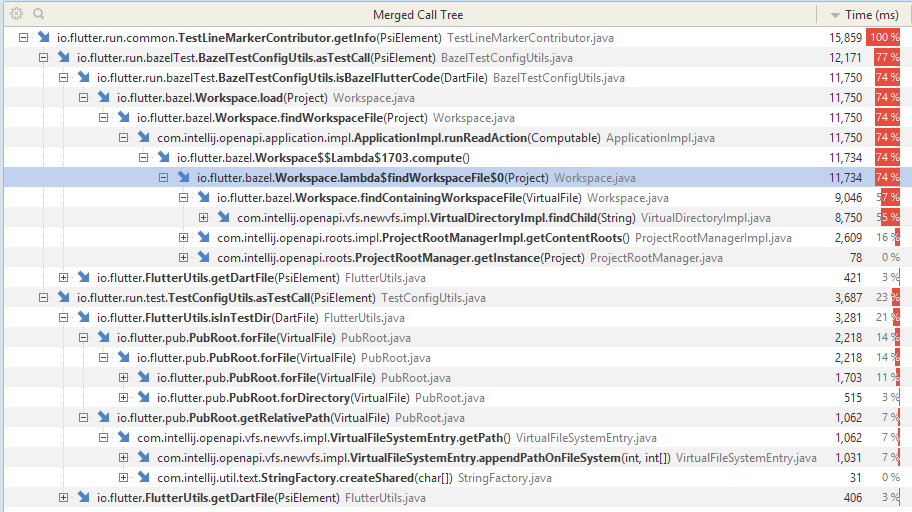
Thank you for the attached logs and CPU snapshots in the JetBrains issue tracker! We've found lot of useful information there:
- Up to 10 seconds IDE freeze on each start is caused by the
Flutter Pub Version Checkerplugin (version 1.1.1). I've filed an issue in their issue tracker: https://github.com/pszklarska/FlutterPubVersionChecker/issues/11 - Exception thrown by
Flutter Enhancement Suiteplugin (version 1.3.1). I've filed an issue in their issue tracker: https://github.com/marius-h/flutter_enhancement_suite/issues/25. - Exception thrown by Flutter plugin. Filed separately: https://github.com/flutter/flutter-intellij/issues/4146.
- https://github.com/flutter/flutter-intellij/issues/4036 still shows up in the Flutter plugin 41.1.4 (which is at the moment the latest compatible with IntelliJ IDEA 2019.2.4)
- The main cause of the sluggish IDE is caused by the Flutter plugin trying to add gutter icons in test files. Is is also tracked as https://github.com/flutter/flutter-intellij/issues/4012. Not sure if bazel-related branch of the problem has already been addressed. To be investigated by the Flutter plugin team (cc @devoncarew).
alexander-doroshko
on 28 Nov 2019
@alexander-doroshko
Thanks very much for your analysis. Regarding this part:
Find toString() method usages snapshot. While I see something in the CPU snapshot that could probably be improved a bit on the Dart plugin end, I suppose that in general performance was pretty much fine during the Find Usages action. Just a few seconds for toString() search in a project with 30000 files is probably acceptable.
Find Usages of method with unique name snapshot captured no performance problems at all. All was fast.
Rename field snapshot: looks like no performance problems as well.
This doesn't seem correct. These take a really long time. For example, that rename of a public field of a private class takes from 2 to 15 seconds in my computer. The whole process I mean. Maybe the rename itself is fast in your logs, but it has to find usages, etc. Do your logs account for the whole process?
In more detail: Just to open the rename window it takes some time. I type Shift-F6 and it opens a dialog saying "checking availability at the selection". (by the way, I don't understand this message, availability of what, can you explain?). This dialog takes 2 to 3 seconds to disappear. Then the rename dialog opens.
Then after you type the new name it takes some time, one or two seconds, to enable the Ok button. Yes, I have to wait until it enables the Ok button. What is it doing that prevents me to click that button right away? The rename itself, after you click the Ok button seems to be the fast part, and maybe that's what your logs are showing. But the whole process takes a lot of time, and this is proportional to the size of the project. It takes almost no time if the project is small.
The toString took more than a minute, is that what the logs show? Find Usages also takes a lot. If the logs don't show that then they are not the best tool to solve this. Maybe a video would be better for you to see the problem.
marcglasberg
on 28 Nov 2019
Thanks. CPU snapshots don't show time that the IDE spends waiting for the Dart Analysis Server to respond, so slow rename and find usages are probably caused by slow response from the server.
Some technical details, just for your interest:
"checking availability at the selection". (by the way, I don't understand this message, availability of what, can you explain?)
IDE is asking the server whether 'Rename' refactoring is available at the current caret position
Yes, I have to wait until it enables the Ok button. What is it doing that prevents me to click that button right away?
IDE is asking server whether the entered name is a valid new name for the field/function/whatever being renamed.
The toString took more than a minute, is that what the logs show? Maybe a video would be better for you to see the problem.
Logs don't show that but I trust you without a video =). It's possible to capture Analysis Server logs that would show how long it takes to handle each request. I think engineers from Google Dart/Flutter team will ask you for the details they need if they are unable to reproduce the issue in a huge project.
For the reference, the project that was used to capture CPU snapshots contains ~30000 files (this includes SDK and packages files).
alexander-doroshko
on 28 Nov 2019
IDE is asking server whether the entered name is a valid new name for the field/function/whatever being renamed.
From an usability point of view it's just terrible that it makes you wait between typing something and pressing the Ok button. The IDE should ask the server after we press the Ok button, not before. And then, only if necessary, it should let you know that it can't proceed because the name is invalid.
Even so, how can it take seconds just to check if it's a valid name or not? It's probably checking if there are other variables with the same name. In Java it lets you know that there is a conflict, and gives you the option to proceed if you want. In Dart it just doesn't let you do it, which is bad because sometimes that's really what you want.
So I think there are two problems here:
1) The Dart Analysis Server is very slow. Its speed must be greatly improved, orders of magnitude.
2) Usability problems which are only visible when you have large projects and the server gets slow.
marcglasberg
on 28 Nov 2019
it makes you wait between typing something and pressing the Ok button. The IDE should ask the server after we press the Ok button, not before.
If it were fast it wouldn't cause any issues. As we now have the first complaint we'll address it somehow.
Well, I'm taking a break to wait for Google to comment on the issue.
alexander-doroshko
on 28 Nov 2019
Just to append some information that may be useful, these are some details about the CPU snapshots attached to the issue opened in issue tracker:
- Find usages of method with generic name ("toString"): Took more than 1 minute.
- Find usages of method with unique name: Found a few results after 3 seconds, and took one more sec to find the rest. Notice that this method had up to 10 usages.
- Rename field: Took roughly 2 seconds to open the rename-dialog, but the renaming itself was really fast, although I didn't feel like it was immediate.
ghost
on 28 Nov 2019
@marcglasberg, @hugocbpassos, thanks for the report, and @alexander-doroshko, thanks for the detailed investigation!
There are a lot of items here. Some thoughts:
- the sluggish analysis server responses might be related to memory leaks. We're seeing reports of that here: https://github.com/flutter/flutter-intellij/issues/4143, thought that's for a more recent flutter beta version of the sdk than the version you're on. One way to verify this would be if you see speed improvements after restarting IntelliJ.
- 3rd party plugins can now impact our user experience in ways we have less control or immediate awareness of
- the fix for the gutter icon performance issue (https://github.com/flutter/flutter-intellij/issues/4012) has been committed but hasn't yet shipped with a plugin release. I see a few versions of IntelliJ listed above. If you're willing to try out a pre-release build of the plugin, let me know what version of IntelliJ you're using, and I can attach a build to this issue. That would let us know which issues have been resolved and which remain.
 devoncarew
on 28 Nov 2019
devoncarew
on 28 Nov 2019
@devoncarew
As you said, that's for a more recent flutter beta version of the sdk than the version we're on. Also, no, we don't see speed improvements after restarting IntelliJ, unfortunately.
We don't have many plugins installed, and we just now tested by removing all those we could, with no good results.
About the fix for the gutter icon performance issue, yes, we're willing to try it out. We just updated IntelliJ a few moments ago (before the reports above), so here is our current situation:
[√] Flutter (Channel stable, v1.9.1+hotfix.6, on Microsoft Windows [Version 10.0.17763.864], locale pt-BR)
    • Flutter version 1.9.1+hotfix.6 at c:\flutter
    • Framework revision 68587a0916 (3 months ago), 2019-09-13 19:46:58 -0700
    • Engine revision b863200c37
    • Dart version 2.5.0

[!] Android toolchain - develop for Android devices (Android SDK version 29.0.0)
    • Android SDK at C:\Users\Marcelo\AppData\Local\Android\sdk
    • Android NDK location not configured (optional; useful for native profiling support)
    • Platform android-29, build-tools 29.0.0
    • Java binary at: C:\Program Files\Android\Android Studio\jre\bin\java
    • Java version OpenJDK Runtime Environment (build 1.8.0_202-release-1483-b03)
    ! Some Android licenses not accepted.  To resolve this, run: flutter doctor --android-licenses

[√] IntelliJ IDEA Ultimate Edition (version 2019.3)
    • IntelliJ at C:\Program Files\JetBrains\IntelliJ IDEA 2019.1.1
    • Flutter plugin version 41.1.5
    • Dart plugin version 193.5432

[√] Connected device (1 available)
    • Android SDK built for x86 • emulator-5554 • android-x86 • Android 8.1.0 (API 27) (emulator)
OK, this is a pre-release version of M42 of the plugin. When installed, the version should say something like 'SNAPSHOT'. It'll install into IntelliJ 2019.3; this can be done through the Preferences > Plugins page, in the gear sub-menu in that page. This build won't install into other IntelliJ platform versions.
I expect that it will address many of the performance issues, but would definitely appreciate if people could confirm that, as well as let us know of remaining issues.
devoncarew
on 29 Nov 2019
@devoncarew Sorry for the time it took me to test this.
As soon as I updated IntelliJ to 2019.3 I saw an overall speed improvement. This was before installing your plugin. The fact is that the IDE in my computer was slower than Hugo's, and then it became the same. I used it like this for a few days to get used to it, and then installed the plugin. I didn't notice any improvements with the new plugin (but maybe there were, just not very noticeable).
This is the situation now:
I noticed improvements when renaming fields. Now the rename-dialog opens instantly.
A lot of times the color/highlight syntax takes a few seconds to appear when some change is made or a Dart file is opened, indicating that the AST is still being calculated. Even with very large projects I never saw the code appear white while the AST was being calculated in Java, while in Dart that happens all the time. My conclusion is that things are faster now, but it's still much slower than Java's. The AST calculation needs to be improved a lot.
Find Usages is still slow, as previously reported. By the way, there is an usability problem here, because the Find Usages finds a lot of stuff which is not interesting. It searches properties with the same names for all objects in the project. So it wastes time searching useless stuff. It should show only properties that would be changed if it was a Rename operation.
marcglasberg
on 4 Dec 2019
For those still having problems try deleting all temp files with something like ccleaner, it might help
 toto1384
on 31 May 2020
toto1384
on 31 May 2020
Try adjusting your imports. I noticed that in a project that was using libraries and parts heavily to connect all the imports for all widgets, it took a LONG time. As soon as I removed that and started importing directly, the speed increased. I assume this is because the analyzer doesn't have as many files to look through when looking for suggestions. However, now that we can update imports using smart suggestions (or whatever it's called) this may not solve the issue anymore
 ThinkDigitalSoftware
on 24 Jul 2020
ThinkDigitalSoftware
on 24 Jul 2020
Dart analyzer is using 3gb and has been "analyzing" 1 file for the past 20 minutes, there is no log output. Since its clearly my fault, I should go back to VSCode?
Seriously, even when the analyzer does it's job, it is the most unpredictable environment to work in. It feels like someone made a set of tools from a cheap 3d-printer and called it innovative.
 cyberpwnn
on 4 Dec 2020
cyberpwnn
on 4 Dec 2020
the only workaround for me is binding a hotkey to "restart dart analyzer server", when you try to edit a file which imported from many other files, you should trigger it first and start editing.
when you feel it's almost reaching to analyzing done while you are still editing, just trigger restart again... you will get rid of CPU peak... this crazy thing starts from Dart 2.0. and that's hard to reproduce since it only exists in large codebase with many import. (not every file, only for the file that be imported from many other files)
it seems like analyzer server doesn't update the cache tree well, and cause the objects leak. so the partial structure tree update will get slower and the tree itself get larger by each update. if you make many file editing and the memory will grow up and never end till out of memory. eventually, I only give the heap size 4GB so if I forgot to trigger restart, at least it will crash only in 4GB.
btw, you may need to upgrade your machine to higher performance and more cores. it may..... gets little better. I'm currently using MBP 16 i7 version. also tried 16 i9 version, but no difference.

 jerrywell
on 4 Dec 2020
jerrywell
on 4 Dec 2020
Hi, I'm from JetBrains and I work on the Dart plugin for IntelliJ-based products (including Android Studio).
Performance problems may look the same but may be caused by completely different reasons. The problem reported in this issue has been thoroughly analyzed and addressed (see https://github.com/flutter/flutter-intellij/issues/4142#issuecomment-559531027). So most likely the problems noticed by other people have different nature.
In general, there may be 2 types of performance problems:
- Dart Analysis Server working slowly with huge projects. In this case switching an IDE won't help, Analysis Server is a tool from the Dart SDK, it is used by all IDEs.
- Performance problems come from the IntelliJ Platform, Dart plugin by JetBrains, or Flutter plugin by Google.
In any case we'd be happy to analyze each particular problem. To do this we'll need:
- IDE and SDK versions, detailed problem description and steps to reproduce
- IDE logs (Help -> Collect Logs and Diagnostics Data)
- CPU snapshot that captures some slow operation. Help -> Diagnostics Tools -> Start CPU Usage Profiling. Reproduce the issue. Help -> Diagnostics Tools -> Stop CPU Usage Profiling.
You may file an issue right in the JetBrains Issue Tracker (Project: WebStorm, Subsystem: Dart). Logs may contain some sensitive data like project names and file paths. You may attach logs as visible to jetbrains-team only. We'll analyze each problem individually and will either fix it or move to the right place (which could be Dart SDK, Flutter plugin, 3rd-party plugin, etc.)
alexander-doroshko
on 4 Dec 2020
@alexander-doroshko
Alexander, the Dart plugin for IntelliJ has terrible usability problems that never get fixed. I come from Java development with IntelliJ, and the comparison puts the Dart plugin at some serious disadvantages. Developing for Java is a joy, and developing for Dart is painful.
My question: Where is the best place to complain about these usability problems? In this repository, or in the JetBrains Issue Tracker (Project: WebStorm, Subsystem: Dart) ?
marcglasberg
on 4 Dec 2020
@marcglasberg It's sometimes hard to guess the right issue tracker, sorry.
- Most of code insight features are powered by the Analysis Server, a tool from the Dart SDK. So, things like code highlighting, code completion, refactorings, quick fixes, etc. should usually go to https://github.com/dart-lang/sdk/issues/.
- However, sometimes Analysis Server is giving the correct information but IDE is doing something wrong with it. Also, there might be bugs in the IntelliJ Platform. In this case, JetBrains issue tracker is the right place.
- Some Flutter-related features are added by the Flutter plugin by Google. Its issues are tracked here, in https://github.com/flutter/flutter-intellij/issues/
If you are unsure, feel free to start with the Dart plugin issue tracker or here in the Flutter plugin issue tracker. Both JetBrains and Google handle all incoming requests and redirect to other issue trackers if needed.
alexander-doroshko
on 4 Dec 2020
@alexander-doroshko I'm not sure because I cant debug it, but when ITJ starts up, the analyzer runs through like 10 files but hangs on the last file (i waited an hour to be sure) it's locking up on the last file and never finishes.
I tweaked the analyzer options to ignore that last file, but it just hangs on some other file. The only way to actually type in ITJ is to literally disable the analyzer. (no disk, memory pressure or cpu use, just dead)
Perhaps it would be more wise to focus on stability & reliability first before worrying about performance. I dont care how slow it is if it just does the job every time I ask for it.
cyberpwnn
on 7 Dec 2020
@cyberpwnn This sounds like a critical issue. But it is not known, if I'm not mistaken. So if it's not reported, it will probably not be fixed.
According to your comment, the issue is probably related to the Dart Analysis Server and doesn't depend on the IDE/editor that you use. So the right issue tracker would be https://github.com/dart-lang/sdk/issues/
Please file an issue with as many details as you can, including OS, Dart SDK version, project structure. Ideal bug report is the one that contains steps to reproduce and sample project attached. Though I know it's not always possible.
Analyzer instrumentation log may help to narrow down the issue with analyzer. To get logs: open Registry (searchable using Find Action (Cmd+Shift+A or Ctrl+Shift+A)), and add the following to the dart.server.additional.arguments property: --instrumentation-log-file=/some/path/das.log. Reproduce the problem and attach das.log to your bug report.
I'm not from Google and I'm not working on analyzer, so I may help only with initial issue evaluation. But if I manage to reproduce the problem on my end, I'll probably be able to help investigate it.
alexander-doroshko
on 7 Dec 2020
Trick that sometimes helps to resolve problems with the Dart Analysis Server: try to close all Dart projects and clear analyzer caches.
Mac/Linux: delete ~./dartServer folder.
Windows: delete C:\Users\your_name\AppData\Local\.dartServer folder.
alexander-doroshko
on 7 Dec 2020
Related issues
 liorgonnen
·
24Comments
liorgonnen
·
24Comments
 gazialankus
·
28Comments
marcglasberg
·
49Comments
gazialankus
·
28Comments
marcglasberg
·
49Comments
 sethladd
·
40Comments
sethladd
·
40Comments
 Timmmm
·
30Comments
Timmmm
·
30Comments
Most helpful comment
Hi @marcglasberg,
I'm from JetBrains and I want to help to localize the issue. Yes, it might be caused by a slow Dart Analysis Server, but I also want to make sure it's not an IntelliJ Platform, Dart plugin or some 3rd party tool. So there are 2 things I'd like to ask for: