Files: Per-tab navigation history not persisted when reopening the tab or window
Say I open a tab at a certain location in the Files app. Then I close the app and reopen it later. The state is restored i.e. the folder location is where I left it. But I can't go back in the file directory structure using Alt+Left arrow key.
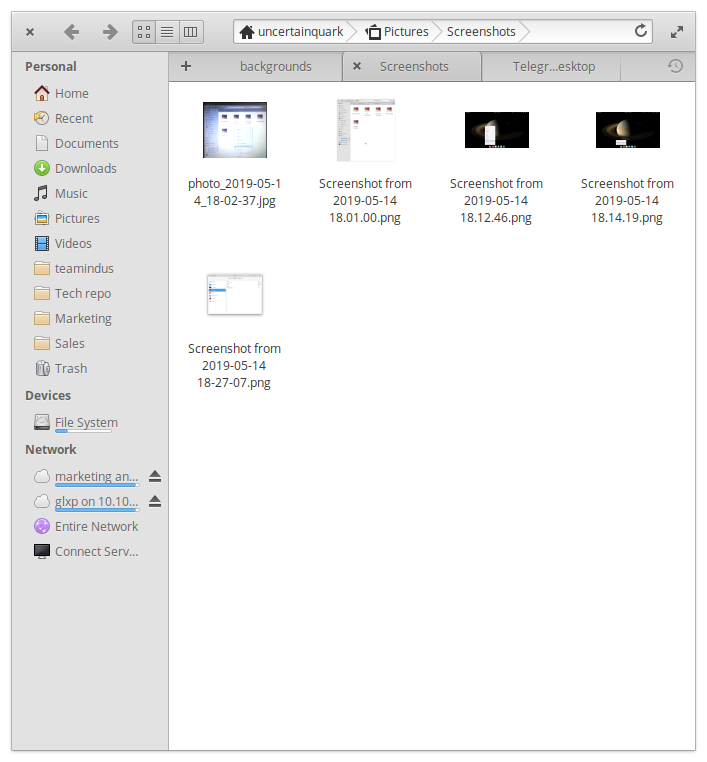
So in this example, I can't go "up" to the "Pictures" folder from "Screenshots" one.
Want to back this issue? Post a bounty on it! We accept bounties via Bountysource.
 uncertainjatan
All 2 comments
( You can actually go "up" by using Alt + up arrow )
 peteruithoven
on 14 May 2019
peteruithoven
on 14 May 2019
<Alt><LeftArrow> is actually for going back in the navigation history (ie equivalent to pressing the back button on the header bar). Since the navigation history is not (currently) saved and restored, this will not work on first reopening Files.
You may want to change the description to a feature request for saving and restoring the navigation history, if this is what you want.
 jeremypw
on 14 May 2019
jeremypw
on 14 May 2019
Related issues
 Gabriel-p
·
6Comments
Gabriel-p
·
6Comments
 tintou
·
6Comments
tintou
·
6Comments
 rodrigoaraujolima92
·
5Comments
rodrigoaraujolima92
·
5Comments
 a-tokarev
·
4Comments
a-tokarev
·
4Comments
 GammaGames
·
3Comments
GammaGames
·
3Comments
Most helpful comment
<Alt><LeftArrow>is actually for going back in the navigation history (ie equivalent to pressing the back button on the header bar). Since the navigation history is not (currently) saved and restored, this will not work on first reopening Files.You may want to change the description to a feature request for saving and restoring the navigation history, if this is what you want.