Files: Clicking breadcrumb to go to current folder doesn't work in column view
Describe the bug
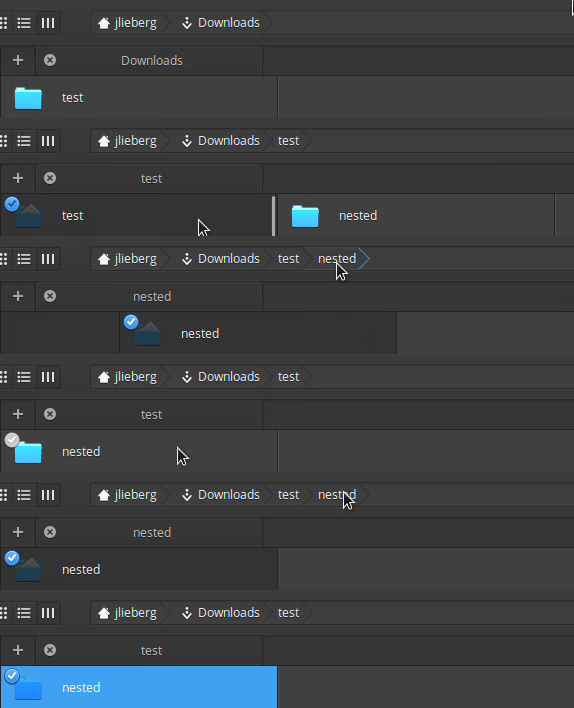
Clicking the last breadcrumb in the path should (at least it used to) make the first column the target folder.
To Reproduce
Steps to reproduce the behavior:
- Set view to columns
- Go to nested folder
- Click on the last breadcrumb
- Nothing happens
Expected behavior
It should clear all columns and move the last column to the far left, like it does if you click any other part of the breadcrumb
Screenshots or screen recordings
Platform Information

- I'm using the latest released stable version
 GammaGames
All 3 comments
Doesn't seem any good reason why the last breadcrumb should differ in behaviour. If it helps pending a fix, you can also double click on a folder in the view to make it root.
 jeremypw
on 9 Oct 2020
jeremypw
on 9 Oct 2020
I thought it was an optimization for the non-column views. Instead of having to recreate the view for the folder the app is currently showing, it just ignored the action altogether. I only noticed because columns is the only view I use.
I have single click disabled with tweaks so I can't make make the folder root by double clicking. I don't mind that, I did it to myself with the non-standard setup.
GammaGames
on 9 Oct 2020
Yes, you are right. I have now pushed a fix.
jeremypw
on 10 Oct 2020
Related issues
 tintou
·
5Comments
tintou
·
5Comments
 micahilbery
·
5Comments
micahilbery
·
5Comments
 rodrigoaraujolima92
·
5Comments
rodrigoaraujolima92
·
5Comments
 eljefuri
·
9Comments
eljefuri
·
9Comments
 CodingSpiderFox
·
5Comments
CodingSpiderFox
·
5Comments
Most helpful comment
Yes, you are right. I have now pushed a fix.