Files: Files does not open files with a default application
Expected Behavior
Files remember default applications and open some kind of files with that application.
In the following example, text files should be opened with VS Code, which is selected as a default application to open text files.
Actual Behavior
Files does not remember default applications or open some kind of files with that application.
In the following example, text files are opened with Code, which is not selected as a default application to open text files.
Steps to Reproduce the Behavior
- Install Visual Studio Code (VS Code)
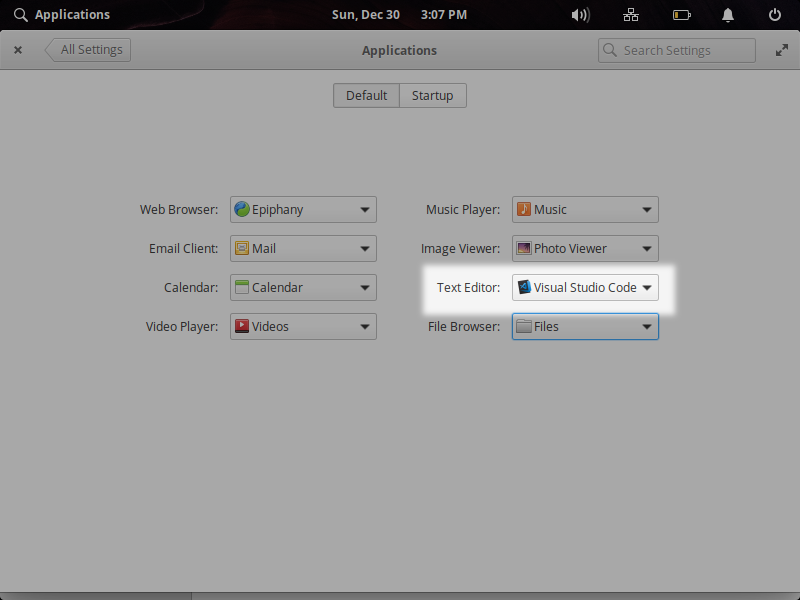
- Set VS Code as a default text editor in System Settings
- Create a text file in a directory and click it to open
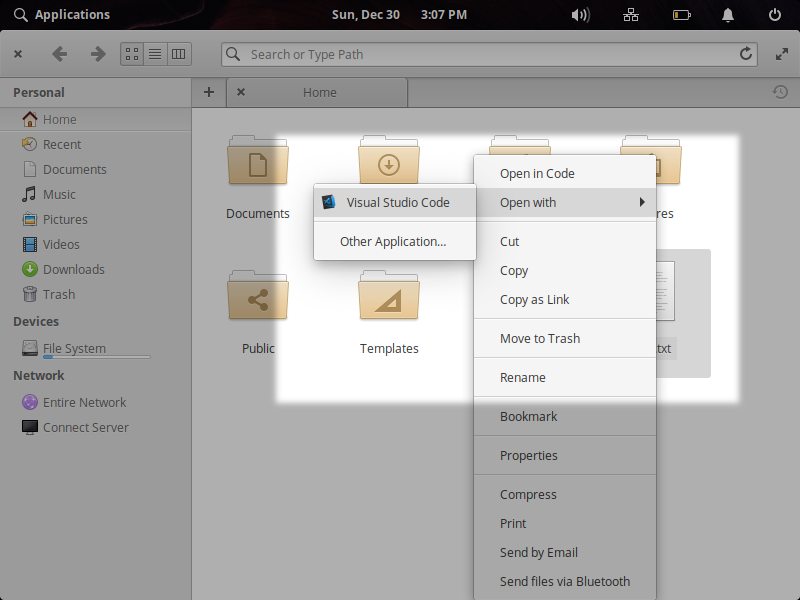
- The file is opened with Code, although you set VS Code as a default text editor.
You may see Code stays at the top of the context menu, and VS Code is in the "Open with" menu
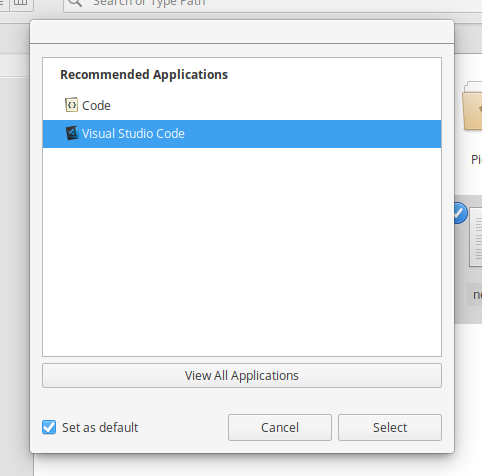
- Select "Open with" in the context menu→"Other Application…" and try to set VS Code as a default application to open text files in the dialog above. Even after I restart Files or the system, text files is not opened with VS Code, and instead opened with Code
Note
- This issue happens with Files 4.1.x. I didn't face this issue with Files 4.0
- This issue also happens with other kind of files e.g. xlsx files
 ryonakano
All 17 comments
In current master, using a .txt file for testing:
- Opening a file with an app from the "Open with" submenu does not change the default application for that mime-type (I think it used to).
- Opening a file with an app from the "Other Application ..." dialog with "set as default" checked does change the default application as indicated by the switchboard applications plug but Files does not change the default app shown in the context menu even after restarting (definite regression)
 jeremypw
on 31 Dec 2018
jeremypw
on 31 Dec 2018
Looks like an unintended side-effect of some code cleanup in this area :-(
jeremypw
on 31 Dec 2018
Strangely, it seems to work as expected using an image file (*.png)? Or a folder (except a bug using Terminal as the default seems to have reappeared)
jeremypw
on 31 Dec 2018
Indeed, also I confirmed images, videos, html, and music files are opened with default applications correctly.
ryonakano
on 31 Dec 2018
In my experience, none of the default app associations I have configured work with Files 4.1.1.
I have:
Qmmp as my default audio player
mpv as my default video player
Mirage as my default photo viewer
[just a few examples that I can name off of the top of my head]
And yet, mpv will always open audio files by default, rather than Qmmp. Yeah, it plays the audio absolutely fine, but this becomes a nuisance when opening another audio file... as it begins to open another mpv window while the existing audio is already playing
 citrusui
on 2 Jan 2019
citrusui
on 2 Jan 2019
I'll install those and check whether the linked PR fixes the problem.
jeremypw
on 2 Jan 2019
I can confirm the linked PR fixes @citrusui 's problem.
jeremypw
on 2 Jan 2019
I am facing same issue. Images and text files not opening with default application. For images I only have Nomacs installed, it shows 'open with' dialog. But for text files, Sublime is set to default, but Files chooses GitKraken automatically.
 adiliqbl
on 3 Jan 2019
adiliqbl
on 3 Jan 2019
A few issues still remain for me:
- Photo files (jpg, png) prompt me for an application to open with every time, even though I have already set Mirage as my default photo viewer
- Audio files are ALWAYS opened in mpv, even though I have set Qmmp as my default audio player*
*Additionally, any default audio player / video player preference I have set is ignored. Even when I set the default Video app (audience) to open video files, mpv is chosen instead. I had initially thought that audio files were falling back to open in the default video player, but this is not the case. Even when I change my default video player AND audio player, mpv is still used
I will be downgrading to Files 4.0 again until another fix arrives :disappointed:
citrusui
on 8 Jan 2019
@citrusui The latest release (4.1.2) occurred before the fix was merged I am afraid so is currently only available by compiling the master source. Another release is due shortly however. If you have tested the master source then please re-open the issue.
jeremypw
on 8 Jan 2019
Yep, can confirm Files 4.1.3 fixes all of my issues! Thank you.
citrusui
on 9 Jan 2019
file 4.1.3, i have issue with pdf. If i select open with okular instead of the default pdf reader, when i click on a pdf it still be opened with the native pdf
 francesco-taioli
on 27 Jan 2019
francesco-taioli
on 27 Jan 2019
@francesco-taioli : For okular to become the default application, you have to go to the 'other application' submenu and select it there with 'set as default' ticked. This is not entirely obvious so maybe there is scope for a UX issue here,
jeremypw
on 27 Jan 2019
I have checked that if you use the "Other Application" dialog then Okular can be set as default so I am not going to reopen this issue (which was about apps not permanently becoming default even if explicitly set as default).
jeremypw
on 27 Jan 2019
@francesco-taioli : For okular to become the default application, you have to go to the 'other application' submenu and select it there with 'set as default' ticked. This is not entirely obvious so maybe there is scope for a UX issue here,
yep @jeremypw , i discovered this after some time. Anyway seems legit that if i go to System settings, applications and i select Okular as default app for pdf i should be able to open pdf with oKular without 'set as default ticket'... this is a minor issue, there are many other MORE important ( wifi with hp pc, hdmi audio ecc )
francesco-taioli
on 28 Jan 2019
@francesco-taioli : There is no way to set the default app for pdfs in System Settings afaict. The setting for "Text Editor" is for plain text. I suppose System Settings/Applications/Default could be expanded to include more common mime types but there is a limit to how many can be included (and that should be raised as an issue against Switchboard).
jeremypw
on 28 Jan 2019
Also check out https://github.com/elementary/files/issues/871
jeremypw
on 28 Jan 2019
Related issues
 GammaGames
·
3Comments
GammaGames
·
3Comments
 apcamargo
·
5Comments
apcamargo
·
5Comments
 Djaler
·
5Comments
Djaler
·
5Comments
 cassidyjames
·
6Comments
ryonakano
·
3Comments
cassidyjames
·
6Comments
ryonakano
·
3Comments
Most helpful comment
In current master, using a .txt file for testing: