Fightpandemics: [Desktop][Mobile] Add search bar on help board with a search button
Feature Summary
Please read this comment down below.
Value
Search keyword feature will make the search capability of Fight Pandemics very effective for the users. This in turn will greatly improve user experience and help users quickly find relevant help.
End Goal
User lands on the post, organization profile, individual profile he/she is looking for.
 Zaydme
All 11 comments
We discussed this on our chat and thought it would be useful adding it here:
1.Separate flow for logged in / non-logged in users. Cards to exactly match the designs already in place for both scenarios.
- When on “All posts”, search for:
a. “posts”: should return all relevant posts ordered by relevancy or activity
b. “Organizations” : should return list of organizations sorted by activity(match just name for now right?)
c. “individuals/members” : should return list of individuals sorted by activity. (match just name for now right?) - When on “Requesting help”, search for:
a. “posts”: should return all “requesting help” posts ordered by relevancy or activity
b. “Organizations” : should return list of organizations sorted by organizations registered as requesting help first and then
by activity(match just name for now right?)
c. “individuals/members” : should return list of individuals sorted by members registered as requesting help first and then
by activity. (match just name for now right?) - When on “Offering help”, search for:
a. “posts”: should return all “offering help” posts ordered by relevancy or activity
b. “Organizations” : should return list of organizations sorted by organizations registered as offering help first and then by
activity(match just name for now right?)
c. “individuals/members” : should return list of individuals sorted by members registered as offering help first and then by
activity. (match just name for now right?)
All filters to work on top of all the above.
 Ritika92
on 1 Sep 2020
Ritika92
on 1 Sep 2020
@Ritika92 @Zaydme
I have question for the requirement under below scenario:
As mentioned above:
“individuals/members” : should return list of individuals sorted by activity. (match just name for now right?)
All Post:
- Navigate to Help Board ->Select Individual from search dropdown -> enter
so the wordshould be searched within the individual posts and displayed in sorted order as per the recent activity?[Suggested in Requirement above]
Query: Can it be sorted on the basic of exact match then partial match? [Both title and body of the post should be match]?
 rabbi08
on 4 Sep 2020
rabbi08
on 4 Sep 2020
@rabbi08 Yes, results are stored based on a "textScore" which is the score associated with the corresponding query for each matching document.
The textScore signifies how well the document matched the search term or terms, you referred to it as exact/partial match.
Posts that have less matching keywords get a lower score.
Posts that have all keywords get a high score. And posts that have all the keywords in the exact order get even higher score. And the score gets higher if both the title and content had matching keywords.
Zaydme
on 4 Sep 2020
@Zaydme thanks for clarifying.
I have another question, this search will take preference over the filters?
For e.g. If user filter the post as per provider = 'Individual' and the search for any keyword like test, Medical, mask, then this search feature will search for keyword in the individual user posts having specific keyword in the post title or description or author name?
Also, I have observed that we have 'All post/Individual/Org" options in search textbox as well. This will work as duplicate of the existing filter i..e. "Provider = Individual"?
Thanks
rabbi08
on 8 Sep 2020
@rabbi08
- The first question:
If you select individual from the filters and searched "mask" it will show you all the posts posted by an individual and contains the word "mask", so the filters and the search keyword work together. - The second question:
No, filters and "tabs" are different, if you selected the "individual" filter, and searched on the posts tab, it will show you posts made by individuals, but if you selected the individual tab (the new 3 options under the search bar) the feed will no longer show posts, it will show profile cards instead, and you can search for a user/org that contain a specific keyword in their name/about.
- So filters will work normally as always, but the filters button will only appear in the posts tab, because posts are the ones that can be filtered for now.
Zaydme
on 8 Sep 2020
- l from the filters and searched "mask" it will show you all the posts posted by an individual and contains the word "mask", so the filters an
Thanks @Zaydme
So the filter takes priority over the search keyword.
And if I select 'Individual' tab in search textbox, then the keyword entered, will be searched from the user profile and about the user like name or location only.
Sorry for asking so many questions, Thanks for the clarification.
rabbi08
on 8 Sep 2020
@rabbi08
Just a small clarification, we don't look for the search keyword in the location, so if you searched "New York" it won't show you users that are in New York, but who's name or description contains the word "New York". Location is instead used to sort search results by distance from the user.
So if you are logged in and you searched "Doctor" in the Individuals tab, you will get a list of all users named or have "Doctor" in their description, and they will be sorted from the closest to you to the farthest.
Zaydme
on 8 Sep 2020
This is the updated requirement (for User stories please check the feature pod : https://www.notion.so/fightpandemics/Search-Keyword-aba03fb8cd804629a690e331cd11dea4)
Feature Summary
- A search bar will be available on top of the Help Board section.
The user can type in keywords and hit enter. The user will have see 3 new TABS below the search bar: a. "Posts", b. "Individuals" and c. "Organizations" with search results under each:
a. List of Posts containing the keyword in their description, title or tag
b. List of Individual names and description "About" section containing the keyword
c. List of Organization names and description containing the keyword
The matching keywords in the results will be highlighted.
If user searched for a post : User can use filters (all filters) on top to further sort out the results and if signed in, can interact with the posts otherwise will be redirected to sign up in order to interact with the posts.
If user searched for an organization: User can use Location filter on top to further sort out the results based on preferred location (Organizations that have chosen to hide their location will be taken out from the filter's results) and if signed in can interact with the Organization cards otherwise will be redirected to sign up in order to interact with the cards.
If user searched for an individual: User can use Location filter on top to further sort out the results based on preferred location (Individuals who have chosen to hide their location will be taken out from the filter's results) and if signed in can interact with the Individual cards otherwise will be redirected to sign up in order to interact with the cards.
For the Mobile version the feature will work exactly the same way except on the front end the search bar will appear with the following drop down options to save space (Users option below will be called Individuals):
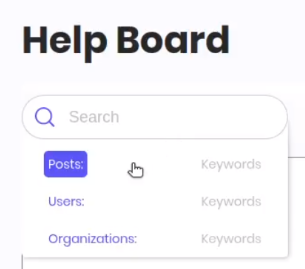
And based on what the user has selected, the page will be refreshed with results from "Posts", "Individuals" or "Organizations".
Future addition/improvement:
User should be able to type in keywords in the search bar and be able to see relevant posts/organizations/individuals in a drop down from where he/she can select the post/organization/individual they like.
Value
Search keyword feature will make the search capability of Fight Pandemics very effective for the users. This in turn will greatly improve user experience and help users quickly find relevant help.
End Goal
User lands on the post, organization profile, individual profile he/she is looking for.
Ritika92
on 12 Sep 2020
Update: Tested the fix for bug below. Looking Good
getting "500 " error as a non-logged in user as below:
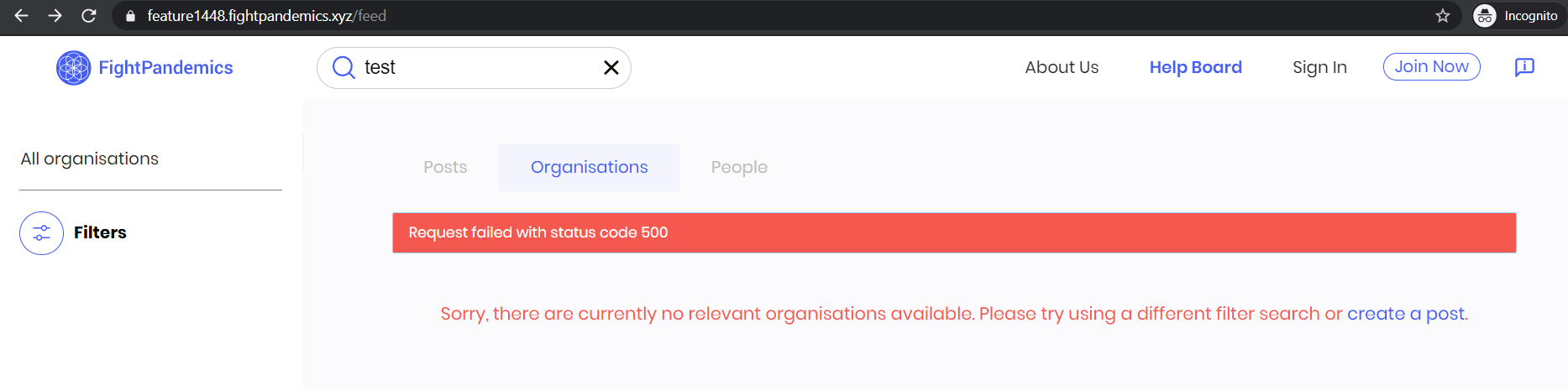
 sheeba1
on 23 Sep 2020
sheeba1
on 23 Sep 2020
Thanks @Zaydme!!! Add me as a reviewer as well as @idjevm and @OzkanAbdullahoglu
 joshmorel
on 17 Oct 2020
joshmorel
on 17 Oct 2020
@joshmorel I did, thank you.
https://github.com/FightPandemics/FightPandemics/pull/1491
Zaydme
on 17 Oct 2020
Related issues
 tiagocostasilva
·
10Comments
tiagocostasilva
·
10Comments
 BMariscal
·
9Comments
BMariscal
·
9Comments
 tejasm2
·
4Comments
tejasm2
·
4Comments
 pemika-me
·
9Comments
rabbi08
·
10Comments
pemika-me
·
9Comments
rabbi08
·
10Comments