Fightpandemics: User friendly message should be displayed if the email update for an Org is successful or NOT.
- Open "https://staging.fightpandemics.work/"
- Login using valid email/pwd
- Navigate to Profile -> Org_name[Already added]
- Click on EDIT icon to edit account information
- Update the 'Organisation email" to existing email in the system, say for e.g. try with the individual user email ID and click on 'Save Changes' button.
Issue#: You will observe that nothing will happen and only the focus moves to the top of the screen and revert the changes.
Refer below GIF.
https://share.getcloudapp.com/2NuyK5X1
- Now update the email with valid unique email ID and click on 'Save Changes'
You will observe that email for the Org is updated and user is directed to Org Profile page.
Expected behavior: Ideally, user should get user friendly message if the email update is successfully or unsuccessful.
 rabbi08
All 10 comments
We should also confirm the email right @rabbi08?
 manualzuru
on 3 Aug 2020
manualzuru
on 3 Aug 2020
We should also confirm the email right @rabbi08?
Yeah, valid email address, which should be confirmed while be added/updated for an Org just like we do for individual profiles.
rabbi08
on 3 Aug 2020
@rabbi08 two questions regarding this one:
- in regards to displaying a user friendly error, do we want this message to show an error under the email input filed ?
- in regards to success message, do we want an alert to show? are we still redirecting the users back to org page?
 soniaroh
on 5 Aug 2020
soniaroh
on 5 Aug 2020
- isplaying a user friendly error, do we want this message to show an error under the email input filed ?
- in regards to success message, do we want an alert to show? are we still redirecting t
@nr431207 Below are the answers for the qs raised above:
- No, the message should be displayed on the top after user update email and clicks on 'Save Changes' button.
To keep consistency throughout the application, let's display the error message in same way as we have unique email error messages on 'Create profile' page.
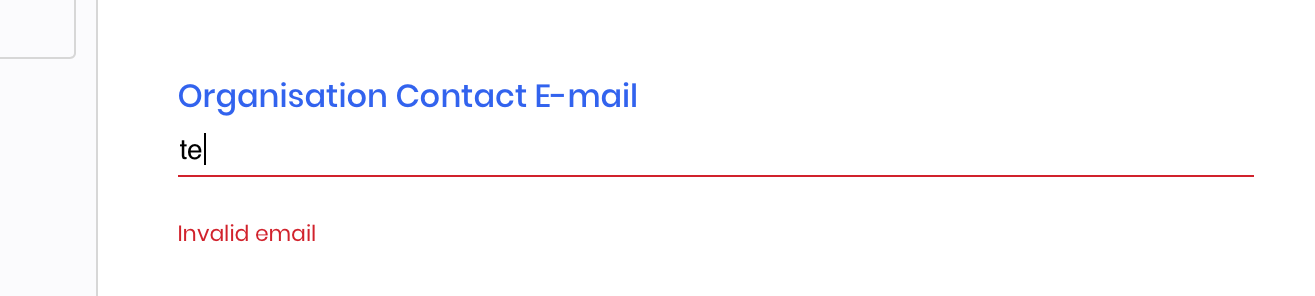
Please note that currently in FP we are displaying email address validation under the email input field, for e.g. refer below screenshot:
- It will be great if we can display "Email successfully updated" message but
here I wanna highlight what @manualzuru suggested above that-
-> we need to confirm the email after email is updated, as we do for individual user email. So, after user update valid email address ->send email verification -> User will confirm the email and then email should be updated for an organisation.
-> "Email successfully updated" message should be displayed after updated email is verified.
Please let me know if answer your question or if any other query.
Thanks
rabbi08
on 5 Aug 2020
@rabbi08 does the user actually need to confirm the changed and verified email address for an org before it gets updated? Im not sure if Im following.
soniaroh
on 5 Aug 2020
@rabbi08 ok I think I understand it now, youre talking about the email verification that is sent to the user's provided email address along with a link to confirm the account, right?
soniaroh
on 6 Aug 2020
@rabbi08 ok I think I understand it now, youre talking about the email verification that is sent to the user's provided email address along with a link to confirm the account, right?
Yes, we need to verify email, which user is trying to update.
rabbi08
on 6 Aug 2020
@rabbi08 I looked into this further, and what we have in place for email verification is designed for new user signup, so our backend is currently expecting password along with other data to perform verification through Auth and we are dealing with different set of data in org profile edit page. In that case I will need some backend help on this if we are trying to implement the email confirmation portion. But if we want to proceed without that piece, I can implement the user friendly messages.
soniaroh
on 6 Aug 2020
@rabbi08 I looked into this further, and what we have in place for email verification is designed for new user signup, so our backend is currently expecting password along with other data to perform verification through Auth and we are dealing with different set of data in org profile edit page. In that case I will need some backend help on this if we are trying to implement the email confirmation portion. But if we want to proceed without that piece, I can implement the user friendly messages.
@nr431207 Agree. Currently this email verification process is only working for Individual profile creation only.
I will suggest that's lets currently work with only error handling part for successful and unsuccessful email Update during Org ->EDIT process.
And then we can add email verification for Organisation profile while 'Creating and updating Organisation' i.e. we have to verify the email while Org is added and then we have to verify the email when Org email is updated during EDIT process.
We can have separate ticket for Org email verification process.
@manualzuru great if you can add your thoughts/input on the same.
Thanks
rabbi08
on 6 Aug 2020
@idjevm @nr431207
Please display the message for any updates made in the fields.
Rest looks good
 ppagarawal
on 12 Aug 2020
ppagarawal
on 12 Aug 2020
Related issues
 doheekim93
·
8Comments
doheekim93
·
8Comments
 idjevm
·
5Comments
rabbi08
·
6Comments
idjevm
·
5Comments
rabbi08
·
6Comments
 pthoma14
·
8Comments
pthoma14
·
8Comments
 sheeba1
·
7Comments
sheeba1
·
7Comments