Facebook-for-woocommerce: ViewCategory injection conflicts with Wooommerce pagination on product-category page.
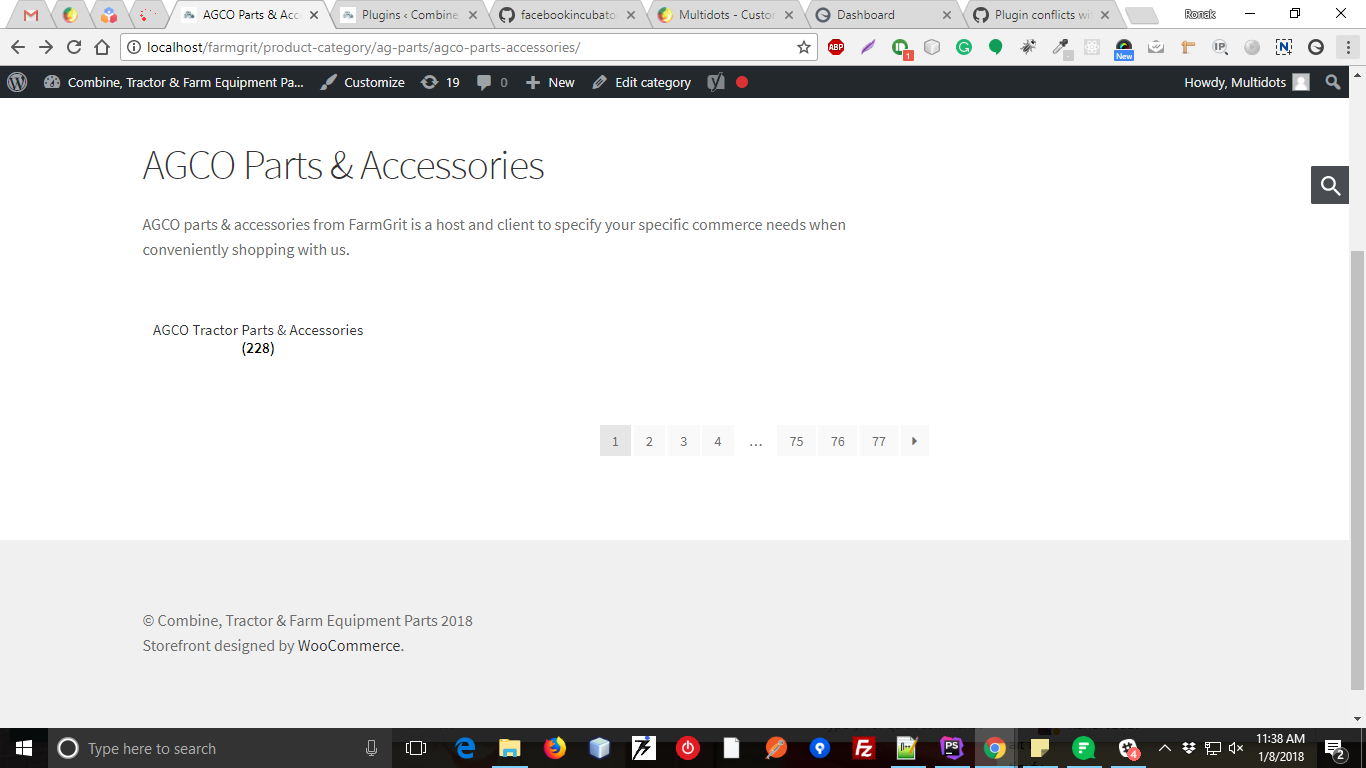
This plugin is conflicting with WooCommerce pagination functionality on the product-category page. When we click on product-category than there is a list of subcategories but in normal there is not any pagination is displayed but after activating this plugin it adds pagination below subcategory listing. and also pagination works wrong.
When I have checked code below function is affecting it.
file: facebook-commerce-events-tracker.php
line no: 43
public function inject_view_category_event() {
global $wp_query;
$products = array_values(array_map(function($item) {
    return wc_get_product($item->ID);
  },
  $wp_query->get_posts()));

// if any product is a variant, fire the pixel with
// content_type: product_group
$content_type = 'product';
$product_ids = array();
foreach ($products as $product) {
  if (!$product) {
    continue;
  }
  $product_ids = array_merge(
    $product_ids,
    WC_Facebookcommerce_Utils::get_fb_content_ids($product));
  if ($product->get_type() === 'variable') {
    $content_type = 'product_group';
  }
}

$categories =
  WC_Facebookcommerce_Utils::get_product_categories(get_the_ID());

$this->pixel->inject_event(
  'ViewCategory',
  array(
    'content_name' => $categories['name'],
    'content_category' => $categories['categories'],
    'content_ids' => json_encode(array_slice($product_ids, 0, 10)),
    'content_type' => $content_type
  ),
  'trackCustom');
}
When I remove above function It will working fine.
 ronakganatra9
All 13 comments
Hi,
Thanks for reporting this. Which version of extension are you using? Could you share some screenshot? Also, could you give us a list of detailed steps so that we can try them on our test servers and reproduce your problem? Thanks.
 jieminz22
on 5 Jan 2018
jieminz22
on 5 Jan 2018
Hello Jiemin,
Thanks for your response, I am using The latest version of " Facebook for WooCommerce" - Version 1.6.6 and " WooCommerce"- version 3.1.2 and also I have tried the latest version 3.2.6. Here is the list of detailed steps:
I am displaying subcategories on category page.
Without "Facebook for WooCommerce" Plugin it is working fine, Here I have attached screenshots of it.
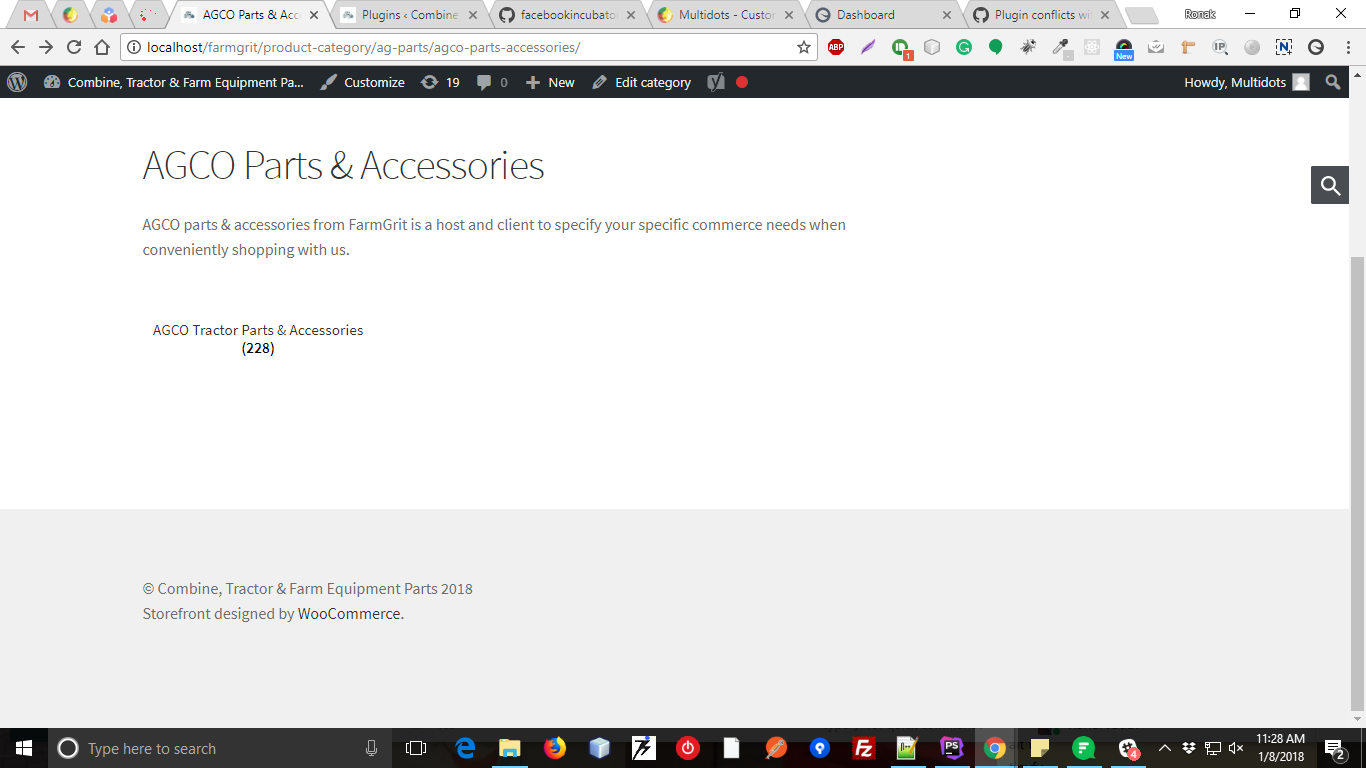
After Activating this plugin, wrong pagination is displayed in bottom you can check below screenshot:
Thanks & Regards,
Ronak Ganatra
ronakganatra9
on 8 Jan 2018
Hello Jiemin,
are you able to produce the issue?
Let me know If any details are missing from my side.
Regards,
Ronak
ronakganatra9
on 9 Jan 2018
Hello Ronak,
Thanks for your patience. Unfortunately, I couldn't repro the problem using our latest version 1.7.4, I recommend upgrading, there have been many changes since 1.6.6.
Could you provide me with some more details, maybe my setup was incorrect:
- Could you tell us what theme you are using?
- Could you tell us how you are displaying the child categories on the product category page? Is it through an extension or a custom theme?
This info will help us create an identical setup to what you have on our own test server so we can fix it.
In the meantime, I have a workaround for you though,
[Edit : Check the workaround in my next response in the thread, this one didn't work]
You will lose the ViewCategory pixel event, but it is not a critical event.
Hope that helps.
 dmitridr
on 9 Jan 2018
dmitridr
on 9 Jan 2018
Hello plugin team,
I am facing the same issue with using the latest version of this plugin.
I am using the default theme of WooCommerce ( Storefront ).
Here I have attached the details for produce the issue on your server.
- Download the latest version of woocommerce and installed it on your WordPress setup.
- import the woocommerce dummy product from the csv.
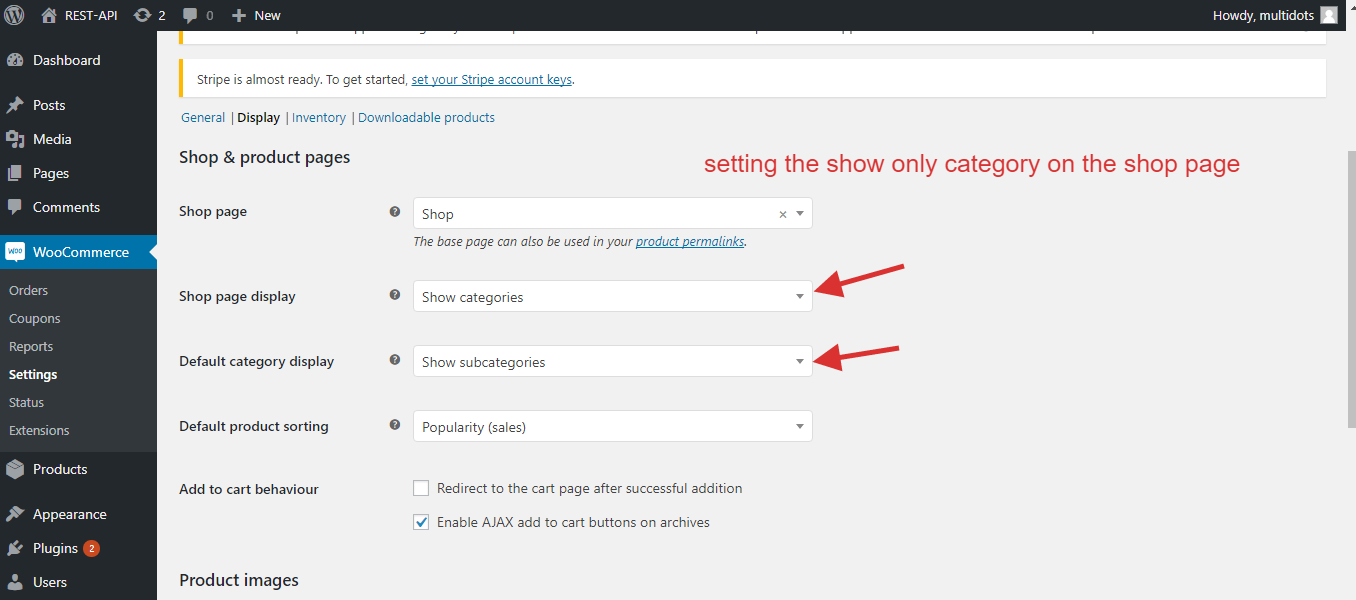
- Go to Woocommerce->Settings->products->display.
- Then select the "show categories" from the drop-down for the "Shop page display".
- Select the "Show subcategories" from the drop-down for the "Default category display".
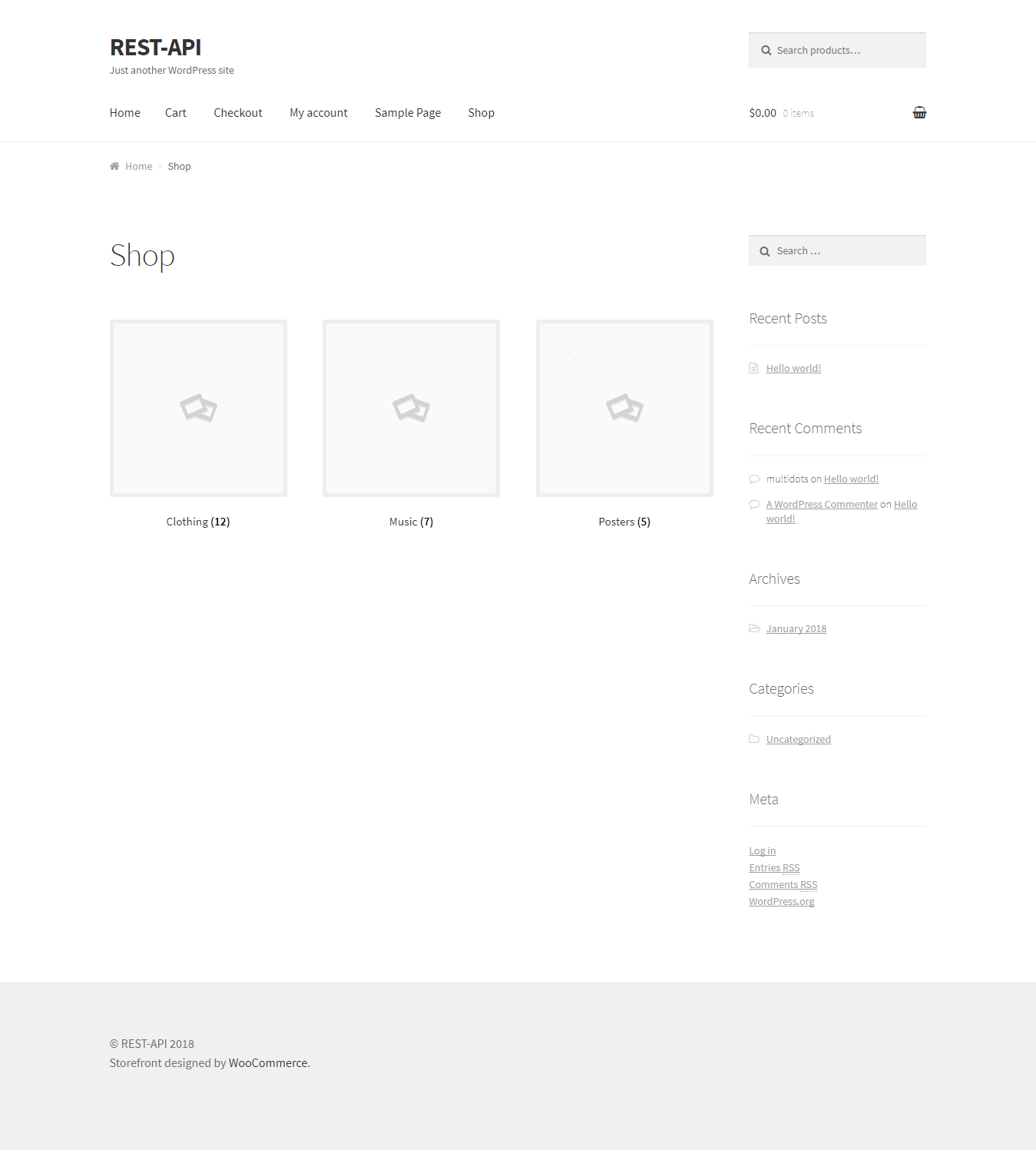
Now check the shop page, It will display the three parent category without any page navigation and this is the default functionality of woocommerce.
Then install and setup your plugin in this WordPress setup.
And visit again the shop page. you will get the pagination and when you click on the page then it displays the products.
So, I'm sure that this issue is coming from the "facebook-for-woocommerce" plugin.
Here, I have attached the screenshot of it.
Setup the Woocommerce Plugin.
Without Activating the plugin "facebook-for-woocommerce".
After Activating plugin "facebook-for-woocommerce".
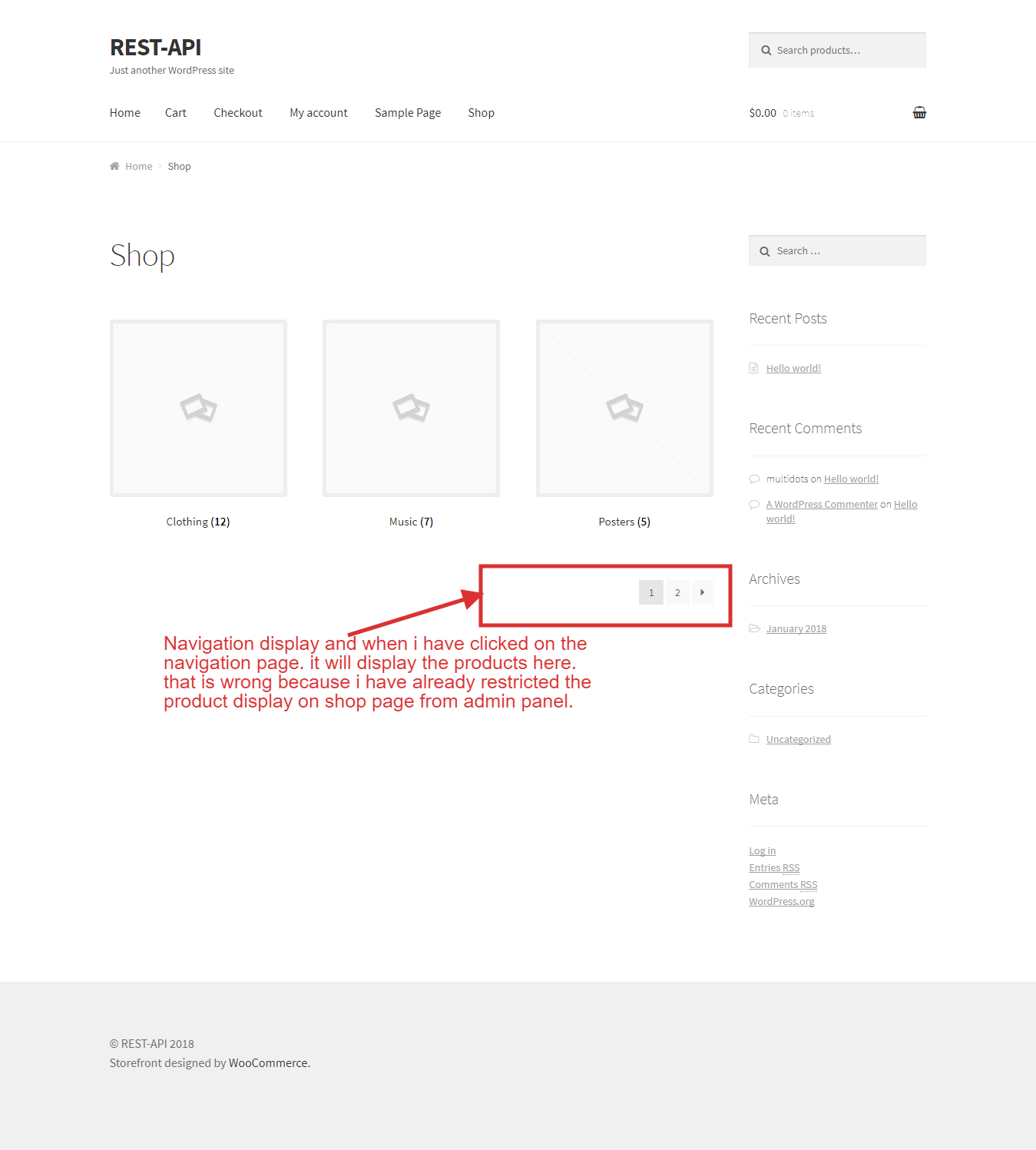
Can you please help me to resolve this issue ASAP.
Thanks & Regards,
Ajay
 ajayghaghretiya
on 10 Jan 2018
ajayghaghretiya
on 10 Jan 2018
Hello Dmitri,
Thanks for your response. I am using storefront theme. Displaying subcategory on the category page is by default WooCommerce functionality. I have done the same setting as per above screenshots of Mr. Ajay.
ronakganatra9
on 10 Jan 2018
Hello Dmitri,
Have you got all your queries or yet you have any doubts ?
Please let me know your thoughts.
Regards,
Ronak Ganatra
ronakganatra9
on 11 Jan 2018
Hello Team,
Have you got time to produce this issue ?
I am waiting for your reply.
Regards,
Ronak Ganatra
ronakganatra9
on 12 Jan 2018
Hi All,
Thanks for your patience. I managed to reproduce the problem thanks to the detailed steps given by @Mr-AjayM (Thanks!).
The workaround is to remove the following lines from facebook-commerce.php using the plugin editor :
https://github.com/facebookincubator/facebook-for-woocommerce/blob/ab380ecc55da726e7e5ec015450e55fe34c35f5f/facebook-commerce.php#L270-L271
I confirmed that this will remove the problem (the workaround I first suggested does not).
We are working on a more detailed fix, and should have one in v1.7.7 or v1.7.8.
dmitridr
on 12 Jan 2018
@dmitridr Thanks for the understanding the thing and suggest the solution to commenting these lines.
Happy to contribute here :+1:
Thanks & Regards,
Ajay G.
ajayghaghretiya
on 13 Jan 2018
Thanks @dmitridr for quick reply. Does it will affect in any functionalities ?
ronakganatra9
on 16 Jan 2018
The workaround will disable the ViewCategory pixel event. But it is not a critical event unless you are running FB Dynamic Ads with targeting rules on specific categories.
dmitridr
on 26 Jan 2018
Hi all,
I tried to reproduce this bug again recently but could not. It seems with newer versions of WooCommerce there is no conflict with the ViewCategory event, so feel free to add it back in.
Closing this out.
dmitridr
on 14 Nov 2018
Related issues
 sm7uge
·
7Comments
sm7uge
·
7Comments
 spradooooo
·
4Comments
spradooooo
·
4Comments
 whippetdesign
·
6Comments
whippetdesign
·
6Comments
 iamgabrielma
·
4Comments
iamgabrielma
·
4Comments
 vesceram
·
5Comments
vesceram
·
5Comments