Exporters: Add support for morph targets using optimized meshes
I have encountered a problem when exporting a mesh from with morphtargets which are optimized, demonstrated in the image below:
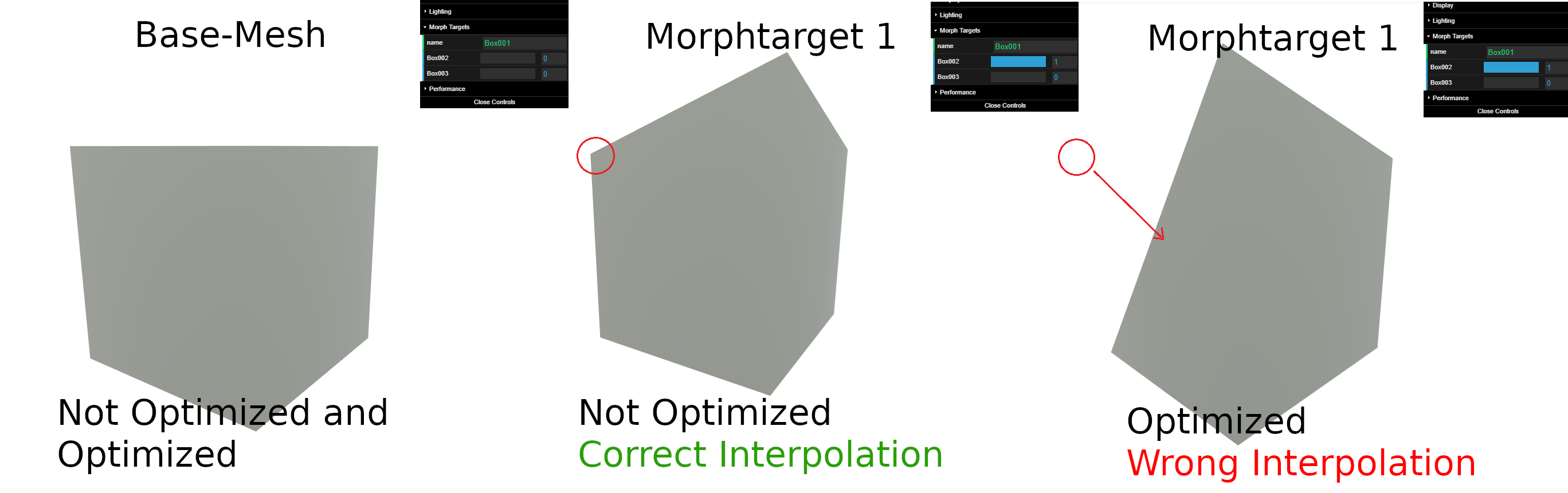
Where the optimized morphtarget-vertices are dislocated, while the non-optimized morphtarget-vertices export correctly. The base-mesh-vertices export correctly however for both cases: Optimized and non-optimized. I have exported the mesh from 3Ds Max 2019. The problem does not appear when using the exporter in Maya though.
I have looked a bit into the code already and could not figure out the problem yet. Any suggestions to solve the problem are highly appreciated!
 theRevilot
All 10 comments
Interesting. I'll take a look into it. @theRevilot, can you share your project file that reproduces this?
 Drigax
on 3 Jul 2019
Drigax
on 3 Jul 2019
Reading the 3dsMax documentation on morph targets, it doesn't appear that morph targets are supported with optimized meshes, due to possible disparity in vert count between seed & target meshes after the optimization pass, I'd assume.
Does this work with other 3d scene formats?
Drigax
on 4 Jul 2019
@Drigax , thank you for the quick response!
I have provided all files in the attached zip folder. It includes the cube presented above in all babylon-exporter formats: babylon, binary babylon, gltf, glb.
babExportMorphData.zip
Debbugging into the exporter it seems that all conversions use the same code, which produces the same problem when checking babylon's 'optimze vertices' button: The morphtargets are setup wrong.
The mesh itself is not optimized within 3ds max. Morphtargets in the example scene do have the same amount of vertices as their seed-mesh.
The problem really seems to appear at the optimization step of morphtargets during export, as the seed-mesh gets optimzed correctly.
theRevilot
on 4 Jul 2019
So just to be sure, it works of you turn off Babylon.js vertex optimization right?
This sounds reasonable for me as we can optimize the meshes up to a point where mesh and morph targets do not have the same vertex count.
If this is the case the idea could be to do no optimization if we detect morph targets (or emit a warning?)
 deltakosh
on 4 Jul 2019
deltakosh
on 4 Jul 2019
@deltakosh yes correct, it works for me if I turn off vertex optimization in the Babylon.js exporter.
Well yes the target mesh can get optimized to a point where the vertex count does not correspond to the seed-mesh-vertex count, which is kind of the problem that I am adressing.
Would it not be beneficial to ensure that the amount of optimized target-vertices corresponds to the amount of seed-mesh-vertices during export though? - I have changed the code in such a way that vertex positions get optimized, without accounting for correct texture coordinates and normals for instance. As a result optimized morphtargets morph correctly after export, reducing the file size tremendously. My point is that seed-mesh-vertices could depict the way target-mesh-vertices are setup during export and eventually account for correct optimized morphtarget interpolation, as well as for a small file-size.
theRevilot
on 5 Jul 2019
So you have kind of a fix? We will gladly accept all help you can bring
So far we do not plan to change the way we optimize our vertices but if you already have something working that changes the plan :)
deltakosh
on 5 Jul 2019
Alright. So I think I have found a simple fix for this issue: The main problem was that while the base-mesh stores texture-coordinates for each vertex, the target-mesh does not. As a result the amount of vertices generated for the base-mesh is higher than the amount of target-mesh vertices when optimized. I solve this problem by applying the texture coordinates of the base-mesh to the target-mesh respectively during export.
theRevilot
on 11 Jul 2019
I'm having issues with 3DS Max 2018 babylon exporter using morph targets without vertex optimisation. All looks correct in the viewport, animation groups setup correctly, but when viewing with donmccurdy mesh looks messed up.
Exported all targets out of Max into Blender used shape keys and exported first time without issue - not sure what the problem is with the Max exporter??
 samyH
on 16 Jul 2019
samyH
on 16 Jul 2019
Here are my exports if they help at all?
samyH
on 16 Jul 2019
I don't think we made any actual progress on this. Closing this issue.
Drigax
on 7 Apr 2020
Related issues
 EtagiBI
·
4Comments
EtagiBI
·
4Comments
 echadwick-wayfair
·
4Comments
echadwick-wayfair
·
4Comments
 aguaviva
·
8Comments
aguaviva
·
8Comments
 vpenades
·
9Comments
echadwick-wayfair
·
3Comments
vpenades
·
9Comments
echadwick-wayfair
·
3Comments
Most helpful comment
So you have kind of a fix? We will gladly accept all help you can bring
So far we do not plan to change the way we optimize our vertices but if you already have something working that changes the plan :)