Exporters: glTF exports errors in Max2019, crashes in Max2020
Hi
Using babylon.js glTF exporter for 3dsmax 2019 v20191026.3
We've been leveraging BabylonJS exporter for a few weeks now, and we've been finding a number of issues...
We're working with Max2019 mostly, since Max2020 is too prone to crash straight away when exporting even a simple cube, so it's completely unusable.
On 2019, we're able to export, but the exported meshes usually have errors:
{
    "uri": "Bee%5BAnimFinal%5D.glb",
    "mimeType": "model/gltf-binary",
    "validatorVersion": "2.0.0-dev.2.7",
    "validatedAt": "2019-11-06T11:04:15.076Z",
    "issues": {
        "numErrors": 5,
        "numWarnings": 0,
        "numInfos": 6,
        "numHints": 0,
        "messages": [
            {
                "code": "VALUE_NOT_IN_RANGE",
                "message": "Value 0 is out of range.",
                "severity": 0,
                "pointer": "/accessors/391/count"
            },
            {
                "code": "VALUE_NOT_IN_RANGE",
                "message": "Value 0 is out of range.",
                "severity": 0,
                "pointer": "/accessors/440/count"
            },
            {
                "code": "VALUE_NOT_IN_RANGE",
                "message": "Value 0 is out of range.",
                "severity": 0,
                "pointer": "/accessors/457/count"
            },
            {
                "code": "VALUE_NOT_IN_RANGE",
                "message": "Value 0 is out of range.",
                "severity": 0,
                "pointer": "/accessors/474/count"
            },
            {
                "code": "VALUE_NOT_IN_RANGE",
                "message": "Value 0 is out of range.",
                "severity": 0,
                "pointer": "/accessors/491/count"
            },
            {
                "code": "NODE_EMPTY",
                "message": "Empty node encountered.",
                "severity": 2,
                "pointer": "/nodes/83"
            },
            {
                "code": "UNUSED_OBJECT",
                "message": "This object may be unused.",
                "severity": 2,
                "pointer": "/accessors/391"
            },
            {
                "code": "UNUSED_OBJECT",
                "message": "This object may be unused.",
                "severity": 2,
                "pointer": "/accessors/440"
            },
            {
                "code": "UNUSED_OBJECT",
                "message": "This object may be unused.",
                "severity": 2,
                "pointer": "/accessors/457"
            },
            {
                "code": "UNUSED_OBJECT",
                "message": "This object may be unused.",
                "severity": 2,
                "pointer": "/accessors/474"
            },
            {
                "code": "UNUSED_OBJECT",
                "message": "This object may be unused.",
                "severity": 2,
                "pointer": "/accessors/491"
            }
        ],
        "truncated": false
    },
    "info": {
        "version": "2.0",
        "generator": "babylon.js glTF exporter for 3dsmax 2019 v20191026.3",
        "resources": [
            {
                "pointer": "/buffers/0",
                "mimeType": "application/gltf-buffer",
                "storage": "glb",
                "byteLength": 2212848
            },
            {
                "pointer": "/images/0",
                "mimeType": "image/png",
                "storage": "bufferView",
                "image": {
                    "width": 1024,
                    "height": 1024,
                    "format": "RGBA",
                    "bits": 8
                }
            }
        ],
        "hasAnimations": true,
        "hasMaterials": true,
        "hasMorphTargets": false,
        "hasSkins": true,
        "hasTextures": true,
        "hasDefaultScene": true,
        "primitivesCount": 1,
        "maxAttributesUsed": 5
    }
}
 vpenades
All 9 comments
We're working with Max2019 mostly, since Max2020 is too prone to crash straight away when exporting even a simple cube, so it's completely unusable.
```
Do you have 3ds Max 2020.2 installed? Earlier versions will not work.
 Drigax
on 6 Nov 2019
Drigax
on 6 Nov 2019
Thanks for the report!
I'm aware of the export errors, but they appear to be benign in most usecases, but I agree that we should fix them.
I haven't had too much time to pinpoint what's causing the incorrect accessors, but if you can share a source scene that reproduces this, I can take a look in the next few days.
Drigax
on 6 Nov 2019
Regarding 3dsMax version, it looks like it's plain 2020, although there's so many versions, product informations, and numbers that is hard to tell. At the very least, if a certain plugin is not able to run on a given version of Max, I would suggest to show a warning in the installer, or in the plugin itself. Otherwise crashing max makes BabylonJS to look bad and unreliable.
We will try to update Max to 2020.2 and see what happens...
Regarding the other errors, we're processing glTFs over a pipeline that performs strict glTF validation, so even if the files might be viewable in BabylonJS, we can't open them. Also, 3D View cannot open them either.
I'll try to find the scene that was producing the issue, but I feel like our artist has already overwritten that scene with a newer scene that does not present that problem.
vpenades
on 6 Nov 2019
Thanks for the suggestions, they're definitely simple improvements that
should help resolve ambiguity. I'll add a warning to our Max 2020 install path and
already updated our online documentation to reflect this.
https://github.com/BabylonJS/Documentation/commit/aaa48f6c245d4ab37d84fb5350bb688ed1d3143f
If the export errors happen in the future, a testing scene will definitely
help us pinpoint and fix issues that you may run into. As an open source
project, every last one of our users can help us be as good and reliable as possible :)
Thanks,
Nick
On Wed, Nov 6, 2019, 8:40 AM Vicente Penades notifications@github.com
wrote:
Regarding 3dsMax version, it looks like it's plain 2020, although there's
so many versions, product informations, and numbers that is hard to tell.
At the very least, if a certain plugin is not able to run on a given
version of Max, I would suggest to show a warning in the installer, or in
the plugin itself. Otherwise crashing max makes BabylonJS to look bad and
unreliable.We will try to update Max to 2020.2 and see what happens...
Regarding the other errors, we're processing glTFs over a pipeline that
performs strict glTF validation, so even if the files might be viewable in
BabylonJS, we can't open them. Also, 3D View cannot open them either.I'll try to find the scene that was producing the issue, but I feel like
our artist has already overwritten that scene with a newer scene that does
not present that problem.—
You are receiving this because you commented.
Reply to this email directly, view it on GitHub
https://github.com/BabylonJS/Exporters/issues/673?email_source=notifications&email_token=AA6FAWM4EQTIMUANYB3O6OLQSLXQPA5CNFSM4JJUC372YY3PNVWWK3TUL52HS4DFVREXG43VMVBW63LNMVXHJKTDN5WW2ZLOORPWSZGOEDHFWRI#issuecomment-550394693,
or unsubscribe
https://github.com/notifications/unsubscribe-auth/AA6FAWNKPNBL44DSYUWP4Z3QSLXQPANCNFSM4JJUC37Q
.
Drigax
on 6 Nov 2019
This should add proper notice to the user when installing Max2Babylon 2020. I have a bit of extra time today to look into the accessor export as well.
Drigax
on 7 Nov 2019
I think I'm making good progress here.
I was able to re-export the alien source scene using Maya since it's so cool and hits a lot of our export paths, it appears to have many of the same errors you are reporting. Thankfully due to both exporters using the same shared babylon->gltf code, this fix should resolve the issue for Max as well:

Detailed report:
{
  "uri": "alien.gltf",
  "mimeType": "model/gltf+json",
  "validatorVersion": "2.0.0-dev.2.7",
  "validatedAt": "2019-11-07T01:51:08.943Z",
  "issues": {
    "numErrors": 10,
    "numWarnings": 0,
    "numInfos": 12,
    "numHints": 0,
    "messages": [
      {
        "code": "VALUE_NOT_IN_RANGE",
        "message": "Value 0 is out of range.",
        "severity": 0,
        "pointer": "/accessors/74/count"
      },
      {
        "code": "VALUE_NOT_IN_RANGE",
        "message": "Value 0 is out of range.",
        "severity": 0,
        "pointer": "/accessors/77/count"
      },
      {
        "code": "VALUE_NOT_IN_RANGE",
        "message": "Value 0 is out of range.",
        "severity": 0,
        "pointer": "/accessors/80/count"
      },
      {
        "code": "VALUE_NOT_IN_RANGE",
        "message": "Value 0 is out of range.",
        "severity": 0,
        "pointer": "/accessors/81/count"
      },
      {
        "code": "VALUE_NOT_IN_RANGE",
        "message": "Value 0 is out of range.",
        "severity": 0,
        "pointer": "/accessors/82/count"
      },
      {
        "code": "VALUE_NOT_IN_RANGE",
        "message": "Value 0 is out of range.",
        "severity": 0,
        "pointer": "/accessors/93/count"
      },
      {
        "code": "VALUE_NOT_IN_RANGE",
        "message": "Value 0 is out of range.",
        "severity": 0,
        "pointer": "/accessors/96/count"
      },
      {
        "code": "VALUE_NOT_IN_RANGE",
        "message": "Value 0 is out of range.",
        "severity": 0,
        "pointer": "/accessors/99/count"
      },
      {
        "code": "VALUE_NOT_IN_RANGE",
        "message": "Value 0 is out of range.",
        "severity": 0,
        "pointer": "/accessors/100/count"
      },
      {
        "code": "VALUE_NOT_IN_RANGE",
        "message": "Value 0 is out of range.",
        "severity": 0,
        "pointer": "/accessors/101/count"
      },
      {
        "code": "NODE_EMPTY",
        "message": "Empty node encountered.",
        "severity": 2,
        "pointer": "/nodes/13"
      },
      {
        "code": "NODE_EMPTY",
        "message": "Empty node encountered.",
        "severity": 2,
        "pointer": "/nodes/17"
      },
      {
        "code": "UNUSED_OBJECT",
        "message": "This object may be unused.",
        "severity": 2,
        "pointer": "/accessors/74"
      },
      {
        "code": "UNUSED_OBJECT",
        "message": "This object may be unused.",
        "severity": 2,
        "pointer": "/accessors/77"
      },
      {
        "code": "UNUSED_OBJECT",
        "message": "This object may be unused.",
        "severity": 2,
        "pointer": "/accessors/80"
      },
      {
        "code": "UNUSED_OBJECT",
        "message": "This object may be unused.",
        "severity": 2,
        "pointer": "/accessors/81"
      },
      {
        "code": "UNUSED_OBJECT",
        "message": "This object may be unused.",
        "severity": 2,
        "pointer": "/accessors/82"
      },
      {
        "code": "UNUSED_OBJECT",
        "message": "This object may be unused.",
        "severity": 2,
        "pointer": "/accessors/93"
      },
      {
        "code": "UNUSED_OBJECT",
        "message": "This object may be unused.",
        "severity": 2,
        "pointer": "/accessors/96"
      },
      {
        "code": "UNUSED_OBJECT",
        "message": "This object may be unused.",
        "severity": 2,
        "pointer": "/accessors/99"
      },
      {
        "code": "UNUSED_OBJECT",
        "message": "This object may be unused.",
        "severity": 2,
        "pointer": "/accessors/100"
      },
      {
        "code": "UNUSED_OBJECT",
        "message": "This object may be unused.",
        "severity": 2,
        "pointer": "/accessors/101"
      }
    ],
    "truncated": false
  },
  "info": {
    "version": "2.0",
    "generator": "babylon.js glTF exporter for Maya 2018 v1.4.0",
    "resources": [
      {
        "pointer": "/buffers/0",
        "mimeType": "application/gltf-buffer",
        "storage": "external",
        "uri": "alien.bin",
        "byteLength": 1613352
      },
      {
        "pointer": "/images/0",
        "mimeType": "image/png",
        "storage": "external",
        "uri": "AlienMesh_normal.png",
        "image": {
          "width": 2048,
          "height": 2048,
          "format": "RGB",
          "bits": 8
        }
      },
      {
        "pointer": "/images/1",
        "mimeType": "image/png",
        "storage": "external",
        "uri": "AlienMesh_ORM.png",
        "image": {
          "width": 2048,
          "height": 2048,
          "format": "RGB",
          "bits": 8
        }
      },
      {
        "pointer": "/images/2",
        "mimeType": "image/png",
        "storage": "external",
        "uri": "AlienMesh_basecolor.png",
        "image": {
          "width": 2048,
          "height": 2048,
          "format": "RGB",
          "bits": 8
        }
      }
    ],
    "hasAnimations": true,
    "hasMaterials": true,
    "hasMorphTargets": true,
    "hasSkins": true,
    "hasTextures": true,
    "hasDefaultScene": true,
    "primitivesCount": 8,
    "maxAttributesUsed": 7
  }
}
Looking at the accessors that the report is complaining about, I can see a pattern in that they are all animation track input frame accessors:
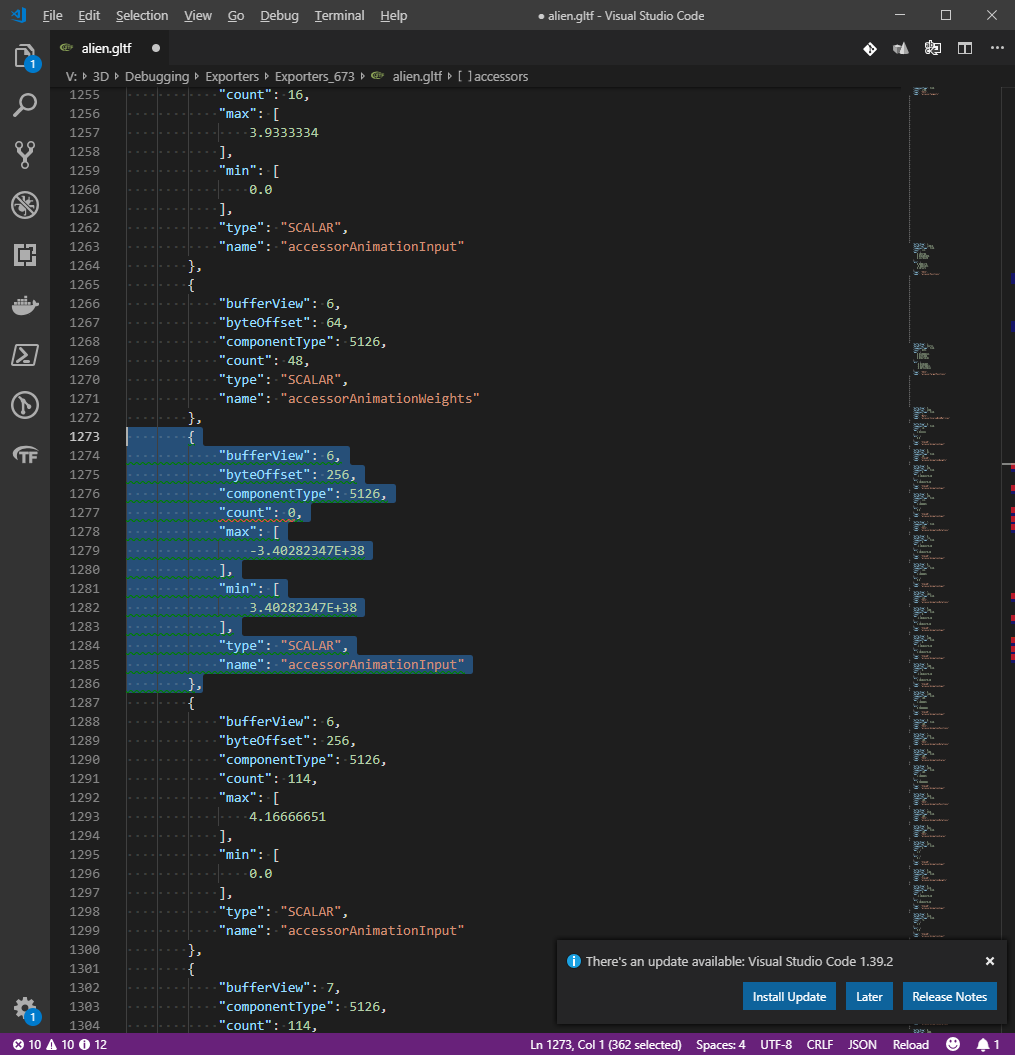
Tracing through the source, I can say that the accessor export code is..._interesting_ to say the least. Looking at a few snippets, I think I see what's wrong here:
We create the accessor in the output gltf before we even check if there are keyframes in this track to export. Not good at all. At the very least we should verify that we have frames to export before creating the input and output accessors. This would appear to reproduce in cases where we have a long animation track split over multiple animation groups, where the track would have no keyframes for the group.
I'm currently working on adding the proper check and testing...but to be honest I don't really like how any of this was written. It seems very fragile and copy-paste between the different cases for morph targets, bones and nodes...
But at the very least I'll do my due diligence to fix this particular issue before I risk regressing this for the sake of cleanliness. 😀
Drigax
on 7 Nov 2019
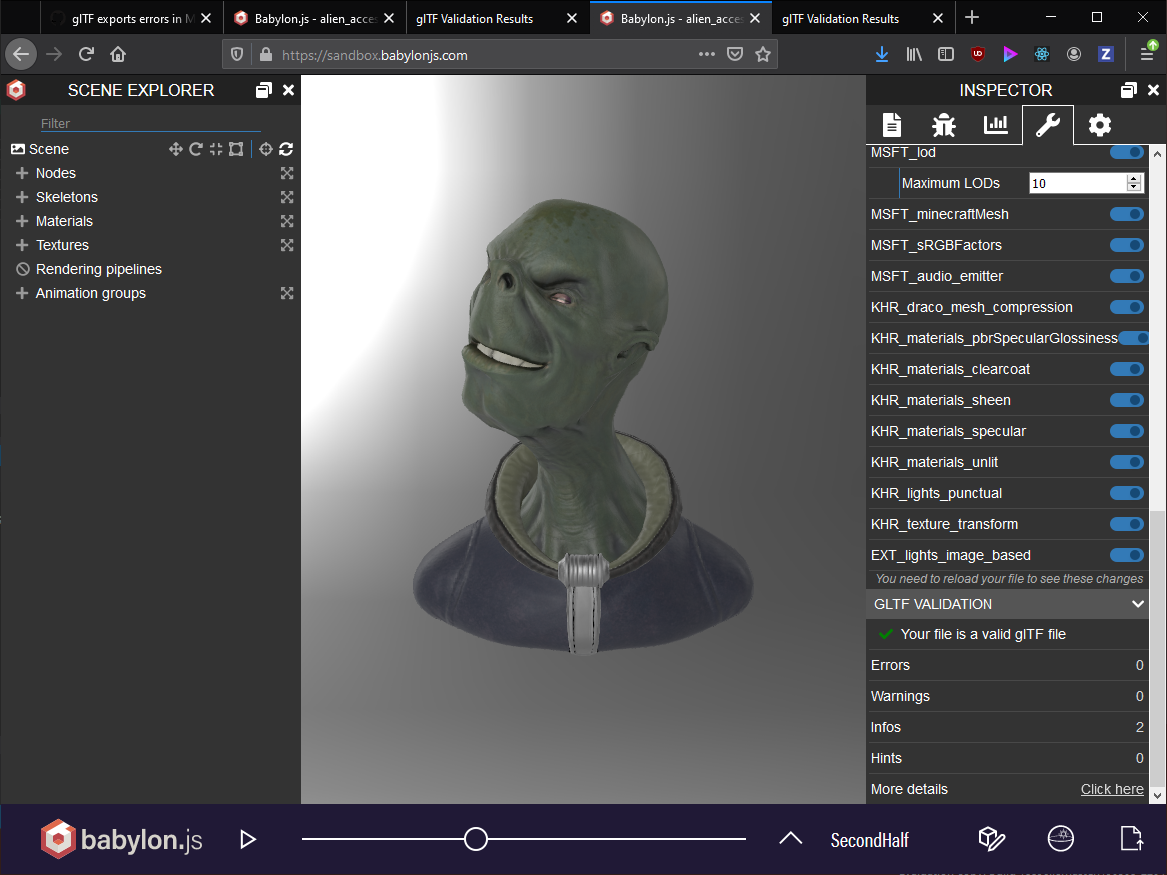
Update: fix looks good. Going to test against some regression tests in Max, then check in
Drigax
on 7 Nov 2019
Checkin complete, everything looks good now as far as I could test. If this issue still occurs, please feel free to reopen with a repro. Thanks again for reporting these issues! 😀
Drigax
on 7 Nov 2019
This issue with Max 2020 versioning definitely causes plenty confusion with our users. I decided to add some more warning to the exporter dialog itself, Users should now see:
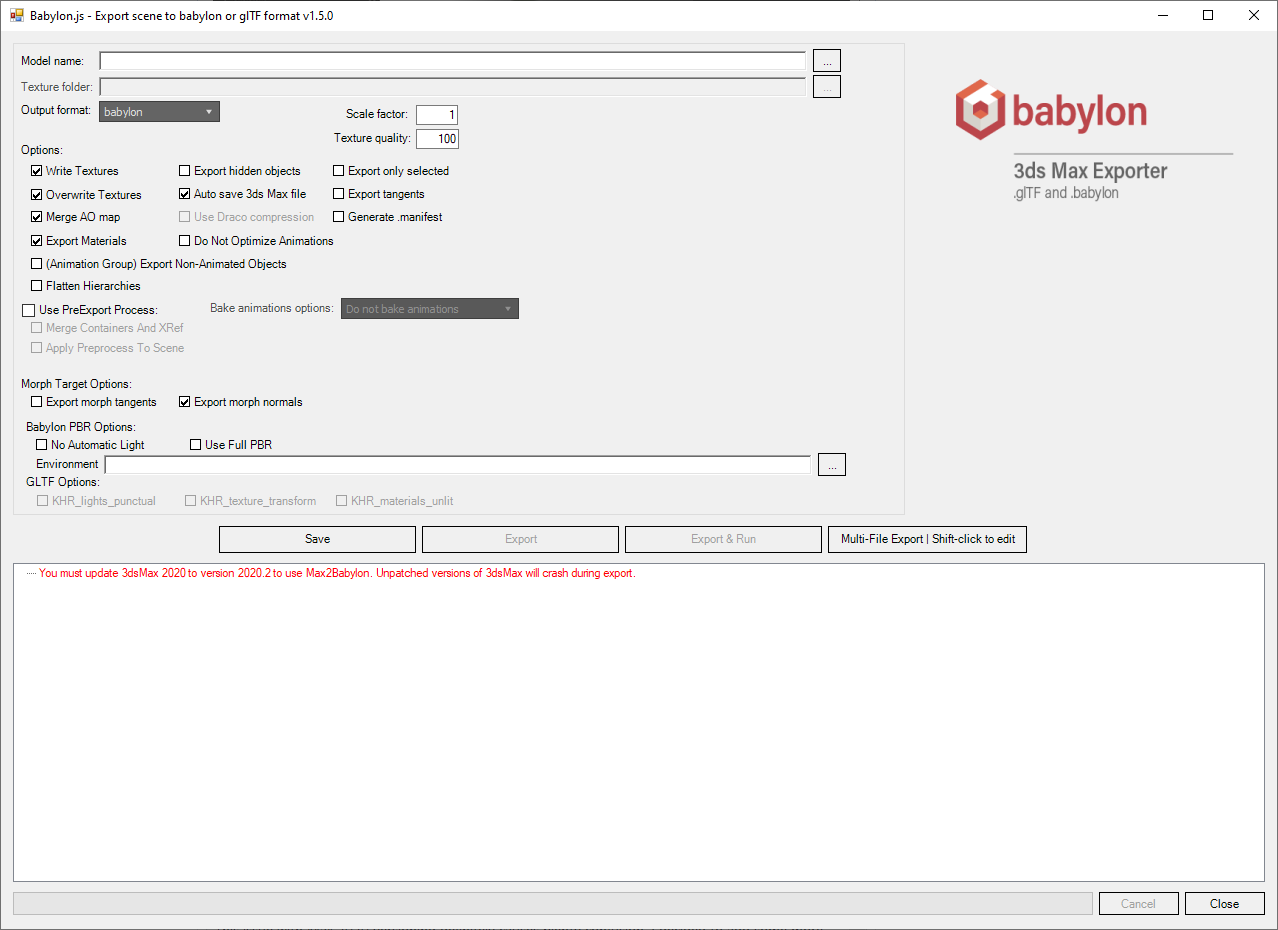
If they are using an unpatched version of 3dsMax 2020.
Drigax
on 11 Nov 2019
Related issues
 aguaviva
·
8Comments
aguaviva
·
8Comments
 jcartie
·
8Comments
jcartie
·
8Comments
 total3dx
·
5Comments
total3dx
·
5Comments
 echadwick-wayfair
·
5Comments
echadwick-wayfair
·
4Comments
echadwick-wayfair
·
5Comments
echadwick-wayfair
·
4Comments