Exporters: [Max][glTF] Some meshes look black without env map
Hello,
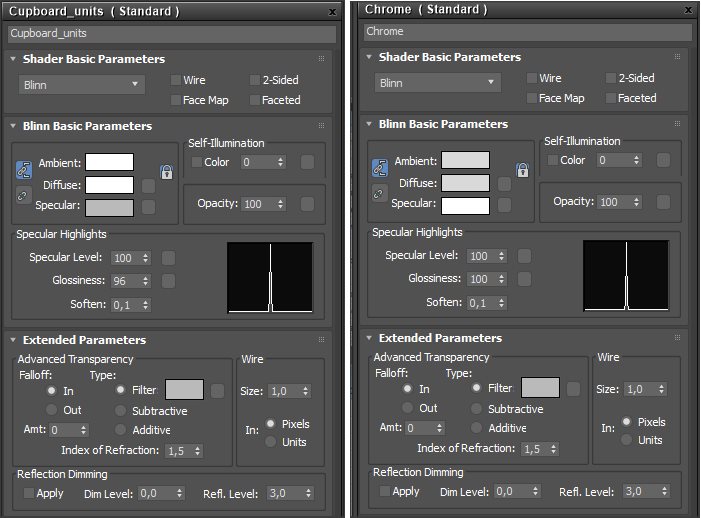
I have a pretty simple model with a bunch of Standard materials applied to it. Some materials have similar specularity and glossiness settings, but look totally different when exported to glTF. For instance, there're cupboard material and chrome material:
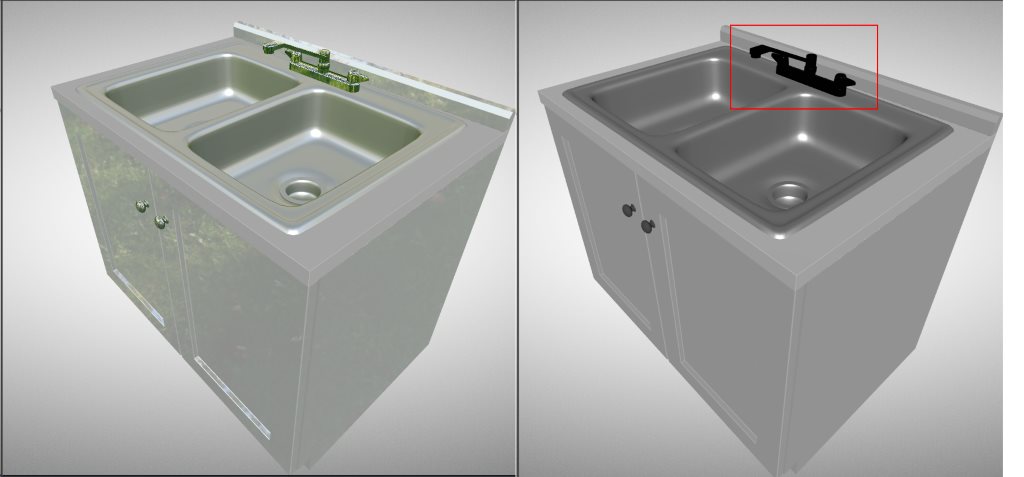
When I export my model to glTF and turn off env map in a viewer, chrome material becomes almost black whereas cupboard material just loses reflection:
Source model:
Cupboard.zip
 EtagiBI
All 4 comments
Maybe @patrickryanms can have a look?
 deltakosh
on 20 Mar 2019
deltakosh
on 20 Mar 2019
Take a look at the red channel of your Metallic/Roughness map. It could be the occlusion channel is black instead of white.
Cheers,
Misterboogie
 Misterboogie
on 2 Apr 2019
Misterboogie
on 2 Apr 2019
@EtagiBI, what you are seeing is actually correct behavior, but let me take some time to explain what is going on. I am not sure how familiar you are with the glTF spec or with Physically-Based Rendering (PBR) materials so please forgive me if I repeat things you already know.
You have created your materials in Max as blinn-phong materials, but the glTF spec requires PBR materials, PBR metal-rough is default, but you can use PBR spec-gloss with an extension. The exporter converts anything that isn't using the physical material shader in Max to PBR metal-rough in the glTF file. This is how your material is written into the glTF file itself:
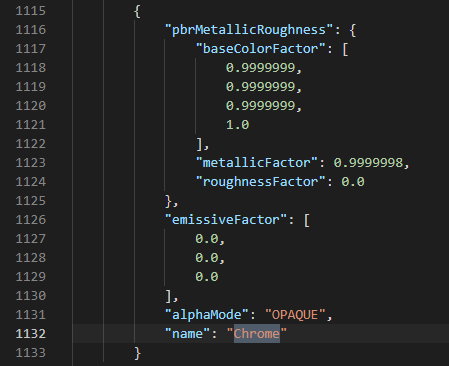
Here is your file exported and rendering in the Babylon sandbox. You didn't mention what glTF viewer you are using, but I am using the sandbox because I can dig into the scene with the inspector. Here is your file straight in the sandbox with an added directional light in the scene.
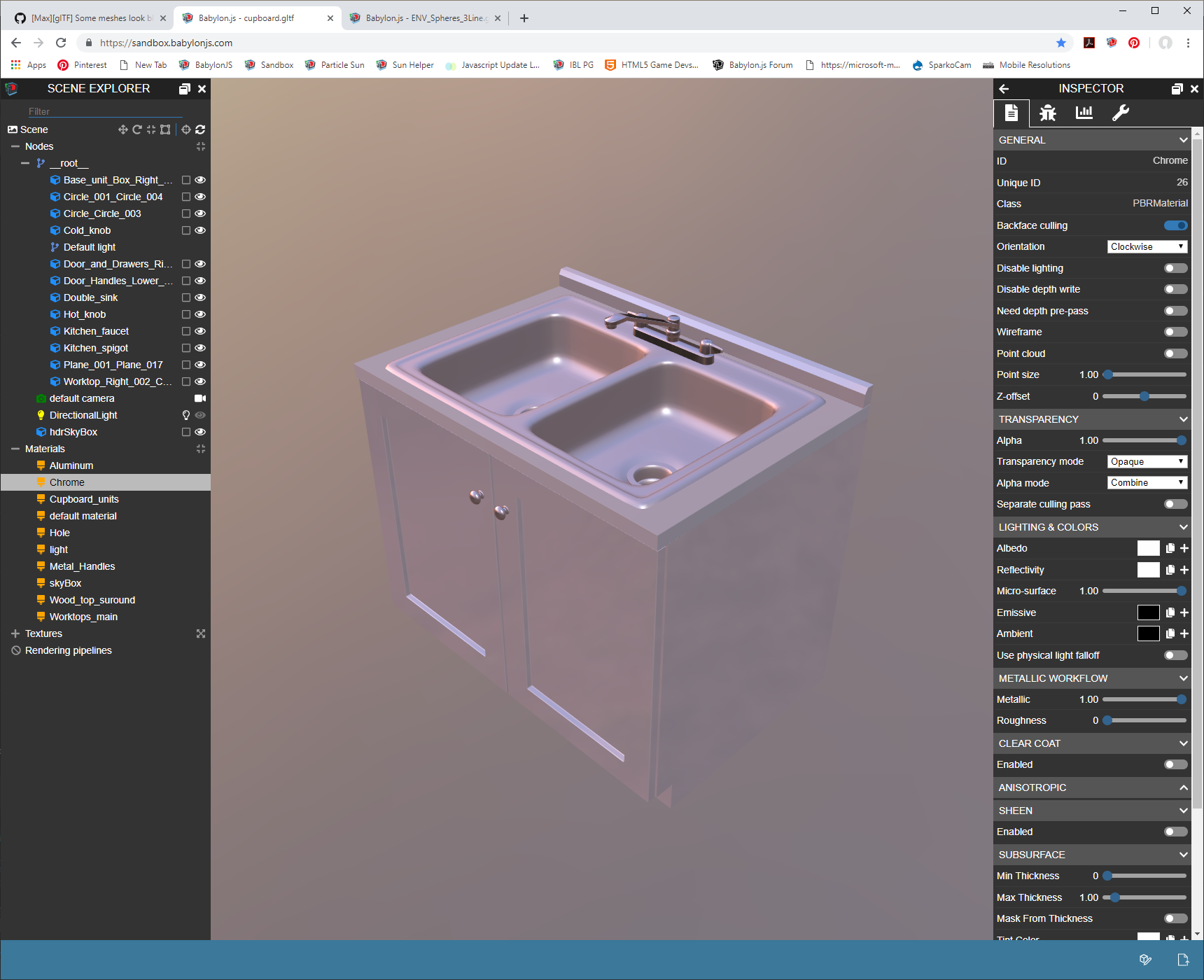
This is basically what you saw with your original screen shot, the major difference being the environment map used for lighting. When I disable the environment lighting and just have the directional light in the scene, you see basically what your other screen shot shows:
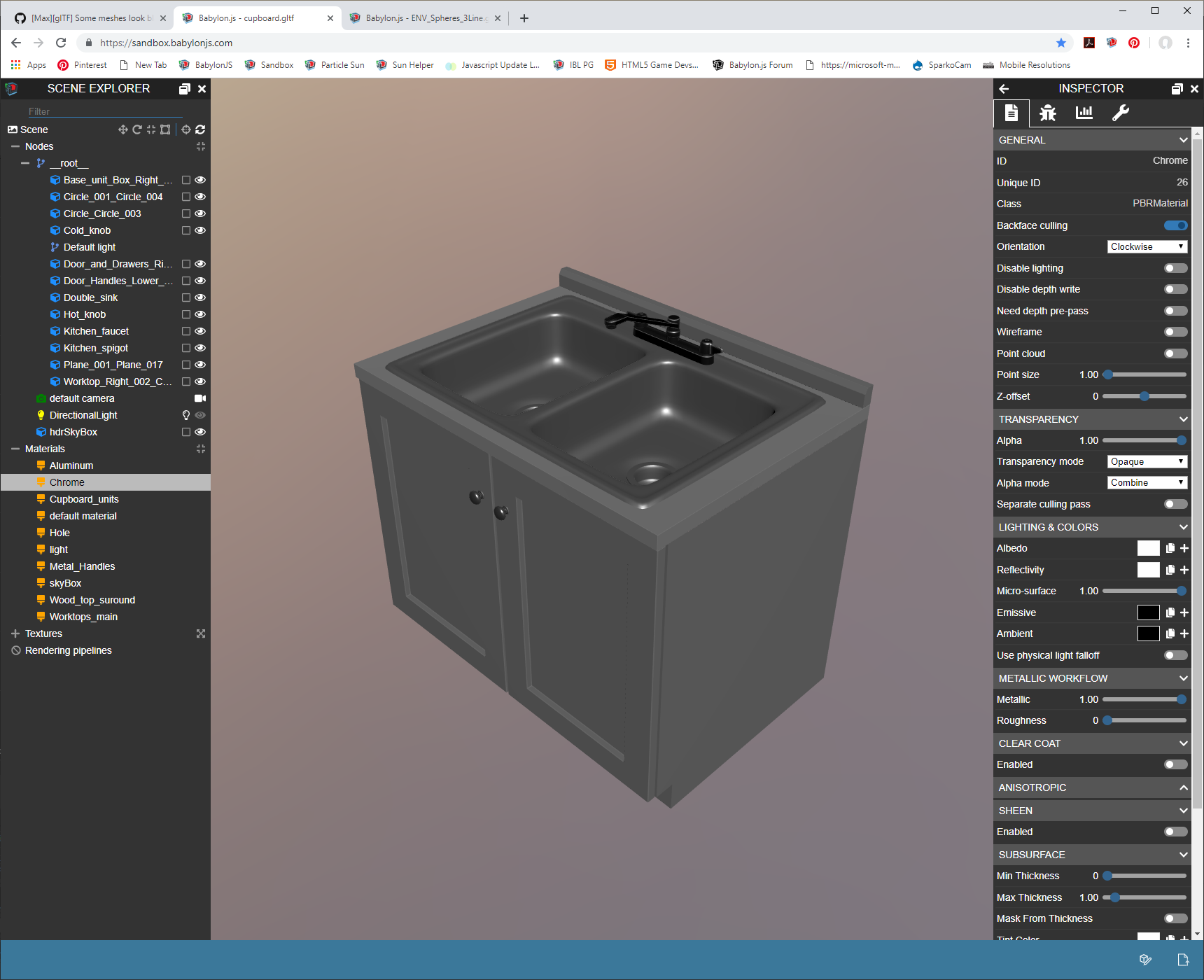
Note, however, the hot specular highlights on the spigot. These come from the super sharp reflections of the directional light. The reason that they are so sharp is that the roughness of the material is 0, which means that there is no spread of reflections on the surface and all reflected lights, environment or otherwise are sharp. The reason that the specular color is white is due to the other parameter here, metallic. Which a PBR metal-rough workflow, metallic items contribute their base color to the specular reflections and in your case, you have white as your base color so your specular reflections are white.
The reason that the rest of your material is black is that due to energy conservation, a 0.0 roughness object reflects it's environment lighting exactly, and an environment map for image-based lighting (IBL) is required for physically based rendering. This is to seat the object into the environment by influencing the materials with the colors of light around them. This means that most of your base color will be gone due to the heavy reflections of the environment with a roughness value of 0.0.
To help illustrate what I am talking about, I grabbed our roughness test model and did the same thing, added a directional light and rendered with an environment and without:
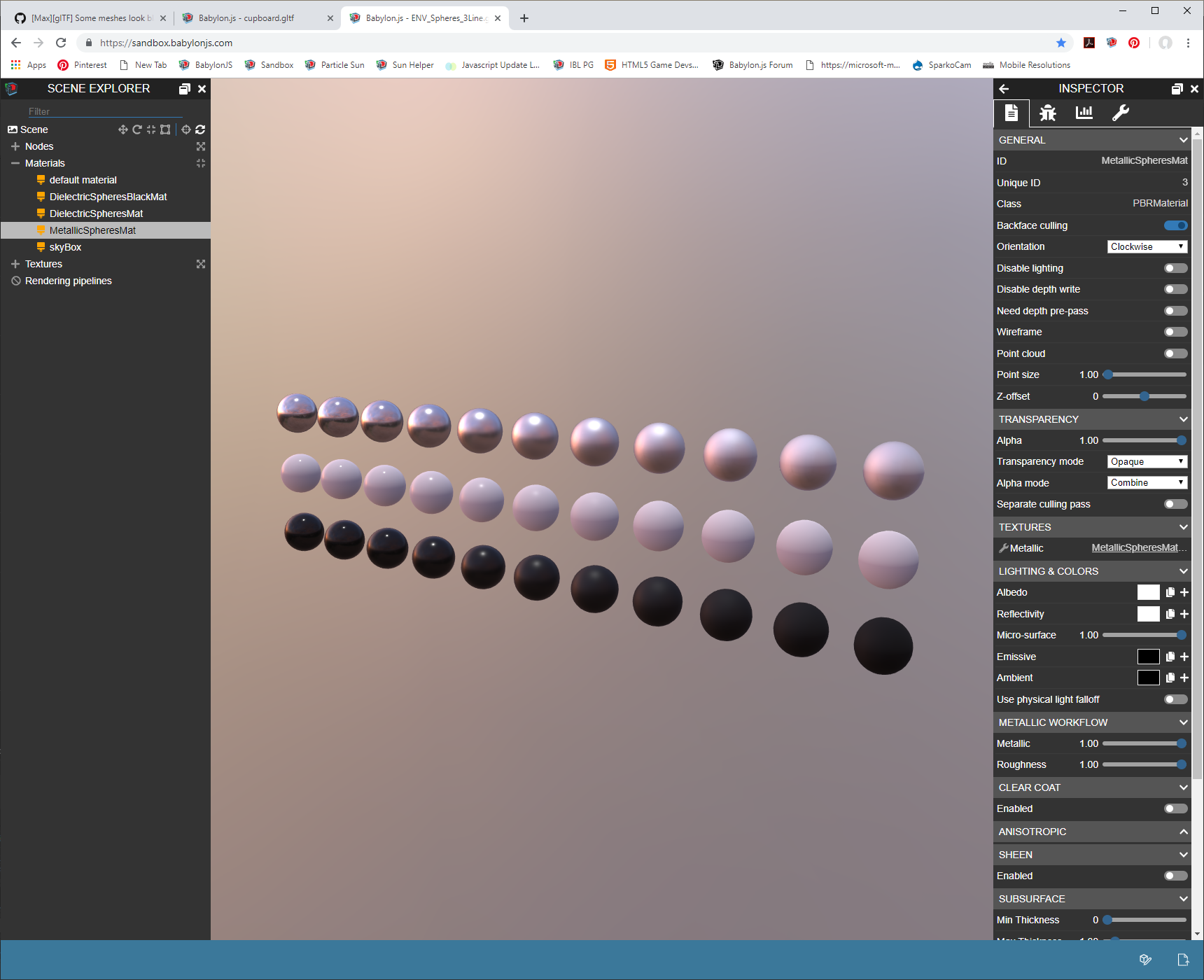
You can see in the first image that the roughness goes from 0.0 on the left to 1.0 on the right with metallic in the top row and a base color of white. Notice how the reflections broaden and soften as the roughness climbs by 0.1 in each column.

This is the same model with no environment lighting. The highlight in the 0.0 roughness column is super sharp, but there is nothing to reflect so the rest of the material is black. As the roughness increases, the specular highlight from the directional light broadens, but there is still no environment contribution so the rest of the material remains black.
Basically what you are doing by removing the environment map in physically-based rendering is telling the shader model which expects to have some sort of image based light that there are no other surfaces for light to bounce off of and not other light sources.
Imagine you are in a room with red walls, no windows, and no light inside of it. Any object you place in the room will be completely black due to the lack of light. Now you introduce a lamp into the room. The light will illuminate the walls, and your object, but will also bounce off the walls and contribute red light to the object. The walls in real time rendering are your image based lighting, or environment. If you have a light source, but no environment lighting in PBR, you are essentially lighting your object in a void. There is no light bouncing off of anything, so the surfaces not hit by a direct light source will be black.
Let me know if any of this doesn't make sense or if you have further questions about authoring for PBR materials.
 PatrickRyanMS
on 2 Apr 2019
PatrickRyanMS
on 2 Apr 2019
@PatrickRyanMS thanks for the extensive explanation!
 Drigax
on 23 Apr 2019
Drigax
on 23 Apr 2019
Related issues
 echadwick-wayfair
·
5Comments
echadwick-wayfair
·
4Comments
echadwick-wayfair
·
5Comments
echadwick-wayfair
·
4Comments
 vpenades
·
9Comments
echadwick-wayfair
·
4Comments
echadwick-wayfair
·
3Comments
vpenades
·
9Comments
echadwick-wayfair
·
4Comments
echadwick-wayfair
·
3Comments
Most helpful comment
@EtagiBI, what you are seeing is actually correct behavior, but let me take some time to explain what is going on. I am not sure how familiar you are with the glTF spec or with Physically-Based Rendering (PBR) materials so please forgive me if I repeat things you already know.
You have created your materials in Max as blinn-phong materials, but the glTF spec requires PBR materials, PBR metal-rough is default, but you can use PBR spec-gloss with an extension. The exporter converts anything that isn't using the physical material shader in Max to PBR metal-rough in the glTF file. This is how your material is written into the glTF file itself:
Here is your file exported and rendering in the Babylon sandbox. You didn't mention what glTF viewer you are using, but I am using the sandbox because I can dig into the scene with the inspector. Here is your file straight in the sandbox with an added directional light in the scene.
This is basically what you saw with your original screen shot, the major difference being the environment map used for lighting. When I disable the environment lighting and just have the directional light in the scene, you see basically what your other screen shot shows:
Note, however, the hot specular highlights on the spigot. These come from the super sharp reflections of the directional light. The reason that they are so sharp is that the roughness of the material is 0, which means that there is no spread of reflections on the surface and all reflected lights, environment or otherwise are sharp. The reason that the specular color is white is due to the other parameter here, metallic. Which a PBR metal-rough workflow, metallic items contribute their base color to the specular reflections and in your case, you have white as your base color so your specular reflections are white.
The reason that the rest of your material is black is that due to energy conservation, a 0.0 roughness object reflects it's environment lighting exactly, and an environment map for image-based lighting (IBL) is required for physically based rendering. This is to seat the object into the environment by influencing the materials with the colors of light around them. This means that most of your base color will be gone due to the heavy reflections of the environment with a roughness value of 0.0.
To help illustrate what I am talking about, I grabbed our roughness test model and did the same thing, added a directional light and rendered with an environment and without:
You can see in the first image that the roughness goes from 0.0 on the left to 1.0 on the right with metallic in the top row and a base color of white. Notice how the reflections broaden and soften as the roughness climbs by 0.1 in each column.
This is the same model with no environment lighting. The highlight in the 0.0 roughness column is super sharp, but there is nothing to reflect so the rest of the material is black. As the roughness increases, the specular highlight from the directional light broadens, but there is still no environment contribution so the rest of the material remains black.
Basically what you are doing by removing the environment map in physically-based rendering is telling the shader model which expects to have some sort of image based light that there are no other surfaces for light to bounce off of and not other light sources.
Imagine you are in a room with red walls, no windows, and no light inside of it. Any object you place in the room will be completely black due to the lack of light. Now you introduce a lamp into the room. The light will illuminate the walls, and your object, but will also bounce off the walls and contribute red light to the object. The walls in real time rendering are your image based lighting, or environment. If you have a light source, but no environment lighting in PBR, you are essentially lighting your object in a void. There is no light bouncing off of anything, so the surfaces not hit by a direct light source will be black.
Let me know if any of this doesn't make sense or if you have further questions about authoring for PBR materials.