Exporters: unable to view/use gltf file after export
The last few days my test exports haven't been launching in the babylon sandbox viewer and I'm unclear of why.

I get this error saying that the web viewer failed to load. I've also gotten an error in the web viewer referring to a specific texture file, though that error is less consistent (I suspect it's there, but the error in the above image is taking priority). When I try to run it through a gltf-glb pipeline tool I'm using to convert my files I get a consistently-reproducible error message referring to the same texture file, which is "deadPropsMat_baseColor.jpg". ( This is all happening in the same working file I sent you guys on this issue: https://github.com/BabylonJS/Exporters/issues/549 )
In maya there is a material called "deadPropsMat" which has a channel called "baseColor" so I assume the jpg file is generated because of that. I'm just not really sure why the gltf is convinced there should be a jpg by that name, and am frustrated that the gltf being convinced of this seems to be causing me to not be able to view/test my file in the babylon viewer.
Is there something I can be doing to get back to being able to use my gltfs?
 BaldSavant
All 39 comments
Hello,
Looking into it now we should have a fix soon, it looks like a regression to me.
 sebavan
on 24 Jun 2019
sebavan
on 24 Jun 2019
@BaldSavant, I have just tried the latest version of the maya exporter : https://github.com/BabylonJS/Exporters/releases/tag/preRelease20190622.4 on maya 2019 with the following setup:
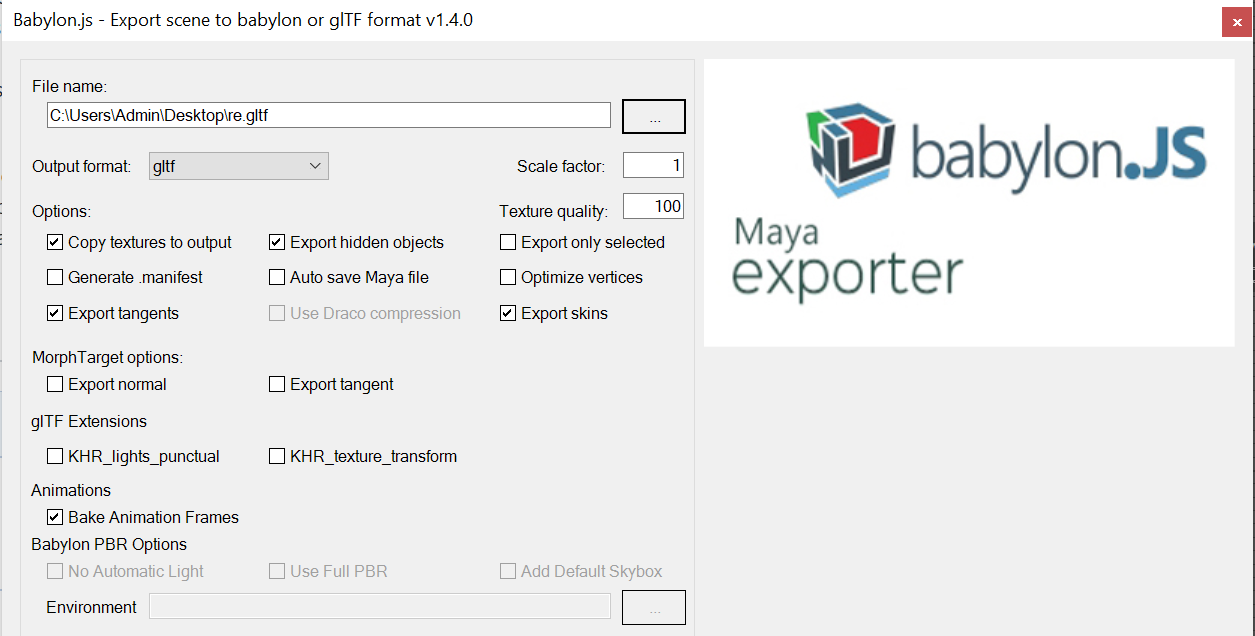
I presses export and run and I can not see any error:
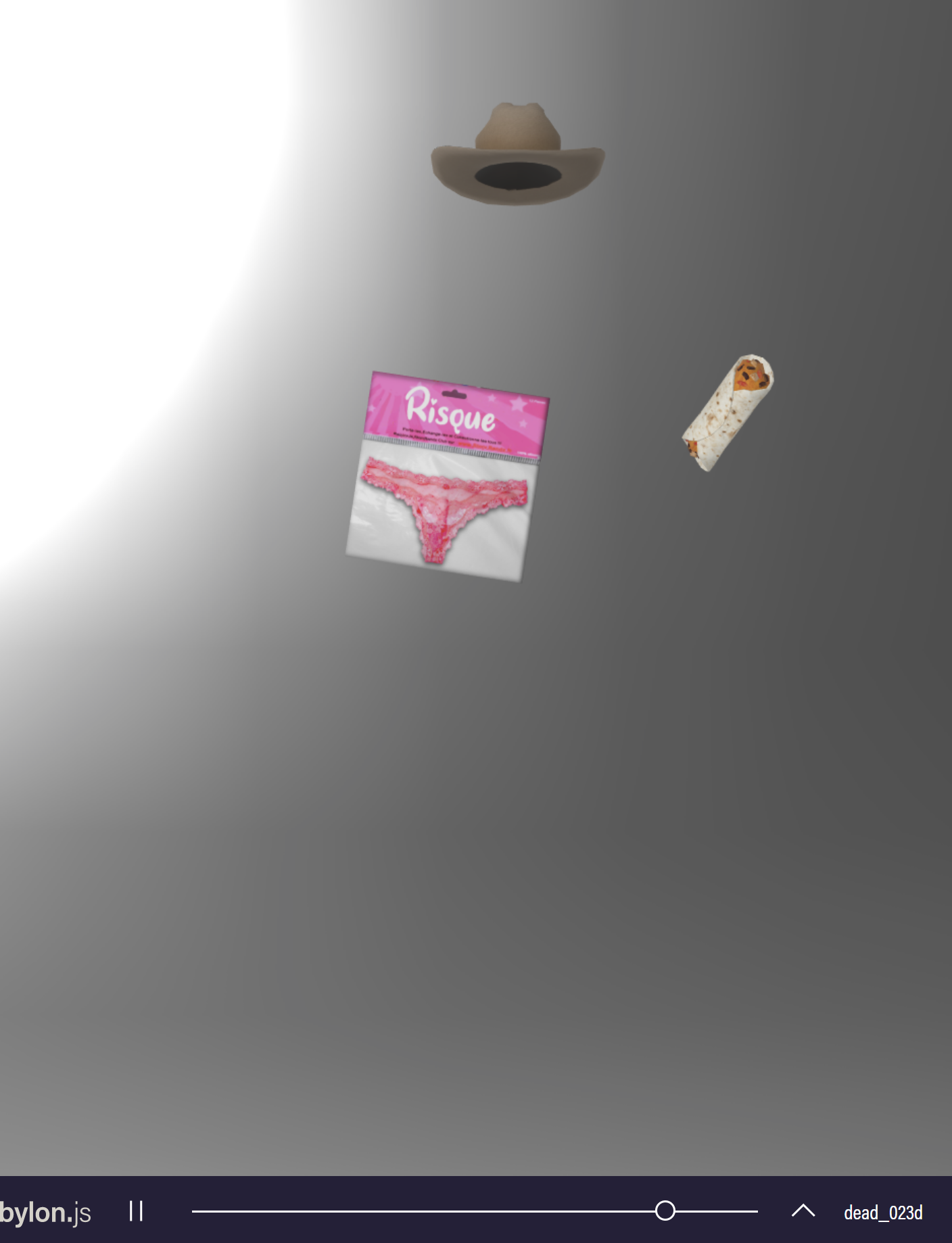
Could you confirm you export in a similar way ???
sebavan
on 24 Jun 2019
Mostly identical, though a few differences:
I'm using Maya 2018, for one. Beyond that I'm using "export selected only". Lastly, my version of babylon exporter doesn't have that bottom row of options (I assume because you're on 1.4 and the link you sent is 1.3, so you're probably beta or whatever).
Those things strike me as minor, but maybe they'll be significant to you somehow?
BaldSavant
on 24 Jun 2019
Yup some of the fixes might only be available in 1.4, could you try it out and let us know ?
Thanks a lot in advance.
sebavan
on 25 Jun 2019
So I updated my babylon exporter and even went ahead and updated to Maya 2019 as well and what I'm getting is still this (though I DID get a screengrab of the texture error, so that's convenient):

So still no luck, even with 1.4 and maya 2019
BaldSavant
on 25 Jun 2019
@BaldSavant Could you share with me a screenshot of your export config ? I am unfortunately unable despite quite a lot of different tests ?
sebavan
on 25 Jun 2019
Conveniently, I had left the window running, so this is exactly the exporter I used to make the previous image
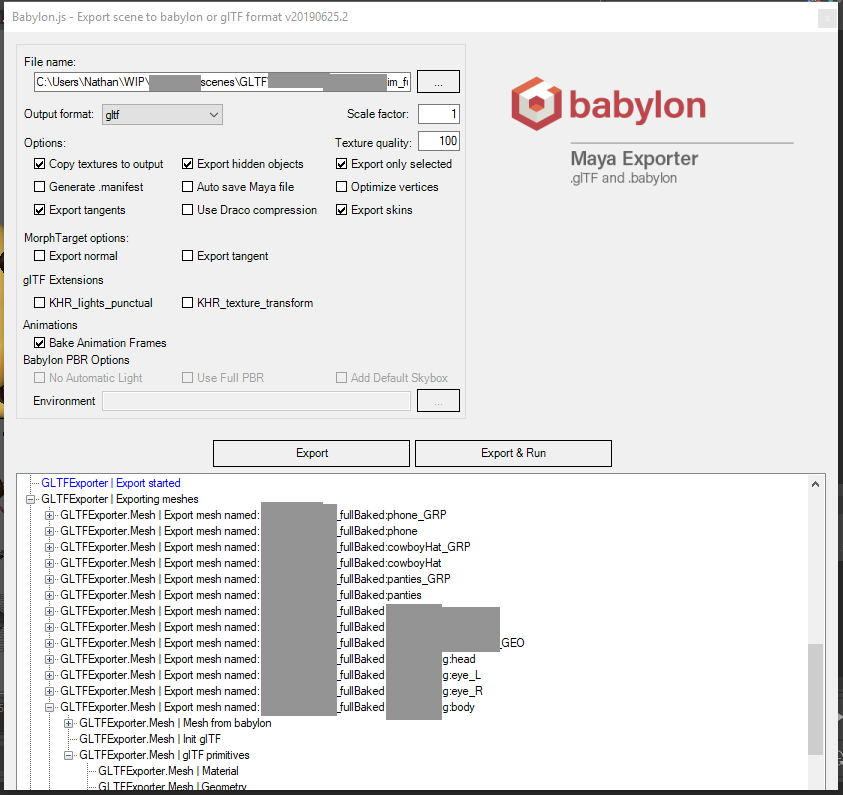
BaldSavant
on 25 Jun 2019
Great and what is selected at export time ? that is the main difference I can spot for me I unselected this box.
sebavan
on 26 Jun 2019
So I can't show you an image, of course, but it's a set of meshes and groups. The character mesh is a number of separate pieces all grouped under an overall character geo node. Each of the props are a single piece of geo which has an empty group above them for rigging/animation purposes (same reason the character meshes are all grouped under a node together). The objects which are selected during this export are all of the geo pieces and the groups above.
It's 19 objects total. 5 of which are the described group nodes, and the other 14 are the meshes. I need all 19 of these objects for this export to be considered successful.
edit: Oh, and the 5 group nodes are all the root of their various hierarchies. They are in no way attached.
Also, the props are not referenced into the scene, but the character IS referenced, so both its geo node and the meshes under it are all referenced objects.
BaldSavant
on 26 Jun 2019
Could you try to uncheck the Export Only Selected just to confirm this at least works for you ?
sebavan
on 26 Jun 2019
Ok, so one interesting problem with my situation here is that I'm trying to export 8000 frames of animation, which takes roughly 2 hours. That's why I'm using Export Selected, because I want only the minimum to keep the time down (not that I imagine it would add more time, admittedly).
All that to say that I can try it, but I won't know the result until tomorrow.
BaldSavant
on 26 Jun 2019
Else do you think you could create a smaller repro as you did last time ?
This would be the easiest way to troubleshoot.
sebavan
on 26 Jun 2019
Did the full export and have the same issue even with Export Only Selected turned off.
BaldSavant
on 26 Jun 2019
@BaldSavant I ran into this issue the other day accidentally. Hopefully I can chime in with something useful.
Your error message looks like the sandbox is trying to access a texture referenced by the gltf that isn't found. Can you see what happens if you load a PNG with the expected name alongside the gltf?
@deltakosh, is this correct behavior? I would have assumed that if a texture is not found, we replace it with a default texture instead of failing to load the model entirely.
 Drigax
on 26 Jun 2019
Drigax
on 26 Jun 2019
The behaviour is correct when the texture is not found my issue is why is it not found, not exported or not accessible ?
@BaldSavant could you check if it is exported at least in your destination folder ?
sebavan
on 26 Jun 2019
@sebavan So it does generate a file by that name into my destination folder. The file is predictably identical to the props texture it's sort of named after.
@Drigax If I grab both the gltf and the jpg and drag them into the sandbox together, I just get the "failed to load" error instead of the texture-specific error. (the same error as in the first post of this thread)
BaldSavant
on 26 Jun 2019
@BaldSavant you also need to drag the bin file associated.
It looks like the server does not find the file for some reason. I wonder if you have spaces or other special characters in the generated path.
sebavan
on 26 Jun 2019
Ah. So you do. I now get a new, exciting error:
"Failed to execute 'open' on 'XMLHttpRequest': Invalid URL"
That's when I drag the .gltf .jpg and .bin files all together into the sandbox viewer.
BaldSavant
on 26 Jun 2019
Could you check in the devtools network tab if anything is wrong. I am more and more sure there are some caracter issues in the generated urls or something related to this
Would be great if you could create a smaller sharable repro.
sebavan
on 27 Jun 2019
Ok, so I had our network guy come walk me through the devtools network tab to be as sure as possible I wasn't missing anything, and neither of us see anything useful in the network tab itself. He said it looked like the process was being stopped before it ever got to try and call for anything, which generally makes sense given it's telling us that it's failed to even execute the open command.
However, I'm getting a long list of errors on the Console tab, most of which are variations on this:
babylon.js:16 Access to XMLHttpRequest at 'file://txt_pads_tm.jpg/' from origin 'https://sandbox.babylonjs.com' has been blocked by CORS policy: Cross origin requests are only supported for protocol schemes: http, data, chrome, chrome-extension, https.
There seems to be a copy of that error for each texture file that my gltf should be using. Also, on the bottom of a long list of the above error, there is one final error which is this:
babylon.js:formatted:26549 Uncaught (in promise) DOMException: Failed to execute 'open' on 'XMLHttpRequest': Invalid URL
    at e.open (https://preview.babylonjs.com/babylon.js:16:618171)
    at s (https://preview.babylonjs.com/babylon.js:16:114242)
    at p (https://preview.babylonjs.com/babylon.js:16:115055)
    at Function.e.LoadFile (https://preview.babylonjs.com/babylon.js:16:115283)
    at https://preview.babylonjs.com/loaders/babylonjs.loaders.min.js:1:33796
    at new Promise (<anonymous>)
    at https://preview.babylonjs.com/loaders/babylonjs.loaders.min.js:1:33739
    at async Promise.all (index 1)
    at async Promise.all (index 0)
    at async Promise.all (index 1)
and as to your repro request, I'm not able to share anything with the character model we're using, regardless of how small. I've already shared everything else that's in this maya file currently, and you don't seem to be having the same issue with that file, so unfortunately I don't think there's anything else I can do to help aside from describing my issues as best I can.
BaldSavant
on 27 Jun 2019
It looks more and more like an issue with the requests for you.
Do you experience the same with a simple cube with a texture for instance. Also what browser/version/os are you using ?
This is getting stranger and stranger.
sebavan
on 27 Jun 2019
oh my god. I DO get this error with the textured box. Did my whole sandbox just break?!
I'm using windows 10, Chrome.... uh... looks like Version 75.0.3770.100 (Official Build) (64-bit)
BaldSavant
on 27 Jun 2019
ok, I just tested on some old files and they all seem to work still, so it's not just the sandbox breaking, it must be something with the more recent exporter.
BaldSavant
on 27 Jun 2019
I am on the exact same os/browser, could you try drag drop in Firefox ? to understand if it is local or browser specific ?
sebavan
on 27 Jun 2019
Yep, my box test scene still has the same error in Firefox, which I've just downloaded and installed, so I know it's up to date
BaldSavant
on 27 Jun 2019
Wait, I was mistaken. I didn't drag the texture in with the box. The box gltf works if I move the texture in with it into firefox. My character file I actually need is NOT working, even when I grab associated texture files.
BaldSavant
on 27 Jun 2019
also of interest, it looks like the filepath it's trying to find is wrong. If you look at the last image I shared, with the error related to the texture path, you can see it's asking for %3A in part of the image path, but my local file is using underscores, not colons, for its entire file name. So it should never be trying to refer to a %3A (which google tells me is a colon)
BaldSavant
on 27 Jun 2019
Could you try a glb export instead ? to validate that we have a similar issue ?
sebavan
on 27 Jun 2019
the glb of the textured box actually works in chrome just fine, unlike the gltf of the same.
BaldSavant
on 27 Jun 2019
.........................
I just tried the box test again and it's working in chrome, even as a gltf. That was not the case a few minutes ago, I swear.
BaldSavant
on 27 Jun 2019
Ok I am pretty sure this is the colon in the mesh/texture names which is breaking your export.
As a quick test you could try to rename all the :head / :eye... / :body to see if it works, if confirmed we ll try to find a way to fix the export.
sebavan
on 27 Jun 2019
Ah, so there's at least part of the problem here. I've got a namespace in maya because the character is referenced right now. so in Maya we've got materials called [character]_anim_fullBaked:deadPropsMat and babylon seems to want to create jpegs based on those materials, for whatever reason, but windows doesn't allow filenames to include colons. This means that no, I can't rename the textures and try again, but also helps to illuminate why this desync is happening in the first place.
BaldSavant
on 27 Jun 2019
Yup I will try to prevent using colon in texture names to see if that fixes it.
sebavan
on 27 Jun 2019
Could you create a textured box with this kind of namespace setup ??? I have no idea how to do this part. It should be enough to repro.
sebavan
on 27 Jun 2019
OK! Yes. I can now reproduce this problem with the box!
If you have a namespace on the material when exporting a gltf, it kicks out a misnamed image file, and when you try to bring all of those into the sandbox, you get the 'failed to open' error I've mentioned.
I also tried to make a glb with the same file after exporting the gltf and ended up with an error in babylon saying "Export cancelled: could not find file "blah blah file location" at System.IO.___Error.WinIOError(Int32 errorCode, String maybeFullPath) at System.IO.FileStream.Init(String path, FileMo" (which ends very suddenly, so I'm not sure I'm seeing the whole error, but anyway)
BaldSavant
on 27 Jun 2019
Could you share the maya file of the broken box ? this would be awesome :-)
sebavan
on 27 Jun 2019
Here ya go, a whole pile of files I've used to recreate the problem, and the results of my exports (including a mostly blank folder from when the glb export failed) so you can play with those and see if you get the same results.
I'm also headed home for the day, so hopefully these files will give you enough to work with for the evening. Thanks for all your help!
BaldSavant
on 27 Jun 2019
Yup it looks like a great repro thanks a ton !!!
sebavan
on 27 Jun 2019
You can find the new release here: https://github.com/BabylonJS/Exporters/releases/tag/preRelease20190627.1
sebavan
on 27 Jun 2019
Related issues
 vpenades
·
9Comments
vpenades
·
9Comments
 ogmasoul3d
·
7Comments
ogmasoul3d
·
7Comments
 echadwick-wayfair
·
5Comments
echadwick-wayfair
·
5Comments
 MaximeOrlandi
·
7Comments
Drigax
·
7Comments
MaximeOrlandi
·
7Comments
Drigax
·
7Comments