Exporters: Maya inserted colon in material names causing texture export failure
Bug
When importing an OBJ file into Maya, the material names will be renamed with a colon in them like this:
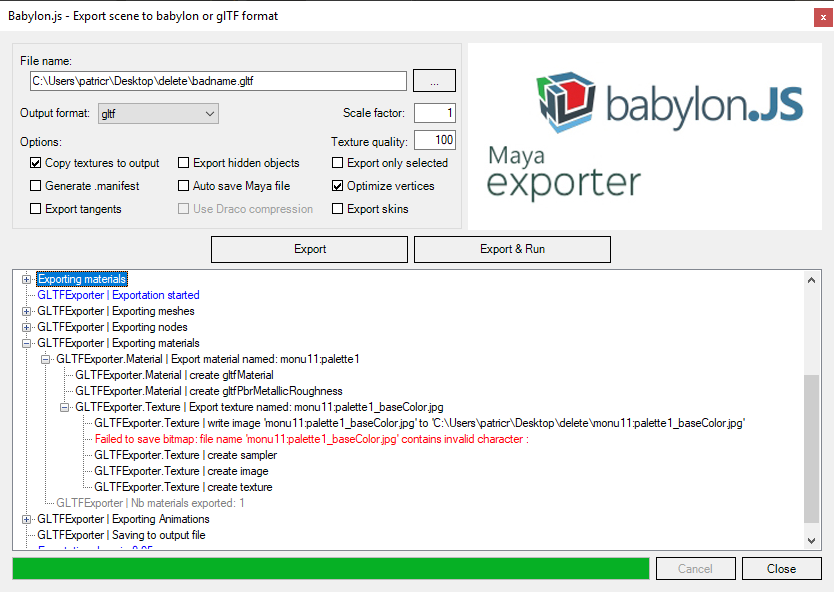
When exporting this mesh to glTF with the Babylon exporter, an error is generated saying the exporter failed to save the bitmap because it contains an invalid character. Renaming the material to remove the colon corrects the issue and it will export correctly. We should automatically remove any invalid characters in material names from Maya as adding the mesh name and a colon is default behavior for importing meshes to prevent conflicts in object names.
 PatrickRyanMS
All 2 comments
@PatrickRyanMS just merged a fix for this for v1.2.23: https://github.com/BabylonJS/Exporters/tree/master/Maya
 kcoley
on 17 Oct 2018
kcoley
on 17 Oct 2018
👍1
Feel free to reopen if the issue comes up again
kcoley
on 17 Oct 2018
👍1
Was this page helpful?
0 / 5 - 0 ratings
Related issues
 jcartie
·
8Comments
jcartie
·
8Comments
 kutomer
·
6Comments
kutomer
·
6Comments
 cptSwing
·
6Comments
cptSwing
·
6Comments
 echadwick-wayfair
·
3Comments
echadwick-wayfair
·
3Comments
 ogmasoul3d
·
7Comments
ogmasoul3d
·
7Comments