Steps to reproduce
How can we trigger this problem?
Try to flash a v2.0 version ota to a esp 8285 with 1M flash
Does the problem persists after powering off and on? (just resetting isn't enough sometimes)
Expected behavior
After flashing a ESPEasyUploaderMega_1024 for 8285 it should be possible to flash a new espeasy version.
Size of the ESPEasyUploaderMega_1024 for 8285 should be smaller or the espeasy firmware should be smaller.
Actual behavior
Hi, I've tried to flash a new espeasy firmware ota to a 8285 device.
Yes, it has 1M Flash, so it is not directly possible.
I've tried with ESPEasyUploaderMega_1024.bin , but this does not work.
I then compiled one for 8255, but infortunally it has a size of 308Kb now
Flash Size: | 1024 kB
-- | --
Sketch Max Size: | 568 kB
System | Reboot
Firmware | Load
So it is currently not possible to flash a firmware ota
System configuration
Hardware:
Sonoff S20 with 8285 Chip
Software or git version:
ESP_Easy_v2.0-20180322_normal_ESP8285_1024.bin
 sidey79
All 37 comments
Yay, I get to close an issue..
This will work for all Sonoff 8266 devices, very confident it should be fine for 8285 too.
If you flash from above v2 to below v2, or vice versa you will need reconfig the Sonoff.
Connect to Sonoff via WiFi after flashing initial & using password espconfig then use http://192.168.4.1
Recent after 2.0 upgrading / downgrading configs will be saved, it will be found on same IP.
No need to restart / power off the Sonoff.
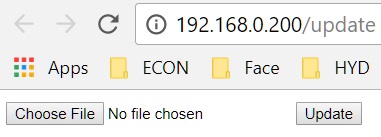
After upgrading the same looking page as the original will reload, so remove the /update from the address in the browser to go to the main page to ensure it is ready,
sorry I haven't had time to fix it yet.
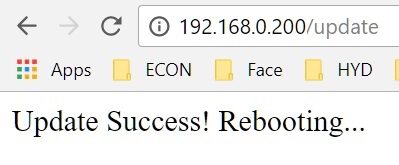
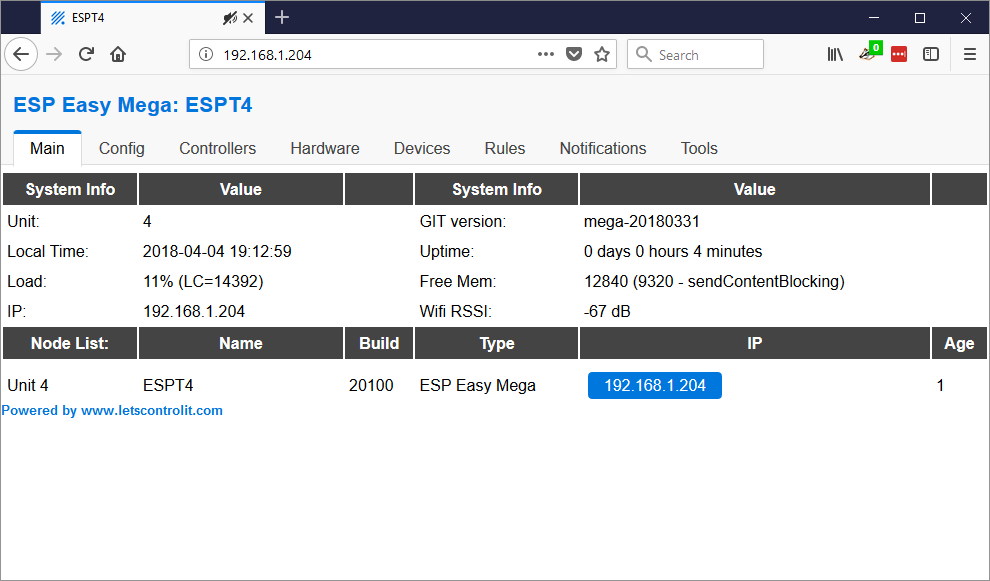
It's ambiguous.. Main page looks like this
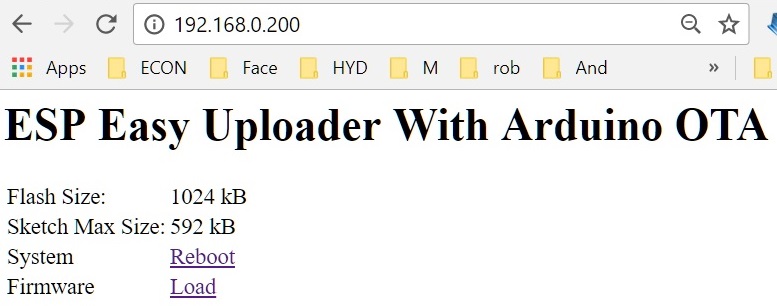
You see this you are good to go, I assume you don't get to see this page now.
You will not see any LED on the Sonoff after uploading the initial uploader.
The one you have flashed now with megauploader is now dead & needs a cable to fix.
Hoping you have more to update ? If not, after you fix your Sonoff please use this firmware to do a firmware swap so I get some feedback with 8285.. I use it to upgrade / downgrade all my firmwares for debugging.
If upgrading/downgrading older firmwares you will also need converted older firmware..
All recent 1m firmwares releases are already the correct format.
Initial_Firmware_Uploader_Sonoff_1M.zip
 Oxyandy
on 29 Mar 2018
Oxyandy
on 29 Mar 2018
So i just used the wrong uploader firmware?
with Initial_Firmware_Uploader_Sonoff_1M it should work?
This shoud be corrected in the docs:
https://www.letscontrolit.com/wiki/index.php/ESPEasy#2.0.2B_firmware_on_1MB_modules
sidey79
on 29 Mar 2018
Mate I agree, I am new to everything IoT...
I have a hole in my head for all the things I have studied, then followed the docs 'exactly'
only to learn much later why it was not working -- but only after I work it out for myself..
Hours of my time wasted pulling units apart and back together to cable flash, cause OTA failed.
Hope you enjoy my solution, happy to share..
A positive result from you will make me smile ear to ear ;)
Cheers
Oxyandy
on 29 Mar 2018
I compiled another specific to 8285, if you have further issues..
Oxyandy
on 29 Mar 2018
@sidey79 - How did you go ?
Did you confirm it's working ?
Thanks
Oxyandy
on 31 Mar 2018
@Oxyandy
Yes, i can confirm.
- flash Initial_Firmware_Uploader_Sonoff_1M.zip
- Flash ESP_Easy_v2.0-20180322_normal_ESP8285_1024.bin
I am happy. All settings are preserved :)
sidey79
on 31 Mar 2018
Yay !
I had no 8285 to confirm with, so thanks for eliminating the 0.01% doubt I had.
I could easily write a program that you drag & drop a firmware onto and it outputs the correct format. Sadly I have a 1TB hard drive which has some kind of chip failure, all my goodies for programming are on there.. Died 1 day after I put everything on there as a temp place to sort them.
Things I could really use right about now.
Writing something now, without access would take me 10 times longer, I might try the freezer trick today see if I can get a read.. Recovery needs a new board & a few hundred dollars :(
Oxyandy
on 1 Apr 2018
Hi,
I have tried to upload a new firmware on a 8285 unit (WEMOS D1 MINI) using both the "Initial_Firmware_Uploader_Sonoff_1M.zip" and the "ESPEasyUploaderMega_1024.bin".
But in both cases I couldn't get back to the unit web page. I had to reflash it using a usb cable.
Hardware:
WEMOS D1 LITE 1M (8285)
 giig1967g
on 2 Apr 2018
giig1967g
on 2 Apr 2018
@giig1967g - So you never got to see the 'Uploader Page' ?
Or after you uploaded, the initial that was fine,
then you uploaded main firmware, then no response from the webserver..
Which ?
And what firmware was on there before ?
Sorry I do not have same hardware
Oxyandy
on 2 Apr 2018
Hi,
I don't see the uploader page at all.
And the settings are gone.
I tested several. Mega-dev-12 and a more recent one mega-20180326.
giig1967g
on 2 Apr 2018
As I said above ESPEasy_v2.0.0-dev12_normal_8285.bin is not in correct format..
"If upgrading/downgrading older firmwares you will also need converted older firmware..
All recent 1m firmwares releases are already the correct format."
But yeah, I can write a tool which sorts & also creates the correct format firmwares..
After I converted every firmware I found, I am able to upgrade & downgrade ALL fimwares ever released and change via OTA on my Sonoff Basic Modules
@giig1967g do you usually flash with DOUT specified ?
Oxyandy
on 3 Apr 2018
Hi,
Didn't work with recent firmware also..
Sorry what is DOUT?
giig1967g
on 3 Apr 2018
https://www.letscontrolit.com/wiki/index.php/ESP_Hardware#Flash_modes
I wish more people studied the wiki...
 Grovkillen
on 3 Apr 2018
Grovkillen
on 3 Apr 2018
Sorry :(
To flash I connect the unit to a USB port and use your tool "ESP.Easy.Flasher".
Using OTA, I just load the firmware from the web page.
I can't say if I use QIO, DIO or DOUT.
Back to topic, anyone have been able to use "ESPEasyUploaderMega_1024.bin" to upgrade the firmware OTA?
giig1967g
on 3 Apr 2018
As you see in the documentation the 1024 size FW files are predefined as DOUT, the rest is DIO. None are QIO. BUT you can manually override this internally set flash mode with a flash tool, mine can force DOUT for example. If you haven't specifically done anything to force the setting you can be sure that the file you flashed (1024) is indeed DOUT.
Grovkillen
on 3 Apr 2018
You also have to set the flash mode during build, to make sure the that mode is still being used by the firmware itself.
Using a slower mode will always work, the other way around is not guaranteed.
In terms of performance: QIO > QOUT > DIO > DOUT
So if you can flash using DIO, you can also write using DOUT.
But if you need to flash using DOUT, you have to use a firmware file built with DOUT set. Else the flashing will work, but updating settings may not work.
 TD-er
on 3 Apr 2018
TD-er
on 3 Apr 2018
thanks for the explanation.
But still I can't understand how I can flash the 1M chipset (8285) via OTA.
If the published firmwares are DOUT, then it should work, but it didn't.
giig1967g
on 3 Apr 2018
My guess is that the firmware should get smaller.
The size of the new firmware + intermediate firmware + spiff should be smaller than 1M
Also I don't know where the firmware file is being stored during flash procedure. Maybe the 8285 has some strange limitations, which make OTA a lot more difficult.
TD-er
on 3 Apr 2018
Can you please explain more detailed, what Firmware files you flashed and what exactly ist halpening after that?
sidey79
on 3 Apr 2018
Yes.
Latest test was:
My unit had firmware ESP_Easy_mega-20180326_dev_ESP8285_1024.bin
Correctly configured with my SSID, wifipassword and static IP address.
I uploaded ESPEasyUploaderMega_1024.bin.
The web page said "Upload succcessful. Rebooting."
But then I could not reach the unit anymore to upload the new firmware.
I had to connect the unit to my PC using a USB cable and then reload a new firmware.
So, the problem seems that the uploader does not work.
giig1967g
on 3 Apr 2018
Right,
I uploaded ESPEasyUploaderMega_1024.bin.
The web page said "Upload successful. Rebooting."
Exactly the symptoms, I was able to get.
The message - "Upload successful. Rebooting." - is as a result of the firmware 'already' on the device..
If you were now to connect the device to a 'Serial Monitor', I am sure the 'Uploader Firmware' is dead..
Once this happens, the only cure is to 'cable flash'...
If your WEMOS 8285 hardware has the same limitations as the Sonoffs then you need to use:
1. Initial_Firmware_Uploader_Sonoff_1M
This is why it was posted here..
You should see
"Upload successful. Rebooting."
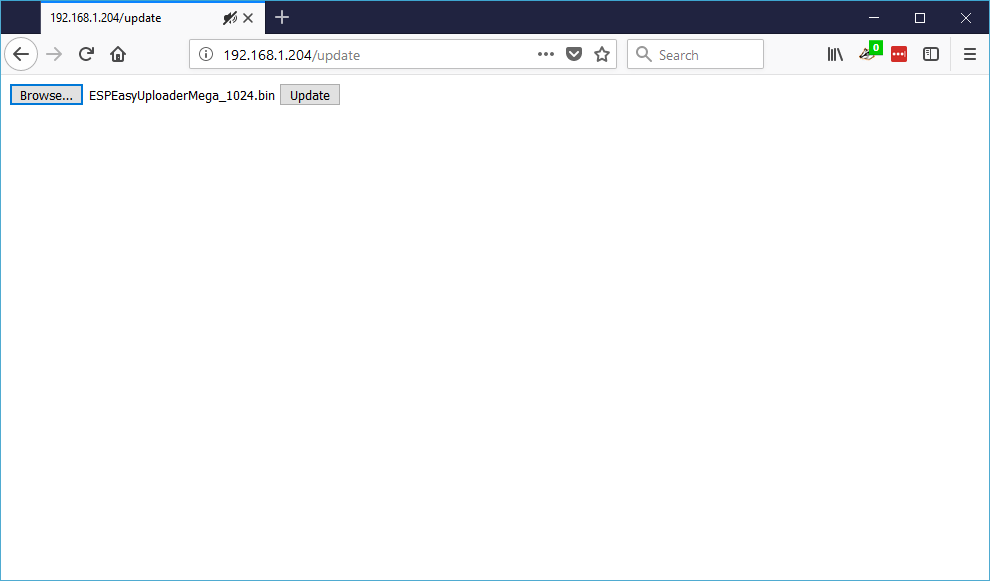
Then it should be asking for a new file to upload, a very plain page with 2 grey buttons like you started with.
Remove the /update from the address in the browser to go to the main page.
Main page looks like this
So STOP here...
Answer the question, are you able to see the main page as pictured above after uploading either of the
'Firmware Uploader'
?
Oxyandy
on 3 Apr 2018
Hi,
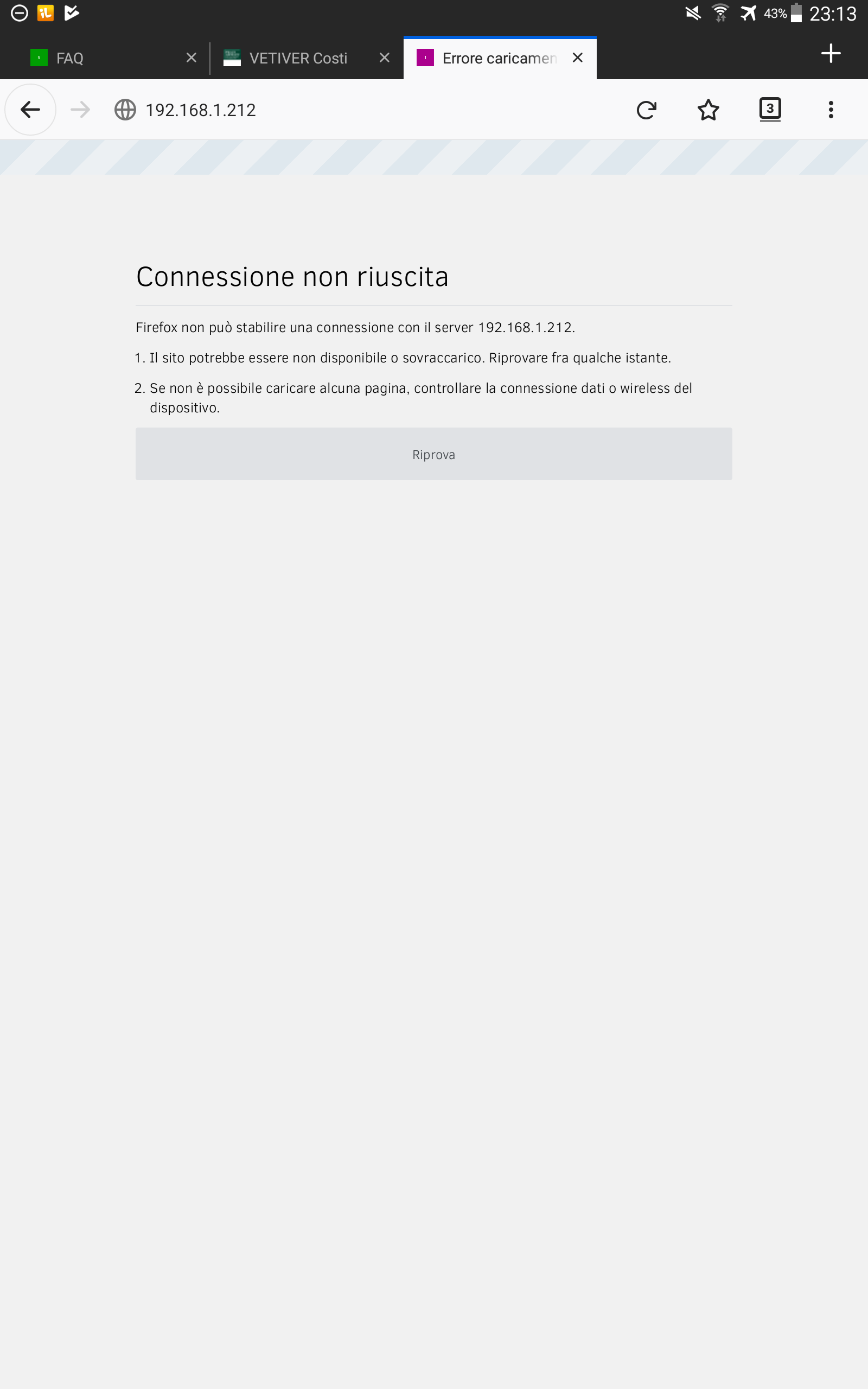
Plain answer is no.
I get a white error page.
giig1967g
on 3 Apr 2018
Your screen shot is missing /update
Does that mean you 'after' the initial firmware upload you saw
What firmware was on the WEMOS before uploading the initial ?
Have you ever seen the page as in the picture above
-- 'after' uploading either of the "Uploader' firmwares ?
On the newer firmwares, there is a 'Check Box' for "Enable Arduino OTA", have you been ticking this ?
Oxyandy
on 4 Apr 2018
Hi,
after the upload of the "Firmware_Uploader" I saw the following screen (copied from your screenshots):
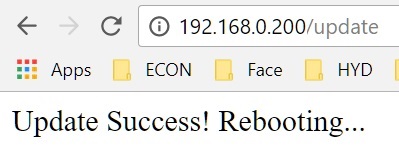
Then I removed the /update to acess the unit and I got blank page.
I haven't set "Enable Arduino OTA".
Will try it tonight, but on the 4M units the OTA works even without that setting.
On WEMOS I had mega-20160326
giig1967g
on 4 Apr 2018
Then I removed the /update to access the unit and I got blank page.
How long did you wait ? Did you try a few times ?
I'd like to help you be successful & learn why it has not been easy for you..
This way maybe I can help others better...
Learn why people are finding it difficult...
Oxyandy
on 4 Apr 2018
Really thanks for your help!
I waited quite a long time.
Last test I made was a day after the update.
(the unit is still connected but unaccessible)
But let me try with the "Enable Arduino OTA" setting.
That could be the trick.
giig1967g
on 4 Apr 2018
Hi,
I made several tests tonight.
The result is the following:
With ESPEasyUploaderMega_1024.bin (with or without setting "Enable Arduino OTA") the unit uploads the uploader and then crashes with the log below. Then no more logs in the serial console.
With Initial_Firmware_Uploader_Sonoff_1M.bin the unit uploads the uploader and then crashes with the same error log but keeps crashing forever on the serial console.
Maybe the version of the uploader are not compiled for the 8285?
INIT : Booting version: mega-20180331
INIT : Warm boot #4
FS   : Mounting...
FS   : Mount successful, used 75802 bytes of 113201
CRC  : program checksum       ...OK
CRC  : Settings CRC           ...OK
CRC  : SecuritySettings CRC   ...OK
INIT : Free RAM:17288
INIT : I2C
INIT : SPI not enabled
WIFI : AP Mode disabled
WIFI : AP Mode ssid will be ESP_Easy-0 with address 192.168.4.1
IP   : Static IP :3422660800
WIFI : Connecting KeepOut attempt #0
WD   : Uptime 0 ConnectFailures 0 FreeMem 14440
IP   : Static IP :3422660800
IP   : Static IP :3422660800
IP   : Static IP :3422660800
IP   : Static IP :3422660800
WIFI : Connected! AP: KeepOut (BC:EE:7B:EF:A3:38) Ch: 9 Duration: 3061 ms
WIFI : Static IP: 192.168.1.204 (ESP-Easy-0) GW: 0.0.0.0 SN: 0.0.0.0
WD   : Uptime 1 ConnectFailures 0 FreeMem 13992
FILE : Saved config.dat
FILE : Saved security.dat
Update: ESPEasyUploaderMega_1024.bin
                                    sleep disable
                                                 ...................................................................................................ERROR[0]: No Error
.ERROR[0]: No Error
.ERROR[0]: No Error
...................................Update Success: 276848
                                                         Rebooting...

 ets Jan  8 2013,rst cause:2, boot mode:(3,7)

load 0x4010f000, len 1384, room 16
tail 8
chksum 0x2d
csum 0x2d
v09826c6d
@cp:0
     ld

Exception (0):
epc1=0x40231560 epc2=0x00000000 epc3=0x00000000 excvaddr=0x00000000 depc=0x00000000

ctx: sys
sp: 3ffff8a0 end: 3fffffb0 offset: 01a0

>>>stack>>>
3ffffa40:  60000600 3ffeeca8 40233988 3ffffa70
3ffffa50:  0019c06a 00100000 4023588b 3ffeed54
3ffffa60:  3ffeeca8 3ffffa70 00000008 3fffff10
3ffffa70:  40235c78 3ffffa80 00000008 40225436
3ffffa80:  00000010 40225421 00000082 00000079
3ffffa90:  00000026 58323025 0000007d 3fff12d4
3ffffaa0:  00000000 40206855 3fff12d4 3fff12d4
3ffffab0:  3ffee81e 4023a430 00000000 3fffff10
3ffffac0:  40004b31 3fff12d4 000002f4 000fc000
3ffffad0:  4010569e 0000001f 3ffee81e 40221fc7
3ffffae0:  40222640 60000e00 3fff12d4 4022261b
3ffffaf0:  40104ee4 000000fd 0000001f 60000200
3ffffb00:  3fffff10 ffffffff ffffffff ffffffff
3ffffb10:  ffffffff ffffffff ffffffff ffffffff
3ffffb20:  ffffffff ffffffff ffffffff ffffffff
3ffffb30:  ffffffff ffffffff ffffffff ffffffff
3ffffb40:  ffffffff ffffffff ffffffff ffffffff
3ffffb50:  ffffffff ffffffff ffffffff ffffffff
3ffffb60:  ffffffff ffffffff ffffffff ffffffff
3ffffb70:  ffffffff ffffffff ffffffff ffffffff
3ffffb80:  ffffffff ffffffff ffffffff ffffffff
3ffffb90:  ffffffff ffffffff ffffffff ffffffff
3ffffba0:  ffffffff ffffffff ffffffff ffffffff
3ffffbb0:  ffffffff ffffffff ffffffff ffffffff
3ffffbc0:  ffffffff ffffffff ffffffff ffffffff
3ffffbd0:  ffffffff ffffffff ffffffff ffffffff
3ffffbe0:  ffffffff ffffffff ffffffff ffffffff
3ffffbf0:  ffffffff ffffffff ffffffff ffffffff
3ffffc00:  ffffffff ffffffff ffffffff ffffffff
3ffffc10:  ffffffff ffffffff ffffffff ffffffff
3ffffc20:  ffffffff ffffffff ffffffff ffffffff
3ffffc30:  ffffffff ffffffff ffffffff ffffffff
3ffffc40:  ffffffff ffffffff ffffffff ffffffff
3ffffc50:  ffffffff ffffffff ffffffff ffffffff
3ffffc60:  ffffffff ffffffff ffffffff ffffffff
3ffffc70:  ffffffff ffffffff ffffffff ffffffff
3ffffc80:  ffffffff ffffffff ffffffff ffffffff
3ffffc90:  ffffffff ffffffff ffffffff ffffffff
3ffffca0:  ffffffff ffffffff ffffffff ffffffff
3ffffcb0:  ffffffff ffffffff ffffffff ffffffff
3ffffcc0:  ffffffff ffffffff ffffffff ffffffff
3ffffcd0:  ffffffff ffffffff ffffffff ffffffff
3ffffce0:  ffffffff ffffffff ffffffff ffffffff
3ffffcf0:  ffffffff ffffffff ffffffff ffffffff
3ffffd00:  ffffffff ffffffff ffffffff ffffffff
3ffffd10:  ffffffff ffffffff ffffffff ffffffff
3ffffd20:  ffffffff ffffffff ffffffff ffffffff
3ffffd30:  ffffffff ffffffff ffffffff ffffffff
3ffffd40:  ffffffff ffffffff ffffffff ffffffff
3ffffd50:  ffffffff ffffffff ffffffff ffffffff
3ffffd60:  ffffffff ffffffff ffffffff ffffffff
3ffffd70:  ffffffff ffffffff ffffffff ffffffff
3ffffd80:  ffffffff ffffffff ffffffff ffffffff
3ffffd90:  ffffffff ffffffff ffffffff ffffffff
3ffffda0:  ffffffff ffffffff ffffffff ffffffff
3ffffdb0:  ffffffff ffffffff ffffffff ffffffff
3ffffdc0:  ffffffff ffffffff ffffffff ffffffff
3ffffdd0:  ffffffff ffffffff ffffffff ffffffff
3ffffde0:  ffffffff ffffffff ffffffff ffffffff
3ffffdf0:  ffffffff ffffffff ffffffff ffffffff
3ffffe00:  ffffffff ffffffff ffffffff ffffffff
3ffffe10:  ffffffff ffffffff ffffffff ffffffff
3ffffe20:  ffffffff ffffffff ffffffff ffffffff
3ffffe30:  ffffffff ffffffff ffffffff ffffffff
3ffffe40:  ffffffff ffffffff ffffffff ffffffff
3ffffe50:  ffffffff ffffffff ffffffff ffffffff
3ffffe60:  ffffffff ffffffff ffffffff ffffffff
3ffffe70:  ffffffff ffffffff ffffffff ffffffff
3ffffe80:  ffffffff ffffffff ffffffff ffffffff
3ffffe90:  ffffffff ffffffff ffffffff ffffffff
3ffffea0:  ffffffff ffffffff ffffffff ffffffff
3ffffeb0:  ffffffff ffffffff ffffffff ffffffff
3ffffec0:  ffffffff ffffffff ffffffff ffffffff
3ffffed0:  ffffffff ffffffff ffffffff ffffffff
3ffffee0:  ffffffff ffffffff ffffffff ffffffff
3ffffef0:  ffffffff ffffffff ffffffff ffffffff
3fffff00:  ffffffff ffffffff ffffffff ffffffff
3fffff10:  ffffffff ffffffff ffffffff ffffffff
3fffff20:  ffffffff ffffffff ffffffff ffffffff
3fffff30:  ffffffff ffffffff ffffffff ffffffff
3fffff40:  ffffffff ffffffff ffffffff ffffffff
3fffff50:  ffffffff ffffffff ffffffff ffffffff
3fffff60:  ffffffff ffffffff ffffffff ffffffff
3fffff70:  ffffffff ffffffff ffffffff ffffffff
3fffff80:  ffffffff ffffffff ffffffff ffffffff
3fffff90:  ffffffff 3fff6a6c 00000007 3fff5670
3fffffa0:  200201e9 3fff5a68 ffffff01 ffffffff
<<<stack<<<

 ets Jan  8 2013,rst cause:2, boot mode:(3,7)

load 0x4010f000, len 1384, room 16
tail 8
chksum 0xef
csum 0xef
csum err
ets_main.c
 ets Jan  8 2013,rst cause:4, boot mode:(3,7)

wdt reset
load 0x4010f000, len 1384, room 16
tail 8
chksum 0xef
csum 0xef
csum err
ets_main.c
giig1967g
on 4 Apr 2018
any news on this?
giig1967g
on 5 Apr 2018
Hi @giig1967g
I have no more time to devote to 8285 hardware, as I do not have any, I can not test.
I know the "Initial Uploader" has now helped 3 users change firmware via OTA
that could not do it earlier..
Very interested to see if you can find a solution, post back if you do.
Oxyandy
on 6 Apr 2018
Take a look at my EspBuddy. It can do the "two-steps" OTA upload in one command, and the included OTA intermediate firmware has been reported (at least once) to be working on ESP8285.
HTH
 soif
on 6 Apr 2018
soif
on 6 Apr 2018
Hi,
I ttied to load "ESPEasyUploader.OTA.1m128.esp8266.bin" via OTA, but the result was that after the upgrade the unit became unresponsive, and kept sending rubbish to the serial port, until I reflashed it.
Is this uploader compiled for 8285?
giig1967g
on 6 Apr 2018
it is compiled with dout flash_mode and thus should work on both 8285 and 8266. One user had issue similar to yours and finally succeeded on a 8285 device. You should read the full issue to find clues. _The size and corrupted SPIFF are usual suspects..._
soif
on 7 Apr 2018
@soif, I read giig1967g issue as never even once being able to see the 'Upload Page'
after uploading the initial firmware..
Is this the same giig1967g ?
Oxyandy
on 7 Apr 2018
@Oxyandy : correct.
giig1967g
on 7 Apr 2018
@soif, I read giig1967g issue as never even once being able to see the 'Upload Page'
after uploading the initial firmware..
_Just a suggestion : maybe you could really and carefully read the issue linked , and try by yourself._
Absolutely sorry to just try to help you 😦 ,
soif
on 7 Apr 2018
@soif , I meant no harm, do not stop suggesting because of me, you can see I've tried..
@giig1967g please try flash initial via serial, see if there is serial output &/or if device loads to
"Firmware Upload Page" - I am still very interested to see if you find a solution..
I used serial output to diagnose & solve all my OTA issues, now I just use the devices Web Page to upload Initial, then (modified) full firmwares - From R78 to recent releases, very successfully - I love it..
Easy when you know how & it just 'works'
Oxyandy
on 8 Apr 2018
It is possible to flash OTA to 1M units, although it has become a bit hard with those large binary builds we now have.
I will close this one now.
Please let me know if it is still an issue.
TD-er
on 4 Nov 2019
Related issues
TD-er
·
198Comments
 megamarco833
·
91Comments
TD-er
·
388Comments
megamarco833
·
91Comments
TD-er
·
388Comments
 ymoona
·
103Comments
megamarco833
·
187Comments
ymoona
·
103Comments
megamarco833
·
187Comments