Esp8266_deauther: how i turn off the built in led ?
 Niklaus1911
All 13 comments
Go to settings and change Use LED and click save.
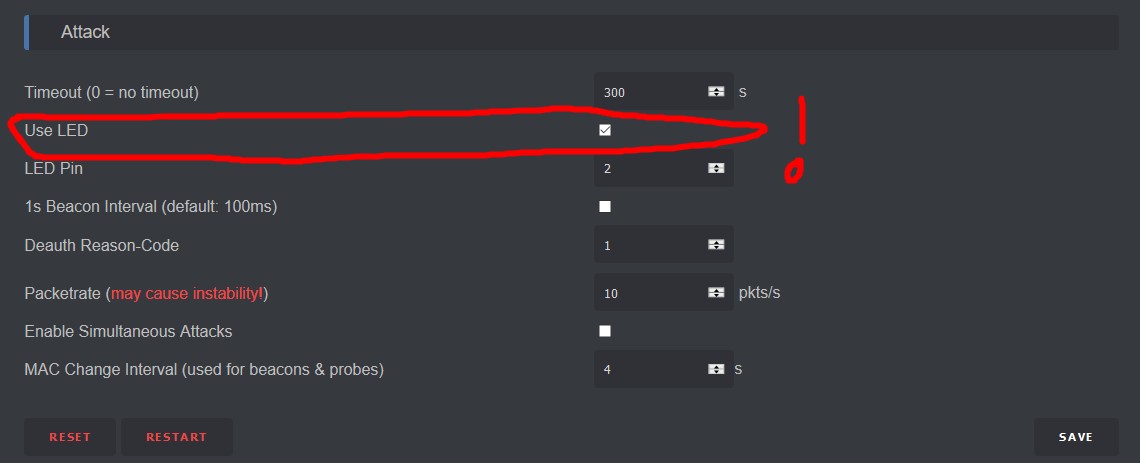
 spacehuhn
on 8 Aug 2017
spacehuhn
on 8 Aug 2017
It stays on
Niklaus1911
on 8 Aug 2017
Yep, I'm using the 1.6 version and the LED always stays on.
 125K
on 8 Aug 2017
125K
on 8 Aug 2017
Works perfect for me on every board.
Are you maybe talking about the Deauther boards? They have multiple LEDs for the charging circuit and a LED on GPIO 16: https://github.com/spacehuhn/esp8266_deauther/blob/master/esp8266_deauther/esp8266_deauther.ino#L20
spacehuhn
on 8 Aug 2017
WoW. Never seen a LED on the GPIO 16 pin of my board. I use a classic NodeMCU board.
For me this is a red LED and is turned on at the beginning of the firmware.
 N0vaPixel
on 8 Aug 2017
N0vaPixel
on 8 Aug 2017
Im talking about nodemcu esp8266
Niklaus1911
on 8 Aug 2017
You are talking about this red LED ?

N0vaPixel
on 8 Aug 2017
Thanks for the picture @N0vaPixel !
Seems to actually be GPIO16. Not all of my boards have a LED there which is weird.
I will adjust the .bin file.
spacehuhn
on 8 Aug 2017
@N0vaPixel Yes
Niklaus1911
on 8 Aug 2017
To clarrify for all, there is currently two differents LEDs used by the firmware.
The blue is the default used when an attack is running. (Pin 2). You can configure it in the settings web page.
But the red is turned on at startup for some board (GPIO16 confirmed)
This is not bad, it can show that the esp8266 is on and the firmware works correctly ¯_(ツ)_/¯
N0vaPixel
on 8 Aug 2017
Yep.
I updated the standart 1mb .bin file:
https://github.com/spacehuhn/esp8266_deauther/releases/download/v.1.6/esp8266_deauther_1mb.bin
I guess most people don't want that LED to be on, just because previous versions didn't had that either.
If you still want it, flash the Arduino code.
I will add it to my to-do list for the next update to put an option for GPIO16 into the web interface as well!
spacehuhn
on 8 Aug 2017
Thanks! I was about to modify it.
125K
on 8 Aug 2017
@spacehuhn Yes i think it's a good idea. This new LED can be confusing for many.
For those who want to build a custom firmware to turn off this LED 🔨
In esp8266_deauther.ino
Replace this line #define USE_LED16
With //#define USE_LED16
N0vaPixel
on 8 Aug 2017
Related issues
 Garfius
·
4Comments
Garfius
·
4Comments
 tobybear
·
4Comments
tobybear
·
4Comments
 m00n21
·
4Comments
m00n21
·
4Comments
 newlearnergrgsm
·
4Comments
newlearnergrgsm
·
4Comments
 crazyguy830
·
3Comments
crazyguy830
·
3Comments
Most helpful comment
It stays on