Enterprise: ListView: Select on Focus not working correctly
If a ListView is set up with the selectOnFocus option set, the row is automatically selected which is correct, However, the first click on a different row has no effect. Second and subsequent clicks work okay and all is fine when using the keyboard.
To Reproduce
Steps to reproduce the behavior:
- Set up a ListView with selectOnFocus option set.
- Add 3 items to it the list.
- Show the listview
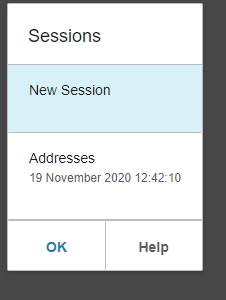
- click once on a row other than the selected row -> Address row had been clicked once
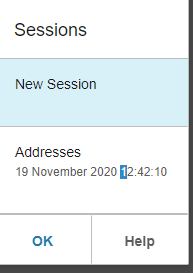
- Click again on that row
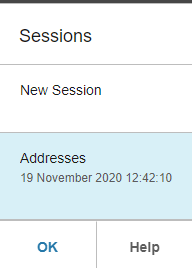
- Row now selected okay.
Expected behavior
Should only need to click once to select a different row
Version
v4.31.2
Platform
- Sunsystems
- Device: (if applicable) [e.g. iPhone 6 or Samsung Galaxy S6]
- Windows 10
- Chrome
- Browser Version: 86.0.4240.198 (Official Build) (64-bit)
 nbeare-infor
All 4 comments
So let me clarify these steps we are using selectOnFocus: true
- Go to https://master-enterprise.demo.design.infor.com/components/listview/example-singleselect.html
- Tab into the listview - item is selected on focus as expected
- "Attempt" to click row 2 to select - the first time this does not work - but the second time it will
 tmcconechy
on 19 Nov 2020
tmcconechy
on 19 Nov 2020
My screenshots only have 2 items on them (first row is the heading), whereas my reproduce steps mention 3 items. sorry for the confusion.
Re your clarification
Agreed, except that its the opposite result to what you have said in step 3. i.e. click row 2 DOES NOT work first time but DOES work second and subsequent times.
nbeare-infor
on 19 Nov 2020
Fixed on this commit https://github.com/infor-design/enterprise/commit/ead1f86be60211ebf013d5d860f785203e0dca02
tmcconechy
on 12 Feb 2021
QA Passed. Now working as expected.

 janahintal
on 16 Feb 2021
janahintal
on 16 Feb 2021
Related issues
janahintal
·
3Comments
 jbrcna
·
3Comments
jbrcna
·
3Comments
 awbuboltz
·
3Comments
awbuboltz
·
3Comments
 fitzorama
·
3Comments
fitzorama
·
3Comments
 brianjuan
·
3Comments
brianjuan
·
3Comments