Enterprise: Homepages: homepage.js isn't returning a correct height.
Describe the bug
The homepage component element doesn't have a height set on it.
To Reproduce
Steps to reproduce the behavior:
- Go to http://master-enterprise.demo.design.infor.com/components/homepage/example-hero-widget.html
- In devtools highlight the
div.homepageelement. - make
overflow: autoas an element style - See incorrect height
Expected behavior
Want to see the height correctly set for the homepage element give it's home page tiles current layout.
Version
- ids-enterprise: v4.19
Screenshots
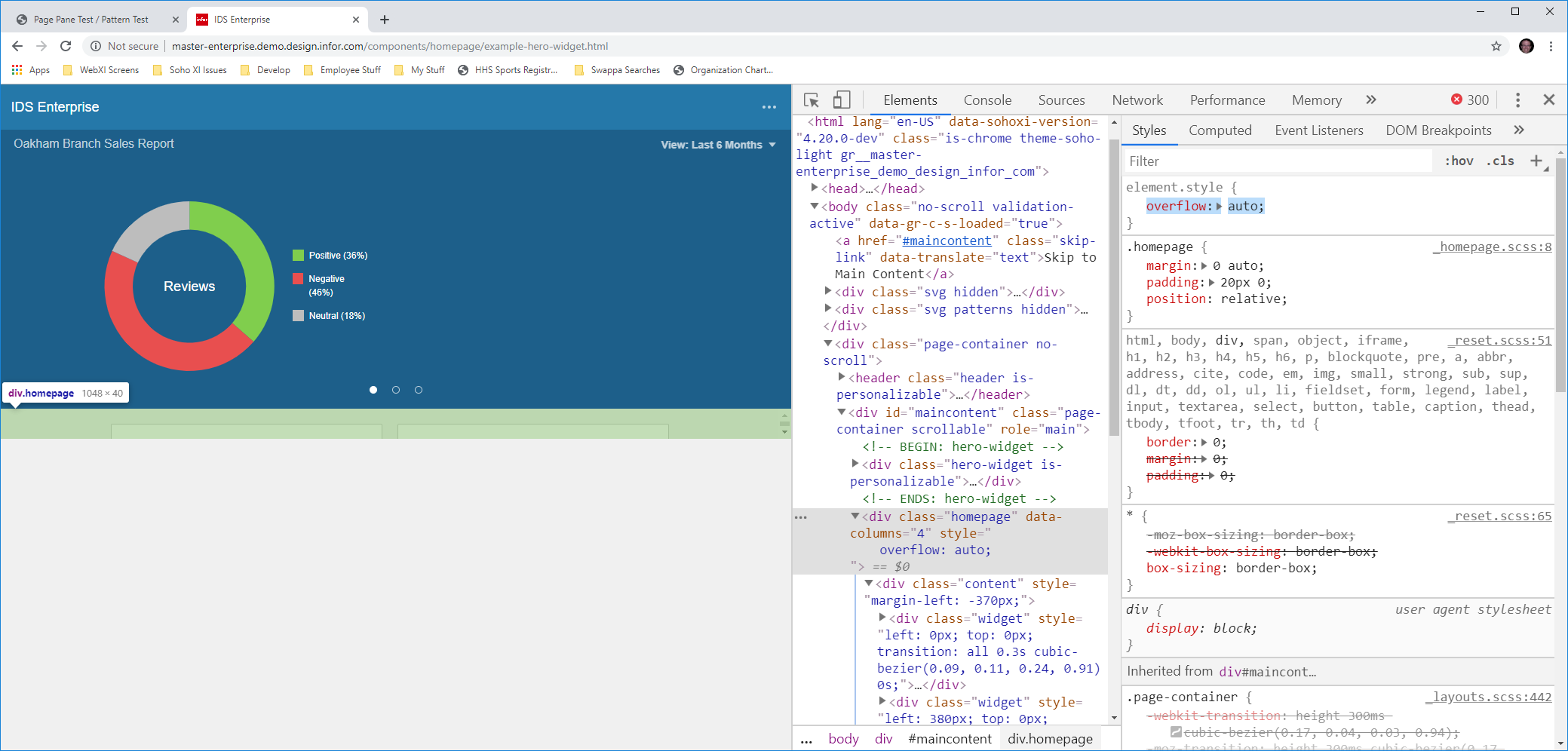
Notice when I set overflow to auto it shows the home page's true height.
Platform
- OS Version: Windows 10
- Browser Name chrome
- Browser Version Version 75.0.3770.100 (Official Build) (64-bit)
Additional context
Add any other context about the problem here.
 pwpatton
All 17 comments
We want this for full-page scrolling. The issue is we want to make tabs sticky to the top as they move up. But if there is a homepage below the tabs it causes the tabs to shift up and out of view.
pwpatton
on 24 Jul 2019
We need to put a bit more work into this issue to call it "done". See this comment on #2521.
CSS alone isn't enough to get the container height properly defined, since all the Homepage Widgets are absolutely positioned and there are no other elements inside the container to govern the height.
My guess is we augment what's in resize() to somehow calculate the rows of blocks and store the container height.
 EdwardCoyle
on 25 Jul 2019
EdwardCoyle
on 25 Jul 2019
Maybe we can just provide an event after render of the layout that omits the current height then the developers can do what they want with that (set it on our/their markup)
 tmcconechy
on 25 Jul 2019
tmcconechy
on 25 Jul 2019
I don't see how that would work. We really need the home page to have a size to work
pwpatton
on 25 Jul 2019
The idea is we dont need that size to be set and it may cause extra reflows. So we just provide you an event and you can set it and also can use the height on parents or whatever. Another option is a non default setting to set the height.
tmcconechy
on 26 Jul 2019
How would I be able to compute the size if you guys can't ?
pwpatton
on 26 Jul 2019
We would compute the height and either send it to you in the event or set it on a option (setInlineHeight: true). There is an event now on render but it is currently not giving you the height. Although you could inspect the dom on that event and figure out the height maybe as a workaround?
tmcconechy
on 26 Jul 2019
Ok I see, so you would send an event each time the size changes and we can get the computed height and set it where we need?
pwpatton
on 26 Jul 2019
Yeah either that or an option or see if setting directly is easy and doesnt cause any issues . I think that will work but this does need work
  $('.homepage').homepage().on('resize', function () {
    console.log(this, this.offsetHeight)
  });
- it doesnt fire now on init only when resizing the page so maybe need a new event that fires on both.
- It's hard to get the height because thats the height of the container so will need @EdwardCoyle
height: inheritadded as well.
We'll look at this next sprint as planned.
tmcconechy
on 26 Jul 2019
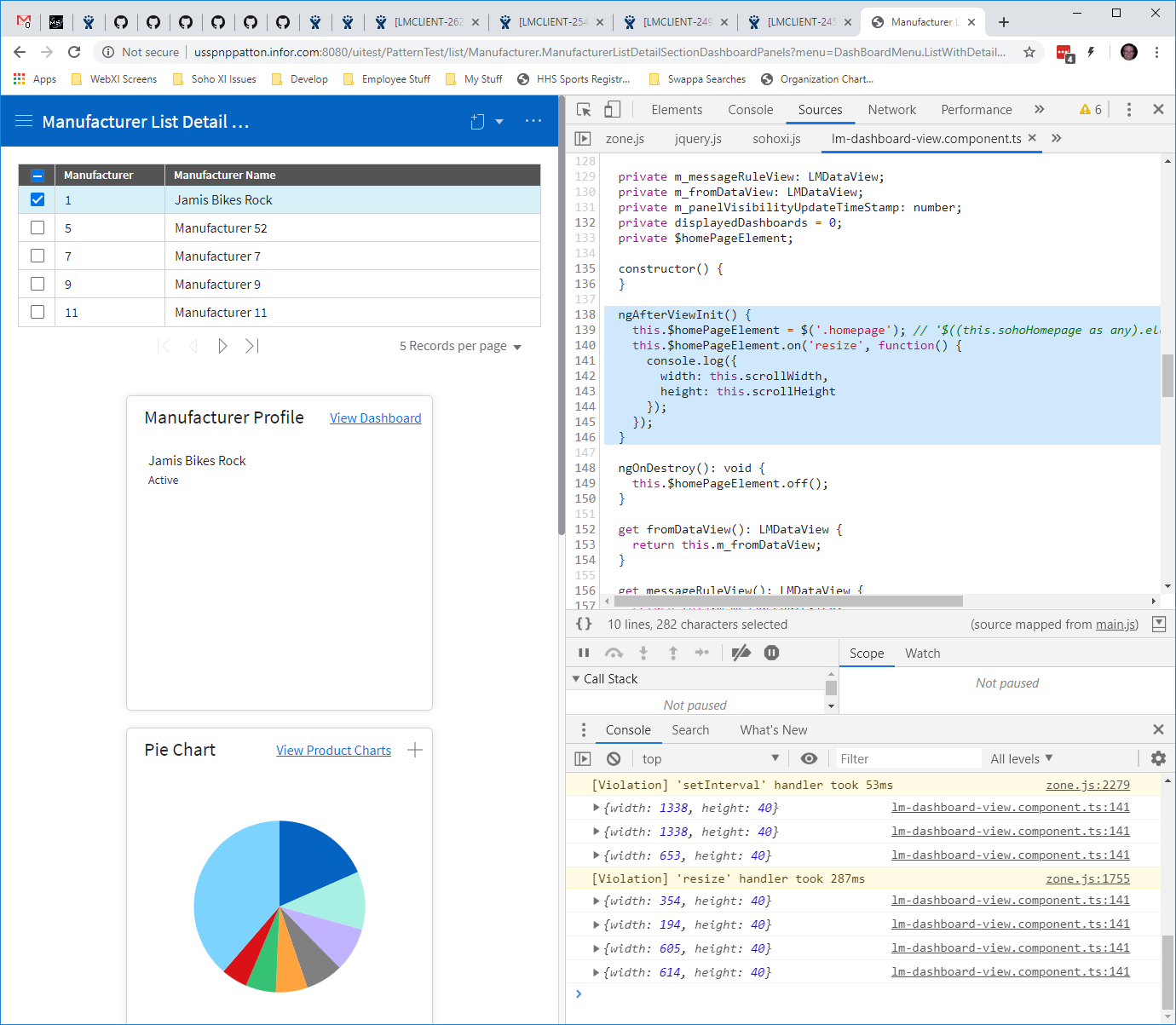
@deep7102 noted that it might work to use:
$('.homepage').on('resize', function() {
  console.log({
    width: this.scrollWidth,
    height: this.scrollHeight
  });
});
But then you also need to set that after doing the component init. As a possible workaround.
tmcconechy
on 26 Jul 2019
well, that didn't work as it returns a scrollHeight of 40px.
pwpatton
on 29 Jul 2019
I tihnk we need to add the height: inherit as well on the original PR we cancelled https://github.com/infor-design/enterprise/pull/2521
tmcconechy
on 30 Jul 2019
ok, let me try that
pwpatton
on 30 Jul 2019
@tmcconechy no go there, still not showing a height. Perhaps homepage needs code to compute its height and send those in a resize message maybe.
pwpatton
on 30 Jul 2019
Do you think you could devise an EP test page with the scroller on it? That might make this easier to figure out.
tmcconechy
on 30 Jul 2019
Yes, I think we can make a sample that shows how we are using it. And we should be able to have full-page scrolling and sticky tabs in the sample like landmark has.
pwpatton
on 30 Jul 2019
QA Passed. working as expected.
metaData: string has containerHeight property in the console upon resizing.
Will move to Done. Tested in http://master-enterprise.demo.design.infor.com/components/homepage/test-hero-widget-calculate-height.html
 janahintal
on 19 Aug 2019
janahintal
on 19 Aug 2019
Related issues
 jbrcna
·
3Comments
jbrcna
·
3Comments
 CindyMercadoReyes
·
3Comments
CindyMercadoReyes
·
3Comments
 awbuboltz
·
3Comments
jbrcna
·
3Comments
awbuboltz
·
3Comments
jbrcna
·
3Comments
 SasiPalanati
·
3Comments
SasiPalanati
·
3Comments