Enterprise: Editor: Missing toolbar button in small browser
Describe the bug
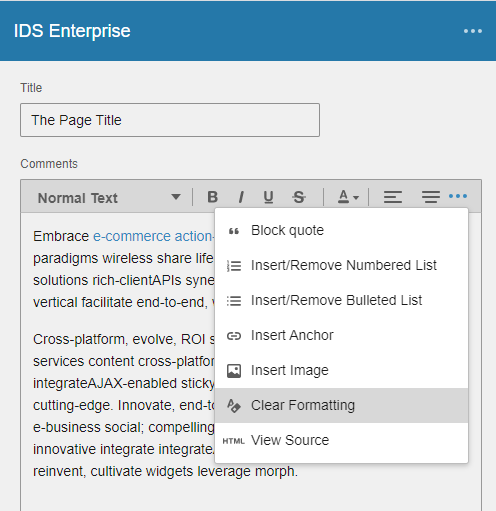
When the browser window is small one item in the toolbar is not listed (which one depends on the width of the window). For example if the window is wide enough to show the left and center align buttons but not the right align. The right align button will not be in toolbar or menu.
To Reproduce
Steps to reproduce the behavior:
- Go to https://master-enterprise.demo.design.infor.com/components/editor/example-index.html
- Make the window small enough so the center align button is visible, but not the right align.
- Click the ... menu
- Issue: Note that the right align option is not visible.
- Close the menu again
- Make the browser just a little wider so that the next separator is visible, but not the quote
- Click the menu again
- Note that the "quote button" is not avialable
Expected behavior
All icons should be available (in either the toolbar or the menu). So in step 4 the Right align option should be in the menu and in step 8 the Quote button should be avaialble inte the menu.
Version
- ids-enterprise: 4.31.1
Screenshots
Platform
- Infor Application/Team Name: Homepages
- OS Version: Windows 10
- Browser Name: Chrome
- Browser Version: Version 84.0.4147.135 (Official Build) (64-bit)
Additional context
-
 SofiK
SofiK
All 9 comments
Seems to be related to all Flex Toolbars, but apparently very easy to spot on a formatter toolbar
 EdwardCoyle
on 10 Sep 2020
EdwardCoyle
on 10 Sep 2020
This issue is now resolved. Thank you.
Verified in https://master-enterprise.demo.design.infor.com/components/editor/example-index.html?colors=0066D4
Verified in https://master-enterprise.demo.design.infor.com/components/editor/example-index.html

 janahintal
on 16 Sep 2020
janahintal
on 16 Sep 2020
Hi!
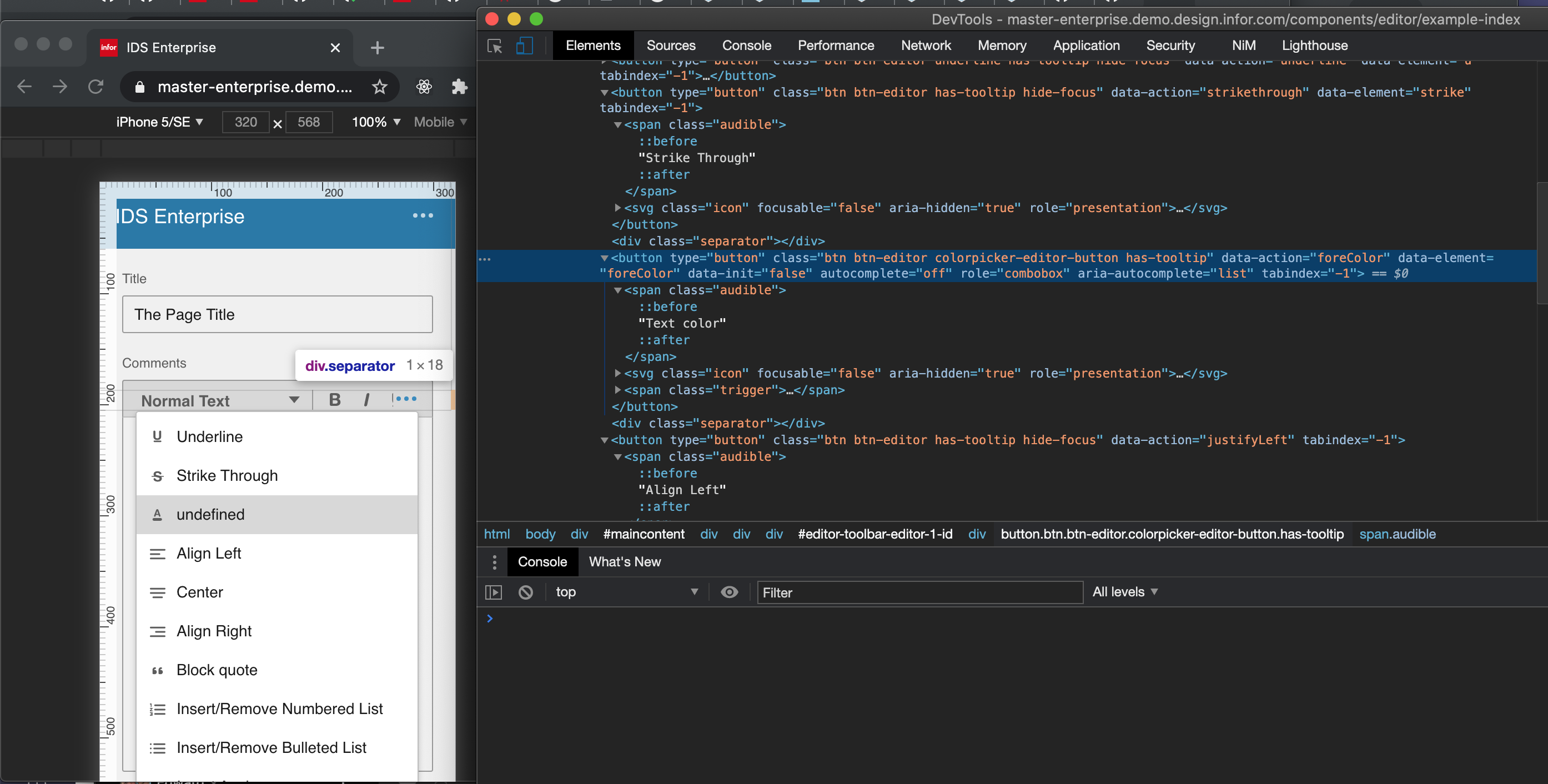
What is that undefined in the mobile image? Is it text color?
SofiK
on 17 Sep 2020
Good question @SofiK - i cant figure out what this is doing. It should say text color tho. @EdwardCoyle was looking for an easy fix but i dont understand whats wrong here.
 tmcconechy
on 17 Sep 2020
tmcconechy
on 17 Sep 2020
Can it be related to the separator?
SofiK
on 17 Sep 2020
@EdwardCoyle is more familiar with how that menu is generated. i was thinking a locale string was missing but i couldnt find one. Lets fail it so we know to take a look
tmcconechy
on 17 Sep 2020
Seems to be the Colorpicker getting picked up by the overflow menu. The Flex Toolbar might be getting this incorrectly or not knowing to throw it out. This is a new bug I think.
EdwardCoyle
on 18 Sep 2020
ok, can you raise an issue for this @SofiK ? Thanks!
tmcconechy
on 18 Sep 2020
Sure, will do it on Monday :)
Den fre 18 sep. 2020 17:05Tim McConechy notifications@github.com skrev:
ok, can you raise an issue for this @SofiK https://github.com/SofiK ?
Thanks!—
You are receiving this because you were mentioned.
Reply to this email directly, view it on GitHub
https://github.com/infor-design/enterprise/issues/4296#issuecomment-694922293,
or unsubscribe
https://github.com/notifications/unsubscribe-auth/ACCDPDZHGUZHLIVTLWPTFZDSGNZMVANCNFSM4QJOD3JQ
.
SofiK
on 18 Sep 2020
Related issues
 CindyMercadoReyes
·
3Comments
CindyMercadoReyes
·
3Comments
 awbuboltz
·
3Comments
awbuboltz
·
3Comments
 dubde
·
4Comments
SofiK
·
3Comments
janahintal
·
3Comments
dubde
·
4Comments
SofiK
·
3Comments
janahintal
·
3Comments