Enterprise: Input / Context Menu: Right Click Me text error in within the autocomplete label
Describe the bug
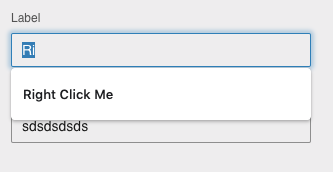
Input / Context Menu: Right Click Me text error in within the autocomplete label
To Reproduce
Steps to reproduce the behavior:
- Go to url: http://4190-rc0-enterprise.demo.design.infor.com/
- Scroll down to Context Menu on Input Fields
- Click inside the Label field box
- Click on the delete key to remove characters from " Right Click Me"
- See error on MAC Chrome when the user begins to remove characters from the filed box "Right Click Me appears under the field box. Please see screen shot attached.
Expected behavior
Autocomplete should not appear under the Label and Label2 field box
Version
- ids-enterprise: [e.g. v4.9.0 or v4.19.0]
Screenshots
Platform
- OS Version: [iOS 8]
- Browser Name [Chrome]
- Browser Version [Version 74.0.3729.169 (64-bit) ]
Additional context
Add any other context about the problem here.
None
 CindyMercadoReyes
All 3 comments
Seems like the audible label is adding a value. We should probably remove that or change it from adding. Also we can add autocomplete: off
<input type="text" data-options="{trigger:'rightClick'}" data-popupmenu="action-popupmenu" value="Right Click Me" id="input-menu" aria-haspopup="true" aria-controls="action-popupmenu" class="">
 tmcconechy
on 11 Jun 2019
tmcconechy
on 11 Jun 2019
👍1
tmcconechy
on 11 Jun 2019
Also we found the popup on a search field is inserted in the DOM it should also have autocomplete="off"
tmcconechy
on 11 Jun 2019
👍1
Was this page helpful?
0 / 5 - 0 ratings
Related issues
 awbuboltz
·
3Comments
awbuboltz
·
3Comments
 jbrcna
·
3Comments
jbrcna
·
3Comments
 guoliang
·
3Comments
jbrcna
·
3Comments
guoliang
·
3Comments
jbrcna
·
3Comments
 SasiPalanati
·
3Comments
SasiPalanati
·
3Comments