Enterprise: RTL: Toolbar gets wrong position when application menu is used
Describe the bug
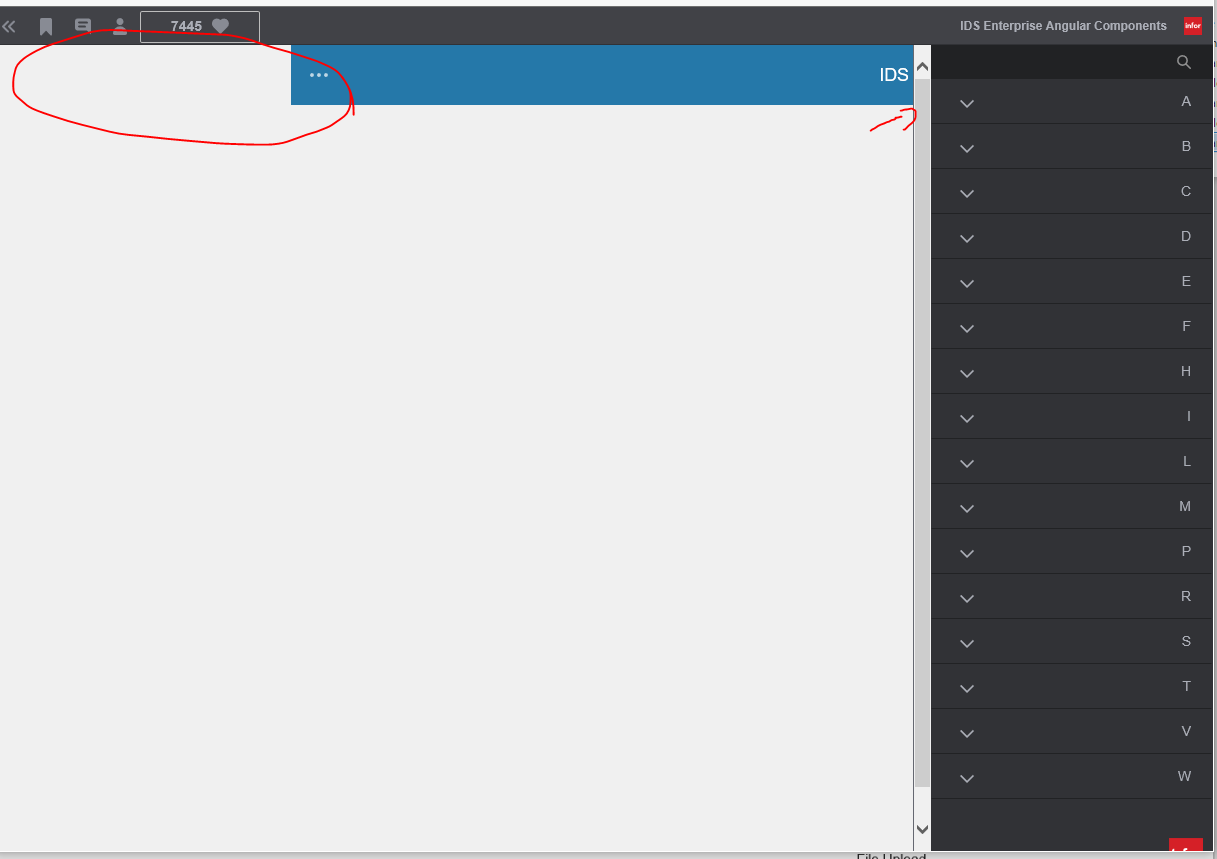
When you run in RTL (ar-SA as locale) the application is moved to the right, but the space left for the application menu is still on the left, so the menu hides parts of the toolbar in IE11. Reproducible in enterprise-ng.
To Reproduce
Steps to reproduce the behavior:
- For the angular project Change locale to ar-SA in app.component.ts
- Go to http://localhost:4200/
- Issue occurs here, Empty space to the left and menu button is placed below the Application menu
Expected behavior
The full toolbar should be visible with no extra space to the left
Version
- ids-enterprise-ng: 5.0
Screenshots
Platform
- OS Version: Windows 10
- Browser Name: IE11
- Browser Version: 11.253.17763.0
Additional context
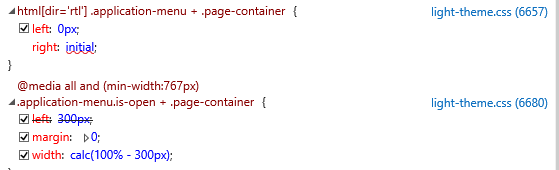
Changing right to "auto" instead of "initial" in html[dir='rtl'] .application-menu + .page-container {
Might be one way to solve it.
 SofiK
SofiK
All 3 comments
@tmcconechy, checked in NG and non NG and it seems fixed already. Will now move this ticket.
 ericangeles
on 28 May 2020
ericangeles
on 28 May 2020
Seems that this issue has already been fixed or we can no longer reproduce it. Can you retest this on the latest @SofiK ?
 tmcconechy
on 28 May 2020
tmcconechy
on 28 May 2020
This issue is now resolved.
 CindyMercadoReyes
on 18 Jun 2020
CindyMercadoReyes
on 18 Jun 2020
Related issues
 jbrcna
·
3Comments
CindyMercadoReyes
·
3Comments
jbrcna
·
3Comments
CindyMercadoReyes
·
3Comments
 EdwardCoyle
·
4Comments
EdwardCoyle
·
4Comments
 dubde
·
4Comments
dubde
·
4Comments
 SasiPalanati
·
3Comments
SasiPalanati
·
3Comments
Most helpful comment
@tmcconechy, checked in NG and non NG and it seems fixed already. Will now move this ticket.