Enterprise: Calendar: Show Right-Side Panel while on Week View and Day View
Is your feature request related to a problem or use case? Please describe.
Calendar does not show the Right-Side Panel when the Week View or Day View is selected. Infor Pathway needs the pane because important details still need to be displayed for the users while changing the views.
Describe the solution you'd like
Calendar would work better if it shows the same Right-Side Panel shown in Month View even if the user selects on Week View and Day View.
Describe alternatives you've considered
N/A
Additional context
Infor Pathway will be using it in filing Bookings for certain Facilities like the screenshot below:
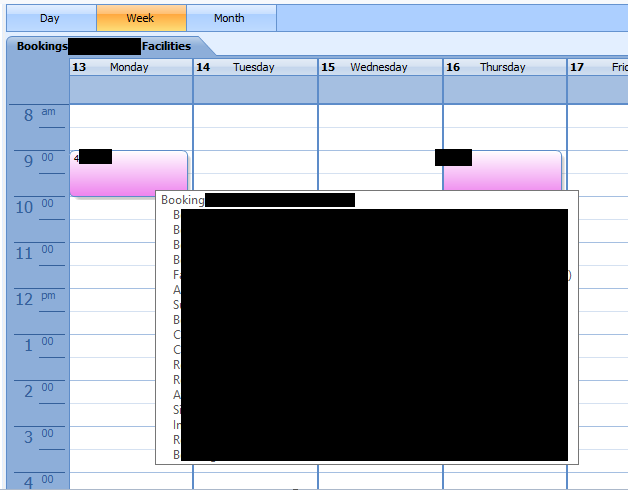
A lot of details are placed in the Bookings (items in _pink_) and it may be possible that multiple Booking Items will be present. Hence, showing the Right-side panel with the details for the Calendar events even in a different view (such as Day or Week View) would be essential and helpful for the user.
 fritzm-ux
All 4 comments
This does make sense and during initial build out i thought of it. But In order to do this weekview might be needed to make single days within the week selectable. Right now the whole week is "selected" but a day may have a marker on it to return back to other views. Possible make week days clickable and add a selected day state within the week.
 tmcconechy
on 7 May 2020
tmcconechy
on 7 May 2020
Thank you for this Tim. We'll just stay subscribed to this and wait for the possible enhancement in the future.
Additionally, by any chance that you may have this in mind too, maybe in the Day View, the day can also be highlighted or have some styling for uniformity - making it similar to the change that will be done if the single days within the week becomes selectable and be having more styles.
fritzm-ux
on 8 May 2020
Just adding a link to the relevant MS Teams Chat here for future reference
 EdwardCoyle
on 8 May 2020
EdwardCoyle
on 8 May 2020
Thats a possibility. I think at minimum the selected "style" like you see on the month view should maybe be applied somehow to the day view and definately the weekview. The thing is now in the day view its only the current day, so thats the selected one/showing. Not sure if you need another "action" to select it there. But on weekview you do for sure.
tmcconechy
on 8 May 2020
Related issues
 jbrcna
·
3Comments
jbrcna
·
3Comments
 CindyMercadoReyes
·
3Comments
CindyMercadoReyes
·
3Comments
 janahintal
·
3Comments
janahintal
·
3Comments
 SofiK
·
3Comments
jbrcna
·
3Comments
SofiK
·
3Comments
jbrcna
·
3Comments