Enterprise: Overflow not set on modals in uplift.
Describe the bug
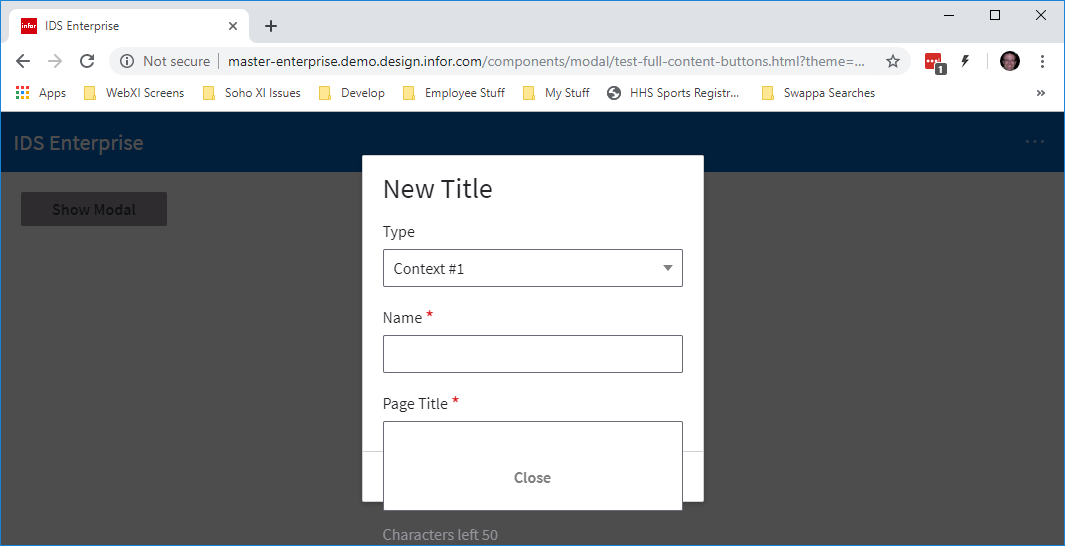
When bringing up a modal if the window is to short for the content a scroller does NOT appear and the context spill out of bounds of the modal.
To Reproduce
Steps to reproduce the behavior:
- Go to http://master-enterprise.demo.design.infor.com/components/modal/test-full-content-buttons.html?theme=uplift&variant=light&colors=0563C2
- Click on "Show Modal" button
- Make the browser shorter than the dialog
- Notice not scroller and fields seem to spill out of the modal.
Expected behavior
An overflow for the modal content area should scroll the modal content.
Version
- ids-enterprise: 4.20.0-dev.20190725 and 4.20.0-dev.20190724
Screenshots
Additional context
We believe this change caused the issue
https://github.com/infor-design/enterprise/commit/1b2cbe8eacd5e673dca7f7136191aabbaa842342
 pwpatton
All 4 comments
FYI, per #2318, this fixed this issue in Uplift Modals:
Message - Click success button on IE edge and a tiny scroll bar is visible
I'm guessing we care more about the ability to scroll, moreso than the existence of the scrollbar? If so, I can reverse the change.
 EdwardCoyle
on 29 Jul 2019
EdwardCoyle
on 29 Jul 2019
Any way to do the 'inherit' just for these message modals? For our form modals (and your guys' form modals) no scrolling happens.
pwpatton
on 29 Jul 2019
Perhaps for the message fix we just needed to remove some padding or something for IE? As really the message shouldnt need a scrollbar bar all for it in that case. But we do need to scroll in modals more often then not.
There may be cases a very large message would scroll but more cases on a modal for it. Just seemed like the scrollbar was there just for a small amount of room and wasnt needed.
 tmcconechy
on 29 Jul 2019
tmcconechy
on 29 Jul 2019
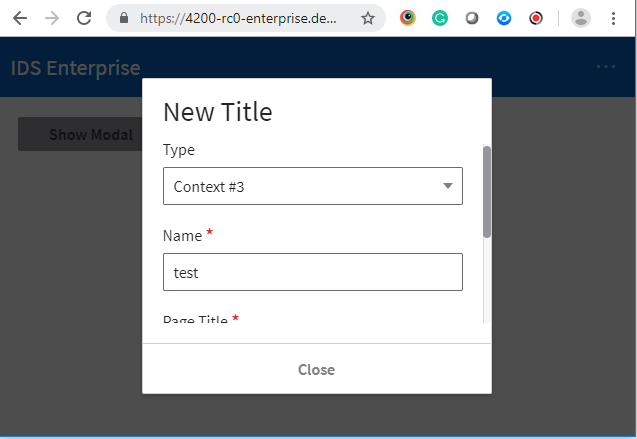
https://4200-rc0-enterprise.demo.design.infor.com/components/modal/test-full-content-buttons.html?theme=uplift&variant=light&colors=0563C2
Passed QA testing on all browsers.
 brianjuan
on 5 Aug 2019
brianjuan
on 5 Aug 2019
Related issues
 fitzorama
·
3Comments
fitzorama
·
3Comments
 SofiK
·
3Comments
SofiK
·
3Comments
 swetteinfor
·
3Comments
swetteinfor
·
3Comments
 sanx72
·
3Comments
sanx72
·
3Comments
 jbrcna
·
3Comments
jbrcna
·
3Comments