Enterprise: Fileupload: Modal dialog can disappear when tabbing
Describe the bug
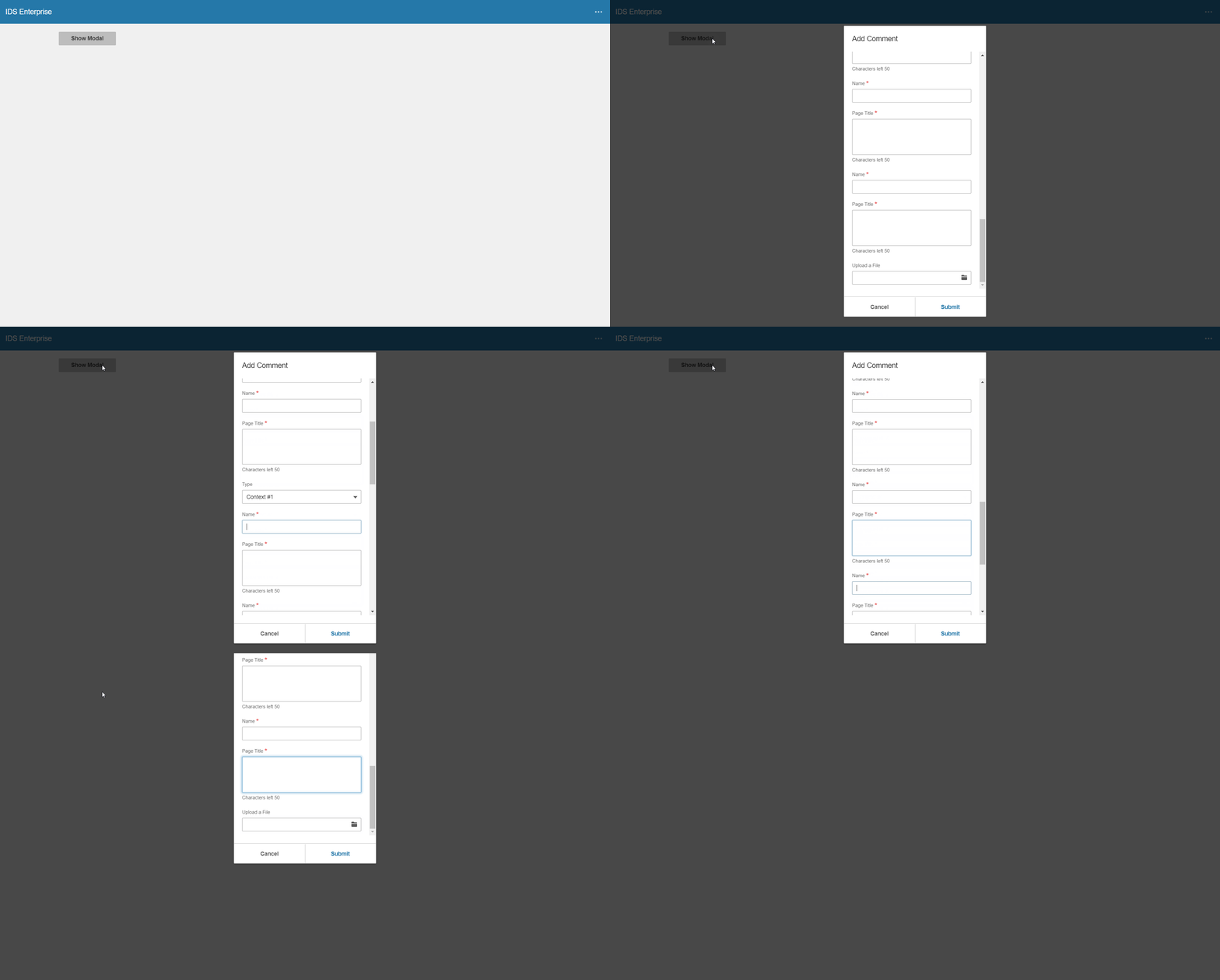
When a file upload control is used on modal dialog and there are sufficient (many) fields, tabbing through the file upload control will cause the modal dialog to disappear or cause it to partially display.
The test below has been modified to have additional fields on the modal.
test-fileupload.zip
To Reproduce
Steps to reproduce the behavior:
- Unzip the above file and replace \app\views\components\modal\test-fileupload.html
- Go to http://localhost:4000/components/modal/test-fileupload.html
- Click on the Show Modal button
- The modal should display and focus should be in the first field
- Using the tab key, tab through all the fields; the file upload field is the last field
- Modal dialog disappears when tabbing out of the file upload field
- Shift-tab will cause the modal to reappear, although it is not placed correctly on the screen
Expected behavior
Expect the first button of the dialogs buttons to receive focus next.
Version
- ids-enterprise: 4.25.1
Screenshots
Platform
- all
Additional context
Add any other context about the problem here.
 fitzorama
All 3 comments
@tmcconechy We will need a patch for 4.25.1.
fitzorama
on 7 Feb 2020
@fitzorama created a 4.25.2 with this fix and a corresponding 6.4.2 release of NG. Both now in npm
 tmcconechy
on 10 Feb 2020
tmcconechy
on 10 Feb 2020
Passed QA in all browsers, tested in http://master-enterprise.demo.design.infor.com/components/modal/test-fileupload-scroll.html. Will retest once beta is deployed.
 brianjuan
on 11 Feb 2020
brianjuan
on 11 Feb 2020
Related issues
 CindyMercadoReyes
·
3Comments
brianjuan
·
3Comments
CindyMercadoReyes
·
3Comments
brianjuan
·
3Comments
 janahintal
·
3Comments
janahintal
·
3Comments
 EdwardCoyle
·
4Comments
EdwardCoyle
·
4Comments
 swetteinfor
·
3Comments
swetteinfor
·
3Comments