Element-android: Homescreen shortcuts for rooms
riot-android has the ability to add homescreen shortcuts to particular rooms (long press on room, add homescreen shortcut). It'd be nice to have this in riotX prior to replacing riot-android since its a feature I use.
 amalon
All 11 comments
You can do it by long pressing on the RiotX icon, for favorite rooms, and on devices that supports it.
 bmarty
on 22 Jun 2020
bmarty
on 22 Jun 2020
ahah, i didn't even think of trying that! Do you think it makes sense to have an option from long-press on room too, so it doesn't have to be made favourite first and so its easier to find?
(I remember that "ahah" moment of realising that long-press was even a thing with Android, far too long after I started using Android :-) )
amalon
on 22 Jun 2020
However, it seems this feature is limited to at most four favorite rooms; if you have more, they may or may not be listed.
It seems Riot Android's approach was more general in allowing _any_ (even non-favorite) room to be chosen as a shortcut.
 eras
on 1 Jul 2020
eras
on 1 Jul 2020
Yes, we will improve that, that's why this issue is still opened :)
bmarty
on 1 Jul 2020
I miss having a direct message conversation shortcut.
 luv2code
on 17 Jul 2020
luv2code
on 17 Jul 2020
We need an icon to add the action to create a home shortcut to this bottom sheet:
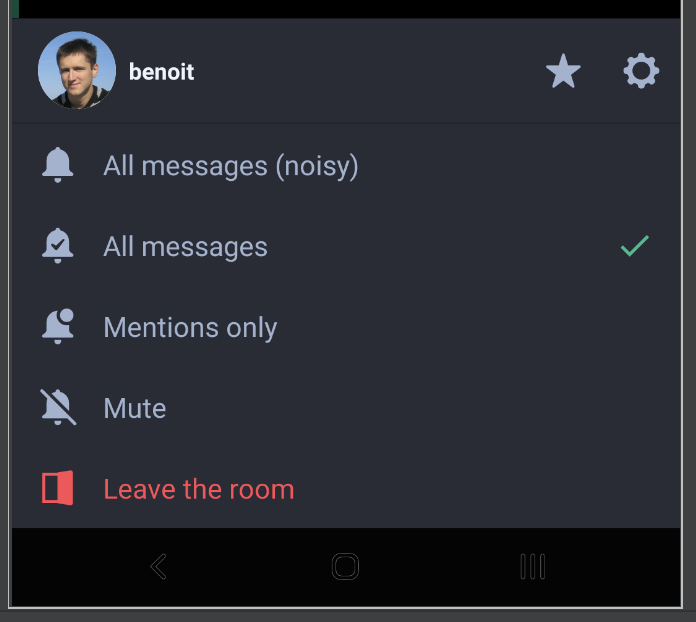
There were no icon on Riot-Android.
bmarty
on 17 Aug 2020
Thanks @bmarty for taking the time to talk me through this. Here's an example mockup of "add to home screen" added to the settings of a room.
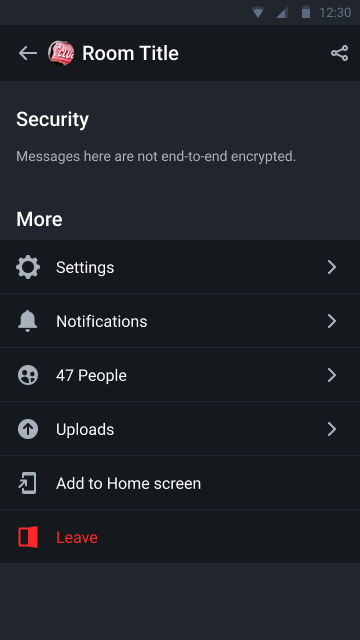
Please feel free to ignore colour changes - it's not relevant to the issue.
 niquewoodhouse
on 28 Sep 2020
niquewoodhouse
on 28 Sep 2020
I believe this should be also available from this screen:
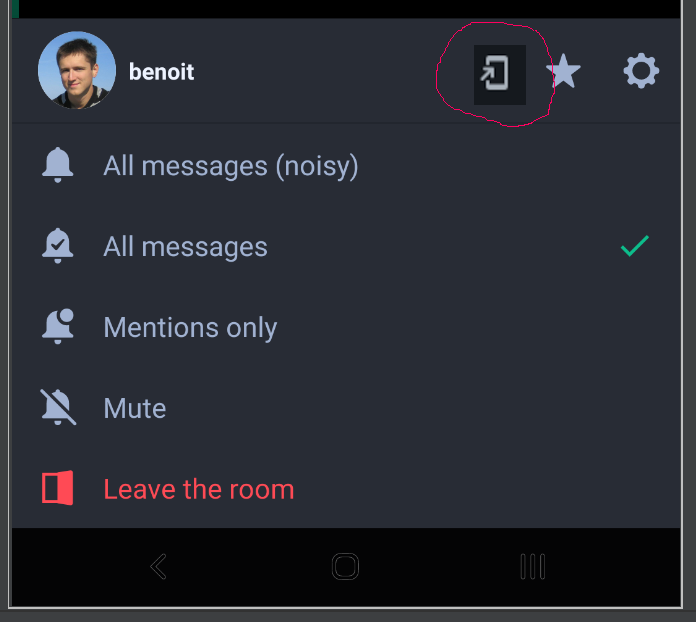
As it's very complicated to make a shortcut from the room list.
 532910
on 19 Oct 2020
532910
on 19 Oct 2020
We decided with the design team to put this action in the room setting, which is just behind this:  in this screen ^.
Adding a shortcut is not something you may want to do too often.
Also this area will be (maybe) used to handle the low priority toggle for the room.
bmarty
on 20 Oct 2020
We decided with the design team to put this action in the room setting
Yep, it's a good decision, it allows to create a shortcut with two (in fact three) actions, when room is opened.
But I'm talking about an addition shortcut button, that will allow to create a shortcut from a room list with one (ok two) action.
Adding a shortcut is not something you may want to do too often.
I can say the same about favorite: is not something you may want to do too often.
Also this area will be (maybe) used to handle the low priority toggle for the room.
There are a lot of space for two icons.
532910
on 21 Oct 2020
So now you can, from the room list
1- long click on a room
2- click on settings
3- (scroll)
4- click on "Add to Home screen"
5- press back
6- goto step 1 for another room.
I think it is acceptable for this action
There are a lot of space for two icons.
Not if the room name is long, especially for small screen.
Also I realize that there is no other place to toggle the favorite state of a room, which should at least be possible from the room settings. But this is another story...
bmarty
on 22 Oct 2020
Related issues
 jcgruenhage
·
3Comments
bmarty
·
3Comments
jcgruenhage
·
3Comments
bmarty
·
3Comments
 Bubu
·
3Comments
bmarty
·
3Comments
Bubu
·
3Comments
bmarty
·
3Comments
 mvgorcum
·
3Comments
mvgorcum
·
3Comments
Most helpful comment
So now you can, from the room list
1- long click on a room
2- click on settings
3- (scroll)
4- click on "Add to Home screen"
5- press back
6- goto step 1 for another room.
I think it is acceptable for this action
Not if the room name is long, especially for small screen.
Also I realize that there is no other place to toggle the favorite state of a room, which should at least be possible from the room settings. But this is another story...