Eddiebot: Channel not found error when running without Firebase keys
I was trying to set up EddieBot locally without the Firebase keys.
- I disabled the Firebase errors by commenting out these lines:
./node_modules/firebase-admin/lib/auth/credential.js:134
./node_modules/firebase-admin/lib/auth/credential.js:142
- Then I filled up
./.envlike this:
DISCORD_TOKEN=<token of my bot in single quotes>
COMMAND_PREFIX="^"
# You can find this from "right clicking" on your server and selecting "Copy ID".
DISCORD_SERVER_ID=<my server token in single quotes>
# You can use ANY channel by "right clicking" on your server and selecting "Copy ID". A #bot channel is recommended.
DISCORD_BOT_CHANNEL_ID=<token on the #bot channel in my server in single quotes>
# Generate a firebase service account in the UI, the `gcloud` CLI will generate you the wrong service account.
# When you download your Firebase service account details, these will be in the downloaded/generated json file.
FIREBASE_PRIVATE_KEY=""
FIREBASE_PROJECT_ID=""
FIREBASE_CLIENT_EMAIL=""
FIREBASE_DATABASE_URL=""
- Now when I try to run the bot, this is what I face:
❯ npm run start:local

> [email protected] start:local /home/raisinten/Desktop/universe/git/EddieBot
> npm run build && node dist/index.js


> [email protected] build /home/raisinten/Desktop/universe/git/EddieBot
> tsc

[1601308601188] INFO  (504 on hp): Scheduling the job opensource-reminder
[1601308601192] ERROR (504 on hp): Channel not found
(node:504) UnhandledPromiseRejectionWarning: Error [DISALLOWED_INTENTS]: Privileged intent provided is not enabled or whitelisted.
    at WebSocketManager.createShards (/home/raisinten/Desktop/universe/git/EddieBot/node_modules/discord.js/src/client/websocket/WebSocketManager.js:260:15)
(node:504) UnhandledPromiseRejectionWarning: Unhandled promise rejection. This error originated either by throwing inside of an async function without a catch block, or by rejecting a promise which was not handled with .catch(). To terminate the node process on unhandled promise rejection, use the CLI flag `--unhandled-rejections=strict` (see https://nodejs.org/api/cli.html#cli_unhandled_rejections_mode). (rejection id: 1)
(node:504) [DEP0018] DeprecationWarning: Unhandled promise rejections are deprecated. In the future, promise rejections that are not handled will terminate the Node.js process with a non-zero exit code.
^C
 RaisinTen
All 11 comments
It's great having you contribute to this project
Feel free to raise an Issue! Welcome to the community :nerd_face:If you would like to continue contributing to open source and would like to do it with an awesome inclusive community, you should join our Discord chat and our GitHub Organisation - we help and encourage each other to contribute to open source little and often 🤓 . Any questions let us know.
![github-actions[bot] picture](https://avatars.githubusercontent.com/in/15368?v=4&s=40) github-actions[bot]
on 28 Sep 2020
github-actions[bot]
on 28 Sep 2020
I followed your instructions to replicate the issue.
But I do not get any errors.
DISCORD_TOKEN="key"
COMMAND_PREFIX="^"
# You can find this from "right clicking" on your server and selecting "Copy ID".
DISCORD_SERVER_ID=key
# You can use ANY channel by "right clicking" on your server and selecting "Copy ID". A #bot channel is recommended.
DISCORD_BOT_CHANNEL_ID=key
# Generate a firebase service account in the UI, the `gcloud` CLI will generate you the wrong service account.
# When you download your Firebase service account details, these will be in the downloaded/generated json file.
FIREBASE_PRIVATE_KEY=""
FIREBASE_PROJECT_ID=""
FIREBASE_CLIENT_EMAIL=""
FIREBASE_DATABASE_URL=""
Might be something wrong with the discord config.
Did you invite the bot to the discord channel?
 AllanRegush
on 28 Sep 2020
AllanRegush
on 28 Sep 2020
Hi @RaisinTen, thank you for raising this issue 😃.
I think the problem you're experiencing has something to do with what @AllanRegush said, which is the permissions for your bot. We documented the use of gateway intents, but perhaps it could improve more. I checked and we don't have a link for you to know where to configure these privileged intents that the bot needs.
Have a look at #70, if you need further help let us know 👍.
@AllanRegush and @eddiejaoude, I'd suggest we use this chance to improve the docs on this regard, what do you think? I don't think we need a full section like Discord.js docs, but maybe this part:
Should you receive an error prefixed with [DISALLOWED_INTENTS] please review your settings for all privileged intents you use. The official documentation for this topic can be found on the discord API documentation.
 BOLT04
on 28 Sep 2020
BOLT04
on 28 Sep 2020
I used this for the permissions https://discordapi.com/permissions.html#56320
AllanRegush
on 28 Sep 2020
Thanks for the help guys! Yes, I too think it is an issue with the permissions of the bot. I temporarily changed src/client.ts to:
export const client = new Client();
and commented out most of src/index.ts and it started working.
Where can I find the permissions of the dummy bot I made on Discord and how do I edit the permissions?
[NOTE: In the linked website, I did try filling in the client ID (it turned green) and followed the steps but it didn't change the permissions of my bot]
RaisinTen
on 29 Sep 2020
@RaisinTen did you check the on that PR I linked above: https://discordjs.guide/popular-topics/intents.html#privileged-intents? There you can find the Discord Developer Portal link to find those permissions and more info on the topic 😃
BOLT04
on 29 Sep 2020
@BOLT04 yes I did check it yesterday but it didn't occur to me instantly that I had to turn the SERVER MEMBERS INTENT on like your image showed. I turned it on and now it works perfectly! :slightly_smiling_face:
This is what I get in the log though:
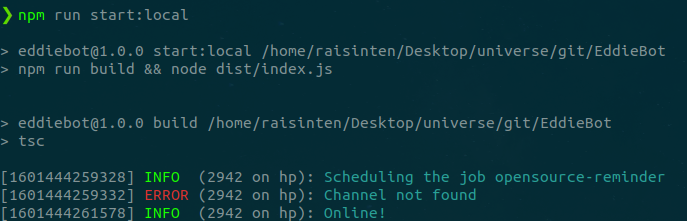
Do you know what the reason is behind that error? I tried few commands on my channel and it produced the correct responses.
I was still wondering how I can view and edit all my bot permissions like in the link provided by @AllanRegush.
Also, how long does it take for the bot to go offline after I send a SIGINT to the process?
RaisinTen
on 30 Sep 2020
Do you know what the reason is behind that error? I tried few commands on my channel and it produced the correct responses.
The reason you get this error is either you didn't set the correct bot channel id in .env file
https://github.com/EddieJaoudeCommunity/EddieBot/blob/2c8adb209b1b397914025cd4f0f595743e7b4654/.env.example#L5-L6
or because scheduleOpenSourceReminder in index.ts starts executing and logging to the bot channel before the bot is ready.
To fix it, move scheduleOpenSourceReminder on index.ts:41
https://github.com/EddieJaoudeCommunity/EddieBot/blob/2c8adb209b1b397914025cd4f0f595743e7b4654/src/index.ts#L41
to index.ts:16 so it start executing when the bot is ready.
https://github.com/EddieJaoudeCommunity/EddieBot/blob/2c8adb209b1b397914025cd4f0f595743e7b4654/src/index.ts#L14-L16
 alrifay
on 30 Sep 2020
alrifay
on 30 Sep 2020
@alrifay hey, thanks for the reply! :slightly_smiling_face:
I just tried what you mentioned but it still produced the same error.
After checking the docs I found that login returns a Promise<string>. So, I tried this instead:
(async() => {
    // bot authenticates with discord
    await client.login(process.env.DISCORD_TOKEN);
    scheduleOpenSourceReminder();
})();
and it works!
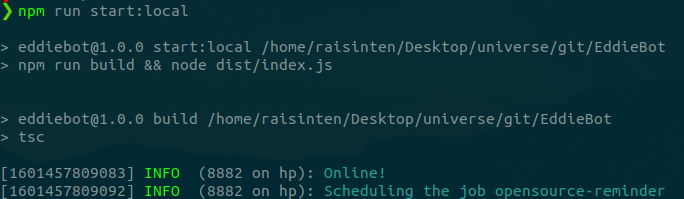
Do you think I should make a pr with this change?
RaisinTen
on 30 Sep 2020
Do you think I should make a pr with this change?
Of course, PRs are always welcome 🎉
I just tried what you mentioned but it still produced the same error.
I'm curious to know why it didn't work for you, could you show me what you did and didn't work 😁
Because I tried the example
client.once('ready', () => {
    log.info('Online!', 'Lets get started...');
    scheduleOpenSourceReminder();
    if (client.user) {
        client.user.setPresence({
            activity: {
                name: `${config.COMMAND_PREFIX}help for help`,
                type: 'WATCHING',
            },
            status: 'online'
        });
    }
});
and it worked.
alrifay
on 30 Sep 2020
@alrifay I just noticed that I moved scheduleOpenSourceReminder(); to the wrong line. Silly me! :disappointed:
Your code works perfectly! I'll make a pr to close this issue. :slightly_smiling_face:
RaisinTen
on 1 Oct 2020
Related issues
BOLT04
·
36Comments
 ApolloDev0
·
12Comments
AllanRegush
·
18Comments
BOLT04
·
11Comments
ApolloDev0
·
12Comments
AllanRegush
·
18Comments
BOLT04
·
11Comments
 mstanciu552
·
10Comments
mstanciu552
·
10Comments
Most helpful comment
The reason you get this error is either you didn't set the correct bot channel id in
.envfilehttps://github.com/EddieJaoudeCommunity/EddieBot/blob/2c8adb209b1b397914025cd4f0f595743e7b4654/.env.example#L5-L6
or because
scheduleOpenSourceReminderinindex.tsstarts executing and logging to the bot channel before the bot is ready.To fix it, move
scheduleOpenSourceReminderon index.ts:41https://github.com/EddieJaoudeCommunity/EddieBot/blob/2c8adb209b1b397914025cd4f0f595743e7b4654/src/index.ts#L41
to index.ts:16 so it start executing when the bot is ready.
https://github.com/EddieJaoudeCommunity/EddieBot/blob/2c8adb209b1b397914025cd4f0f595743e7b4654/src/index.ts#L14-L16