Eddiebot: No response for ^bio command
Hello everyone! This is the first time I'm contributing here. :smile:
Bug perhaps?
This is the first time I'm trying out the bot. Seeing others writing ^bio in #bot-chat, I thought about doing the same. However, unlike others, the bot didn't respond to my message.

Am I doing something wrong or am I gonna receive a bounty for breaking EddieBot? :laughing:
 RaisinTen
All 24 comments
It's great having you contribute to this project
Feel free to raise an Issue! Welcome to the community :nerd_face:If you would like to continue contributing to open source and would like to do it with an awesome inclusive community, you should join our Discord chat and our GitHub Organisation - we help and encourage each other to contribute to open source little and often 🤓 . Any questions let us know.
![github-actions[bot] picture](https://avatars.githubusercontent.com/in/15368?v=4&s=40) github-actions[bot]
on 19 Sep 2020
github-actions[bot]
on 19 Sep 2020
Hey @RaisinTen, great to see you here 😃. Perhaps the bot wasn't online when you tried it.
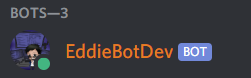
I believe "EddieBot" has the "$" command prefix and "EddieBotDev" has the "^" prefix.
Do you remenber if EddieBotDev was online? If it was and you didn't get a response, then you should be rewarded cause you just found a bug 😄... or at least, getting a response is the expected behavior. What probably happened is that ^bio is the command for reading your bio, and perhaps the code does nothing if you don't have a bio.
Try setting a bio with: ^bio github <your github link>, or another option like these:
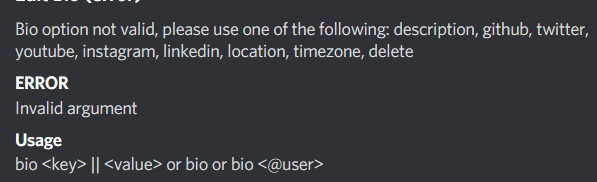
 BOLT04
on 19 Sep 2020
BOLT04
on 19 Sep 2020
Hi @BOLT04, awesome seeing you here too! Problem solved right now! Perhaps you meant:
- ^bio github <your github link>
+ ^bio github || <your github link>
Thank you very much. :smiley:
RaisinTen
on 19 Sep 2020
yes I meant that 😅, thanks for raising the issue and I think we can raise another issue for not getting a response when typing ^bio, in case the user has no bio to read. It should improve UX and we could return a response with an example that they can use.
What do you think @RaisinTen and @eddiejaoude ?
BOLT04
on 19 Sep 2020
@BOLT04 that's a brilliant idea! :100:
Maybe we can do something similar for all commands where, when the prefix matches a valid command, the bot displays a list of valid completions?
For example, for this:

I would expect the bot to list out these two:
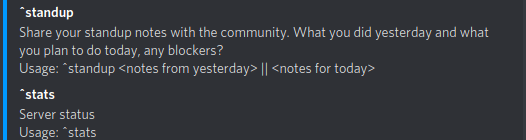
RaisinTen
on 19 Sep 2020
@RaisinTen wow that is such a cool idea 👍👍👍. I think that is would be super cool to implement and it helps the new community members.
Not sure how this suggestion list would be implemented rn, but it's definitely something to add to the backlog 😃
BOLT04
on 19 Sep 2020
@BOLT04 thanks! :smile:
I'd really like to help but I'm not sure I understand how the command routing really works. Maybe this repo needs a CONTRIBUTING.md file where it's all explained?
RaisinTen
on 19 Sep 2020
we have a contributing file on the folder .github and this documentation on commands. If it's not enough we can definitely open a new issue to improve this explanation 👍.
BOLT04
on 19 Sep 2020
Thanks for the link! I think it would be nice to move the CONTRIBUTING.md file to the top level directory. As a newcomer, I would have never guessed that the file would be found inside a dotfile directory lol.
Other than that, now I do understand how we can make a new command for the bot because the docs explain that pretty nicely. However, I still think it needs a little more to explain about how the command routing takes place. I understand the part that takes place after index.ts is called, but I'm afraid I don't get what happens before that really. :slightly_smiling_face:
RaisinTen
on 19 Sep 2020
Awesome conversation and idea 👍 . I think there are at least 2 issues to be created from this 👍
 eddiejaoude
on 19 Sep 2020
eddiejaoude
on 19 Sep 2020
That is a great point you made, I assumed the .github folder was the correct place to put it. But after reading their docs, I agree the root level makes it easier for a newcomer to find it 👍 (this would make a good issue and PR if you want to make it 😃)
I understand the part that takes place after index.ts is called, but I'm afraid I don't get what happens before that really. 🙂
This is an improvement we can make to the docs 👍 💯 , thanks for pointing out the part you had trouble understanding. What happens before is on the src/index.ts file at the source root. But there is actually more to the start of the whole "story" 😄.
When a message is sent by a user on the Discord server, the Discord app sends an event to the Discord Gateway, which then sends that event to the clients that are connected to it with WebSockets, in our case Discord.js.
Since we registered an event handler (the function exported on commands.ts that is explained on our docs) for the message event here, the client library will call that function and this is where those commands exported in the index.ts you said are used and where there is logic to decide which one to call.
_Note: This is my understanding of it right now 😄_
Like @eddiejaoude said, I support the creation of more issues to resolve this @RaisinTen.
BOLT04
on 19 Sep 2020
The bot was online. It was working for me.
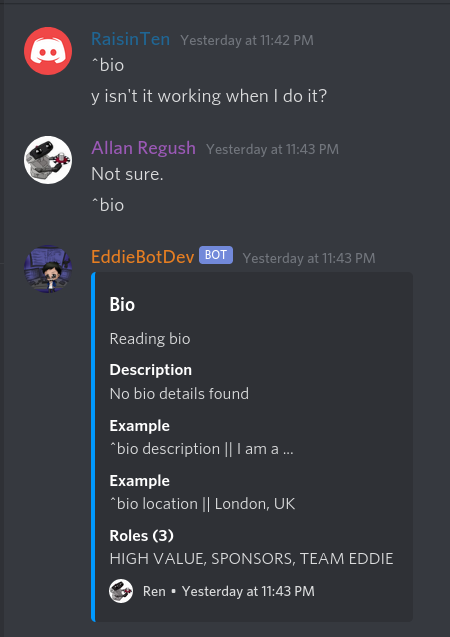
 AllanRegush
on 19 Sep 2020
AllanRegush
on 19 Sep 2020
Great response @BOLT04 💪 .
I think with docs, sometimes it is easier to make changes where the person thinks is best and raise a pull request. Then once we can see it, we can always move the docs around as required. We might move existing docs around too.
My suggestion is always to raise doc changes, we can move it around in another PR 🤓
eddiejaoude
on 19 Sep 2020
I think the bot works if you have any bio set already, if you have no bio info it ignores the command - we need it to respond with "please set some bio info... "
eddiejaoude
on 19 Sep 2020
from bio.ts
        if (data) {
            Object.entries((data).bio).forEach(([key]) => {
                let value = data.bio[key];
                if(key === 'location') {
                    value = value.display_name;
                }
                return embed.addField(key.toUpperCase(), value);
            });
        } else {
            embed.addField('Description', 'No bio details found');
            embed.addField('Example', `${config.COMMAND_PREFIX}bio description || I am a ...`);
            embed.addField('Example', `${config.COMMAND_PREFIX}bio location || London, UK`);
        }
oh, so there should have been a response 🤔
eddiejaoude
on 19 Sep 2020
Yeah - There are two bugs here:
211
Then when there is an assigned role it gets added to the database.
So data is true.
Then it breaks trying to add the key and value to embed.addField
AllanRegush
on 19 Sep 2020
To reproduce.
- delete bio
- try bio command // Expect no reply
- assign description, twitter, github etc.
- try bio command
- bot replies
AllanRegush
on 19 Sep 2020
Ah ok 👍
eddiejaoude
on 19 Sep 2020
I think the issue is the data.bio field is undefined and throws an exception when the user doesn't have a bio.
 alrifay
on 19 Sep 2020
alrifay
on 19 Sep 2020
undefined is Falsy it wouldn't execute the code inside the if block
AllanRegush
on 20 Sep 2020
@AllanRegush The data object exist(truthy) if the user has some roles. but if the user doesn't have a bio, the key bio will be undefined
the correct condition should be
if (data && data.bio) {
    // ...
}
Yep this is what I'm about to PR.
AllanRegush
on 20 Sep 2020
That is a great point you made, I assumed the
.githubfolder was the correct place to put it. But after reading their docs, I agree the root level makes it easier for a newcomer to find it +1 (this would make a good issue and PR if you want to make it smiley)I understand the part that takes place after index.ts is called, but I'm afraid I don't get what happens before that really. slightly_smiling_face
This is an improvement we can make to the docs +1 100 , thanks for pointing out the part you had trouble understanding. What happens before is on the
src/index.tsfile at the source root. But there is actually more to the start of the whole "story" smile.When a message is sent by a user on the Discord server, the Discord app sends an event to the Discord Gateway, which then sends that event to the clients that are connected to it with WebSockets, in our case Discord.js.
Since we registered an event handler (the function exported oncommands.tsthat is explained on our docs) for themessageevent here, the client library will call that function and this is where those commands exported in theindex.tsyou said are used and where there is logic to decide which one to call._Note: This is my understanding of it right now smile_
Like @eddiejaoude said, I support the creation of more issues to resolve this @RaisinTen.
@BOLT04 Really awesome explanation! Would be very cool if you could add that to the docs too. :slightly_smiling_face:
RaisinTen
on 20 Sep 2020
Related issues
 Vyvy-vi
·
11Comments
Vyvy-vi
·
11Comments
 stemount
·
16Comments
stemount
·
16Comments
 GoluffyxD
·
12Comments
BOLT04
·
36Comments
GoluffyxD
·
12Comments
BOLT04
·
36Comments
 ApolloDev0
·
12Comments
ApolloDev0
·
12Comments
Most helpful comment
Yep this is what I'm about to PR.