Ebiten: Alpha channel ignored in DrawRectWithShader
OS: Windows
GO: go1.15.2 windows/amd64
Issue:
Drawing with DrawRectWithShader does not seem to take alpha channel into account varying it from 0 to 1.
Expectation:
When setting 4th argument of vec4 to 0, I expect the rectangle to be invisible showing only the color of my last screen.Fill(color.RGBA{60, 60, 60, 255}) call.
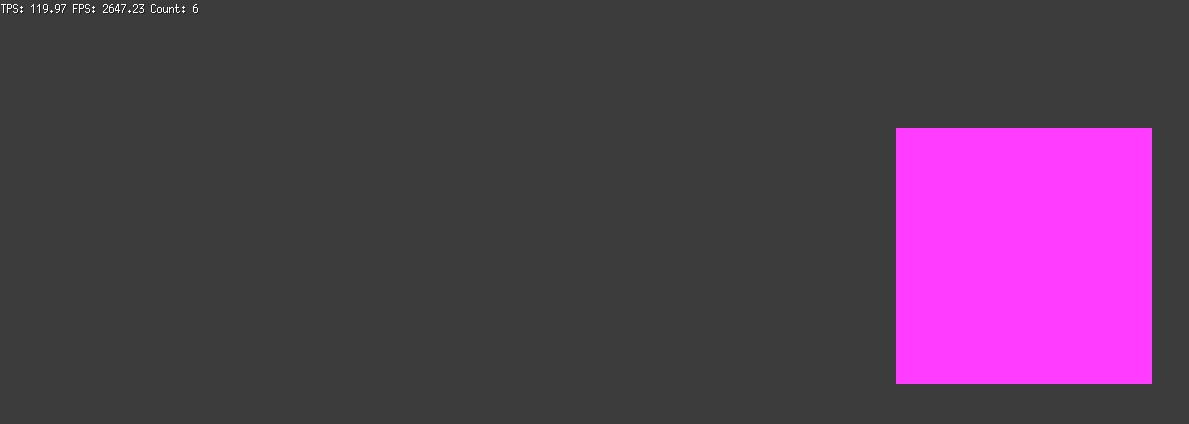
Reproduction Code:
Draw func:
func (g *Game) Draw(screen *ebiten.Image) {
    screen.Fill(color.RGBA{60, 60, 60, 255})
    geom := ebiten.GeoM{}
    geom.Translate(128*1+256*3, 128)
    shaderOpts := &ebiten.DrawRectShaderOptions{
        GeoM: geom,
        Images: [4]*ebiten.Image{
            g.ShapeMap,
            g.Texture,
        },
        Uniforms: map[string]interface{}{
            "ScreenSize": []float32{spriteWidth, spriteHeight},
        },
    }
    screen.DrawRectShader(256, 256, shader.HexagramShader, shaderOpts)

    ebitenutil.DebugPrint(screen, fmt.Sprintf("TPS: %0.2f FPS: %0.2f", ebiten.CurrentTPS(), ebiten.CurrentFPS(), someGlobalVariable))
}
Shader code:
func Fragment(position vec4, texCoord vec2, color vec4) vec4 {
    return vec4(1,0,1,0)
}
I tried playing around with CompositeMode knowing it doesn't make sense, without any success.
Do we agree on the fact that the rectangle (here square) area should show color.RGBA{60, 60, 60, 255} or am I misunderstanding something ?
Thanks in advance
 Zyko0
Zyko0
All 2 comments
Just a quick note:
return vec4(1,0,1,0)
Ebiten treats only pre-multiplied alpha colors, then rgb values must be equal to or less than alpha value.
 hajimehoshi
on 12 Nov 2020
hajimehoshi
on 12 Nov 2020
Oh okay ! Thank you, I definitely read that line on your website, but I didn't pay attention to what it was or its meaning.
I just searched for it, and I'm fine with it now, thanks again !
Zyko0
on 12 Nov 2020
Related issues
hajimehoshi
·
7Comments
 QiProject
·
4Comments
hajimehoshi
·
4Comments
hajimehoshi
·
6Comments
hajimehoshi
·
6Comments
QiProject
·
4Comments
hajimehoshi
·
4Comments
hajimehoshi
·
6Comments
hajimehoshi
·
6Comments