Ebiten: Unexpected aliased edges on iPhone emulator and an actual device
SSStand reported:
iPhone:

Expected (macOS desktop):

I'm now waiting for the code and the images to reproduce the issue.
 hajimehoshi
All 6 comments
Reproduced the issue.
hajimehoshi
on 24 Jun 2020
Even with scaling 1, there can be unexpected jaggy edges on desktops...
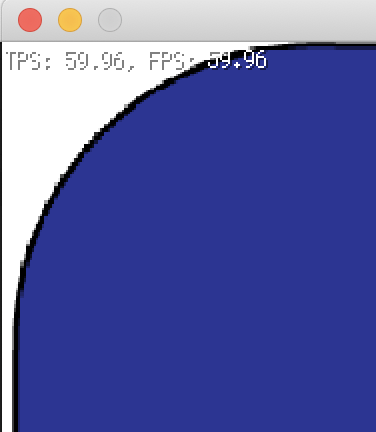
Adding GeoM.Translate(0.5, 0.5) fixed the issue.
This doesn't happen on Ebiten 1.11.3. 1.12.x caused this issue.
hajimehoshi
on 24 Jun 2020
git bisect says 1785b6a670b211e2d976eb78e1a2588ad35389d6 is the cause of https://github.com/hajimehoshi/ebiten/issues/1212#issuecomment-648702883
hajimehoshi
on 24 Jun 2020
The image is created with FilterLinear, then the linear filter is used. In this case, taking texels can happen on texel borders (e.g., if the position is (2.5, 2.5), texels are picked from (2, 2), (2, 3), (3, 2), (3, 3), which are all on the borders), and this can cause unexpected results.
hajimehoshi
on 24 Jun 2020
The current finding: with the same code, mipmaps are used on macOS, while they are not used on iOS. I'm not sure why, but this reasons the rendering difference.
hajimehoshi
on 24 Jun 2020
OK I found the cause of the issue firstly reported: on the user side, the given filter at NewImageFromImage was different :-)
hajimehoshi
on 24 Jun 2020
Related issues
 zladnrms
·
4Comments
hajimehoshi
·
7Comments
zladnrms
·
4Comments
hajimehoshi
·
7Comments
 ilyar
·
3Comments
hajimehoshi
·
4Comments
hajimehoshi
·
5Comments
ilyar
·
3Comments
hajimehoshi
·
4Comments
hajimehoshi
·
5Comments
Most helpful comment
OK I found the cause of the issue firstly reported: on the user side, the given filter at NewImageFromImage was different :-)