Easy-digital-downloads: Bundle product selector: show only product variations if the product is variably priced.
Bug Report
Expected behavior
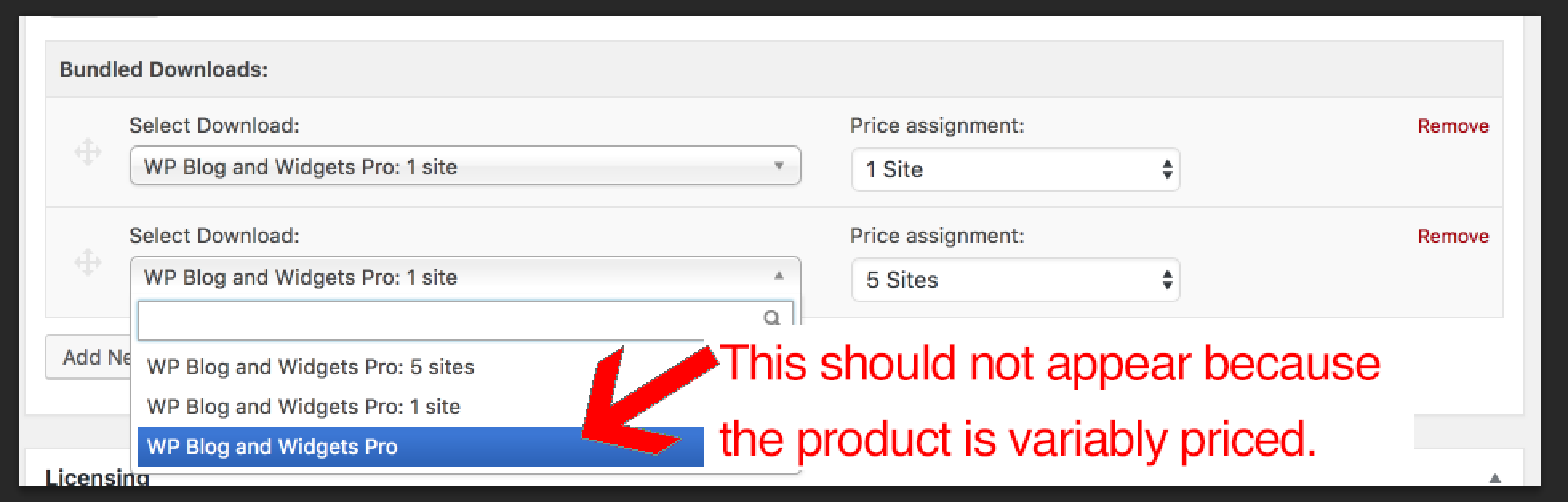
When I create a bundle and choose child products within it, if the child product is variably priced, I expect to _only_ have the option of choosing variable prices.
Actual behavior
When I create a bundle and choose child products within it, if the child product is variably priced, I have the option of choosing variable prices (good) _and_ a non-variable priced version (bad). The non-variable price does not actually exist, and therefore should not be in the list.
Steps to reproduce the behavior
1) Create a variably priced product.
2) Create a bundle.
3) In the "Bundled Download" area, notice how you can choose a version of your product without choosing a variable price. If chosen, it's unclear what the expectation should be, and really doesn't make sense in this context.
Information (if a specific version is affected):
PHP Version: Any
EDD Version (or branch): Any
WordPress Version: Any
Any other relevant information:
This has confused numerous customers. Here's one related ticket:
https://secure.helpscout.net/conversation/590847803/83208?folderId=749231
It's important to note that this could affect backward compatibility for some stores. Likely the best approach here would be to migrate any of these that are already-selected in bundles to default to the smallest variable available. For example:
If Variable Product A is selected in a bundle, automatically update it so that Variable Product A: First Variation is selected.
 mintplugins
All 22 comments
We'll just have to update our Product selector where we allow 'show variations' to 'disable main product' as a flag. This should do the trick.
There are cases we'll want to include all variations of a product (like a discount code), but in the case of the bundle price selector we'll for sure want to allow that to only be to a price Id.
We could also use this in the 'files list' which would solve some support pain points when you have a mix of variable priced items in a bundle that you want to deliver different files for each variable price point.
 cklosowski
on 5 Sep 2018
cklosowski
on 5 Sep 2018
I would disagree about the discount code. If you have variable products, selecting a non-variable version of that product could easily be mistaken as meaningless, since a non-variable version of the product does not actually exist. It's an assumption on our part that the site owner would assume that selecting a non-variable version of the product means they are including all variations.
I believe we should remove non-variable versions of variable products from all select fields, since those products do not actually exist.
If the site owner wants a discount code to apply to all variable prices, they should add all variable prices to the list attached to a discount code. It reduces the possibility of user confusion and tightens up the user experience.
mintplugins
on 5 Sep 2018
I agree with a piece of what both of you are saying.
For something like discounts, I do think the overall product should be listed. But you are right, Phil, that we can't assume they'd understand what it means. I'd rather see some sort of visual indicator that it's the complete product.
- Simple Product - Option One
- Simple Product - Option Two
- Simple Product - Option Three
- Simple Product (All Price Options)
Some people have dozens of price options. But even without considering that, I do think it makes a lot of sense to be able to choose an entire product.
To be clear, my suggestion is based on situations like a discount. I do agree that there are cases where having the full product is not needed at all.
 SDavisMedia
on 5 Sep 2018
SDavisMedia
on 5 Sep 2018
I can agree with that. If it said Simple Product (All Price Options), that would sort out my concerns completely. Good approach @SDavisMedia
mintplugins
on 6 Sep 2018
Blah! Chosen isn't working for me for me on 3.0 (or branches based on 3.0). Can't test this at the moment.
SDavisMedia
on 7 Nov 2018
@SDavisMedia This is ready for more testing, I believe that the Chosen issues in the release/3.0 branches is good now
cklosowski
on 28 Nov 2018
@dgoldak mind testing this for me if you have 3.0 set up? If not, no worries. For some reason Chosen just isn't working for me.
SDavisMedia
on 29 Nov 2018
Sorry for the Chosen Regression here!
If there are other places where a similar type-to-search is required, and where there are fewer than 13 items, it will have the same issue.
 JJJ
on 30 Nov 2018
JJJ
on 30 Nov 2018
I confirmed, bundles cannot be created until issue/7054 is fixed. I'll test as issue/7054 is resolved.
 dgoldak
on 30 Nov 2018
dgoldak
on 30 Nov 2018
@dgoldak I'm actually merging issue/7054 into this one, it was built off the same branch. There are still issues with it, I believe. let me commit what I have currently.
cklosowski
on 3 Dec 2018
I'll test this today.
dgoldak
on 5 Dec 2018
@cklosowski From the Discount add/edit screen, it seems Chosen displays Simple Product (All Price Options) just fine now, but the variable pricing options themselves are gone. On the Download add/edit screen, Chosen displays the pricing options but _not_ the new selection for all options, which I believe we've agreed on.
Correct me if I'm wrong but what I described for Discounts is incorrect.
SDavisMedia
on 6 Dec 2018
@SDavisMedia actually right now it is correct. Our discounts do not yet support per price Option.
cklosowski
on 6 Dec 2018
Ah yea my bad. Just went through another round of testing and it appears everything is working for me.
Let's make sure everyone tests discount Download Requirements since that affects checkout. The restrictions worked for me for qualified carts and unqualified carts. :+1:
SDavisMedia
on 6 Dec 2018
Oops. Just found a bug.
- Go to add/edit Download screen and select to configure a bundle.
- Start searching for a variable price product. Everything will look fine, as in you'll see price options but no main product (intended).
- Publish your new product and then revisit the Chosen menu for the included product. You'll now see the main product listed with the variable pricing options. You can even select and save it. Note that it doesn't include the new
(All Price Options)text.
SDavisMedia
on 6 Dec 2018
Noted, that was one of the bugs I was experiencing still too. Since we were merging a few different chosen issues into this @SDavisMedia I knew we'd find a few edge cases. I was just hoping to make sure that chosen was even loading for people. I'll see what I can figure out there.
cklosowski
on 6 Dec 2018
Sorry guys, finally was able to confirm the bundle selector is working as expected with issue/6760 checked out.
I didn't test the bug Sean noted since it sounds like it's "expected".
dgoldak
on 8 Dec 2018
Ok I fixed up the issue @SDavisMedia was seeing. Should be ready for another round.
cklosowski
on 23 Jan 2019
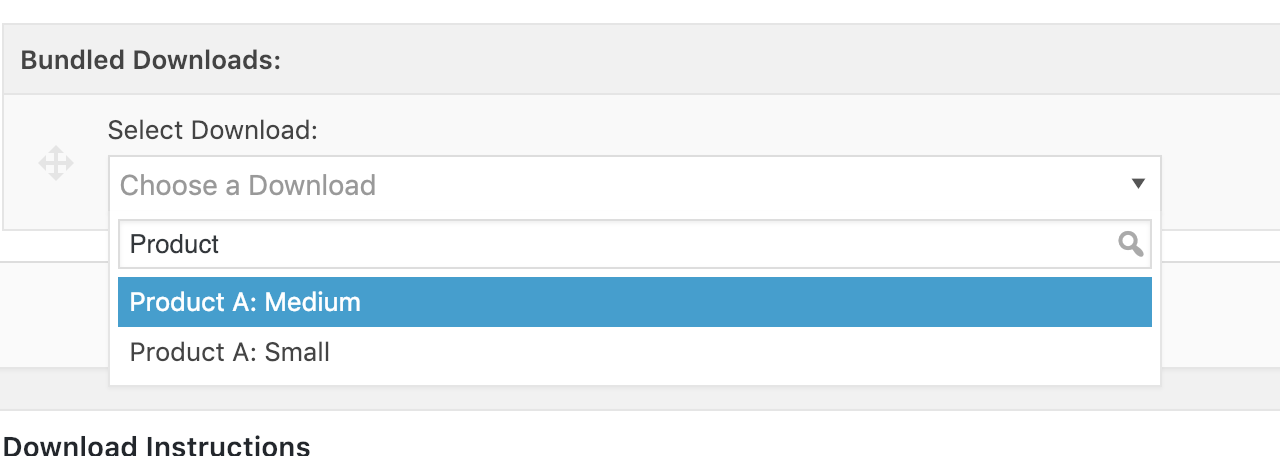
Bundle is fine
It's working well when creating a Bundle:
Discounts not showing variable price options
But when creating a discount code I am only seeing the "all price options". I cannot select any variable version of the product as a requirement:

mintplugins
on 24 Jan 2019
@mintplugins Discounts don't support variable pricing for them, yet. The only place this has been added is Discounts Pro. We simply added the 'All Price Options' to make it more clear that it was applying to all variations of the product.
cklosowski
on 24 Jan 2019
@cklosowski In that case all is well. I also tested Sean's issue above:
Revisit the Chosen menu for the included product. You'll now see the main product listed with the variable pricing options. You can even select and save it. Note that it doesn't include the new (All Price Options) text.
I am not able to see the Main Product (without a variable price) after saving a product.
mintplugins
on 25 Jan 2019
Perfect @mintplugins that's what our goal was, to stop that 'assumption' part of bundles and variable pricing.
cklosowski
on 29 Jan 2019
Related issues
 JeroenSormani
·
5Comments
JeroenSormani
·
5Comments
 nabeghe
·
5Comments
nabeghe
·
5Comments
 Ismail-elkorchi
·
3Comments
Ismail-elkorchi
·
3Comments
 scottbuscemi
·
5Comments
scottbuscemi
·
5Comments
 mindctrl
·
4Comments
mindctrl
·
4Comments