Dxvk: Assassin's Creed Syndicate freezes on startup
So Assassin's Creed Syndicate freezes on the first frame with DXVK :

Wine
The only way out is to kill the process.
On Windows 10 with DXVK enabled it goes through the startup videos and to a black menu with useable cursor. It then spouts this error :
The procedure entry point DXGID3D10RegisterLayers could not be located in the dynamic link library
C:\Windows\SYSTEM32\d3d10core.dll.

Windows 10
Does it need some DirectX10 functions to work ? Or something with the nvidia driver.
274 Seems to be related
Software information
Assassin's Creed Syndicate v1.51 Uplay
System information
- GPU: Nvidia Geforce GTX 980Ti
- Driver: 390.48 on Linux, 391.35 on Windows
- Wine version: 3.6 Staging
- DXVK version: 5fa8174
Apitrace file(s)
apitrace.exe is unable to produce any trace on this uplay game. I tried injecting dxgitrace.dll and it produced this weird trace. Not sure if it's of any use.
Log files
Wine :
d3d11.log:
ACS_d3d11.logdxgi.log:
ACS_dxgi.log
Windows 10 :
d3d11.log:
ACS_d3d11.logdxgi.log:
ACS_dxgi.log
 popsUlfr
All 24 comments
@popsUlfr Does this game work with wined3d?
Based on your trace, the game seems to require support for D3D11VideoDevice, which DXVK does not and will never support, but it might be optional.
Anyway, I cannot debug this issue without a proper apitrace.
@ZereoX please open a separate issue, yours is obviously unrelated. Posting multiple different issues in one thread makes it impossible to keep track of things.
 doitsujin
on 14 Apr 2018
doitsujin
on 14 Apr 2018
@doitsujin
Does this game work with wined3d?
It freezes at the same point heh...
Anyway, I cannot debug this issue without a proper apitrace.
It seems like most if not all Ubisoft/Uplay games are non-apitraceable from what I've seen. The process forks and calls Uplay, I guess ? So Apitrace exits and Uplay manages to start the process after all, it is just a pain.
I'll try to find more usable information if possible. Thank you.
popsUlfr
on 15 Apr 2018
If it does that, it might as well be a wine issue, similar to the one in Fallout 4 in case you're aware of that. Do you by any chance have a Windows install around where you can test that?
In case of forking executables, what you could try is to rename the program's executable to something like ACS.orig.exe and create a new file ACS.exe which would be an executable shell script like this:
#!/bin/bash
wine /something/apitrace.exe trace -a dxgi ACS.orig.exe
No guarantee that it works, it's a bit of a last-resort strategy but it might help.
doitsujin
on 15 Apr 2018
@popsUlfr Please test this with the latest Nvidia beta driver, 396.18.05.
doitsujin
on 25 Apr 2018
@doitsujin Sorry for the late reply
System information
- GPU: Nvidia Geforce GTX 980Ti
- Driver: 396.18 on Linux
- Wine version: 3.7 Staging
- DXVK version: 9aa73d1
Alright it goes through the startup videos, then it arrives on the the animated screen that tells you to click any button to access the main menu but it's all black. I hear the sound of the Start screen going to the main menu and the last thing I see is like a plane with a light source and the game closes. According to wine it terminated normally so no backtrace.

With DXVK_DEBUG_LAYERS=1 the game crashes on launch with this backtrace
backtrace-debuglayers.txt
I got my hands on a version of the game which well, bypasses Uplay but it is still unable to do an apitrace beyond the first frame.
In wined3d mode it somehow loops on the disclaimer screen a few times but then goes to black forever and ever. Like Disclaimer -> Black -> Disclaimer -> Black -> Disclaimer -> Black
EDIT:
Oh no I wasn't using 396.18.5 !
Here we go :

No black screens now it goes to the menu and closes itself.
0108:fixme:bcrypt:BCryptOpenAlgorithmProvider algorithm L"ECDH_P256" not supported
00be:fixme:kernelbase:AppPolicyGetProcessTerminationMethod 0xfffffffa, 0x33fe34
003e:err:combase:RoGetActivationFactory Failed to find library for L"Windows.UI.ViewManagement.UIViewSettings"
[0429/175245.147:WARNING:cert_verify_proc_win.cc(111)] Unknown error -2146762482 mapped to net::ERR_FAILED
There's a wine bug here from what I can tell related to bcrypt and cert verification at that point.
Starting Uplay in offline mode and launching the game manages to get us into the game :
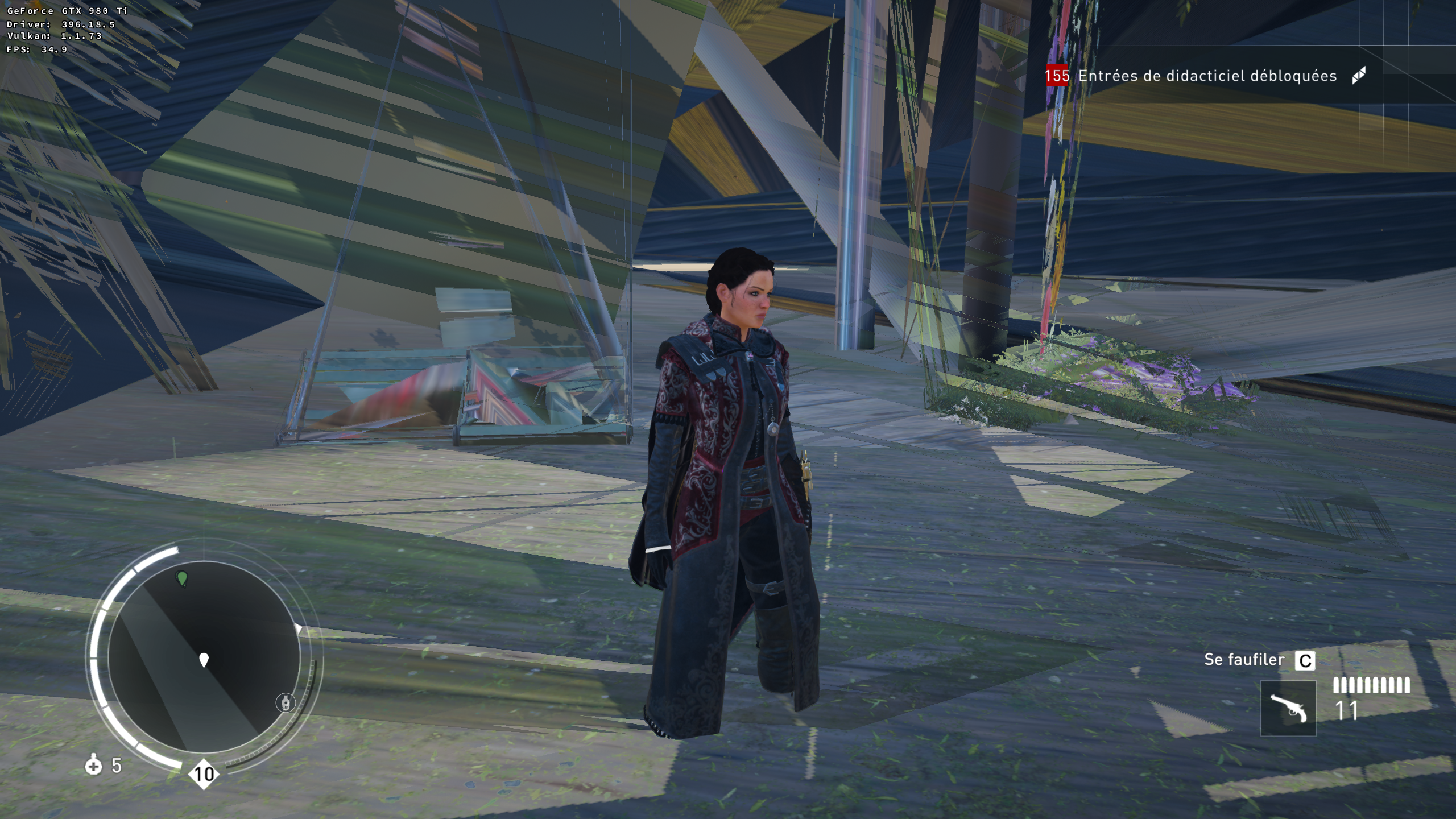
And it's beautiful :P
Related to the new shader compiler ?
EDIT2:
__GL_NextGenCompiler=0 freezes the game on the first frame just like in the initial bug report. Locks up the whole machine and have to wait like 2 mins before being able to get back another tty to kill the process.
popsUlfr
on 29 Apr 2018
The last beta Nvidia driver doesn't help either:
https://imgur.com/SeY7xok
https://imgur.com/e7GGTX9
https://imgur.com/vQwOlYF
 mozo78
on 12 May 2018
mozo78
on 12 May 2018
Same problem than Nvidia user with my AMD Rx580 :
https://imgur.com/a/FnWf5Zd
 Odelpasso
on 8 Jun 2018
Odelpasso
on 8 Jun 2018
@doitsujin I forgot to add the both log, sorry.
Odelpasso
on 9 Jun 2018
So, can someone try to record an apitrace? There are instructions on the Wiki on how to do that for games which don't like being traced the normal way.
doitsujin
on 14 Jun 2018
I tried it but with apitrace the game crashes after the splash screen. Here you are the created file:
https://my.pcloud.com/publink/show?code=XZSzkf7ZqYwCHmIN217puIlLlzMmI8htLx2X
mozo78
on 15 Jun 2018
The renderig issues should be fixed with 9520c9b1b88fbb0749a18afa34505ba6034e5aa4. I don't have Syndicate, but Origins ran into similar issues and now works fine:

doitsujin
on 3 Sep 2018
I don't know how to use this so I'll wait for someone else to try it. Will this fix be icluded in the next version of DXVK?
mozo78
on 3 Sep 2018
@mozo78 Here's a build: dxvk-master.tar.gz
doitsujin
on 3 Sep 2018
Thank you! I'll try it and will report back ASAP!
mozo78
on 3 Sep 2018
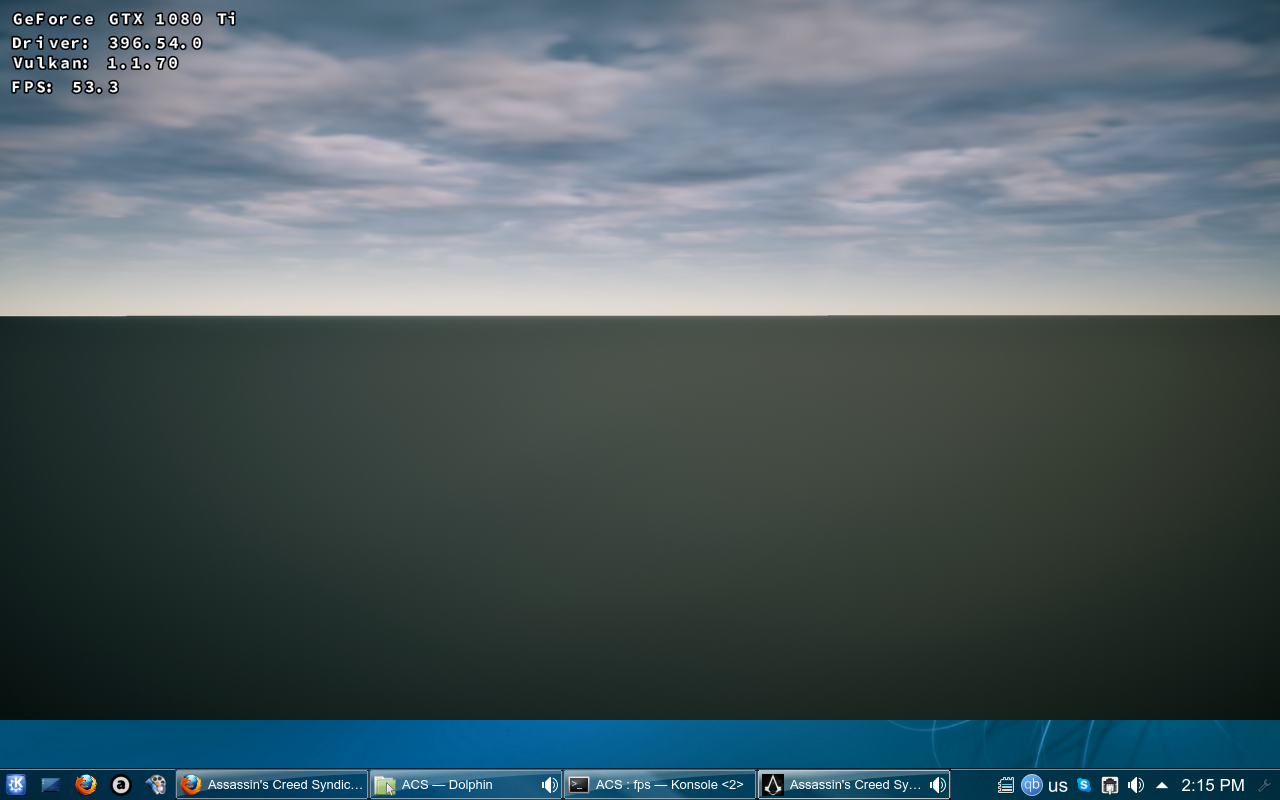
Unfortunately I get this after the intro movie:
mozo78
on 3 Sep 2018
Please test with 396.54.02. The game requires an updated revision of the VK_EXT_vertex_attribute_divisor extension which your current driver might not support, namely, to support a divisor of zero.
doitsujin
on 3 Sep 2018
Yes silly me... It now works, GREAT job doitsujin!!!
 dreamhunt
on 3 Sep 2018
dreamhunt
on 3 Sep 2018
Hello doitsujin! I'm sorry for the reopening but what settings do you use for Assassin's Creed: Origins? I'm constantly getting:
And DXVK logs are empty...
mozo78
on 4 Sep 2018
AC:Origins doesn't work on Linux due to DRM issues. I ran the game on Windows for testing.
doitsujin
on 4 Sep 2018
Ah, I see. Thank you for the clarification. Best regards!
mozo78
on 4 Sep 2018
Been following along here and am interested to test out that dxvk build with my copy of AC. I've got the correct nvidia drivers according to nvidia-smi.
My issue is I can't seem to find where I should put the dll's, in drive_c in the respective folders or is there a global proton dxvk folder I'm missing?
Cheers!
 Firelfy
on 7 Sep 2018
Firelfy
on 7 Sep 2018
You have to put the x64 dlls in the game's exe directory or in the wine's system 32 :)
mozo78
on 8 Sep 2018
Awesome, placing the dll's with the exe worked. Still unsure why installing the dll's to the wine prefix didn't work... Will have to look into that one.
Firelfy
on 8 Sep 2018
If play it through Proton, you'll have to replace the DXVK DLLs inside the Proton install directory (in proton-3.7/lib64/wine/dxvk or something like that).
doitsujin
on 8 Sep 2018
Related issues
 arabcian
·
3Comments
arabcian
·
3Comments
 index-0
·
3Comments
index-0
·
3Comments
 jekstrand
·
5Comments
jekstrand
·
5Comments
 HunterCZ122
·
4Comments
HunterCZ122
·
4Comments
 Ahmed-E-86
·
4Comments
Ahmed-E-86
·
4Comments