Ds4windows: [TODO] Start Drafts of Future Mapper Program
In the future year of 2019, work needs to be done on newer mapping prototype programs that could possibly replace DS4Windows. It would definitely be a replacement as backwards compatibility with current DS4Windows profiles would not be considered. This topic should be expanded upon in the Wiki but this issue will be used in the Work Board to show future intent to work on something.
If nothing else, at least a two week effort needs to be made to see if investing more time on a replacement would be worthwhile.
https://github.com/Ryochan7/DS4Windows/wiki/Ideas-for-Future-Successor
 Ryochan7
All 31 comments
What about separating GUI and the mapping service? This would make it easy to make the core engine as a background Win service which doesn't have "admin vs non-admin privileges" problems (service has an admin privileges). Through a service it would be easy to do also "service dependency links" where for example Steam or GeForceExperience services are set to depend on DS4Windows service and therefore Windows makes sure that DS4Win service boots up first and can do "Hide DS4 magic" before those potentially problematic services are run (assuming controller is connected already when the system boots up).
Euro Truck Simulator 2 Improved Gyro Tilt controls will be desired to allow a DS4 to be used as a >pseudo steering wheel to >control a truck. The gyro would be mapped to the Xbox 360 Left Stick.
I suggest to take a look at the latest "Steering wheel emulation" pull request/fork (https://github.com/Ryochan7/DS4Windows/pull/491). These days I play ETS2 using this steering wheel emulation logic and it works wonderfully. The version there supports left and right stick axis (X and Y whatever configured) and even trigger axis if triggers are not needed in a game. I'm also considering to add support to output (feed) DS4 gyro steering wheel values to virtual VJoy device, so both sticks and triggers of DS4 controller can be mapped for other purposes and gyro feeds vjoy virtual device (ETS/ATS games support multiple controllers at the same time). The latest fork/pull version has a configuration GUI and calibration options, so there is no need to use action hotkeys to initiate calibration process or to use "Powered by Notepad" to edit profile files.
 mika-n
on 10 Dec 2018
mika-n
on 10 Dec 2018
I have done minor performance testing with the service model and output performance was slightly better than when running the mapper in a normal Windows application. Exclusive mode issues might be reduced but I am not sure that they would go away completely even when running a mapper as a service. Exclusive access problems would probably only be fully resolved if work is done at the driver level.
Making some kind of API for the inter-process communication needed to make an editable mapper work would be above my coding level. Looking at how SC Controller does its job would be required to learn how that type of model works. Initial work would be done making an updated application and possibly branch out from there.
Out of the items listed so far, making something workable with Oblivion is the most ambitious proposal. That is one game that requires some fairly complex mapping in order to make it playable with a controller. DS4Windows is definitely not capable of pulling it off well. I had played Oblivion with an Xbox 360 controller mapped to KB+M controls before and it was a pretty good experience. I have never tried it with the Steam Controller so maybe I should try some community profiles.
Having full range wheel support for ATS would be helpful. Getting better support for 180 degree mode would be useful as well. Having support for smooth steering like what is available with the Steam Controller, but not as laggy, would be nice.
Ryochan7
on 13 Dec 2018
unlike jebbel's, I would like to keep all of the current features and keep it portable with no appdata usage as it is now.
Memory Reader game specific profiles so that we can cause something with the controller to happen when a certain memory address occurs (like restoring rumble to pc games whos console counterparts had them by hitting a hotkey to capture the address in-game and linking a controller action to it like the way special actions are currently implemented.
I would really like auto xinput ports so we wouldnt have to worry about trying to find the correct ports to make controllers work.
When batteries get low to the point of turning off, the controller acts weird (not distinquishing p1 from p2 proberly, etc. I would like to see some improvements on that.
Lastly, i would like fixes for a controller having a chance of not connecting or both controllers being P1 when multiple controllers are turned on at the same time.
 shinra358
on 16 Dec 2018
shinra358
on 16 Dec 2018
The plan would be to include almost the full feature set of DS4Windows and maybe add some functionality that I have not found a way to get into DS4Windows; one such option would be stick dead zone mode like a Cross dead zone mode. There are some pieces of functionality that likely won't get migrated.
- Flush HID was a bad workaround to start with so that option will not be included.
- The older Curve option will not be carried over. It did not work that well and the extra axis mapping settings that have been added to DS4Windows make the option obsolete.
- UDP server will be removed as it has been a maintenance problem from the start and its use case is too limited.
- The Use DInput only option should probably get converted to something that specifies the desired output device(s) to utilize.
Some minor work has been done so far but nothing substantial. The extent is that most axis mapping options have been remade and incorporated. Some minor build optimizations that were discovered while testing were incorporated into the latest version of DS4Windows. One big surprise is just how much better the app performs by targeting a different version of C#. Although DS4Windows now targets C# 7.2, DS4Windows does not currently use any C# features beyond what is available in C# 6.
I should probably set up some test repository so that I can keep track of what changes have been made. Also, it would allow other people to see what I am doing.
Ryochan7
on 27 Dec 2018
On idea about key/axis re-mapping logic.
Support to re-direct outputs to vJoy virtual device (each mapping could have output device definition as x360, vJoy1, vJoy2, vJoy3 etc). This way certain additional outputs (sixaxis, touchpad click in different corners, touchpad swipes etc) which don't fit into standard x360 device profile (unless some default mappings are left out) could be re-directed to another virtual device.
And to stretch out this even more DS4Win could let re-map multiple input DS4Controllers as one virtual output device (two DS4 conntrollers, but only one output x360 or vJoy device).
I realized that this is not exactly what DS4Windows app was built to do originally and there are some other applications which allow multi-device mappings to one vJoy output device. Especially flight simulator dudes seem to use those kind of re-map apps when they use several non-integrated controllers (yokes, pedals, throttle levers, etc etc).
mika-n
on 2 Jan 2019
the problem regarding GeForce Experience can be solved in an easy way, if DS4 return a value when a controller is connected we can edit the startup of GeForce Experience only when DS4 output that specific value (at the moment GFEx start when its updater complete the check) in this way GeForce Experience donìt grab the exclusive mode on controller... anyway GFEx grab the exclusive mode on controller only when the nVidia Overlay (feature for save screnshoot, record video, streaming the game on twitch/FB/YT) is enabled.
The idea for a new DS4 isn't bad, but when you change a way for another you know what you leave but don't know at all what you will find.
For me the only change for the current DS4 to do is move the Hide DS4 controller to profile section, this because some PC game recognize the ds4 controller natively (Destiny 2 is one of this and with DS4 i can map feature that this game don't use like the swipe for extra action and maintani the ds4 native functionality for this game) but open the ds4 app for disable the hide ds4 option every time...
 jinkazama82it
on 8 Jan 2019
jinkazama82it
on 8 Jan 2019
- The Use DInput only option should probably get converted to something that specifies the desired output device(s) to utilize.
What I would like to see in this regard is some way to effectively disable the application by default, and use it with a whitelist of games. The way I use it is I use "DInput only" on my default profile, and then use auto profile for the games that aren't on Steam and doesn't natively support the DS4.
 Lombra
on 10 Jan 2019
Lombra
on 10 Jan 2019
I guess skipping device enumeration could be a startup option. The problem with that type of functionality will always be a problem with Bluetooth connections though. Once a device handle is opened then the original DirectInput device would be seen as a dead controller.
I haven't done anything since the last update. The closest thing to any work being done was figuring out how data binding works in WPF. I don't like the implications of using the INotifyPropertyChanged interface but WPF does support a secondary way to signal a property change using more specific events. I would rather go that route.
Ryochan7
on 11 Jan 2019
Not sure if this feature is possible in current DS4Windows but I'd really like option to remap axis to the digital button because L2/R2 is registered as triggers with analog and this causes the problem in some games/launchers which automatically tries to map Axis to the directions.
Example - Tony Hawk American Wasteland launcher
When you map direction UP you move analog stick up and it automatically assign axis to DOWN as well.
The problem is that when you try to map Action to the trigger. The L2/R2 (LT/RT) axis can be registered only to 1 action
http://4.bp.blogspot.com/_xRv70spi7RI/SWvebnQ8RXI/AAAAAAAAAe0/mu9fNQ-S730/s320/04.JPG
As a workaround I remapped entire controller to keyboard but it would be nice to have option to select digital buttons instead of analog axes.
 1oglop1
on 12 Jan 2019
1oglop1
on 12 Jan 2019
It looks like the game only supports DirectInput. Unfortunately, the problem that you have described is a consequence of design decisions made by Microsoft regarding how the Xbox 360 controller is exposed as a DirectInput device. Both triggers are mapped to one DirectInput axis so both triggers cannot be used simultaneously.
The DS4 DirectInput device does expose each trigger as a full DirectInput axis but games can have issues with that configuration as found in issue #536. ViGEmBus support would have made it possible to emulate a DS4 controller instead of an Xbox 360 controller which would likely take care of the issue. Maybe a new version of the driver will get a public release and I can consider supporting it in some way. The initial plan was to have DS4Windows use ViGEmBus exclusively around early 2018 but that did not happen.
Ryochan7
on 12 Jan 2019
After recent experiments especially with testing HttpClient, I think I have finally given up on the idea of making a successor in C# running on .NET. Apparently using the System.Net.Http assembly massively slows down any tested application that uses it. With all the misadventures experienced trying to use all the tricks available in C#, I don't think that the .NET Runtime is up to the task and it probably should not be used when raw performance is crucial.
I don't think that I will give up on using C# and .NET entirely. I might end up doing some more testing but it will be more of an academic exercise than anything else. I guess I will likely use C++ and utilize the Qt toolkit for any future work on a successor.
Ryochan7
on 19 Jan 2019
Garbage collector is one potentially big factor in C# (and in Java) apps if the app needs to talk to a hardware and it is crucial always to stay within a predictable performance threshold. One way to avoid random GC slow downs is to minimize new object allocations by using buffers (ring buffer is one way to do it efficiently) and pre-allocated objects which are just marked as "available" in the app logic (instead of releasing objects back to GC).
However, recent C# compilers (7.x versions and upcoming 8.x improves optimizers even further) and JIT are very good to optimize code and there is less tweaks developer need to do in order to get good performance in C#. In theory C/C++ is more powerful but it leaves much more for developers to tweak project and compiler settings and memory management. If these settings are not optimal or the app uses some badly optimized C/C++ std library functions then C/C++ app may easily be slower than C#.
My opinion is that C/C++ has these days less and less reasons to brag about performance. Device drivers and "talking to metal level" may be still area where C/C++ has advantages, but beyond that C# /.NET is comparable in terms of runtime performance. But it is true that down to millisecond type of apps may randomly see slownesss in C#/.NET because of GC memory cleanups (unless C# app utilize instance re-use of objects technique instead of allocating and releasing objects rapidly within a short period of time).
GUI and other "non near-real-time-functionalities" are much easier to code in C# than in C/C++ because developer can spend more time in logic instead of trying to manage and debug C/C++ pointers and memory bookkeeping.
How about splitting the new successor in two parts? Engine talking to the hardware and handling mapping rules and feeding virtual drivers. And a separate app layer doing GUI for profile and config editing, HttpClient/UDPServer "non-near-real-time" stuff? This way time critical hardware talking could be in C/C++ service app but everything else in C# app?
mika-n
on 20 Jan 2019
It seems like even splitting responsibilities won't really help. Using one odd assembly to add functionality or making some random change to the C# portion could bring about drastic unwanted changes that affect the entire application. The same type of problems can be replicated in far smaller programs. My main problem is the .NET Runtime; it is better than the Java Virtual Machine for sure but it still seems to be a bottleneck.
I have looked into Qt integration in Visual Studio. It works but I might opt to use Qt Creator again and just use the MSVC compiler as opposed to gcc. Minor testing has shown that better results can be achieved with a small Qt app compared to a similar small C# WPF application. This is all still up in the air.
Ryochan7
on 20 Jan 2019
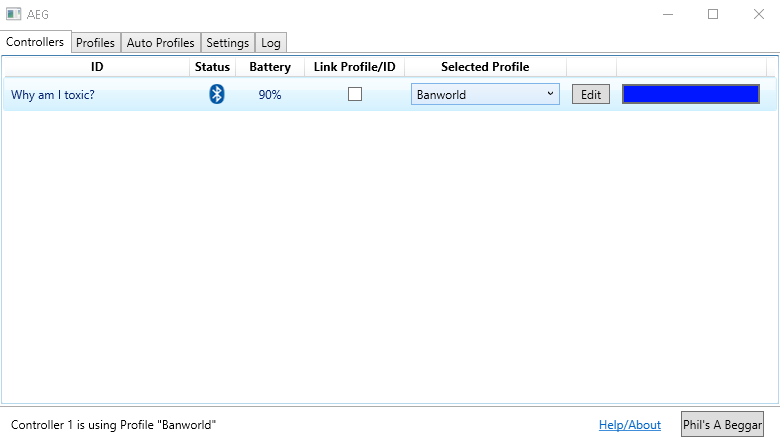
End up playing with WPF and Xaml over the last few days. I think I somewhat understand the concepts of data binding and MVVM now. Making basic layouts seems a tad easier in WPF than WinForms for the most part; using a ListView with a GridView has been a pain though. I have made a base layout that almost duplicates the current DS4Form in DS4Windows. It is just using some basic objects in the code-behind for setting up data binding. The next experiment will be to set up some kind of interface that actually interacts with DS4Device objects.
Ryochan7
on 6 Feb 2019
Like!
 Ryusennin
on 7 Feb 2019
Ryusennin
on 7 Feb 2019
Although DS4Windows now targets C# 7.2, DS4Windows does not currently use any C# features beyond what is available in C# 6.
It definitely looks like version 1.6.11 will actively utilize features available in C# 7 and later. Heavy use of ref returns will be utilized to curb struct copying for lightbar color routines. I am still looking into it but a square stick routine will probably take advantage of the in parameter feature and maybe ref struct type feature. Those two features were introduced with C# 7.2.
Ryochan7
on 12 Feb 2019
omg ds4windows is dead now? really thanks Ryonchan7 for all the hard work you're putting in since you got this project. hope this new project rise up pretty fast too. thanks alot.
 fersnake
on 13 Mar 2019
fersnake
on 13 Mar 2019
DS4Windows is not dead yet but I hope to make something more flexible. It is a long term goal that I hope will start to come to fruition by the end of 2019. The current DS4Windows code base can be very limiting. Working on DS4Windows has still been helpful for finding way to improve .NET application performance in general.
No real work has been done since the last update. I have been a bit busy and I busted my right hand so I have been coding one handed for the past couple of weeks. It has slowed me down a lot.
Ryochan7
on 13 Mar 2019
that's enough pornhub for you for a while mr travis 😂
On Wed, Mar 13, 2019, 8:30 AM Travis Nickles notifications@github.com
wrote:
DS4Windows is not dead yet but I hope to make something more flexible. It
is a long term goal that I hope will start to come to fruition by the end
of 2019. The current DS4Windows code base can be very limiting. Working on
DS4Windows has still been helpful for finding way to improve .NET
application performance in general.No real work has been done since the last update. I have been a bit busy
and I busted my right hand so I have been coding one handed for the last
couple of weeks. It has slowed me down a lot.—
You are receiving this because you commented.
Reply to this email directly, view it on GitHub
https://github.com/Ryochan7/DS4Windows/issues/512#issuecomment-472402368,
or mute the thread
https://github.com/notifications/unsubscribe-auth/ADy0MwtiaNZDzOXRgTRxwgS2ilFsvqt7ks5vWO9tgaJpZM4ZJ3Qb
.
shinra358
on 13 Mar 2019
Here is a non-update for the most part. I have added ViGEmBus as an official dependency in the Successor page. I was being optimistic beforehand hoping that eventually I would be able to dump the ScpVBus driver. Despite the growing pains, at least it has happened in DS4Windows. It looks like the current force feedback issue will be addressed in some fashion soon. That will not be a problem for a future mapper program.
Another thing is that I am going to give myself a more direct goal. I really want to play Oblivion again. That installment is my favorite Elder Scrolls game and it has been a long time since I played it. DS4Windows does not have the functionality that I feel like I would need to make playing it possible with a controller. I have tried to play Oblivion using the Steam mapper but I did not like the community profiles that I tested.
It is possible to have a decent experience with a controller. Some of the features that I would want for that game are listed in the Successor page. It would be a heavy KB+M configuration.
Ryochan7
on 10 Apr 2019
Ironically, one of the primary reasons I'm waiting for Skyblivion is because I desperately want proper gamepad support in Oblivion :)
Ryusennin
on 10 Apr 2019
Heavy use of ref returns will be utilized to curb struct copying for lightbar color routines.
Wow, these are new to me and a little hard to wrap my head around. You're probably aware of the potential performance traps, but I'll link this stuff I'm reading _just in case_ you haven't seen it.
https://blogs.msdn.microsoft.com/seteplia/2018/03/07/the-in-modifier-and-the-readonly-structs-in-c/
https://blogs.msdn.microsoft.com/seteplia/2018/04/11/performance-traps-of-ref-locals-and-ref-returns-in-c/
https://blogs.msdn.microsoft.com/seteplia/2018/05/03/avoiding-struct-and-readonly-reference-performance-pitfalls-with-errorprone-net/
Even read access, not write, to a readonly variable of a non-readonly struct creates a defensive copy. Wild. And if you use an "in" parameter, that's a readonly variable, so the struct needs to be entirely readonly as well or you get defensive copying again. Ack!
As someone relatively new to the C# world, I struggle to see the value of structs at all. But I've never done high-performance design. Reading some more posts about them, I see they do have some uses when you're deep into optimization.
 Corrodias
on 12 Apr 2019
Corrodias
on 12 Apr 2019
As someone relatively new to the C# world, I struggle to see the value of structs at all. But I've never >done high-performance design. Are they a little faster to use in some way?
Good links you provided. And here is one more to answer your question and confuse the scene :-)
https://docs.microsoft.com/en-us/dotnet/csharp/programming-guide/classes-and-structs/using-structs
https://docs.microsoft.com/en-us/dotnet/csharp/language-reference/keywords/value-types
https://docs.microsoft.com/en-us/dotnet/csharp/language-reference/keywords/reference-types
Structs are value types and classes are reference types. Knowing that both can define methods then at first struct and class may seem pretty much the same, but value type vs reference type is a big difference in terms of memory allocation and sometimes in performance (depending on how those objects are used).
mika-n
on 12 Apr 2019
I see; thanks for the info. I'm probably never going to be working on something with the kind of performance requirements DS4Windows operates under, but you never know. This could be useful and is at least certainly interesting.
Corrodias
on 12 Apr 2019
Having access to some newer C# features has been very helpful. I had not heard about those pitfalls with structs. One pitfall I had encountered was regarding boxing and unboxing being performed (resulted in 2 copies) when the Equals method was being called before using IEquatable; the same situation with a class would just apply to the pointer. I usually make sure to test most changes for performance regressions.
The lightbar code in DS4Windows had many struct instances being copied and modified every gamepad poll so changing those copy operations to using references helped speed up performance a good bit. The DS4Color struct is fairly small so turning that into a class would probably not have been a great idea just for the benefit of having a reference type.
Ryochan7
on 13 Apr 2019
I have finally started thinking about an API for the mapping routines. Unlike my first test, at least I now have a prototype that can map to an Xbox 360 controller properly. I have created a test ground repository where I will continue to push changes as I go along.
Ryochan7
on 16 Apr 2019
DS4Windows now uses the ref locals reassignment feature which requires targeting C# 7.3. The feature is being used in the KB+M functions in InputMethods to curb array access. C# 7.3 was being used as the language target for the last few versions of DS4Windows but now a feature from C# 7.3 is being used in the code. The Successor Wiki page has been updated to acknowledge C# 7.3 as the language target.
https://blog.jetbrains.com/dotnet/2018/07/24/ref-local-re-assignment/
Ryochan7
on 16 Apr 2019
After all the work you have put into this project it would make sense for you to
make your own modern version of a tool like this (with a dark GUI, etc.). It's
impressive to see how far this project has come since you started it, so making
your own version makes sense. Especially since 1.7.8 DS4 works with BT fully
native which is impressive to say the least.
 DrConflict
on 4 May 2019
DrConflict
on 4 May 2019
Just my two cents here but
I would love a mapping setup similar to dolphin, which lets you set aributary Boolean expressions of input presses to an output. For instance pressing left shoulder AND NOT right sholder = sends "A", or you could press down lStick and rStick at the same time to send ESC. This is insanely useful.
For the love of emulation dont remove the motion server until a robust replacement is eatablished. There are many games and systems, notably Nintendo, that make required use of motion controls. Core series such as pokemon and breath of the wild have features requireing motion controls and abandoning it leaves people using emulators with no good replacement.
 Corgano
on 10 Jun 2019
Corgano
on 10 Jun 2019
I should get back to updating this; I still have some changes locally that I never pushed. The biggest concern is getting any modifiers in place in an abstract way that is somewhat fast and won't be painful to maintain. C# does not make that task easy. Just abusing inline would probably be good enough for me if C++ were being used. AggresiveInline in C# does not seem to always inline routines and using the relevant assembly causes application slowdown so that defeats the purpose.
At this point, I don't expect to make my old imposed deadline. If I would want to play Oblivion again, I would have to use antimicro as that is the still the best tool (IMO) for playing Oblivion with a controller; that is including evaluating the Steam mapper. Too bad that I still seem to be unable to re-create a similar tool in C#; I did abuse many Qt specific features while developing that program.
Ryochan7
on 8 Aug 2019
Took the time to get the old program compiled; took several hours diagnosing errors just to find out that moc was messing things up and the CMake file had to be updated. Comparing the old profile to what is available on Steam, the profile can now technically be converted over to the Steam mapper completely, The main feature that had been missing from my testing had been any way to map an 8-way dpad. A touch menu can be mapped to the DS4 dpad and that can be used for that purpose although it seems to be a bit flaky. It is not as responsive and the overlay goes away a lot while still switching directions.
3 sets are used for the profile. Set 1 is the standard set used when playing. I think Set 2 was just used to interact with the map (zoom primarily). That set is active while holding R3. Set 3 was used for mapping the spell wheel to an 8-way dpad and mapping hold actions for Quick Save and Quick Load. That set is active while holding R1.
https://gist.github.com/Ryochan7/d5ff79c25e84dc3ee111b69b0db546fd
At least some progress has been made over the past few days with the test source code.
Ryochan7
on 13 Aug 2019
Related issues
 Zhythe
·
6Comments
Zhythe
·
6Comments
 teeedubb
·
8Comments
teeedubb
·
8Comments
 grysor
·
4Comments
grysor
·
4Comments
 OSRAGAMER
·
8Comments
OSRAGAMER
·
8Comments
 bison3
·
5Comments
bison3
·
5Comments
Most helpful comment
What about separating GUI and the mapping service? This would make it easy to make the core engine as a background Win service which doesn't have "admin vs non-admin privileges" problems (service has an admin privileges). Through a service it would be easy to do also "service dependency links" where for example Steam or GeForceExperience services are set to depend on DS4Windows service and therefore Windows makes sure that DS4Win service boots up first and can do "Hide DS4 magic" before those potentially problematic services are run (assuming controller is connected already when the system boots up).
I suggest to take a look at the latest "Steering wheel emulation" pull request/fork (https://github.com/Ryochan7/DS4Windows/pull/491). These days I play ETS2 using this steering wheel emulation logic and it works wonderfully. The version there supports left and right stick axis (X and Y whatever configured) and even trigger axis if triggers are not needed in a game. I'm also considering to add support to output (feed) DS4 gyro steering wheel values to virtual VJoy device, so both sticks and triggers of DS4 controller can be mapped for other purposes and gyro feeds vjoy virtual device (ETS/ATS games support multiple controllers at the same time). The latest fork/pull version has a configuration GUI and calibration options, so there is no need to use action hotkeys to initiate calibration process or to use "Powered by Notepad" to edit profile files.