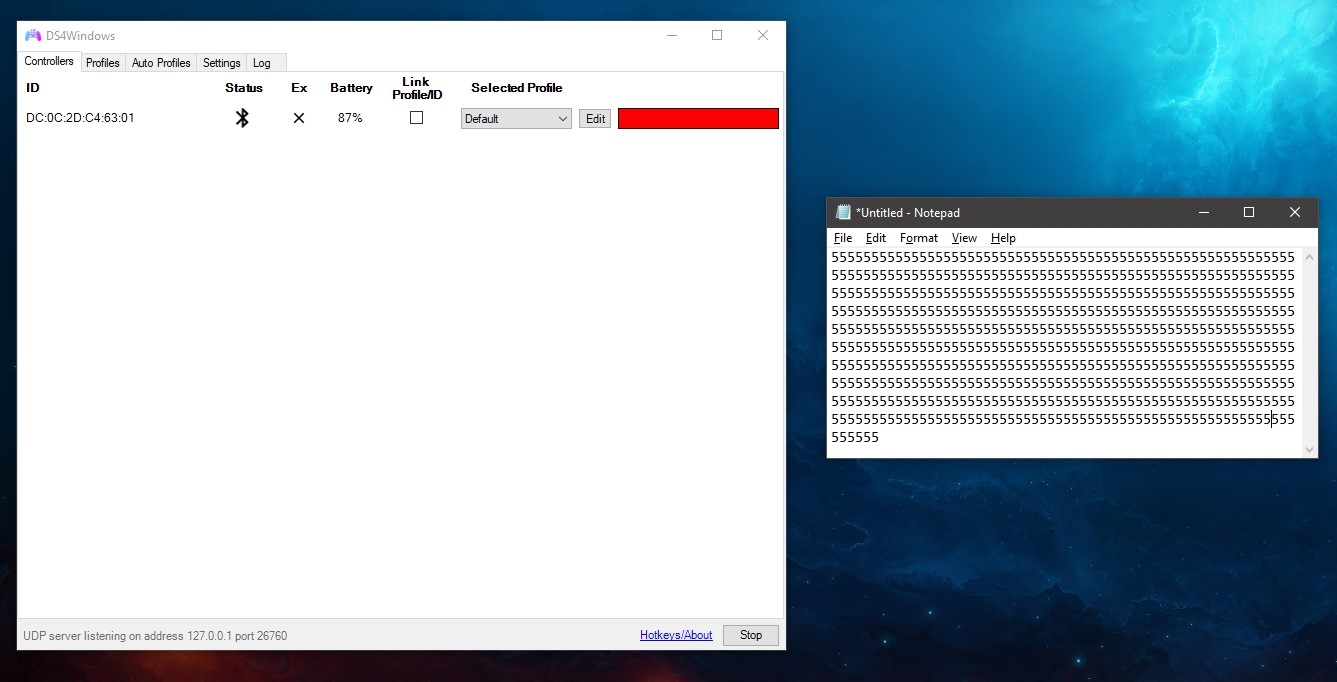
Ds4windows: Automatically pressing the "5" key when turning on service/controller
Hello everyone.
I've just updated my DS4Windows from Jays2Kings (which is working perfectly but fewer functions) to Ryochan7's version although, I'm getting this bug and it's my first time experiencing it from the DS4Windows Software itself.
Let me know if you guys have any solution(s) for this. Thanks in advance.
 Zhythe
All 6 comments
Once upon a time you could have easily used the same settings from the old Jay's version, but that's not the case anymore. I suggest you back up your Jay's install (just rename the folder) and start a fresh profile with Ryochan's version.
 Ryusennin
on 22 Dec 2019
Ryusennin
on 22 Dec 2019
Once upon a time you could have easily used the same settings from the old Jay's version, but that's not the case anymore. I suggest you back up your Jay's install (just rename the folder) and start a fresh profile with Ryochan's version.
Done with that and I have a fresh installed Windows. Oh, I'm asking politely btw. No need to be acting like a pro or someone who knows it all.
"Once upon a time" LULW
Grow up. I'm looking for solutions, not attitude. Thanks. 😊
Zhythe
on 22 Dec 2019
hmmm... Are you sure you don't accidentally have a profile with keyboard mapping "5" in some of the analog gyro or LS/RS stick axies? Those are hardly ever completely stable (unless the profile dfines a big enough deadzone), so having a keyboard mapping in those axies could easily generate loooooots of key events.
Please provide a zipped content of your DS4Windows configuration and profile files (use "Profile folder" link in DS4Windows settings screen or navigate to "%APPDATA%\DS4Windows" folder in FileExplorer). Or try to create a new default profile in DS4Windows and see if the problem is gone by using a default profile. Then you just have to try to find a problematic mapping rule in the original profile (sometimes it is easier to compare profile files by opening those XML files in Notepad).
What is the controller you are using? Standard Sony DS4 gamepad? Logs tab page in DS4Windows should show the exact model name of the connected gamepad.
The same result in USB and BT connections?
I doubt there are this kind of bug in the core engine of DS4Windows because a problem like this would have been detected long time ago and this site would have been flooded with error messages. So I believe this is probably a profile mapping/configuration file issue.
Have you uninstalled all traces of SCPToolkit driver? Sometimes those drivers have caused problems in newer VigEm driver used by the current version of DS4Windows (replaces SCPToolkit drivers).
 mika-n
on 22 Dec 2019
mika-n
on 22 Dec 2019
Grow up. I'm looking for solutions, not attitude.
Err, what? Who's having an attitude here? I was just jokingly telling a little story and exploring a possible solution (because yes, DS4Windows has changed a lot since the Jay version you've been using until now).
And I suggest you stop reading between the lines. I'm not a condescending "pro" and I'm only participating here to try and help people. No need to be insulting for your first post.
Ryusennin
on 22 Dec 2019
This is likely a side effect of a change of program behavior regarding dead zones. In the Jays2Kings build, there was an implicit dead zone on LS and RS of around 0.03(?) if the profile dead zone setting was marked as 0.0. There are times when no dead zone could be useful so the implicit dead zone was removed. Due to that, any profile that maps to KB+M will be negatively impacted and any deviation from absolute center will result in keys being pressed.
I feel like the initial implicit dead zone design decision was wrong. The old dead zone behavior also caused the values outside the dead zone to immediately jump up rather than scale linearly as I would expect. The current anti-dead zone option provides a better and more configurable way to get that type of behavior back to work around in-game dead zone settings. A person on Discord had shown me some functionality that was unintended removed from my change though. There is no type of substitute for negative dead zone functionality in this build; I didn't even know such a feature existed previously tbh. I have not decided on a way to implement an alternative.
TLDR: Set a dead zone for LS and RS. A dead zone around 0.08 for LS and RS would probably be pretty good; PS4 games typically use around 0.10. I like a smaller dead zone on RS when mapping to mouse though. I tend to use around 0.03 when mapping RS to mouse.
 Ryochan7
on 22 Dec 2019
Ryochan7
on 22 Dec 2019
On a somewhat unrelated note, profile templates might be an additional feature that could help work around some initial profile setting issues in the future. As it is now, DS4Windows is set up to create an XInput profile when you create a new profile. Such profile settings might not be suitable for a KB+M profile. With the upcoming 2.0 update, it might be doable to implement a profile template selection window in the future.
Ryochan7
on 23 Dec 2019
Related issues
 zardini123
·
7Comments
zardini123
·
7Comments
 Okami23
·
6Comments
Okami23
·
6Comments
 grysor
·
4Comments
grysor
·
4Comments
 vicvis
·
4Comments
vicvis
·
4Comments
 CarissaIsWierd
·
7Comments
CarissaIsWierd
·
7Comments