Ds4windows: Incompatibility of UDP Server set of DS4Windows with Cemu
Describe the bug
I search for 3 weeks for what now In Cemu, emulating some game, tlozbotw, when i push R2 to hand the bow the game freeze,
and i finaly get, in Options Panel of DS4windows, UDP Server Sets, if "Use Smoothing" is On Cemu low the emulation speed to 0.08Fps,
Expected behavior
a Check if DS4Windows send incoherent Data through UDP Server of Sixaxis over "Use Smoothing", to confirm if is DS4Windows Problem
Screenshots

Desktop (please complete the following information):
- Controller Make and Model: Sony DS4 v.1 (CUH-ZCT1)
- OS: Windows 10 Pro Build 2004 20241.1005
- DS4Windows Version 2.1.15
 OSRAGAMER
All 8 comments
I don't have the means to test the functionality in CEmu. All I know is that the output data works fine in PadTest.exe with no drop in frame rate. Data is continuously sent from the UDP server so it does not make sense why the frame rate would drop only once the bow is being used.
Are you using a DS4Windows profile with conflicting bindings when using CEmu? I believe the CEmu plugin should handle button mappings from the UDP server so you could just use a blank profile while actively using the UDP server with CEmu.
 Ryochan7
on 30 Oct 2020
Ryochan7
on 30 Oct 2020
Hello, very thanks for answer,
i take your coments,
New Profile for the Control in DS4Windows wit Standar Preset, Cemu Blank profile controller,
Checked "Also use for buttons/axes" for take the buttons mappings From UDP Server,
Checked "Use Smoothing" in DS4Windows,
Same result.
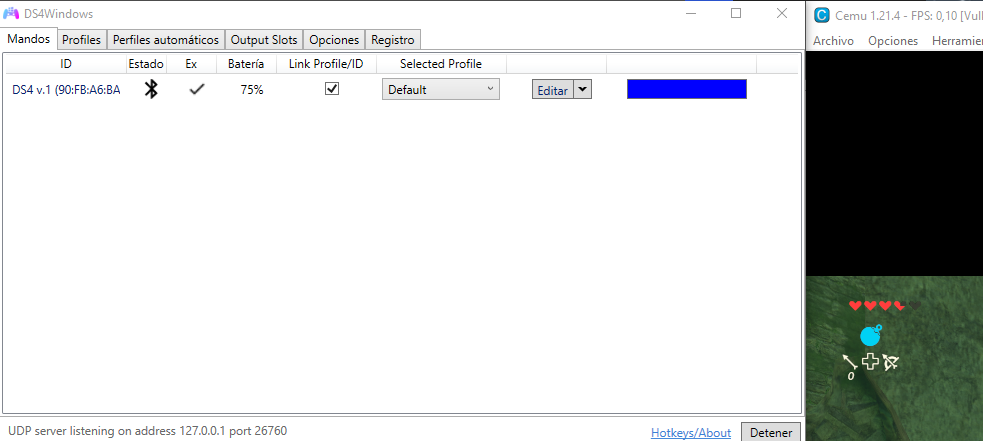
before i reinstall Cemu, Redownload the rom, last try, reinstall DS4Windows, i do this in one hour, i will comment the result.
OSRAGAMER
on 31 Oct 2020
psdt. Padtest works OK to me to, i re-installing DS4Windows
OSRAGAMER
on 31 Oct 2020
Sort of confirmed. Funny enough, Cemu works just fine with Smoothing enabled using the DualSense controller. I am looking at the smoothing output now and the smoothing values sometimes pop up as NaN (Not a Number) with the DS4.
Besides the FPS dropping in Cemu, it seems like this issue breaks BoTW in some interesting ways.
Ryochan7
on 16 Nov 2020
Hello, sorry i get involved in the game, after reinstall DS4Windows Cemu Works Fine, reusing my profiles, so im fine now but i dont know what happen before.
OSRAGAMER
on 16 Nov 2020
Wait DS4Windows Support DualSense?
OSRAGAMER
on 16 Nov 2020
Found out when the problem occurs although I am not exactly sure why yet. It looks like sometimes no proper timestamp can be found at that routine so the measure rate will be marked as Infinity. Once the smoothing routine is called with that rate, NaN will always be output by the smoothing filter. For now, if the elapsed time is 0 in that routine, the UDP output routine will be skipped. Cemu works fine with that workaround.
DualSense support is still in the works. Most of the mapping work has been done. There is still testing I want to perform before merging the code into the main jay branch.
Ryochan7
on 16 Nov 2020
Found the root problem. It only seems to happen when using the highest BT poll rate possible; I normally use a 4 ms BT poll rate. There are times when duplicate timestamps can be pulled from the controller so the elapsed time for the current state will be marked as 0. Now, if a duplicate timestamp is detected (delta of 0), the timestamp pulled from the system stopwatch will be used instead to determine the elapsed time for that gamepad poll.
The other workaround will be left in the UDP output routine.
Ryochan7
on 16 Nov 2020
Related issues
 grysor
·
4Comments
grysor
·
4Comments
 CarissaIsWierd
·
7Comments
CarissaIsWierd
·
7Comments
 teeedubb
·
8Comments
teeedubb
·
8Comments
 pralima87
·
6Comments
pralima87
·
6Comments
 mindah0
·
4Comments
mindah0
·
4Comments