Dotween: Make Unity module dependencies optional
Unity is moving to a more modular architecture internally, which allows smaller builds if certain modules are not used. However, dotween references several Unity modules in the ShortcutExtensions. For example:
Physics module:
https://github.com/Demigiant/dotween/blob/bc02db900dc67654fe3002bec17bec668b088074/_DOTween.Assembly/DOTween/ShortcutExtensions.cs#L365
This prevents Unity from stripping away the modules if they are not used otherwise.
The issue becomes even move obvious in Unity 2018.2 where individual modules can be disabled:

For example Audio disabled, projects will fail to compile with dotween:
error CS1070: The type `UnityEngine.Audio.AudioMixer' has been forwarded to an assembly that is not referenced. Enable the built in package 'Audio' in the Package Manager window to fix this error.
error CS1070: The type `UnityEngine.AudioSource' has been forwarded to an assembly that is not referenced. Enable the built in package 'Audio' in the Package Manager window to fix this error.
Would it be possible to ship those as separate assemblies that can be included in the project only if needed?
 Nezz
Nezz
All 37 comments
Ahoy,
I have already made a modular physics-disabled DOTween engine, but I still have to find the right way to implement it correctly (since I would prefer to have different libraries than to have multiple that can be enabled, because in some cases too many libraries can be a problem) :P
About UI and Audio, removing the DOTween46 files will remove any UI references/shortcuts (audio can't be de-referenced for now though).
 Demigiant
on 3 Jul 2018
Demigiant
on 3 Jul 2018
Sounds great. I think having an assembly for each module (Audio, Physics, UI) is reasonable.
Nezz
on 3 Jul 2018
The problem is that some modules would require multiple assemblies. For example, an "audio module" would require a basic assembly for normal AudioSource shortcuts, plus another one for AudioMixer ones (since AudioMixer is available only since Unity 5, and I'd like to keep backwards compatibility beyond that).
I was thinking of maybe moving all shortcuts to regular C# scripts inside the project, which could be enabled/disabled either via the renaming of their extensions (done automatically via the Setup Panel), or alternatively by adding definitions to the project (still done automatically).
Demigiant
on 3 Jul 2018
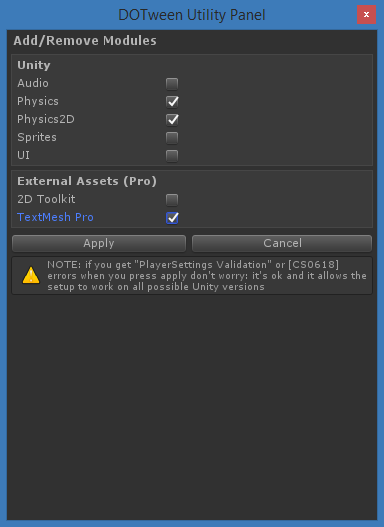
Hey, Here it is, up for a test if you can :) Beware, if you have DOTween Pro in the same project don't test this, since it needs a separate Pro update.
Please let me know if it works well (here it does), and remember to make a backup if you're importing it into an existing project :P
IMPORTANT: upgrade instructions
These are valid in case you're upgrading an existing install in your project.
I tried to make the upgrade as easy as possible (spent 3 whole days just on that part), but Unity doesn't allow to fire post-compilation or load events on new files if the project has errors (unless you reload), so here it is.
- Import the new version in the same folder as the previous one, overwriting old files. A lot of errors will appear but don't worry
- Close and reopen Unity (and your project). This is fundamental: skipping this step will cause a bloodbath
- Open DOTween's Utility Panel (Tools > Demigiant > DOTween Utility Panel) if it doesn't open automatically, then press "Setup DOTween...": this will run the upgrade setup
- From the Add/Remove Modules panel that opens, activate all Modules for the tweens you were using (all of them, probably)
Demigiant
on 18 Jul 2018
Ahoy! Nobody tested this? As far as I did, it seems very ok, but if anyone has a feedback here it would be great :)
Demigiant
on 1 Aug 2018
We are currently still on 2018.1, but I can test it as soon as we upgrade.
Nezz
on 1 Aug 2018
Ah thank you :) As a side note, this new version is not dependent on the new Unity modular system (it's a similar but separate system), so you can install it whenever you want. I'm not saying this to convince you to install now, just for info.
Demigiant
on 1 Aug 2018
I gave it a try and it worked nicely. One thing I'd like to mention though it that I'm not a fan of plugins adding scripting define symbols as it clutters things (so far this is the first plugin we use that does that).
Other plugins like Lunar Console solve this by modifying the plugin script's files. You could add/remove #define DOTPHYSICS in the module files instead. This would also enable you to have all modules enabled by default and people wouldn't have all those compiler errors until they do the setup.
Nezz
on 2 Aug 2018
Thank you for the feedback. And mhmm you're right. I focused so much on scripting define symbols (and decompiled a lot of Unity code in order to fix various bugs with their ways of adding them) that I skipped the idea of just commenting/uncommenting the files themselves. But I understand it can lead to unwanted clutter. Going to try that.
Demigiant
on 2 Aug 2018
Just as a side note: Unity defines a couple of symbols like ENABLE_AUDIO and ENABLE_PHYSICS but these don't get un-defined when removing those packages.
Nezz
on 2 Aug 2018
Whew, done :) Testing it a little bit more before release. The new-er version will auto-remove all define symbols it added, and just change the files directly. After the upgrade, it will also remember the modules you activated/deactivated and will re-activate/deactivate them automatically in case you import a newer version of DOTween.
Demigiant
on 2 Aug 2018
Here it is, v1.2.050. Could you give it a run and tell me if you have any more feedback?
Demigiant
on 2 Aug 2018
I have tried out 1.2.055 in our project. While it works nicely overall. Thanks :)
Nezz
on 8 Aug 2018
I'm afraid there is some sort of issue. All our batch mode tests and builds are getting stuck with the new version using both Unity 2018.1.6 and 2018.2.0. Are you perhaps trying to show some popup that's blocking them?
We run this builds from a clean repository (Library folder is deleted), so there shouldn't be any leftovers from the previous DOTween.
This is the tail of the log on all batch mode jobs. Normally after these lines the builds/tests would start.
Unloading 7465 unused Assets to reduce memory usage. Loaded Objects now: 5749.
Total: 11.208956 ms (FindLiveObjects: 3.109659 ms CreateObjectMapping: 1.466685 ms MarkObjects: 5.129899 ms  DeleteObjects: 1.501457 ms)

Updating Assets/Resources/DOTweenSettings.asset - GUID: e45937ec6b6644b82a49af07b2cecb12...
 done. [Time: 23.864500 ms]
Refreshing native plugins compatible for Editor in 5.39 ms, found 6 plugins.
Preloading 2 native plugins for Editor in 2.21 ms.

----- Total AssetImport time: 1.743446s, AssetImport time: 0.791402s, Asset hashing: 0.000471s [4.9 KB, 10.128942 mb/s]

Warming cache for 7984 main assets: 0.021547 seconds elapsed
Initializing Unity extensions:
 '/Applications/Unity2018.2.0f2/Unity.app/Contents/UnityExtensions/Unity/UnityHoloLens/Editor/UnityEditor.HoloLens.dll'  GUID: 12fd8a0055b84bb59e84c9835a37e333
 '/Applications/Unity2018.2.0f2/Unity.app/Contents/UnityExtensions/Unity/Timeline/Runtime/UnityEngine.Timeline.dll'  GUID: 6a10b2909283487f913b00d94cd3faf5
 '/Applications/Unity2018.2.0f2/Unity.app/Contents/UnityExtensions/Unity/TestRunner/portable/nunit.framework.dll'  GUID: 405b9b51bb344a128608d968297df79c
 '/Applications/Unity2018.2.0f2/Unity.app/Contents/UnityExtensions/Unity/GUISystem/Standalone/UnityEngine.UI.dll'  GUID: f70555f144d8491a825f0804e09c671c
 '/Applications/Unity2018.2.0f2/Unity.app/Contents/UnityExtensions/Unity/GUISystem/UnityEngine.UI.dll'  GUID: f5f67c52d1564df4a8936ccd202a3bd8
 '/Applications/Unity2018.2.0f2/Unity.app/Contents/UnityExtensions/Unity/Timeline/RuntimeEditor/UnityEngine.Timeline.dll'  GUID: 844f815391db42d49455cbf1a7bfc434
 '/Applications/Unity2018.2.0f2/Unity.app/Contents/UnityExtensions/Unity/Networking/Standalone/UnityEngine.Networking.dll'  GUID: dc443db3e92b4983b9738c1131f555cb
 '/Applications/Unity2018.2.0f2/Unity.app/Contents/UnityExtensions/Unity/UnitySpatialTracking/Runtime/UnityEngine.SpatialTracking.dll'  GUID: ed7343f30e3843b3afda8f8b02669cea
 '/Applications/Unity2018.2.0f2/Unity.app/Contents/UnityExtensions/Unity/UnityGoogleAudioSpatializer/Editor/UnityEditor.GoogleAudioSpatializer.dll'  GUID: 4a3ecb1425d14502837abea459cf2b70
 '/Applications/Unity2018.2.0f2/Unity.app/Contents/UnityExtensions/Unity/Networking/Editor/UnityEditor.Networking.dll'  GUID: 5f32cd94baa94578a686d4b9d6b660f7
 '/Applications/Unity2018.2.0f2/Unity.app/Contents/UnityExtensions/Unity/UnityHoloLens/Runtime/UnityEngine.HoloLens.dll'  GUID: f7b54ff4a43d4fcf81b4538b678e0bcc
 '/Applications/Unity2018.2.0f2/Unity.app/Contents/UnityExtensions/Unity/UnitySpatialTracking/Editor/UnityEditor.SpatialTracking.dll'  GUID: b5da970776034f77a070d99423d68791
 '/Applications/Unity2018.2.0f2/Unity.app/Contents/UnityExtensions/Unity/TreeEditor/Editor/UnityEditor.TreeEditor.dll'  GUID: adebbd281f1a4ef3a30be7f21937e02f
 '/Applications/Unity2018.2.0f2/Unity.app/Contents/UnityExtensions/Unity/Networking/UnityEngine.Networking.dll'  GUID: 870353891bb340e2b2a9c8707e7419ba
 '/Applications/Unity2018.2.0f2/Unity.app/Contents/UnityExtensions/Unity/TestRunner/UnityEngine.TestRunner.dll'  GUID: 53ebcfaa2e1e4e2dbc85882cd5a73fa1
 '/Applications/Unity2018.2.0f2/Unity.app/Contents/UnityExtensions/Unity/UnityGoogleAudioSpatializer/RuntimeEditor/UnityEngine.GoogleAudioSpatializer.dll'  GUID: ead147da21254ff9a0a936bdd75e1680
 '/Applications/Unity2018.2.0f2/Unity.app/Contents/UnityExtensions/Unity/UnityGoogleAudioSpatializer/Runtime/UnityEngine.GoogleAudioSpatializer.dll'  GUID: e4f4cf1b9b434137a499903a7a1d651a
 '/Applications/Unity2018.2.0f2/Unity.app/Contents/UnityExtensions/Unity/UnityVR/Editor/UnityEditor.VR.dll'  GUID: 4ba2329b63d54f0187bcaa12486b1b0f
 '/Applications/Unity2018.2.0f2/Unity.app/Contents/UnityExtensions/Unity/UnityHoloLens/RuntimeEditor/UnityEngine.HoloLens.dll'  GUID: 1c6d1fbb51834b64847b1b73a75bfc77
 '/Applications/Unity2018.2.0f2/Unity.app/Contents/UnityExtensions/Unity/UnitySpatialTracking/RuntimeEditor/UnityEngine.SpatialTracking.dll'  GUID: 3a84de5cd0624681b6b6dcd8921d912a
 '/Applications/Unity2018.2.0f2/Unity.app/Contents/UnityExtensions/Unity/GUISystem/Editor/UnityEditor.UI.dll'  GUID: 80a3616ca19596e4da0f10f14d241e9f
 '/Applications/Unity2018.2.0f2/Unity.app/Contents/UnityExtensions/Unity/TestRunner/Editor/UnityEditor.TestRunner.dll'  GUID: 4113173d5e95493ab8765d7b08371de4
 '/Applications/Unity2018.2.0f2/Unity.app/Contents/UnityExtensions/Unity/TestRunner/net35/unity-custom/nunit.framework.dll'  GUID: 4b3fa4bde7f1451a8218c03ee6a8ded8
 '/Applications/Unity2018.2.0f2/Unity.app/Contents/UnityExtensions/Unity/Timeline/Editor/UnityEditor.Timeline.dll'  GUID: 7668179ede524d6396c8b7d84461ea29
Unloading 1435 Unused Serialized files (Serialized files now loaded: 0)
System memory in use before: 0.61 GB.
System memory in use after: 0.61 GB.

Unloading 1391 unused Assets to reduce memory usage. Loaded Objects now: 5789.
Total: 8.444487 ms (FindLiveObjects: 1.836718 ms CreateObjectMapping: 0.803612 ms MarkObjects: 5.442855 ms  DeleteObjects: 0.360463 ms)
Whoa. I do use a post-process hook to determine if DOTween was updated or removed, in which case I try to open DOTween Utility Panel or show a dialog, but that shouldn't cause problems. Give me a short while and I'll send you a version that doesn't try to open any panel (except the upgrade notification one, but that comes from a library that is completely deleted when you run DOTween's Setup).
Demigiant
on 10 Aug 2018
There you go, v1.2.100. After DOTween Setup has been run, this version doesn't try to open other panels nor dialogs anymore, not even when you delete parts of DOTween. Let me know if it solves your issue.
Demigiant
on 10 Aug 2018
Thanks a lot. This version works and does not block tests/builds :)
Nezz
on 10 Aug 2018
Great! Thanks for the update and the bug finding :) Will push another update in a couple days then.
Demigiant
on 12 Aug 2018
With version 1.2.100 we are seeing these errors logged in builds. The animations seem to work though.
Example errors:
<color=#0099bc><b>DOTWEEN ► </b></color>Couldn't load Modules system
UnityEngine.DebugLogHandler:LogFormat(LogType, Object, String, Object[])
UnityEngine.Logger:Log(LogType, Object)
UnityEngine.GameObject:AddComponent()
DG.Tweening.Core.DOTweenComponent:Create()
DG.Tweening.DOTween:Init(DOTweenSettings, Nullable`1, Nullable`1, Nullable`1)
DG.Tweening.DOTween:AutoInit()
DG.Tweening.DOTween:Sequence()
<color=#0099bc><b>DOTWEEN ► </b></color>Tween startup failed (NULL target/property - ): the tween will now be killed ► Object reference not set to an instance of an object.
UnityEngine.DebugLogHandler:LogFormat(LogType, Object, String, Object[])
UnityEngine.Logger:Log(LogType, Object)
DG.Tweening.Tweener:DoStartup(TweenerCore`3)
DG.Tweening.Core.TweenManager:Update(UpdateType, Single, Single)
DG.Tweening.Core.DOTweenComponent:Update()
Reproduced on Android (IL2CPP) and OS X. We are using .NET 4.X with the standard profile. Unity version is 2018.2.4f1.
Nezz
on 21 Aug 2018
During DOTween's Initialization (the one that happens once per runtime, before any tween starts) I use Reflection to access the "DG.Tweening.DOTweenModuleUtils" class, by looking for it either inside "Assembly-CSharp", "Assembly-CSharp-firstpass", or otherwise inside all loaded assemblies via "AppDomain.CurrentDomain.GetAssemblies()", and if that fails you see the message you reported (but it should never fail). Does this trigger something in your mind about possible issues? I have an Android tester that reports no such problems, so I'm a little lost as to why they're happening to you.
Demigiant
on 22 Aug 2018
Could be due to obfuscation. I'll check.
Nezz
on 22 Aug 2018
Yes, it's due to obfuscation. Would it be possible to do what you are doing without reflection?
Nezz
on 22 Aug 2018
I'm afraid not. I need the Modules to be loose scripts (so I can modify them in the editor and use define symbols) and the only valid way to have an assembly communicate with one is reflection.
I don't know what you're using for obfuscation, but what if you place DOTween inside the Plugins folder (I usually keep it there), and prevent obfuscation for the "Assembly-CSharp-firstpass" assembly (the assembly Unity creates for the Plugins directory)? Is it doable?
Demigiant
on 22 Aug 2018
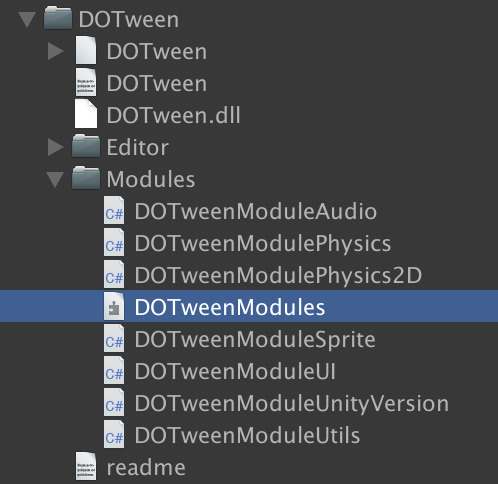
We definitely can't stop obfuscating Assembly-CSharp-firstpass. How about using an assembly definition for the modules with Unity 2017.3 or newer?
Nezz
on 22 Aug 2018
I'm actually investigating how to create it automatically instead than manually via Unity, but in the meantime if you create it yourself it should work.
P.S. On a secondary note, I'm not an expert in obfuscation, but there should be a way to tell your obfuscator to skip some files/folders. Skipping the DOTween module files would be enough.
Demigiant
on 22 Aug 2018
We have noticed for a long time that the log level of dotween was too verbose in our builds ever since we upgraded. Looking at the files that were modified after the builds I see settings getting reverted to their defaults:

This only seems to happen when we build from a clean repository with no Library folder. If we build again with the Library folder being already there it will not happen. Do you know what might cause this? We run our builds in batch mode from a clean repository.
Nezz
on 11 Oct 2018
I do not know if this is relevant. Though when i include Dotween pro in a new project, and then i create a new assembly that references my unity project ( for having completely independent test driven development ) dotween brakes.
 equidevium
on 30 Oct 2018
equidevium
on 30 Oct 2018
@Demigiant Can you check my comment above?
Nezz
on 14 Nov 2018
@Demigiant Hi there. Using version 1.2.055, we're seeing similar errors from Android device builds as Nezz mentioned above, eg:
12-20 16:47:10.376 1819-1845/blah.blah.game E/Unity: DOTween ► Couldn't load Modules system
UnityEngine.Logger:Log(LogType, Object)
DG.Tweening.Core.DOTweenComponent:Create()
DG.Tweening.DOTween:Init(DOTweenSettings, Nullable1, Nullable1, Nullable`1)
DG.Tweening.DOTween:AutoInit()
DG.Tweening.DOTween:Sequence()
DG.Tweening.DOVirtual:DelayedCall(Single, TweenCallback, Boolean)
GameplayController:WeDoSomeStartupThingHere(Int64)
GameplayController:Start()
This only seems to happen in case of building with managed stripping level "medium" or "high". So far as we can tell, tweens are working as expected in the game; and we have not seen any other errors or warnings related to tweens. Should we be still worried about this? And is there something we're doing wrong?
 andras-szabo
on 20 Dec 2018
andras-szabo
on 20 Dec 2018
@andras-szabo Are those the new managed stripping levels in 2018.3? Since these modules are accessed from Dotween using reflection (unless you use them in your code), they might get stripped away. It's indeed a good question whether they are needed or not.
Nezz
on 21 Dec 2018
@Nezz They are- I forgot to mention we're on 2018.3.
andras-szabo
on 21 Dec 2018
Ouch, didn't realize 2018.3 brought a new stripping level that removed Reflection. Indeed the Modules system requires Reflection (only at startup, to allow DLLs to communicate with loose scripts). I will investigate this, but for now please use a stripping level that doesn't strip Reflection.
@Nezz Sorry, totally missed that comment. That is a known bug with Unity (introduced in Unity 2017 I believe) which I realized only lately. In practice, when Unity rebuilds the Library, it resets some ScriptableObjects that are serialized as binaries (it seems it depends on the size of the ScriptableObject, but is also kind of random). I tried many things but I can't find a workaround for that. I hope they'll fix this soon, but for now you should pay attention to discarding any changes to ".asset" files after Unity rebuilds a Library folder (so they revert to your original settings) :|
Demigiant
on 21 Dec 2018
It doesn't strip reflection, I believe it strips code that isn't accessed using traditional means.
@Demigiant Do you have a ticket number for that issue? I can try pushing for a fix there through enterprise support.
Nezz
on 21 Dec 2018
@Nezz I hadn't opened a ticket because I assumed it was too important not to be a known Unity bug. But after you wrote I decided to open one so you could try pushing for a fix. Aaaand... I entered a rabbit hole where I couldn't reproduce the bug and went crazy for a long time trying to understand what was happening.
In the end, I solved it :)
The reason was partly my bad, but still due to what I'm considering a Unity bug. Fact is, I discovered that when the Library is rebuilt the OnPostProcessAllAssets method (which I use to verify and reapply Modules after a DOTween reimport, based on DOTweenSettings modules setup) is called BEFORE Unity has actually completed the database update (so I would say before the assets have actually been processed), so the .asset files are not ready yet (which caused my DOTweenSettings check to find it non-existent and to recreate it).
Can you check this new version and see if all works correctly on your side too?
Demigiant
on 24 Dec 2018
P.S. On a secondary note, I pondered about this more and it's not a Unity bug, it's just my bad. OnPostProcessAllAssets is called at separate intervals for libraries, so it's normal that other assets that are being recreated during a full rebuild might not be ready yet :B
Demigiant
on 24 Dec 2018
Thanks @Demigiant, the fix looks solid. Our settings are no longer reverted to default.
Nezz
on 25 Dec 2018
Hi, I've found this thread while searching for "Couldn't load Modules system" issue I've seen in the logs while using medium or high managed stripping in iOS with IL2CPP.
Adding the class you've mentioned above to link.xml to preserve it fixed the issue for me, at least there is no error in the logs anymore. Just wanted to let you know...
 PixelEnvision
on 20 Feb 2019
PixelEnvision
on 20 Feb 2019
Related issues
 SharpEdgeMarshall
·
3Comments
SharpEdgeMarshall
·
3Comments
 Dentrax
·
10Comments
Dentrax
·
10Comments
 Denis535
·
5Comments
Denis535
·
5Comments
 Zundrium
·
11Comments
Zundrium
·
11Comments
 dooprod
·
11Comments
dooprod
·
11Comments