Dotween: Methods not found when DOTween is not placed in plugins folder.
Steps to reproduce:
1) Start a project on 2018.2 (Not sure if this is version related).
2) Import DOTween in your project (either through Asset Store or downloading it on the website) and run setup.
3) Add this class to your project:
using DG.Tweening;
using UnityEngine;

public class CanvasGroupTest : MonoBehaviour
{

    public CanvasGroup canvasGroup;

    private void Start()
    {
        canvasGroup.DOFade(0, 1, 1f);
    }
}
4) Receive the following error.
Assets/CanvasgroupTest.cs(12,21): error CS1061: Type `UnityEngine.CanvasGroup' does not contain a definition for `DOFade' and no extension method `DOFade' of type `UnityEngine.CanvasGroup' could be found. Are you missing `DG.Tweening' using directive?
5) Place the DOTween library in a Plugins folder.
6) Error goes away.
Can someone explain to me why this is happening? Thanks in advance.
 Zundrium
All 11 comments
That is super weird :O Maybe Unity failed the first compilation and succeeded on the second try, when you moved DOTween to the Plugins folder? Have you tried to move it back outside and then restart Unity? By the way, is that a Visual Studio error or a Unity error (I'm asking if it shows on both or only in Visual Studio)?
 Demigiant
on 5 Nov 2018
Demigiant
on 5 Nov 2018
It's a Unity error. And for some reason it reappears when I restart the project. Doesn't matter where I place the library now. Tested this on 2 PCs, not sure what to do about it. Tried to install it through both the asset store and importing the zip from the website. The Unity error is different this time:
Assets/CanvasgroupTest.cs(11,21): error CS1929: Type `UnityEngine.CanvasGroup' does not contain a member `DOFade' and the best extension method overload `DG.Tweening.ShortcutExtensions.DOFade(this UnityEngine.Material, float, string, float)' requires an instance of type `UnityEngine.Material'
For some reason the Material instance does have the DOFade() method? At least that's what I understand from this error.
Zundrium
on 5 Nov 2018
Ah, but did you activate the "UI" module in the new Modules panel? Otherwise all the UI extensions are not enabled (while the Materials extensions are part of the core so are always enabled).
Demigiant
on 5 Nov 2018
P.S. The Modules panel is accessible from DOTween's Utility Panel
Demigiant
on 5 Nov 2018
Thanks for the quick help! I appreciate it.
Sadly, the issue remains as the UI module is checked by default:
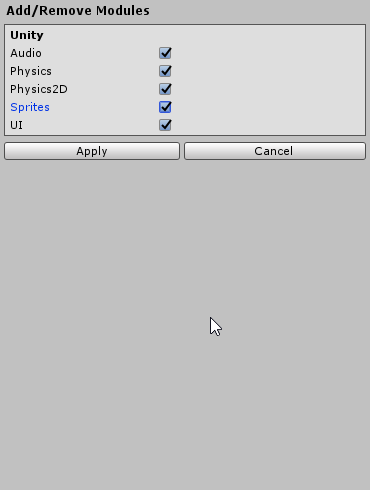
Disabling and re-enabling it doesn't make a difference sadly. But it might have something to do with the setup.
Zundrium
on 5 Nov 2018
I am still very puzzled. Could you open the "DOTweenModuleUI.cs" file in Visual Studio (or any other IDE you're using) and check if the code is enabled (if disabled, everything under line 4 should be greyed out). And could you also copy/paste me the content of line 4 (where it says #if...)?
P.S. The "DOTweenModuleUI.cs" file is inside the "DOTween/Modules" folder.
Demigiant
on 5 Nov 2018
Oh and I forgot to ask. Which version of DOTween do you have?
Demigiant
on 5 Nov 2018
I'm using the latest version (v1.2.135 [Release build]).
Looking at the code in Visual Studio, everything appears to be enabled. I'm just as confused about this as you to be honest.

Can it have something to do with project settings or something like that? I'm using a clean project.
Zundrium
on 6 Nov 2018
Looks like I found the issue!
I guess I haven't correctly isolated and explained the issue. And the reason why the demo I described failed is because of the 3 arguments instead of 2 (D'oh).
While the reason with the real code is something different. Apparently the code I wrote was in a plugins folder. While DOTween is normally imported/installed without a plugins folder. This means that the code inside the plugins folder gets compiled before DOTween, hence the missing references. So when I place DOTween inside the plugins folder, it gets compiled together without any issues.
It might be an idea to place DOTween inside a plugins folder. This will mean that other plugins who depend on DOTween won't have issues with missing references and that DOTween won't get recompiled every time new assemblies are being build.
Thank you so much for your time @Demigiant !
Zundrium
on 6 Nov 2018
Ahhhhhhhh!!! Glad you found it, and damn, I should've thought of that possibility :P
I prefer not to "force" DOTween inside a Plugins folder, but to simply allow users to move it wherever they want. Though indeed I always place it inside said folder. I'll ponder it :)
Cheers!
Demigiant
on 6 Nov 2018
Apologies for the necro here; but I just want to add to this one in case anyone else runs into this same situation and finds themselves at this closed issue.
This issue can also be caused by assembly definitions if you use those in your project. Be sure to add those from the Utility/Setup window, and then link the DOTween modules to the AsmDef files you need access to DOTween in.
 mrcarriere
on 31 Jul 2020
mrcarriere
on 31 Jul 2020
Related issues
 Puutalo
·
8Comments
Puutalo
·
8Comments
 RDeluxe
·
8Comments
RDeluxe
·
8Comments
 kruncher
·
7Comments
kruncher
·
7Comments
 jul-ya
·
12Comments
jul-ya
·
12Comments
 Mukarillo
·
4Comments
Mukarillo
·
4Comments
Most helpful comment
Apologies for the necro here; but I just want to add to this one in case anyone else runs into this same situation and finds themselves at this closed issue.
This issue can also be caused by assembly definitions if you use those in your project. Be sure to add those from the Utility/Setup window, and then link the DOTween modules to the AsmDef files you need access to DOTween in.