On Unity 2019.1.0f2 I never get any OnComplete Callback executed at all - not in a Sequence or in any simple DoMove Tween. I tried this in an empty scene with the newest version of DoTween free on the asset store. It does not work with declared functions neither with anonymous ones using lambda expressions.
 jul-ya
All 12 comments
Hi,
I can't replicate this, here with Unity 2019.1 everything works correctly and OnComplete is called. Can I see the code you're using?
Cheers,
Daniele
 Demigiant
on 17 May 2019
Demigiant
on 17 May 2019
It's super weird... I just used a nearly empty scene with an UI Toggle and called toggle.transform.DOMove(transform.position, 0.1f).OnComplete(()=>{Debug.Log("foo");});
The project itself is XR enabled and contains VRTK 3.3.0 and the Oculus SDK.
jul-ya
on 17 May 2019
I just tried doing the same on a UI Toggle and again everything works :O I'm thinking it might be related to the UI being randomly broken in Unity 2019.1 though (sometimes colors don't change at runtime even if you change them manually via the Inspector, so maybe the position change is somehow broken too).
On a secondary note, you should never use DOMove with a UI element's Transform, but DOAnchorPos on its RectTransform (this has nothing to do with the issue though: I just thought I'd mention it).
And on a third-iary(?) note, I don't have the Oculus SDK though. Is it possible that something else is blocking your tween? Is the tween actually working and the OnComplete is not, or nothing is working? Is it possible there's something else blocking the tween from running (like timeScale or things like that) due to the Oculus SDK?
Demigiant
on 17 May 2019
I know, I just tried DOMove as the last resort, there was no particular reason why I did. The tween is working, only OnComplete is never called. TimeScale seems to be normal, and the weird thing is, tweens are definitely completed as in DOTween's runtime object they disappear after completing and it says 0 tweens again. Currently using a coroutine to wait for the tween to finish so at least for me, there is a workaround, but I thought if it may be reproducible, it would be important to report.
jul-ya
on 20 May 2019
I'm noticing that a DOTweenAnimation onComplete is never called via scripting as well.
    public DOTweenAnimation initialCameraAnimation;

    void OnStart(){
        initialCameraAnimation.onComplete.AddListener(() => {
            Debug.Log("Animation complete...not called");
        });
    }
 thsbrown
on 21 May 2019
thsbrown
on 21 May 2019
I'm noticing that a DOTweenAnimation onComplete is never called via scripting as well.
    public DOTweenAnimation initialCameraAnimation;

    void OnStart(){
        initialCameraAnimation.onComplete.AddListener(() => {
            Debug.Log("Animation complete...not called");
        });
    }
I can confirm. Unity 2019.1.3
DOTween v1.2.235
DOTweenPro v1.0.145
onStepComplete never call too
 IvanMurzak
on 16 Sep 2019
IvanMurzak
on 16 Sep 2019
Additional info:
I subscribe to the events before the animation even started. Possible if may help to investigate the issue
IvanMurzak
on 16 Sep 2019
@Demigiant I found what happened. You should fix it.
Event fires in C# only when in the inspector the event is green. If it is grey any C# subscriptions are ignored.
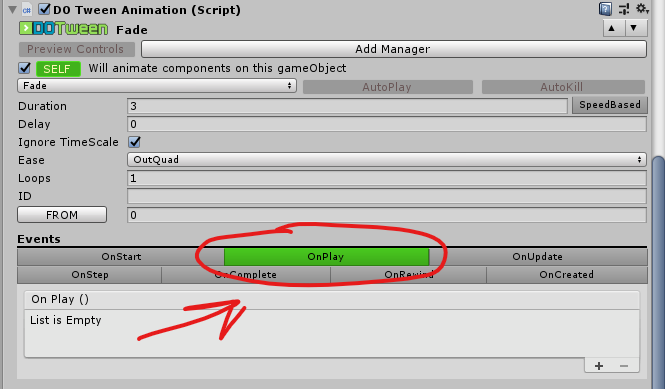
DOTweenAnimation initialCameraAnimation;
initialCameraAnimation.onPlay.AddListener(() => {
        Debug.Log("Animation onPlay ... not called");
});
Ahoy, and sorry for the delay. That is actually by design, and if you want to subscribe to a specific DOTweenAnimation/DOTweenPath events at runtime you should instead use the tween itself (via myDOTweenPath.GetTween().OnComplete(//myEvent). Working on a way to make that clearer in the Inspector itself.
Demigiant
on 20 Sep 2019
@Demigiant I think there may be a case where if the distance to tween using something like DoAnchorPos is really small, OnStart is called, but OnComplete is never called. (in my test case, the value was 3.72529E-09 and OnComplete was never called.)
 RedHatJef
on 10 Jun 2020
RedHatJef
on 10 Jun 2020
@RedHatJef OnComplete should be called even with 0 duration tweens. Can you write me the code so I can replicate it exactly?
Demigiant
on 15 Jun 2020
Try to create sequence, it's works for me
DOTween.Sequence().Append(canvas.DOFade(0f,0.2f)).OnComplete(() =>
                {
                    //DoSomething
                });
 FelixGameNot
on 9 Jul 2020
FelixGameNot
on 9 Jul 2020
Related issues
 eduardbosch
·
3Comments
eduardbosch
·
3Comments
 Wolar
·
5Comments
Wolar
·
5Comments
 RDeluxe
·
8Comments
RDeluxe
·
8Comments
 ShadowTM
·
4Comments
ShadowTM
·
4Comments
 Denis535
·
5Comments
Denis535
·
5Comments