Dotween: [Dotween Pro] Errors when I add a DOTween component
Configuration
Windows 10 | Unity 2018.3.6f1
Platform: Android (OculusGO)
DOTween: v1.2.196
DOTween Pro: v1.0.110
(downloaded the latest version from the assetstore)
Summary
Since I updated with the latest version, I can't add any DOTween components on a gameobject. When I add a DOTween Path component for exemple, I have errors in the log console related to editor GUI.
Screenshots
Create a random gameobject and click on "Add Component > DOTween > DOTween Path",
the DOTween Path component is not visible and errors start to appear (in loop)

Console logs
NullReferenceException: Object reference not set to an instance of an object
UnityEngine.GUILayoutUtility.DoGetRect (UnityEngine.GUIContent content, UnityEngine.GUIStyle style, UnityEngine.GUILayoutOption[] options) (at C:/buildslave/unity/build/Modules/IMGUI/GUILayoutUtility.cs:394)
UnityEngine.GUILayoutUtility.GetRect (UnityEngine.GUIContent content, UnityEngine.GUIStyle style, UnityEngine.GUILayoutOption[] options) (at C:/buildslave/unity/build/Modules/IMGUI/GUILayoutUtility.cs:385)
UnityEngine.GUILayout.DoLabel (UnityEngine.GUIContent content, UnityEngine.GUIStyle style, UnityEngine.GUILayoutOption[] options) (at C:/buildslave/unity/build/Modules/IMGUI/GUILayout.cs:16)
UnityEngine.GUILayout.Label (System.String text, UnityEngine.GUIStyle style, UnityEngine.GUILayoutOption[] options) (at C:/buildslave/unity/build/Modules/IMGUI/GUILayout.cs:12)
DG.DOTweenEditor.Core.AnimationInspectorGUI.StickyTitle (System.String text) (at D:/DG/_Develop/__UNITY3_CLASSES/_Holoville/__DOTween/_DOTween.Assembly/DOTweenProEditor/Core/AnimationInspectorGUI.cs:48)
DG.DOTweenEditor.DOTweenPathInspector.OnInspectorGUI () (at D:/DG/_Develop/__UNITY3_CLASSES/_Holoville/__DOTween/_DOTween.Assembly/DOTweenProEditor/DOTweenPathInspector.cs:171)
UnityEditor.InspectorWindow.DoOnInspectorGUI (System.Boolean rebuildOptimizedGUIBlock, UnityEditor.Editor editor, System.Boolean wasVisible, UnityEngine.Rect& contentRect) (at C:/buildslave/unity/build/Editor/Mono/Inspector/InspectorWindow.cs:1625)
UnityEngine.GUIUtility:ProcessEvent(Int32, IntPtr)
ArgumentException: Getting control 4's position in a group with only 4 controls when doing repaint
Aborting
UnityEngine.GUILayoutGroup.GetNext () (at C:/buildslave/unity/build/Modules/IMGUI/LayoutGroup.cs:117)
UnityEngine.GUILayoutUtility.DoGetRect (UnityEngine.GUIContent content, UnityEngine.GUIStyle style, UnityEngine.GUILayoutOption[] options) (at C:/buildslave/unity/build/Modules/IMGUI/GUILayoutUtility.cs:425)
UnityEngine.GUILayoutUtility.GetRect (UnityEngine.GUIContent content, UnityEngine.GUIStyle style, UnityEngine.GUILayoutOption[] options) (at C:/buildslave/unity/build/Modules/IMGUI/GUILayoutUtility.cs:385)
UnityEngine.GUILayout.DoLabel (UnityEngine.GUIContent content, UnityEngine.GUIStyle style, UnityEngine.GUILayoutOption[] options) (at C:/buildslave/unity/build/Modules/IMGUI/GUILayout.cs:16)
UnityEngine.GUILayout.Label (System.String text, UnityEngine.GUIStyle style, UnityEngine.GUILayoutOption[] options) (at C:/buildslave/unity/build/Modules/IMGUI/GUILayout.cs:12)
DG.DOTweenEditor.Core.AnimationInspectorGUI.StickyTitle (System.String text) (at D:/DG/_Develop/__UNITY3_CLASSES/_Holoville/__DOTween/_DOTween.Assembly/DOTweenProEditor/Core/AnimationInspectorGUI.cs:48)
DG.DOTweenEditor.DOTweenPathInspector.OnInspectorGUI () (at D:/DG/_Develop/__UNITY3_CLASSES/_Holoville/__DOTween/_DOTween.Assembly/DOTweenProEditor/DOTweenPathInspector.cs:171)
UnityEditor.InspectorWindow.DoOnInspectorGUI (System.Boolean rebuildOptimizedGUIBlock, UnityEditor.Editor editor, System.Boolean wasVisible, UnityEngine.Rect& contentRect) (at C:/buildslave/unity/build/Editor/Mono/Inspector/InspectorWindow.cs:1625)
UnityEngine.GUIUtility:ProcessEvent(Int32, IntPtr)
Testing
Everything was correctly imported, I did not touch a folder or a file
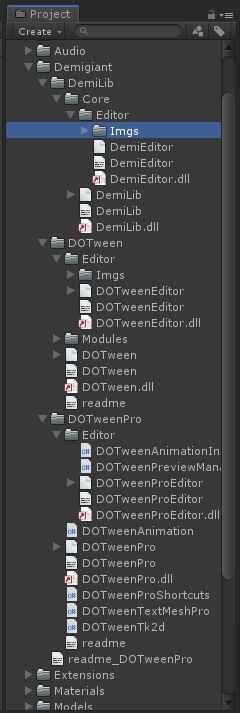
✕ Try to update everything (last version of Unity / DOTween) - Nothing change
✕ Reimport all the project and reinstall the DOTween asset - Nothing change
✓ Switch to an older version - it works when I come back to the old version (PRO)
Thanks in advance for your help!
Cheers,
Y.
 dooprod
All 11 comments
Hi,
I apologize for this issue. I already had another user report it to me
yesterday, but I couldn't reproduce it (I tried the same steps you
mentioned). Now he sent me a sample project that replicates this error so I
hope I'll understand and have a fix asap. Running to work on it :)
Cheers and sorry!
Daniele
On Fri, Mar 1, 2019 at 9:11 AM Dooprod Workshop notifications@github.com
wrote:
Configuration
Windows 10 | Unity 2018.3.6f1
Platform: Android (OculusGO)
DOTween: v1.2.196
DOTween Pro: v1.0.110
(downloaded the latest version from the assetstore)
SummarySince I updated with the latest version, I can't add any DOTween
components on a gameobject. When I add a DOTween Path component for
exemple, I have errors in the log console related to editor GUI.
ScreenshotsCreate a random gameobject and click on "Add Component > DOTween > DOTween
Path",
the DOTween Path component is not visible and errors start to appear (in
loop)
[image: screenshot_01]
https://user-images.githubusercontent.com/1664433/53624223-ccc9fe80-3bff-11e9-97f4-6ecc9e2a8c9e.jpg
Console logsNullReferenceException: Object reference not set to an instance of an objectUnityEngine.GUILayoutUtility.DoGetRect (UnityEngine.GUIContent content, UnityEngine.GUIStyle style, UnityEngine.GUILayoutOption[] options) (at C:/buildslave/unity/build/Modules/IMGUI/GUILayoutUtility.cs:394)UnityEngine.GUILayoutUtility.GetRect (UnityEngine.GUIContent content, UnityEngine.GUIStyle style, UnityEngine.GUILayoutOption[] options) (at C:/buildslave/unity/build/Modules/IMGUI/GUILayoutUtility.cs:385)UnityEngine.GUILayout.DoLabel (UnityEngine.GUIContent content, UnityEngine.GUIStyle style, UnityEngine.GUILayoutOption[] options) (at C:/buildslave/unity/build/Modules/IMGUI/GUILayout.cs:16)UnityEngine.GUILayout.Label (System.String text, UnityEngine.GUIStyle style, UnityEngine.GUILayoutOption[] options) (at C:/buildslave/unity/build/Modules/IMGUI/GUILayout.cs:12)DG.DOTweenEditor.Core.AnimationInspectorGUI.StickyTitle (System.String text) (at D:/DG/_Develop/__UNITY3_CLASSES/_Holoville/__DOTween/_DOTween.Assembly/DOTweenProEditor/Core/AnimationInspectorGUI.cs:48)DG.DOTweenEditor.DOTweenPathInspector.OnInspectorGUI () (at D:/DG/_Develop/__UNITY3_CLASSES/_Holoville/__DOTween/_DOTween.Assembly/DOTweenProEditor/DOTweenPathInspector.cs:171)UnityEditor.InspectorWindow.DoOnInspectorGUI (System.Boolean rebuildOptimizedGUIBlock, UnityEditor.Editor editor, System.Boolean wasVisible, UnityEngine.Rect& contentRect) (at C:/buildslave/unity/build/Editor/Mono/Inspector/InspectorWindow.cs:1625)UnityEngine.GUIUtility:ProcessEvent(Int32, IntPtr)
ArgumentException: Getting control 4's position in a group with only 4 controls when doing repaintAbortingUnityEngine.GUILayoutGroup.GetNext () (at C:/buildslave/unity/build/Modules/IMGUI/LayoutGroup.cs:117)UnityEngine.GUILayoutUtility.DoGetRect (UnityEngine.GUIContent content, UnityEngine.GUIStyle style, UnityEngine.GUILayoutOption[] options) (at C:/buildslave/unity/build/Modules/IMGUI/GUILayoutUtility.cs:425)UnityEngine.GUILayoutUtility.GetRect (UnityEngine.GUIContent content, UnityEngine.GUIStyle style, UnityEngine.GUILayoutOption[] options) (at C:/buildslave/unity/build/Modules/IMGUI/GUILayoutUtility.cs:385)UnityEngine.GUILayout.DoLabel (UnityEngine.GUIContent content, UnityEngine.GUIStyle style, UnityEngine.GUILayoutOption[] options) (at C:/buildslave/unity/build/Modules/IMGUI/GUILayout.cs:16)UnityEngine.GUILayout.Label (System.String text, UnityEngine.GUIStyle style, UnityEngine.GUILayoutOption[] options) (at C:/buildslave/unity/build/Modules/IMGUI/GUILayout.cs:12)DG.DOTweenEditor.Core.AnimationInspectorGUI.StickyTitle (System.String text) (at D:/DG/_Develop/__UNITY3_CLASSES/_Holoville/__DOTween/_DOTween.Assembly/DOTweenProEditor/Core/AnimationInspectorGUI.cs:48)DG.DOTweenEditor.DOTweenPathInspector.OnInspectorGUI () (at D:/DG/_Develop/__UNITY3_CLASSES/_Holoville/__DOTween/_DOTween.Assembly/DOTweenProEditor/DOTweenPathInspector.cs:171)UnityEditor.InspectorWindow.DoOnInspectorGUI (System.Boolean rebuildOptimizedGUIBlock, UnityEditor.Editor editor, System.Boolean wasVisible, UnityEngine.Rect& contentRect) (at C:/buildslave/unity/build/Editor/Mono/Inspector/InspectorWindow.cs:1625)UnityEngine.GUIUtility:ProcessEvent(Int32, IntPtr)
Testing
Everything was correctly imported, I did not touch a folder or a file
[image: screenshot_02]
https://user-images.githubusercontent.com/1664433/53624756-9c835f80-3c01-11e9-92a9-d7e50f0e6bcc.jpg
- Try to update everything (last version of Unity / DOTween)
- Reimport all the project and reinstall the DOTween asset
- Switch to an older version - it works when I come back to the old
version (PRO)Thanks in advance for your help!
Cheers,
Y.—
You are receiving this because you are subscribed to this thread.
Reply to this email directly, view it on GitHub
https://github.com/Demigiant/dotween/issues/293, or mute the thread
https://github.com/notifications/unsubscribe-auth/AH7_PWh0_IJ1Pg0miLqTOWddpmUp-eE5ks5vSOC7gaJpZM4bYfUb
.
 Demigiant
on 1 Mar 2019
Demigiant
on 1 Mar 2019
I'm kind of going crazy here. The sample project which the other user sent me works perfectly here, and I also asked another person to try these same steps out but nothing happens. Also, that error you're getting (the first one, which causes all others) is because a GUIStyle isn't initialized, and that should be impossible.
When you say "Switch to an older version - it works when I come back to the old version (PRO)", you mean it works if you switch DOTween Pro to 1.0.070 and leave DOTween as-is, or you have to revert also DOTween? And if so, to which version?
Sorry again if this is taking a while :/
Demigiant
on 1 Mar 2019
Sorry again if this is taking a while :/
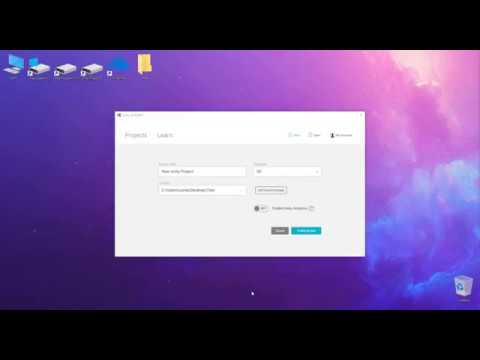
Don't worry, good things take time ✌️ To help you as much as I can, I made a little step-by-step video (3 minutes) where I start from scratch. Maybe you'll find something... ! I just can't use the latest version 😋
 dooprod
on 1 Mar 2019
dooprod
on 1 Mar 2019
Thank you very much! That video was super instructive and it also made me see that the very first error you get is more similar to the one the other user had, which is still something that I don't understand (I still can't have anybody around me reproduce it) but I'm going to try something to see if it works with you :)
Demigiant
on 1 Mar 2019
Ok I should have a solution, Can you try again but, after importing DOTween Pro, replace the DemiLib folder with the one in this zip?
This should:
- Fix the problem
- Log a warning when the problem happens and is fixed, which should give me enough information to understand what's happening and fix it without a workaround
Let me know :)
Demigiant
on 1 Mar 2019
Thanks for your quick reply! I imported the latest DOTween Pro from the AssetStore, I remove the DemiLib folder like you asked, and I imported the Demilib folder from the .ZIP. Everything seems to work now.
I have this warning in the console log:
DeUnityEditorVersion ► Error when detecting Unity Version from "2018.3"
UnityEngine.Debug:LogWarning(Object)
DG.DemiEditor.DeUnityEditorVersion:.cctor() (at D:/DG/_Develop/__UNITY3_CLASSES/_Holoville/__Demigiant.Libraries/_Demigiant.Libraries/Core/DemiEditor/DeUnityEditorVersion.cs:39)
System.Object:__icall_wrapper_mono_generic_class_init()
DG.DemiEditor.DeStylePalette:Init() (at D:/DG/_Develop/__UNITY3_CLASSES/_Holoville/__Demigiant.Libraries/_Demigiant.Libraries/Core/DemiEditor/DeStylePalette.cs:252)
DG.DemiEditor.DeGUI:ChangePalette(DeColorPalette, DeStylePalette) (at D:/DG/_Develop/__UNITY3_CLASSES/_Holoville/__Demigiant.Libraries/_Demigiant.Libraries/Core/DemiEditor/DeGUI.cs:107)
DG.DemiEditor.DeGUI:BeginGUI(DeColorPalette, DeStylePalette) (at D:/DG/_Develop/__UNITY3_CLASSES/_Holoville/__Demigiant.Libraries/_Demigiant.Libraries/Core/DemiEditor/DeGUI.cs:51)
DG.DOTweenEditor.Core.ABSAnimationInspector:OnInspectorGUI() (at D:/DG/_Develop/__UNITY3_CLASSES/_Holoville/__DOTween/_DOTween.Assembly/DOTweenProEditor/Core/ABSAnimationInspector.cs:18)
DG.DOTweenEditor.DOTweenAnimationInspector:OnInspectorGUI() (at Assets/Demigiant/DOTweenPro/Editor/DOTweenAnimationInspector.cs:207)
UnityEngine.GUIUtility:ProcessEvent(Int32, IntPtr)
I can add / remove any DOTween components now.
Do you have any idea of what happened?
dooprod
on 1 Mar 2019
Great! Thanks for the help again :)
I think I understand the problem. For some reason, float.Parse("2018.3") isn't working on your computer. I assume it's because of culture, but it's weird because my culture wants "," instead of "." and it's working there anyway.
Can I ask you to make one last test which would clear this out for me completely? Can you unzip this file in any of the Unity projects that weren't working with DOTween Pro, and let me know what the resulting logs will report (4 logs should appear as soon as recompilation finishes after importing the file)? The project doesn't even need to have DOTween for this test.
Demigiant
on 1 Mar 2019
Oh yes, the "." | "," dilemma... I don't know since when that exits, but you can use "," now in any float (like the transform component, you can write "2,5" and it works, before that, it was impossible to put a comma in the editor, but now he turns dots into commas automatically... !
I should say that I'm in Europe (France), so maybe it's a bug which affects some European countries.
So, I use your file in the project and I have this in the console logs:
2018.3 ► Simple ► FAILURE
UnityEngine.Debug:Log(Object)
UnityVersionTest:.cctor() (at Assets/UnityVersionTest.cs:14)
UnityEditor.EditorAssemblies:ProcessInitializeOnLoadAttributes()
2018.3f ► Simple ► FAILURE
UnityEngine.Debug:Log(Object)
UnityVersionTest:.cctor() (at Assets/UnityVersionTest.cs:18)
UnityEditor.EditorAssemblies:ProcessInitializeOnLoadAttributes()
2018.3 ► NumberStyles.Float, CultureInfo.InvariantCulture ► SUCCESS
UnityEngine.Debug:Log(Object)
UnityVersionTest:.cctor() (at Assets/UnityVersionTest.cs:21)
UnityEditor.EditorAssemblies:ProcessInitializeOnLoadAttributes()
2018.3f ► NumberStyles.Float, CultureInfo.InvariantCulture ► FAILURE
UnityEngine.Debug:Log(Object)
UnityVersionTest:.cctor() (at Assets/UnityVersionTest.cs:26)
UnityEditor.EditorAssemblies:ProcessInitializeOnLoadAttributes()
I think you are on the right track ;-)
dooprod
on 1 Mar 2019
Perfect! :) Got a fix then, pushed it to the Asset Store and will be available very shortly.
I'm European too, Italian, and since Unity 2018 I can use "," instead of "." in floats (which personally I hate :D). That's why this issue seems weird: if it happens to you it should happen to me too. Anyway, I'm just using InvariantCulture now to detect Unity's version (because that always returns with a dot instead of a comma) and it's solved (the SUCCESS you got in the 3rd log). Sorry again for the problem, should've thought of this sooner :B
Demigiant
on 1 Mar 2019
It's perfect, I'm happy if I helped!
It's the best tween engine by far, it deserves a lot of attention 👍 !
Thank you again for all this work!
Case closed ✌️ !
dooprod
on 1 Mar 2019
Thanks to you for all the help and the nice words, and for being an awesome bug reporter :)
Demigiant
on 1 Mar 2019
Related issues
 Mukarillo
·
4Comments
Mukarillo
·
4Comments
 Zundrium
·
11Comments
Zundrium
·
11Comments
 ShadowTM
·
4Comments
ShadowTM
·
4Comments
 koblongata
·
9Comments
koblongata
·
9Comments
 ceyhuntasci
·
5Comments
ceyhuntasci
·
5Comments