Hello @dolanmiu!
I created the table successfully, but no width.
I used various methods of finding,like this:
table.getCell(0, 0).addContent(new Paragraph('Hellow')).CellProperties.setWidth(WidthType.PERCENTAGE, '50%')
table.getCell(0, 1).addContent(new Paragraph('word')).CellProperties.setWidth('50%', WidthType.PERCENTAGE)
table.getCell(0, 2).addContent(new Paragraph('haha')).CellProperties.setWidth(200)
Can you help me?
Thanks.
 Meggie-Wang
All 20 comments
And the table I created will be created twice.
doc.createTable(2, 2)
This will result in a table with 4 rows and 2 columns.
Thanks!
Meggie-Wang
on 10 Dec 2018
And the table I created will be created twice.
doc.createTable(2, 2)
This will result in a table with 4 rows and 2 columns.
Can you show me your code for this?
 dolanmiu
on 11 Dec 2018
dolanmiu
on 11 Dec 2018
const topTable = doc.createTable(2, 2)
topTable.setWidth(WidthType.PERCENTAGE, '100%')
topTable.getCell(0, 0).addContent(new Paragraph('hello')).properties.setVerticalAlign(VerticalAlign.CENTER)
Meggie-Wang
on 12 Dec 2018
Can you point out my mistake?I found that other people didn't encounter this problem.
Meggie-Wang
on 19 Dec 2018
Same here, Meggie-Wang.
 affonso
on 19 Dec 2018
affonso
on 19 Dec 2018
This worked for me for setting it to full width. No idea why setting percentage (pct) to 5000 works though
  const table = doc
    .createTable(numberOfColumns, numberOfRows)
    .setWidth('pct', 5000);
 mettin
on 20 Dec 2018
mettin
on 20 Dec 2018
table.setWidth('pct', '100%');
also works
mettin
on 20 Dec 2018
Is there a duplicate problem with the table you created?
const table = doc.createTable(2, 2)
This should be a table that creates 2 rows and 2 columns, but it repeated once.
Like this:
table.docx
Meggie-Wang
on 21 Dec 2018
hello, I tried to use CellProperties.setWidth to a table but it's don't work in LibreOffice.
 ricustr
on 19 Feb 2019
ricustr
on 19 Feb 2019
Im using this and it works perfectly:
    const table = doc
      .createTable(numberOfColumns, numberOfRows)
      .setWidth('pct', '100%');

    table.getCell(0, 0).CellProperties.setWidth('93%', 'pct');
    table.getCell(0, 1).CellProperties.setWidth('7%', 'pct');
I use the same code for create and setWidth.
      const document = new Document();
      const table = document.createTable(1, 2)
          .setWidth(WidthType.PERCENTAGE, '100%');

      table.getCell(0, 0)
          .CellProperties.setWidth('20%', WidthType.PERCENTAGE);
      table.getCell(0, 1)
          .CellProperties.setWidth('80%', WidthType.PERCENTAGE);

LibreOffice Writer Version: 6.0.7.3
Build ID: 1:6.0.7-0ubuntu0.18.04.2
ricustr
on 19 Feb 2019
As far as i know (im not a maintainer) only 'real' word is supported. I opened your file in word and looks fine!
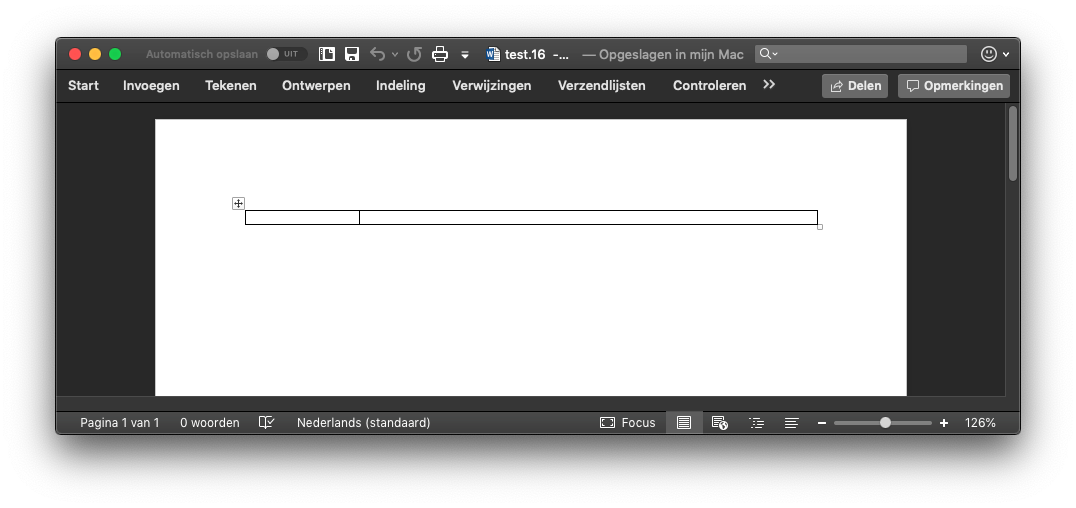
mettin
on 19 Feb 2019
Okay, thank you for fast responses. Have a nice day.
ricustr
on 19 Feb 2019
Try converting to pdf to test: https://cloudconvert.com/
mettin
on 19 Feb 2019
Converting helped, thank for advice.
ricustr
on 19 Feb 2019
Yes, only Microsoft Office is supported
Other office suites will be supported at some point. But no ETA. It's just so difficult to make it working for every Word processor. It's like Safari vs IE vs Firefox vs Chrome all over again... but less easier to test
dolanmiu
on 19 Feb 2019
Will be fixed with:
dolanmiu
on 14 Mar 2019
const table = doc.createTable(2, 2).setWidth('pct', '100%')
This code should create a table with two rows and two columns,however, a table with four rows and four columns was created.
Meggie-Wang
on 18 Mar 2019
This code should create a table with two rows and two columns,however, a table with four rows and four columns was created.
This is not a problem in v5
dolanmiu
on 18 Mar 2019
why not apply a way to directly generate doc file
 Willworkgogogo
on 1 Apr 2019
Willworkgogogo
on 1 Apr 2019
Related issues
 acgrama
·
5Comments
acgrama
·
5Comments
 zahrafali
·
3Comments
zahrafali
·
3Comments
 iainfreestone
·
3Comments
iainfreestone
·
3Comments
 davideickhoff
·
6Comments
davideickhoff
·
6Comments
 huynhtansi
·
6Comments
huynhtansi
·
6Comments