Docx: Column width property doesnt work when there's text in the cells
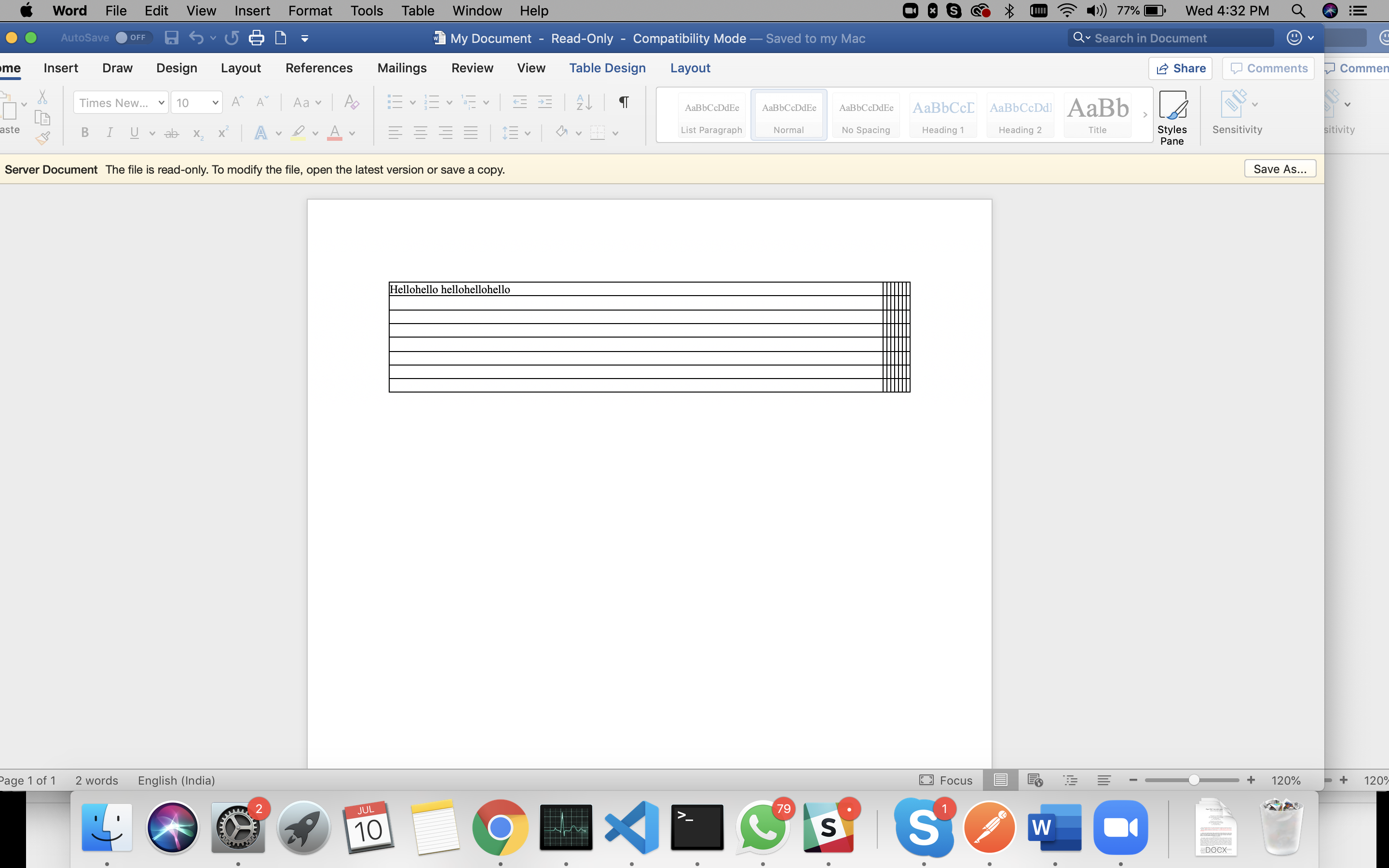
I am trying to add column width of 12.5% for all and i have 8 columns
If there's no text in any cell then they follow the spacing specified by columnWidths, But when there's text, they are not following the given width size
Here is my code -
const doc = new Document();
const abc = new Table({
    rows: 8,
    columns: 8,
    width: 100,
    columnWidths: new Array(8).fill(12.5),
    widthUnitType: WidthType.PERCENTAGE,
});

abc.getCell(0, 0).addParagraph(new Paragraph("Hellohello hellohellohello"));

doc.addTable(abc);
and this is the result
bug
 zahrafali
All 3 comments
add the function abc.setFixedWidthLayout()
 ducviet1696
on 23 Jul 2019
ducviet1696
on 23 Jul 2019
❤3
add the function abc.setFixedWidthLayout()
Thanks! this worked!!
zahrafali
on 29 Jul 2019
In case it helps, you can also use the layout property
new Table({
  width: {...},
  layout: "fixed",
  rows: [...],
  ...
})
Btw could @zahrafali please close this issue?
 henry132109
on 5 Mar 2020
henry132109
on 5 Mar 2020
Was this page helpful?
0 / 5 - 0 ratings
Related issues
 acgrama
·
5Comments
acgrama
·
5Comments
 jacwright
·
6Comments
jacwright
·
6Comments
 davideickhoff
·
6Comments
davideickhoff
·
6Comments
 uldcra
·
3Comments
uldcra
·
3Comments
 brunogaleski
·
6Comments
brunogaleski
·
6Comments
Most helpful comment
add the function abc.setFixedWidthLayout()