Hi there,
first of all: you are doing a great job here!
I am currently styling my document with a style.xml file. The numbering setting for my headings is correct in the word document but the styling of my generated document is different.
In my unzipped docx file, there is an additional numbering.xml file that defines the numbering style that is used in the styles.xml
The Heading 1 style in styles.xml is defined like this:
    <w:style w:styleId="Heading1" w:type="paragraph">
        <w:name w:val="heading 1"/>
        <w:basedOn w:val="Normal"/>
        <w:next w:val="Normal"/>
        <w:qFormat/>
        <w:rsid w:val="00E604E2"/>
        <w:pPr>
            <w:keepNext/>
            <w:pageBreakBefore/>
            <w:numPr>
                <w:numId w:val="2"/>
            </w:numPr>
            <w:suppressAutoHyphens/>
            <w:spacing w:before="720"/>
            <w:jc w:val="left"/>
            <w:outlineLvl w:val="0"/>
        </w:pPr>
        <w:rPr>
            <w:rFonts w:ascii="Arial" w:hAnsi="Arial"/>
            <w:b/>
            <w:kern w:val="28"/>
            <w:sz w:val="32"/>
        </w:rPr>
    </w:style>
you can see the <w:numPr> element that points to the numbering 2. I checked the numbering.xml file and it is set correctly.
    <w:num w:numId="2">
        <w:abstractNumId w:val="2"/>
    </w:num>
and the real definition
    <w:abstractNum w:abstractNumId="2">
        <w:nsid w:val="593B6D3B"/>
        <w:multiLevelType w:val="multilevel"/>
        <w:tmpl w:val="C6264C1E"/>
        <w:lvl w:ilvl="0">
            <w:start w:val="1"/>
            <w:numFmt w:val="decimal"/>
            <w:pStyle w:val="Heading1"/>
            <w:lvlText w:val="%1"/>
            <w:lvlJc w:val="left"/>
            <w:pPr>
                <w:ind w:hanging="432" w:left="432"/>
            </w:pPr>
            <w:rPr>
                <w:rFonts w:hint="default"/>
            </w:rPr>
        </w:lvl>
        <w:lvl w:ilvl="1">
            <w:start w:val="1"/>
            <w:numFmt w:val="decimal"/>
            <w:pStyle w:val="Heading2"/>
            <w:lvlText w:val="%1.%2"/>
            <w:lvlJc w:val="left"/>
            <w:pPr>
                <w:ind w:hanging="576" w:left="576"/>
            </w:pPr>
            <w:rPr>
                <w:rFonts w:hint="default"/>
            </w:rPr>
        </w:lvl>
            ....
    </w:abstractNum>
Since the xml import only uses styles.xml I guess, the information about the numbering is not considered.
Do you have an idea how to get the style from the xmls correctly? Or define the abstractnumberstyle explicitly to be used by Heading 1? Can I merge the xml files?
Thanks for your help, David
 davideickhoff
All 6 comments
just dived into the code and saw that the numbering xml is hardcoded and cannot be overridden by an external numbering.xml.
What do you think about introducing the same option for an external numbering file? It simplifies styling / templating by using Word to set everything up and then just use the xml files.
Other than that, how can I customize / change the hardcoded default numbering style?
Can I add a custom numbering to a style with createParagraphStyle ?
My goal is to create headings like this:
1. Chapter 1
1.1. Subchapter 1
2. Chantper 2
2.1 ...
2.1.1 ...
Thank you!
I will need to do some research, but I do not think this is possible yet
It is possible to have an external styles.xml, but that wouldn't contain numbering stuff inside
Marking as feature request
 dolanmiu
on 13 Nov 2018
dolanmiu
on 13 Nov 2018
My goal is to create headings like this:
1. Chapter 1 1.1. Subchapter 1 2. Chantper 2 2.1 ... 2.1.1 ...
hi, @davideickhoff , i need to have similar headings working till tomorrow morning, was no time to wait, so what i did:
- made all styling i need inside MSWord itself, saved, extracted numbering.xml and styles.xml
- manually replaced numbering.xml after generation of zip
    const packer = new Packer();
    // get compiler
    const compiler = (<any> packer).compiler;
    compiler.compile(document).then((zip: JSZip) => {
      // compile manually and replace numbering.xml
      zip.file('word/numbering.xml', xmlAsString);
      zip.generateAsync({ type: 'blob' }).then((blob) => {
        saveAs(blob, name);
      });
    });
Its not right solution of course, but maybe somebody will need it as temp one.
 itspers
on 8 Dec 2018
itspers
on 8 Dec 2018
Any update on this? Is it possible without @itspers "hack"?
 ihd-dev
on 16 Aug 2019
ihd-dev
on 16 Aug 2019
I have similar problem. It would be great if I could do this:
doc.addSection({
children: [
new Paragraph({
text: 'First item in the list',
numbering: {
num: concrete,
level: 0,
},
contextualSpacing: true,
spacing: {
before: 200,
},
}),
new Paragraph({
heading: HeadingLevel.HEADING_1,
children: [
new TextRun({
text: 'Second but header',
}),
],
numbering: {
num: concrete,
level: 0,
},
}),
],
});
 dijam
on 27 Aug 2019
dijam
on 27 Aug 2019
just dived into the code and saw that the numbering xml is hardcoded and cannot be overridden by an external numbering.xml.
What do you think about introducing the same option for an external numbering file? It simplifies styling / templating by using Word to set everything up and then just use the xml files.
Other than that, how can I customize / change the hardcoded default numbering style?
Can I add a custom numbering to a style withcreateParagraphStyle?My goal is to create headings like this:
1. Chapter 1 1.1. Subchapter 1 2. Chantper 2 2.1 ... 2.1.1 ...Hello @itspers !
I think I have found the solution with the help of @jamesmontalvo3 and @ramonmata with merging their comments. It works in browser with version [email protected].
https://github.com/dolanmiu/docx/issues/396#issuecomment-543874917
https://github.com/dolanmiu/docx/issues/389#issuecomment-527634789
I put a demo for demonstration in codepen:
https://codepen.io/wcqrnj/pen/GRgNgXv
It uses the default headings and generates table of content as well.
Results in MS Word:
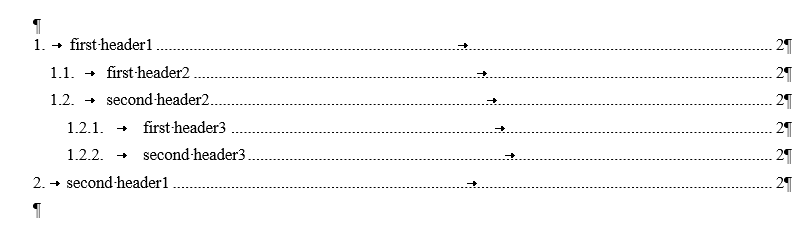
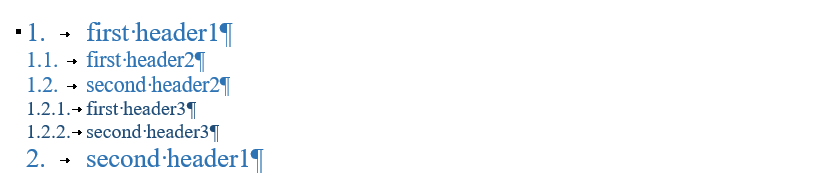
Cheers, He-Wolf
 He-Wolf
on 16 Dec 2019
He-Wolf
on 16 Dec 2019
Related issues
 jacwright
·
6Comments
jacwright
·
6Comments
 madarche
·
5Comments
madarche
·
5Comments
 uldcra
·
3Comments
uldcra
·
3Comments
 zahrafali
·
5Comments
zahrafali
·
5Comments
 GiladFeder
·
6Comments
GiladFeder
·
6Comments
Most helpful comment
hi, @davideickhoff , i need to have similar headings working till tomorrow morning, was no time to wait, so what i did:
Its not right solution of course, but maybe somebody will need it as temp one.