Dockstore: Dockstore did not find Dockstore.cwl file from GitHub (Need to manually add versions for manually added docker hub tools)
Bug Report
I am trying to manually add the Rqc software on Dockstore.
I created a public GitHub repository that provides the Dockerfile and Dockstore.cwl files.
I used Docker Hub to build a Docker image.
Expected behaviour
Info fields (such as Author) filled with data from Dockstore.cwl.
Tool ready to Publish on system.
Actual behaviour
The UI gave me the error message "No description associated with this tool." (see figure below).

Steps to reproduce the behaviour
I filled the "Registry Tool" form with the information showed by the figure below.

Environment (Browser or OS and Dockstore version)
Google Chrome version 59.0.3071.86 64 bits.
Windows 10.
 wdesouza
All 5 comments
Hi @Welliton309
I don't see any obvious errors comparing with https://dockstore.org/containers/registry.hub.docker.com/francescof/pcawg_delly_workflow
Do you see the CWL descriptors in the "Files" tab?
 denis-yuen
on 8 Jun 2017
denis-yuen
on 8 Jun 2017
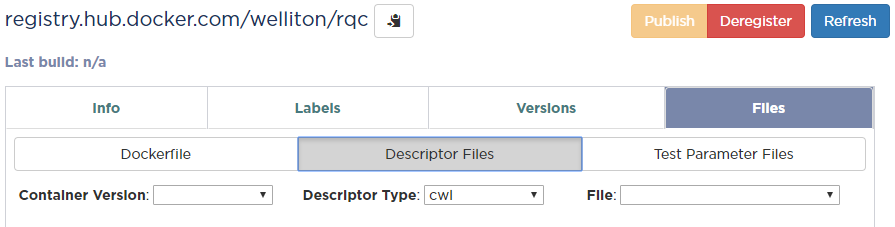
The "Files" tab does not show any information for "Dockerfile" and "Description files".
wdesouza
on 8 Jun 2017
Ah, I think I know what's going on.
Since this is a manually added tool from Docker Hub, go to versions and hit "Add Tag".
You will need to fill in the version tag (the version number on Docker Hub) and the git reference (the version number on GitHub). After you hit Add Tag. it should fill out the description and author fields.
denis-yuen
on 8 Jun 2017
It worked, thank you!
I created a tag in GitHub. The DockerHub automatically created Docker image for the tag.
https://dockstore.org/containers/registry.hub.docker.com/welliton/rqc
wdesouza
on 8 Jun 2017
Looks good!
denis-yuen
on 8 Jun 2017
Related issues
 coverbeck
·
4Comments
coverbeck
·
4Comments
denis-yuen
·
4Comments
coverbeck
·
4Comments
coverbeck
·
4Comments
denis-yuen
·
4Comments
 wendidy
·
3Comments
wendidy
·
3Comments
 Ldcabansay
·
3Comments
Ldcabansay
·
3Comments
Most helpful comment
Ah, I think I know what's going on.
Since this is a manually added tool from Docker Hub, go to versions and hit "Add Tag".
You will need to fill in the version tag (the version number on Docker Hub) and the git reference (the version number on GitHub). After you hit Add Tag. it should fill out the description and author fields.